
The recommendation
Bites 2 Lite is worth choosing for its insert options only after you have thought through placement. The clear app selections are appealing, but they do not cancel the tall-body tipping concern. Choose it when you want the insert-handling routine and have considered where the body will go.
Grades at a glance
| Product | Overall | Placement and physical handling | Ordinary app and button selection | Power, access and routine care chores |
|---|---|---|---|---|
| Petcube Bites 2 Lite | 8.0 | 7.0 | 9.0 | 8.0 |
Does it fit your life?
Choose the location before the inserts
Bites 2 Lite deserves a shortlist place if you want physical choices as well as on-screen ones. Its demonstrations show interchangeable treat inserts, and one app walkthrough presents close, mid and long selections. That combination makes the routine more involved than simply choosing a treat button.
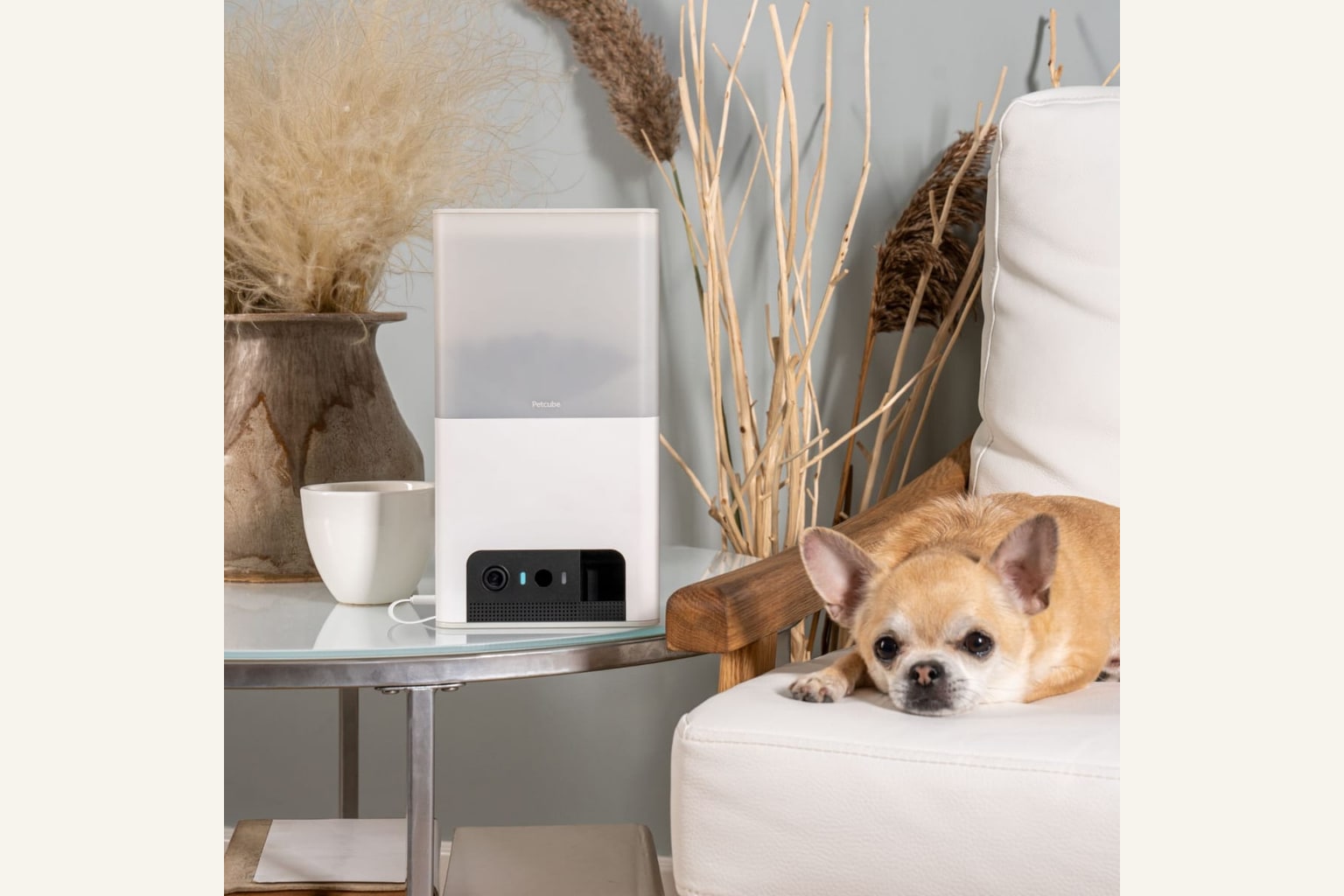
Before those options decide the purchase, consider the tall body. One reviewer praises the rubber base; another specifically worries about tipping despite that base. We would keep both accounts in the decision and settle where the camera will go before choosing it for the insert system.
Bites 2 Lite unboxing and controls; Bites 2 Lite insert demonstration; Bites 2 Lite handling review
Compare the practical choices
| Camera | Start here for | Placement | Controls | Access chores | Overall |
|---|---|---|---|---|---|
| Petcube Bites 2 Lite | Interchangeable treat inserts | 7.0 | 9.0 | 8.0 | 8.0/10 |
| Furbo 360 Dog Camera | Separate turning and treat controls | 8.0 | 9.0 | 8.0 | 8.4/10 |
| Furbo Mini 360 | Compact treat-camera handling | 9.0 | 9.0 | 7.0 | 8.4/10 |
All scores are out of 10 and concern everyday placement, manual selection and access chores. Use the fit and tradeoffs to choose between models.
The positive base account does not settle tipping
The unboxing shows a rubber underside and holes at the rear for wall mounting, and the reviewer speaks positively about stability. The separate handling review describes a tall, narrow body and raises a concern about it tipping on a table. These are different impressions of the same practical issue, so the positive account should not erase the concern.
For a buyer, that means placement needs an explicit decision. Consider the body, the surface and how you will reach the hopper together. Wall-mount holes provide another arrangement to investigate, but follow the instructions for your unit and location. The presence of hardware alone is not a reason to treat every possible position as interchangeable.
Bites 2 Lite unboxing and controls; Bites 2 Lite handling review
Three selection labels make the app choice concrete
In the historical app walkthrough, close, mid and long appear as distinct selections. If you like choosing from visible labels, this is a useful reason to compare Bites 2 Lite with the other treat cameras. Read the labels as choices in that screen, rather than measurements for planning a room.
That unboxing initially uses mints, and the reviewer says they do not have pets. It is useful for seeing the controls and handling steps; the context matters when interpreting the enthusiastic demonstration. Our recommendation here rests on the choices you make at the screen and at the camera.
Inserts give you a choice and another thing to handle
The unboxing shows access to the hopper and interchangeable treat doors. A separate demonstration shows the insert being swapped. That is the physical appeal of Bites 2 Lite: you have a part to choose and change instead of treating the container as a single fixed opening.
It also adds a chore. Think about where you will keep the inserts and whether you want to change them as part of using the camera. When comparing models, give that task as much attention as reaching the hopper. Follow the received unit’s instructions for loading it; the presence of different inserts is not a general invitation to use any treat.
Bites 2 Lite unboxing and controls; Bites 2 Lite insert demonstration
Decide which kind of handling you prefer
Furbo 360 is the useful comparison if you prefer a removable top, a separate treat button and turning arrows. Its reviewer also calls out a small opening, so refill choices still deserve attention.
Furbo Mini 360 puts compact handling and a magnetic lid ahead of the Bites insert routine, with an upward swipe in the demonstration. A sponsored Mini reviewer reports more frequent refills, so smaller does not automatically mean less work. Tkenpro is worth comparing for a held-control gesture and suction cups shown in its named gifted demonstration; consider that as a different placement approach, without assuming the cups settle every surface question.
Furbo 360 household demonstration; Mini 360 demonstration; Sponsored Mini 360 comparison; Gifted TKENPRO demonstration
Questions that should come before checkout
Does the rubber base remove the tabletop concern? The two reviews emphasize different things. Keep the explicit tipping concern alongside the positive base impression.
Do you want to keep and change inserts? If that sounds useful, Bites 2 Lite has a clear reason to be considered. If it sounds like a small part to misplace, the routine may be less appealing.
Are close, mid and long distances you can plan around? They are the selections shown in the app demonstration. Use them to understand the interface, then choose a location on its own merits.
Bites 2 Lite unboxing and controls; Bites 2 Lite insert demonstration; Bites 2 Lite handling review
About this review
We compared published demonstrations of placement, manual controls and access chores. We have not performed our own bench tests. The scores describe those everyday tasks; app observations refer to the versions shown in the reviews. Before ordering, check the exact model, current listing, package contents and instructions.
Petcube Bites 2 Lite
Petcube
Buyers who want physical insert choices and will plan a location for the tall body.
Interchangeable inserts and close, mid and long app selections give you choices; a reviewer’s tall-body tipping concern makes placement the first decision.
Reasons to choose it
- Interchangeable treat inserts are shown in two demonstrations
- Close, mid and long selections appear in the reviewed app
- Rear wall-mount holes provide an alternative arrangement to consider
Tradeoffs to know
- A reviewer raises a tipping concern about the tall body despite its rubber base
- Keeping and swapping inserts adds a physical chore
Think twice if: You want to choose a casual tabletop spot without weighing the reported tipping concern.
Further reading
Ratings
Editorial score 8
Placement and physical handling7
The unboxing shows wall-mount holes and praises the rubber base, while a separate review raises a tall-body tipping concern.
Ordinary app and button selection9
Close, mid and long are explicit treat-selection labels in the demonstrated app.
Power, access and routine care chores8
The hopper and interchangeable doors provide access, but selecting and swapping an insert remains an extra handling step.
Sources & further reading
youtube.com review
youtube.com review
youtube.com review
youtube.com review
youtube.com review
youtube.com review
youtube.com review
Keep reading
Something changed? Help us keep this useful.
Send a correction →