
The recommendation
Choose C30 Dual because you want its lens-view choices. Give the fixed lower lens a deliberate orientation and leave access to the rear and upper head. The arrangement is most appealing when choosing between the views is something you want to do.
Grades at a glance
| Product | Overall | Placement and physical handling | Ordinary app and button selection | Power, access and routine care chores |
|---|---|---|---|---|
| Imilab C30 Dual Security Camera | 8.0 | 8.0 | 8.0 | 8.0 |
Does it fit your life?
Two lens views are useful only if you want to choose between them
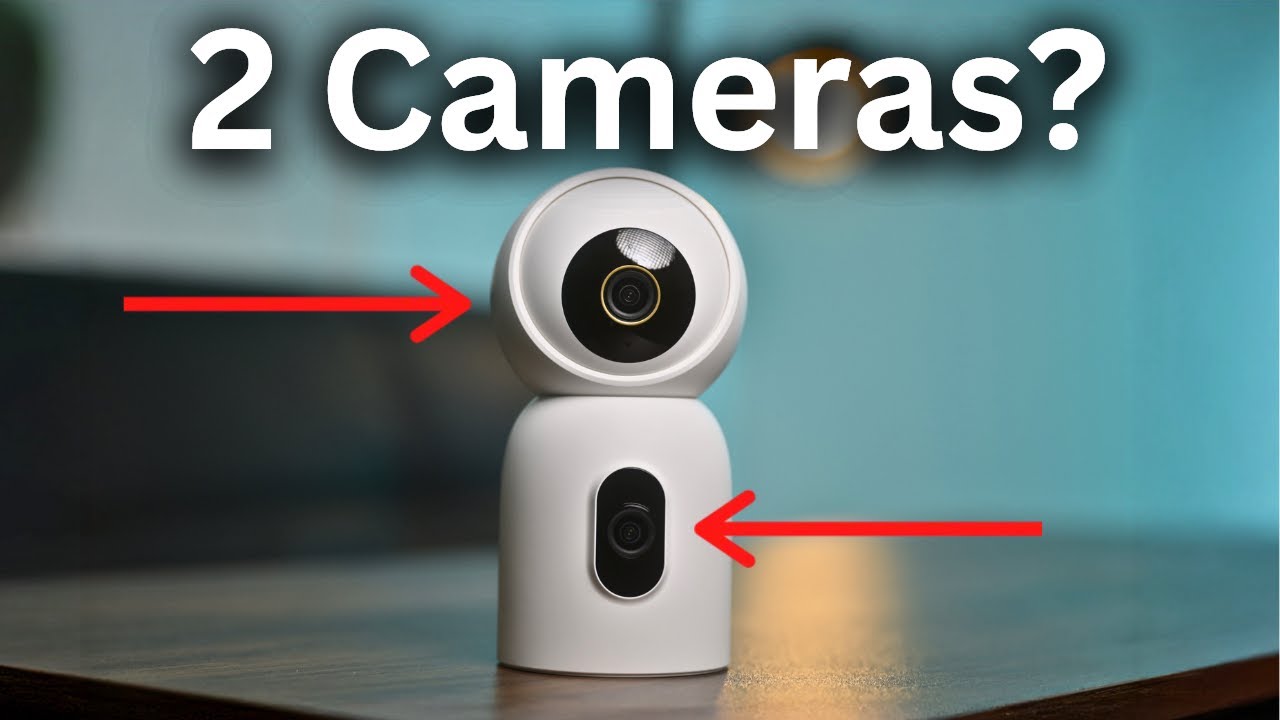
Reviewer photo: IMILAB C30 review.
C30 Dual is the camera to compare when you have a specific reason to want both a fixed lens and a moving assembly. The lower lens stays fixed while the upper assembly moves, and the historical app walkthrough offers dual, fixed-lens and moving-lens views. That gives this model a different buying case from a camera chosen simply for its body size or directional arrows.
Before choosing it, picture which view you would select and where you would point the fixed lens. If those questions have clear answers, the arrangement is worth considering. If the extra choice has little appeal, Eufy E220 and Petcube Cam 360 are more useful starting comparisons.
Compare the practical choices
| Camera | Start here for | Placement | Controls | Access chores | Overall |
|---|---|---|---|---|---|
| Imilab C30 Dual Security Camera | Choosing between lens views | 8.0 | 8.0 | 8.0 | 8.0/10 |
| Eufy E220 Indoor Cam | Placement and directional controls | 9.0 | 9.0 | 8.0 | 8.7/10 |
| Petcube Cam 360 | Small body and wall-plate option | 9.0 | 8.0 | 9.0 | 8.7/10 |
All scores are out of 10 and concern everyday placement, manual selection and access chores. Use the fit and tradeoffs to choose between models.
Orient the lower lens when you place the body
The walkthrough shows the camera engaging its mounting piece with an insert-and-twist action. More important for the everyday arrangement, it shows that the lower lens does not turn with the upper assembly. Moving the upper lens therefore does not replace the initial decision about where the lower one points.
Think through that orientation before settling on the final position. Then consider how you will reach the body if you need access to its connectors or slot. The mount demonstration explains the handling action; use the received unit’s instructions to decide the details for your location.
View selection is an extra step to want
The walkthrough offers a dual-camera screen, a fixed-lens-only view and a moving-lens-only view. These are the choices that justify comparing C30 Dual with the other cameras here. You are choosing which lens view to use as well as any manual directional action.
That can be a welcome choice if you already know how you would use it. If your preference is to open a view and choose direction, ask whether switching lens views adds anything useful to your routine. More options are attractive when they correspond to a decision you actually want to make.
The app example comes from a pre-release walkthrough
The reviewer used Xiaomi Home and described the camera in a pre-release context. That matters when comparing the screen with a product listing today. The walkthrough is a useful demonstration of the view choices the reviewer encountered; it is not a reason to assume the app arrangement is identical for the unit you will receive.
Check the current instructions for the exact C30 Dual you intend to order. Keep the purchase decision centered on the fixed-and-moving arrangement and whether you want its view choices, rather than selecting it solely because of an app name in an older demonstration.
Keep two access points in mind
The Type-C connection and reset button are at the rear of the base in the walkthrough. The card slot is elsewhere: the upper head is raised to expose it in the access demonstration. That makes physical access a two-part question.
A position that leaves room behind the base may still be awkward when you need to reach the head. Picture both actions before placing the camera between other objects. This is about access to the controls and slot, so the useful comparison is the handling work you will do at the camera.
Choose E220 or Cam 360 when direction is the main choice
Eufy E220 is the first comparison if you want compact placement and directional arrows. Its rear micro-USB cable needs clearance, but the buying decision can begin with the location and those controls rather than C30 Dual’s lens-view modes.
Petcube Cam 360 offers a palm-sized body and wall plate in its unboxing, with directional arrows in another demonstration. The unboxing reviewer encountered a setup interruption, so leave time for the first connection. Compare these models if a small body and direct direction choices fit your routine; retain C30 Dual when the separate views are the reason for the purchase.
E220 first impressions; E220 and E30 comparison; Cam 360 unboxing; Cam 360 controls demonstration
Questions to answer before choosing two lenses
Where will the lower lens point? Decide when you place the body, because the lower lens stays fixed while the upper assembly moves.
Which view would you open most often? The walkthrough offers dual, fixed and moving-lens choices. A clear preference helps explain why this arrangement suits you.
Can you reach the rear and the head? The connector/reset and card slot are in different positions. Consider both before choosing a tight location.
Will the app be the same as the walkthrough? Confirm the current instructions; the reviewer explicitly described a pre-release context.
About this review
We compared published demonstrations of placement, manual controls and access chores. We have not performed our own bench tests. The scores describe those everyday tasks; app observations refer to the versions shown in the reviews. Before ordering, check the exact model, current listing, package contents and instructions.
Imilab C30 Dual Security Camera
Imilab
Buyers who specifically want to choose a dual view or an individual fixed or moving-lens view.
A fixed lower lens and moving upper assembly bring extra view choices, with orientation and separate access points to plan around.
Reasons to choose it
- Dual, fixed and moving-lens views offered in the historical walkthrough
- Insert-and-twist mounting action shown
- Rear Type-C connector and reset button visible in the demonstration
Tradeoffs to know
- Fixed lower lens needs deliberate orientation when placing the body
- Reaching the card slot involves raising the upper head
Think twice if: You prefer to choose a camera direction without also choosing between lens views.
Further reading
Ratings
Editorial score 8
Placement and physical handling8
The walkthrough shows an insert-and-twist mounting action, while the fixed lower lens makes the body’s orientation a separate decision.
Ordinary app and button selection8
The historical screen offers dual, fixed-lens and moving-lens views, so selecting a view is part of the interaction.
Power, access and routine care chores8
The walkthrough places Type-C and reset access at the rear; the access demonstration exposes the card slot by raising the upper head.
Sources & further reading
youtube.com review
youtube.com review
youtube.com review
youtube.com review
youtube.com review
youtube.com review
Keep reading
Something changed? Help us keep this useful.
Send a correction →