
The recommendation
Consider the FlowLift Single for covered cable routing if you can leave room to reach its clamp, controls and covers.
Grades at a glance
| Product | Overall | Placement and assembly | Adjustment controls | Cable and desk chores |
|---|---|---|---|---|
| HUANUO FlowLift Single Monitor Mount | 7.0 | 7.0 | 7.0 | 7.0 |
Does it fit your life?
The buying decision
Updated October 16, 2026.
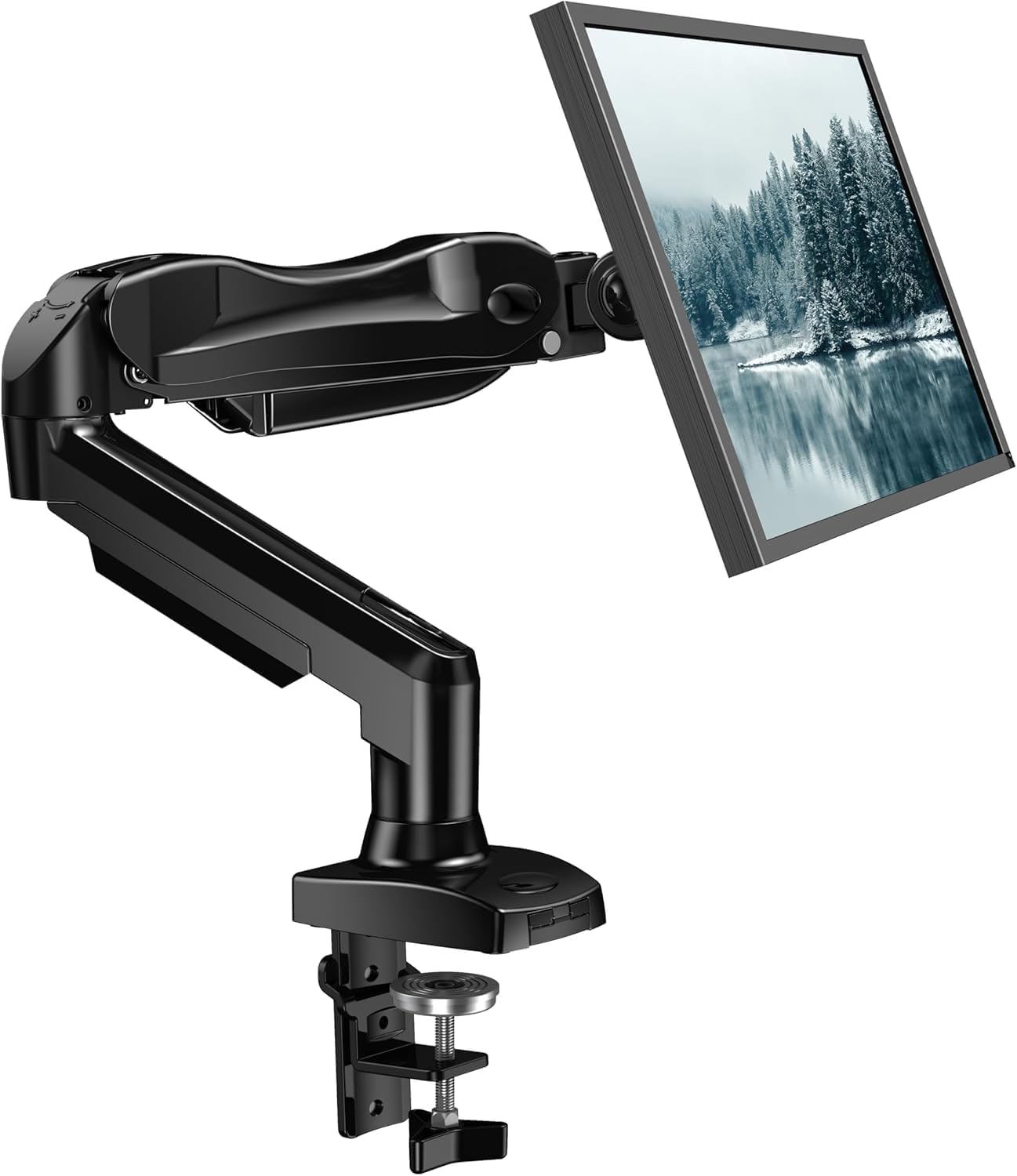
a single arm, clamp and illustrative screen. The linked HNSS6 manual has different housing details; use your unit’s instructions.
Covered wires are the main reason to compare the FlowLift Single. They also create its main everyday tradeoff: changing a cable means reopening the cover. Before choosing a base position, consider whether you can reach beneath the desk and underneath the arm after the workspace is arranged. This is a better match for someone comfortable with those access steps than for someone seeking a cable change with nothing to undo.
Jump to setup, adjustment or cables and desk use.
Placement and assembly
The HNSS6 manual illustrates fastening a bracket underneath the base, tightening a pad beneath the desktop and seating the arm sections separately. The original product image shows the corresponding clamp, screw pad and base arrangement. Together they make the handling requirement clear: setup involves access above and below the desk.
The manual’s upper-arm housing differs from the pictured one. It is useful here for understanding these particular interfaces, not as confirmation that every part, fastener or assembly step matches the current product. Use the instructions supplied with your unit for the full sequence.
Adjustment controls
The illustrated tension adjustment involves supporting the upper arm horizontally while reaching a bolt near its rear. That is a separate setup task from moving the screen to a new viewing angle. Leave enough access to reach the control as described by your unit’s instructions.
At the monitor end, the HNSS6 manual shows adjusting by the screen’s edges. It calls for loosening and relocking the tilt control if the tilt is difficult to adjust; it does not say to do this for every movement. The pictured monitor-end joint supports this limited comparison, but the diagrams do not establish exact angles, tool sizes or how a particular screen will hold position.
Cable and desk chores
The cable diagram shows a cover being opened, wires placed inside and the cover refitted. The pictured arm has distinct underside covers. That gives a practical reason to keep those areas reachable, especially if you expect to replace a display cable later.
Choose this arrangement because you want wires under covers and accept the opening-and-refitting job. The diagram explains that local task; it does not settle every fastener detail or the complete routing sequence for the pictured revision.
Who should consider it
Shortlist it if covered wires are worth a little work when the setup changes. Consider another arrangement if you frequently swap cables and cannot easily reach the underside of the arm. Neither preference establishes whether the arm fits your exact screen or desk; check those requirements before purchase.
Compare the alternatives
The LX offers a different reported arrangement: a lower-arm cover and separate ties above it. WALI is worth comparing for the narrower job of arranging a power lead and DisplayPort cable during a straightforward clamp installation.
The complete monitor-arm guide compares all six options and explains what their task scores cover.
What this review covers
This review uses the HNSS6 manufacturer diagrams for specific clamp, tension, tilt and cover interfaces visible on the pictured arm. The manual is not an exact revision match. It does not establish every supplied part or a complete installation procedure for the product shown.
These reviews compare the work of setting up an arm, adjusting a screen and organizing the desk. They draw on historical review excerpts and specific manufacturer diagrams, without hands-on testing. The scores describe those tasks; they do not establish compatibility, screen support, safety or durability.
The diagrams explain only the interfaces described above. Check the exact screen, desk and instructions before buying. Check the current Amazon offer for the model and supplied parts.
HUANUO FlowLift Single Monitor Mount
HUANUO
One screen with covered cable routing and access for later cable changes.
The FlowLift Single is worth comparing if you prefer cables arranged under covers. Plan access beneath the desk for the clamp, at the adjustment controls and underneath the arm when wires change.
Reasons to choose it
- The pictured arm has distinct underside cable covers.
- The illustrated controls separate tension tuning from monitor-end tilt adjustment.
Tradeoffs to know
- Clamp setup includes access below the desk and separate arm seating.
- Tension tuning requires support and tool access; cable changes require cover handling.
Think twice if: You want to change cables without opening and refitting a cover.
Further reading
Ratings
Editorial score 7
Placement and assembly7
Clamp fastening, underside access and separate arm seating make installation a staged job.
Adjustment controls7
Tension tuning involves supporting the arm; difficult tilt adjustment can require loosening and relocking a control.
Cable and desk chores7
Changing wires involves opening a channel cover, placing the cables and refitting it.
Sources & further reading
amazon.com product page
amazon.com product page
amazon.com product page
amazon.com product page
amazon.com product page
huanuo.com product information
cdn.shopify.com product information
Keep reading
Something changed? Help us keep this useful.
Send a correction →