HUANUO FlowLift Dual Monitor Stand Review (2026): Two screens, more setup
A dual-arm stand for clearing two factory monitor feet, with the usual reward: a cleaner desk after a more careful setup.
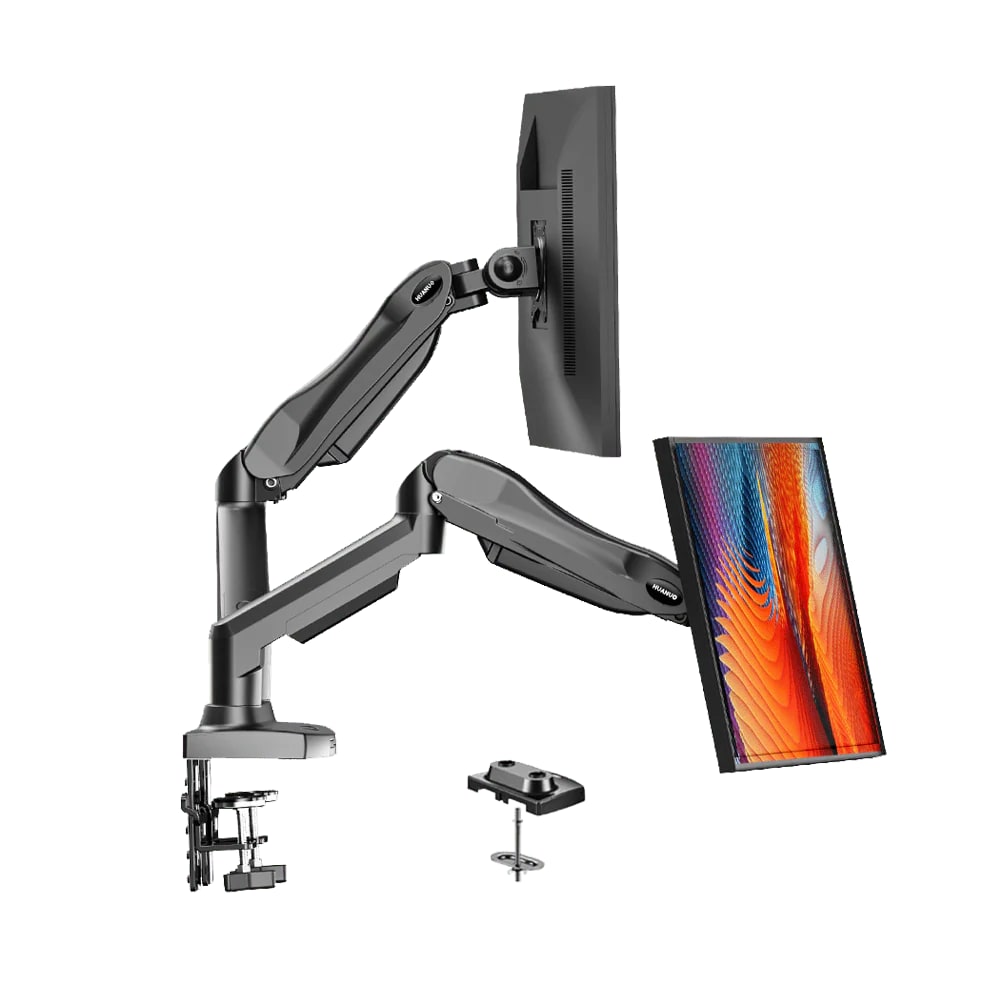
The dual FlowLift is the right lane for buyers who want two monitors off the desk at once. It can feel sturdy and tidy after setup, but two screens double the alignment, screw-length, tension, and desk-load checks.
MSRP
$69.99
Amazon
$59.99
at writing · 2026-05-05
Buyer fit
Dual-monitor lane for side-by-side work setups.
MSRP
$69.99
Amazon
$59.99
at writing · 2026-05-05
Score breakdown
How this product scored
Same rubric, but focused on one product so the reasons behind the score stay readable.
Support and stability
Owners repeatedly describe stable two-monitor support once the arms are adjusted, including reports of 27-inch screens holding without sag.
Adjustment and ergonomics
The range is useful for side-by-side work, and rotation can make cable access easier. The tension setup can still be jumpy or stiff if the monitor weight is not a clean match.
Installation and desk fit
Clamp/grommet mounting and included hardware help, but two VESA plates, two sets of screws, and a heavier desk load leave more room for small mistakes.
Build and support confidence
The base and arms get plenty of “sturdy” praise, but the screw-length complaint and two-screen leverage keep it behind the stronger single-arm picks.
Cable routing and daily use
This is where the dual stand earns its spot: two factory stands disappear, cables route through the arms, and the desk looks less like a control room exploded.
Commerce clarity
The ASIN and core specs are clear enough for comparison, though publication-time seller and price should still be checked because monitor-arm listings can change quickly.
Quick Verdict
HUANUO is one of the familiar Amazon names in monitor arms, and the FlowLift Dual Monitor Stand is its answer for people who want both screens floating instead of sitting on two factory feet. The product promise is simple: two 13- to 32-inch monitors, each 4.4 to 19.8 lb, with full-motion arms, VESA 75x75/100x100 support, and either C-clamp or grommet mounting.
In the full monitor-arm ranking, it lands at #5 as the best dual-monitor pick with an overall score of 7.6/10. The upside is real. One owner wrote, "The build feels solid and stable, even with two monitors attached, and the gas-spring arms move smoothly without sagging." Another nice daily-use note: "It also cleared up a ton of desk space, which I didn’t realize I needed until I had it."
The reason it does not score like the best single arms is that dual arms add more ways for a setup to be slightly wrong. One repeat buyer warned that the longer M4x30 screws "bottomed out on EVERY other monitor" before the screen was tight, creating a loose, wobbly mount until the hardware was corrected. That is the core read: the FlowLift Dual can make a two-monitor desk feel dramatically cleaner, but you should buy it only after checking monitor weight, VESA recess depth, desk strength, clamp clearance, and how much alignment fuss you can tolerate. At writing, Amazon-new availability for ASIN B07T5SY43L was captured at $59.99 on 2026-05-05T16:10:00Z; use the product links to verify today’s seller, condition, price, and fit details before buying and to support KB4UB.
Score Breakdown
- Support and stability: 7.8/10. Owners repeatedly describe stable two-monitor support once the arms are adjusted, including reports of 27-inch screens holding without sag.
- Adjustment and ergonomics: 7.4/10. The range is useful for side-by-side work, and rotation can make cable access easier. The tension setup can still be jumpy or stiff if the monitor weight is not a clean match.
- Installation and desk fit: 7.2/10. Clamp/grommet mounting and included hardware help, but two VESA plates, two sets of screws, and a heavier desk load leave more room for small mistakes.
- Build and support confidence: 7.1/10. The base and arms get plenty of “sturdy” praise, but the screw-length complaint and two-screen leverage keep it behind the stronger single-arm picks.
- Cable routing and daily use: 8.0/10. This is where the dual stand earns its spot: two factory stands disappear, cables route through the arms, and the desk looks less like a control room exploded.
- Commerce clarity: 8.6/10. The ASIN and core specs are clear enough for comparison, though publication-time seller and price should still be checked because monitor-arm listings can change quickly.
What Feels Great After Setup
The reward is obvious once it works: two monitor feet vanish, the screens can line up at a better height, and the desk gets breathing room again. Owners liked the sturdy base, easy pivot/swivel/rotation, and the way the arms held two 27-inch monitors without sag after adjustment.
There is also a small convenience win that is easy to underrate until you need it. One owner wrote, "You can even rotate your monitors straight up while plugged in to check which ports you're using if they're on the bottom of the monitor." That is exactly the sort of day-two benefit a product page usually fails to sell: less crawling behind the desk, fewer mystery cables, and fewer reasons to yank the whole setup apart.
What Gets Annoying
The setup has more variables than a single arm. The tension bolts can be very tight, two screens are harder to line up perfectly, and the wrong screw length can make a monitor feel loose even when the arm itself is fine. The clearest warning came from an owner who said the M4x30 screws bottomed out before tightening several monitors, leaving a "loose, wobbly screen."
That is worth knowing before checkout, not a reason to panic. If both monitors are ordinary 13- to 32-inch displays in the weight range, and your desk can handle a strong clamp in the middle, the FlowLift Dual has a lot going for it. If your screens are mismatched, unusually heavy, deeply recessed around the VESA holes, or sitting on a narrow desk, budget extra time for alignment and possibly different screws.
How It Compares
The dual FlowLift is not trying to beat every single arm. It is trying to solve the two-screen desk problem in one box.
- Ergotron LX Desk Monitor Arm: The LX is the sturdier premium single-arm answer. Two LX arms would cost much more, but they are the better confidence play for expensive monitors.
- HUANUO FlowLift Single Monitor Mount: The single FlowLift is easier to recommend for one normal screen because there is only one tension system and one VESA plate to get right.
- HUANUO ultrawide single arm: If your “two-screen setup” is really one big ultrawide, use the ultrawide lane instead of forcing a dual-arm product into the job.
- WALI GSMP001N: WALI is cheaper and simpler for one screen. The dual FlowLift wins when clearing two stands is the whole point.
- Amazon Basics Gas Spring Arm: Amazon Basics is the cheap first-party option for lighter single displays. It is not the right substitute for a proper side-by-side dual setup.
If you are deciding between one ultrawide, two singles, or a dual mount, compare this with the full monitor-arm ranking first.
Buyer Fit
Best for: A two-monitor desk where both screens are within the weight range and the buyer is willing to spend time matching heights, depths, screws, and tension.
Skip if: You want effortless one-hand height changes, have mismatched heavy monitors, use a fragile/glass desktop, or cannot tolerate fussing with both arms.
Bottom line: Choose the dual FlowLift for a cleaner two-screen desk, not because two arms are easier than one good single arm.
Before buying, check each monitor’s weight without its stand, VESA pattern and recess depth, desk thickness, rear clearance, and cable length. Dual arms can feel fantastic after setup, but they punish “close enough” measurements.
Tell us what this page missed
These pages get better when real buyer complaints make it back into the scoring model. If something important is underweighted, say it.
Rate this review
Give it a score from 1-10 and tell us what to improve.
0/4000 characters