
The recommendation
Consider it for basic single-screen desk organization, after checking your required height and allowing time for assembly.
Grades at a glance
| Product | Overall | Placement and assembly | Adjustment controls | Cable and desk chores |
|---|---|---|---|---|
| Amazon Basics Gas Spring Single Computer Monitor Arm | 7.6 | 7.0 | 7.0 | 9.0 |
Does it fit your life?
The buying decision
Updated October 16, 2026.
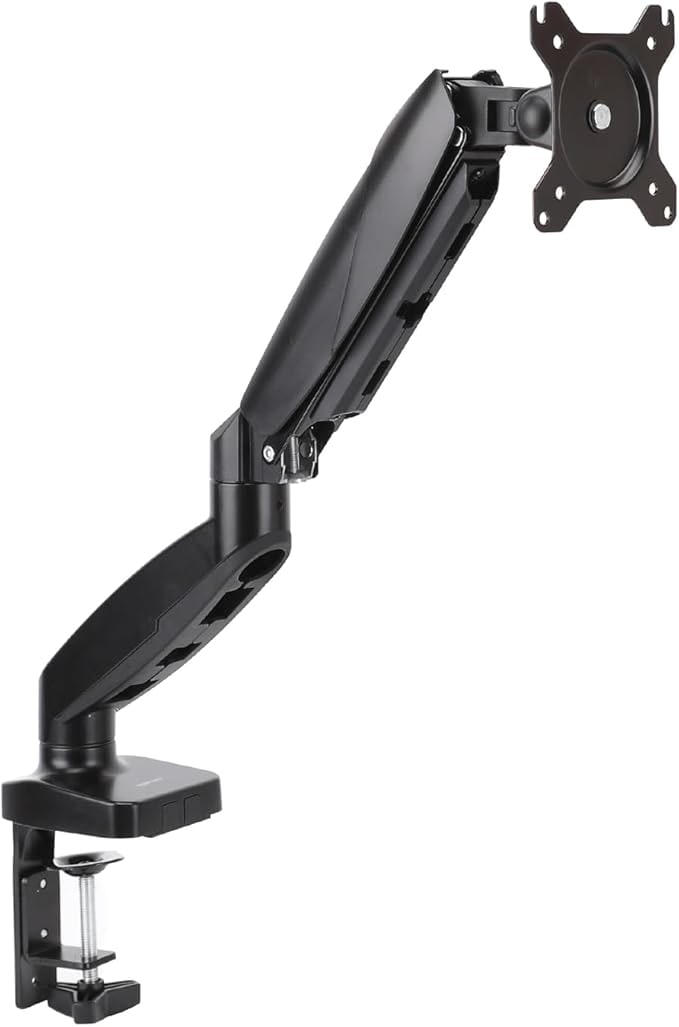
the black single arm, empty monitor attachment plate and desk clamp.
Amazon Basics belongs on the shortlist when the goal is simply to clear a monitor stand from the desktop and keep the wires more organized. A single-arm account describes that benefit while wishing for more substantial clips. If extra height is the main reason for buying an arm, check the intended screen position first: another account wanted more height than the setup provided.
Jump to setup, adjustment or cables and desk use.
Placement and assembly
Setup accounts disagree. One passage explicitly describing the single-monitor arm calls installation straightforward and the instructions clear. Another describes steps presented out of order, confusing piece placement and parts sliding during assembly. The dissatisfied writer intended to return it.
The useful conclusion is to allow time to understand the sequence and lay out the parts. There is support for both manageable installation and a frustrating setup experience, but not for a promise that every installation will be quick or difficult.
Adjustment controls
Accounts describe changing height, tilt and screen orientation. One position-setting routine includes tightening the points intended to remain fixed after choosing the desired angles. Another account describes movement without extra screw tightening, so it would be misleading to turn the first routine into a rule for every move.
A separate writer wanted a little more height. Check where your screen needs to sit before buying, particularly if the original stand is too low. These accounts do not establish a dependable height range for every revision or that a riser is supplied.
Cable and desk chores
Clearing the desktop is the clearest everyday benefit described in the single-arm account. The same passage says the cable clips help organize wires but could be more substantial. That makes the appeal basic tidying, with a modest reservation about the clips.
Choose it if that level of organization fits your desk. The clip comment is a preference about the reported setup, not proof of a durability problem or an exact limit on how many cables fit.
Who should consider it
Consider it if basic clips and a clearer desktop solve the problem. Compare alternatives if extra height is essential, or if you prefer a covered cable arrangement. Check the exact monitor, desk and current product instructions before committing.
Compare the alternatives
WALI is the first alternative to compare for clamp mounting and a concrete power-and-DisplayPort cable task. The FlowLift Single is worth considering if you prefer covered wires and accept reopening the covers when cables change.
The complete monitor-arm guide compares all six options and explains what their task scores cover.
What this review covers
This review uses historical single-arm and associated setup excerpts. Explicitly dual-arm passages are excluded. The retained accounts differ about installation and adjustment, and do not verify the current revision’s height range, included accessories or compatibility.
These reviews compare the work of setting up an arm, adjusting a screen and organizing the desk. They draw on historical review excerpts and specific manufacturer diagrams, without hands-on testing. The scores describe those tasks; they do not establish compatibility, screen support, safety or durability.
Review authorship, ownership and applicability to the current revision remain unverified. Check the exact screen, desk and instructions before buying. Check the current Amazon offer for the model and supplied parts.
Amazon Basics Gas Spring Single Computer Monitor Arm
Amazon Basics
Clearing desk space around one screen and organizing wires with basic clips.
Consider Amazon Basics for clearing the stand from a single-screen desk and arranging wires in basic clips. Setup accounts are mixed, and the desired screen height deserves checking before purchase.
Reasons to choose it
- A single-arm account describes a clearer, more organized desktop.
- Accounts describe changing screen height, tilt and orientation.
Tradeoffs to know
- Setup complaints include confusing instruction order and pieces sliding during assembly.
- One account wanted more height; another wanted more substantial cable clips.
Think twice if: Extra height is essential and you have not confirmed the screen position you need.
Further reading
Ratings
Editorial score 7.6
Placement and assembly7
Straightforward installation accounts coexist with instruction-order and moving-piece difficulties.
Adjustment controls7
Position setting can involve tightening fixed points; desired height needs checking.
Cable and desk chores9
Basic clips and reclaimed desk space support a direct tidying task, with a modest clip reservation.
Sources & further reading
amazon.com product page
amazon.com product page
amazon.com product page
amazon.com product page
amazon.com product page
huanuo.com product information
cdn.shopify.com product information
Keep reading
Something changed? Help us keep this useful.
Send a correction →