WALI GSMP001N Single Monitor Mount Review (2026): Cheap, sturdy, a little fiddly
A low-price gas-spring arm for buyers who want desk space back without pretending a $22-ish mount will feel premium.
WALI gets the ultra-budget lane because owners repeatedly describe a surprisingly stable arm for the money. The catch is refinement: the tilt joint, curved-screen capacity caveat, and setup tuning matter more here than they do on pricier picks.
MSRP
$29.99
Amazon
$22.48
at writing · 2026-05-05
Buyer fit
Low-cost high-capacity single arm for buyers prioritizing price and basic support.
MSRP
$29.99
Amazon
$22.48
at writing · 2026-05-05
Score breakdown
How this product scored
Same rubric, but focused on one product so the reasons behind the score stay readable.
Support and stability
The best owner quotes are reassuring for a budget arm: stable hold, no sag once dialed in, and enough strength for larger-but-still-compatible screens.
Adjustment and ergonomics
Height and motion are useful after tuning, but the tilt joint and tension setup can turn into a chore if the monitor is heavy or awkward to hold.
Installation and desk fit
Clamp and grommet options help, and several owners describe quick setup. The missing desk-thickness detail and variant-heavy Amazon page keep this from scoring higher.
Build and support confidence
Owners call it sturdy, but some also say the materials feel cheaper than premium arms. That is fair at this price, but worth knowing before hanging an expensive screen on it.
Cable routing and daily use
Integrated cable channels are a nice win for a cheap arm, especially if your goal is clearing the factory stand and hiding the cable mess.
Commerce clarity
The selected GSMP001N variant, ASIN, price, and Buy New path were clear at capture, but buyers still need to avoid mixing it up with WALI’s other size and multi-arm variants.
Quick Verdict
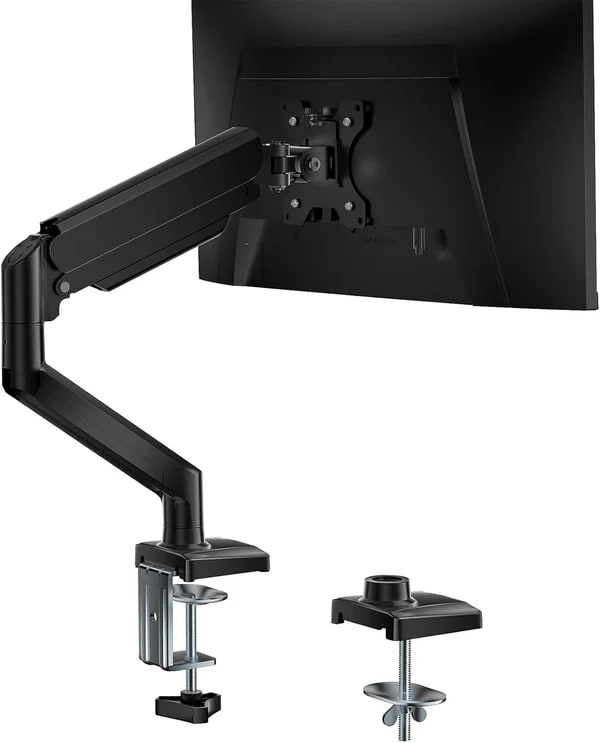
WALI is a value-focused monitor-mount brand, and the GSMP001N is its low-price gas-spring single arm for people trying to get one screen off the desk without paying Ergotron money. The listing promise is broad for the price: 13- to 34-inch screen support, clamp or grommet mounting, integrated cable channels, and up to 26.4 lb for flat screens, with a lower 19.8 lb caveat for curved ones.
In the full monitor-arm ranking, it lands at #4 as the best ultra-budget arm with an overall score of 7.8/10. The good news is that the owner record does not read like a toy. One buyer wrote, "Sturdy Build: I’m using this with a larger screen near the upper end of the size range, and the mount feels incredibly stable." Another said it took "less than 15 minutes" to mount and cable-manage.
The tradeoff is exactly where cheap arms usually get interesting: the final tuning. One detailed owner warned, "If the monitor is tilted incorrectly you are going to need a friend to hold it or adjust it as you tighten/loosen the new bolt again, a major pain." That is not a panic button; it is the checkout note. If your monitor weight, VESA position, desk edge, and patience all line up, WALI can be a lot of arm for very little money. At writing, Amazon-new availability for ASIN B0DGPZR6P1 was captured at $22.48 on 2026-05-05T16:10:00Z; use the product links to verify today’s seller, condition, price, and fit details before buying and to support KB4UB.
Score Breakdown
- Support and stability: 8.1/10. The best owner quotes are reassuring for a budget arm: stable hold, no sag once dialed in, and enough strength for larger-but-still-compatible screens.
- Adjustment and ergonomics: 7.3/10. Height and motion are useful after tuning, but the tilt joint and tension setup can turn into a chore if the monitor is heavy or awkward to hold.
- Installation and desk fit: 7.4/10. Clamp and grommet options help, and several owners describe quick setup. The missing desk-thickness detail and variant-heavy Amazon page keep this from scoring higher.
- Build and support confidence: 7.0/10. Owners call it sturdy, but some also say the materials feel cheaper than premium arms. That is fair at this price, but worth knowing before hanging an expensive screen on it.
- Cable routing and daily use: 7.6/10. Integrated cable channels are a nice win for a cheap arm, especially if your goal is clearing the factory stand and hiding the cable mess.
- Commerce clarity: 8.7/10. The selected GSMP001N variant, ASIN, price, and Buy New path were clear at capture, but buyers still need to avoid mixing it up with WALI’s other size and multi-arm variants.
What Feels Great After Setup
The best part of the WALI is how quickly it can make a cheap desk setup feel less cheap. Owners mention the sturdy feel, clamp/grommet choice, smooth movement after tension tuning, and cable channels that keep the "floating" look cleaner than a stock stand.
The most useful quote is simple: "Once dialed in, moving the monitor up, down, or tilting it is effortless, and it stays exactly where I put it without sagging." That is the version of this arm you are hoping to buy. When the monitor is within the safe weight range and the desk clamp has a solid bite, the payoff is immediate: more desk space, less wobble, and a screen that can swing out of the way instead of living on a giant plastic foot.
What Gets Annoying
The tilt hardware is the part to respect. A detailed owner called the vertical tilt "the problem child of this mount" and said the included bolt would not hold an Odyssey display the way they wanted. Another note said the gas piston needed many turns toward the plus symbol before it would hold the monitor.
That makes WALI a little fiddly, not automatically bad. Treat setup as part of the product: confirm weight without the stand, VESA pattern, flat-versus-curved capacity, desk thickness, clamp clearance, and whether you can safely hold the screen while tension is adjusted. If you want one-hand luxury movement all day, step up. If you want a cheap arm that mostly disappears after setup, WALI still makes sense.
How It Compares
WALI makes the most sense when the price gap matters more than polish.
- Ergotron LX Desk Monitor Arm: The LX is the safer long-term pick for expensive screens because it has the strongest stability and build-confidence story. WALI is dramatically cheaper, but it is not trying to feel as refined.
- HUANUO FlowLift Single Monitor Mount: HUANUO is the better mainstream single-arm lane if you want a still-affordable pick with a stronger everyday ownership story. WALI fights back on price.
- HUANUO ultrawide single arm: Choose the ultrawide HUANUO if you are dealing with a large curved display. WALI’s headline 26.4 lb rating is for flat screens, and the curved-screen caveat matters.
- HUANUO FlowLift Dual Monitor Stand: The dual FlowLift is for clearing two factory stands at once. WALI is simpler if you only need one screen mounted.
- Amazon Basics Gas Spring Arm: Amazon Basics is the cleaner first-party cheap lane for lighter 27-inch setups. WALI has the broader spec story and lower captured price, but also more variant confusion.
If you are still choosing between lanes, compare this against the full monitor-arm ranking before checkout.
Buyer Fit
Best for: Price-sensitive buyers with one compatible monitor who can spend a little time dialing in tension and checking fit.
Skip if: You want premium-feeling adjustments, dislike hardware-store fixes, have a heavy curved screen near the limit, or plan to move the monitor constantly.
Bottom line: WALI is a real bargain if your monitor and desk are a safe match; just buy it like a capable cheap arm, not a secret premium one.
Before buying, do the boring checks: monitor weight without stand, VESA pattern, flat-versus-curved capacity, desk thickness, rear-edge clearance, and cable path. That five-minute check is what separates “wow, cheap upgrade” from “why is my screen slowly nodding at me?”
Tell us what this page missed
These pages get better when real buyer complaints make it back into the scoring model. If something important is underweighted, say it.
Rate this review
Give it a score from 1-10 and tell us what to improve.
0/4000 characters