
The recommendation
Consider M10+ after checking its actual display and app routine. Its qualified usability recommendation reflects specific access friction and limited initial-use scope.
Grades at a glance
| Product | Overall | Readout and useful interpretation | Setup and placement | Daily access and control |
|---|---|---|---|---|
| Temtop M10+ | 6.5 | 7.0 | 7.0 | 5.5 |
Does it fit your life?
A device readout with an app compromise
Temtop M10+ is worth a look when you want readings visible on the unit and are willing to examine the companion app's quirks before making it part of your routine. An unboxing video shows the monitor operating on its internal battery and already displaying information while unplugged. A separate explicit M10+ app report says connection and most settings worked, but describes a wrong AM/PM indicator that the user could not correct. That combination makes the buying case more qualified than a simple promise of easy connected monitoring.
Our usability grade is 6.5/10 overall: 7 for readout and useful interpretation, 7 for setup and placement, and 5.5 for daily access and control. The grades reflect accessible initial readings and meaningful app friction. They do not establish sensor precision, long-term battery endurance or consistent connected performance across a broad group of users. Choose this model only if its observed readout role suits you and the app limitations would be tolerable in the way you intend to use it.
Keep M10+ separate from similar Temtop names
The exact model identity matters here. The videos explicitly describe M10 Plus, and the app-store user explicitly names their M10+. That is the relevant evidence. Experiences with another Temtop M10-family product should not be imported simply because the name or enclosure looks similar. Features, connectivity and power arrangements can be decisive purchase details, so check that the listing and supplied product actually match M10+.
This is especially important if a search result or retailer page compresses several products into one description. Do not infer Wi-Fi behavior, app features or battery life from a neighboring model. The review's strongest facts are narrower: initial battery operation was seen, an on-device display was described, and one M10+ user could connect to the iPhone app and update most settings. Those observations give a useful starting point without filling the gaps with an assumed specification sheet.
Judge value against the tasks you actually need. A low advertised price would not resolve a workflow problem if the app is central to your plan. Equally, a single user's app complaint does not prove that every M10+ will behave the same way. Make the exact workflow, rather than a generic value label, the focus of your comparison.
What the initial videos establish
In one unboxing, the presenter initially assumes the device must stay connected to power, then turns it on and discovers a built-in battery. The unit displays information while unplugged. That correction is useful because it identifies an actual observed action rather than leaving the first assumption unchallenged. It supports the limited claim that battery operation occurred in that initial session.
The same presenter says the device takes some time to catch up after being in its box. That is an initial observation, not a defined stabilization interval for every measurement. It is a reason to follow the startup instructions and allow the device to complete its own process before interpreting an early reading. The presenter’s plan to keep using the monitor remains a plan; the demonstrated experience ends with this initial operation.
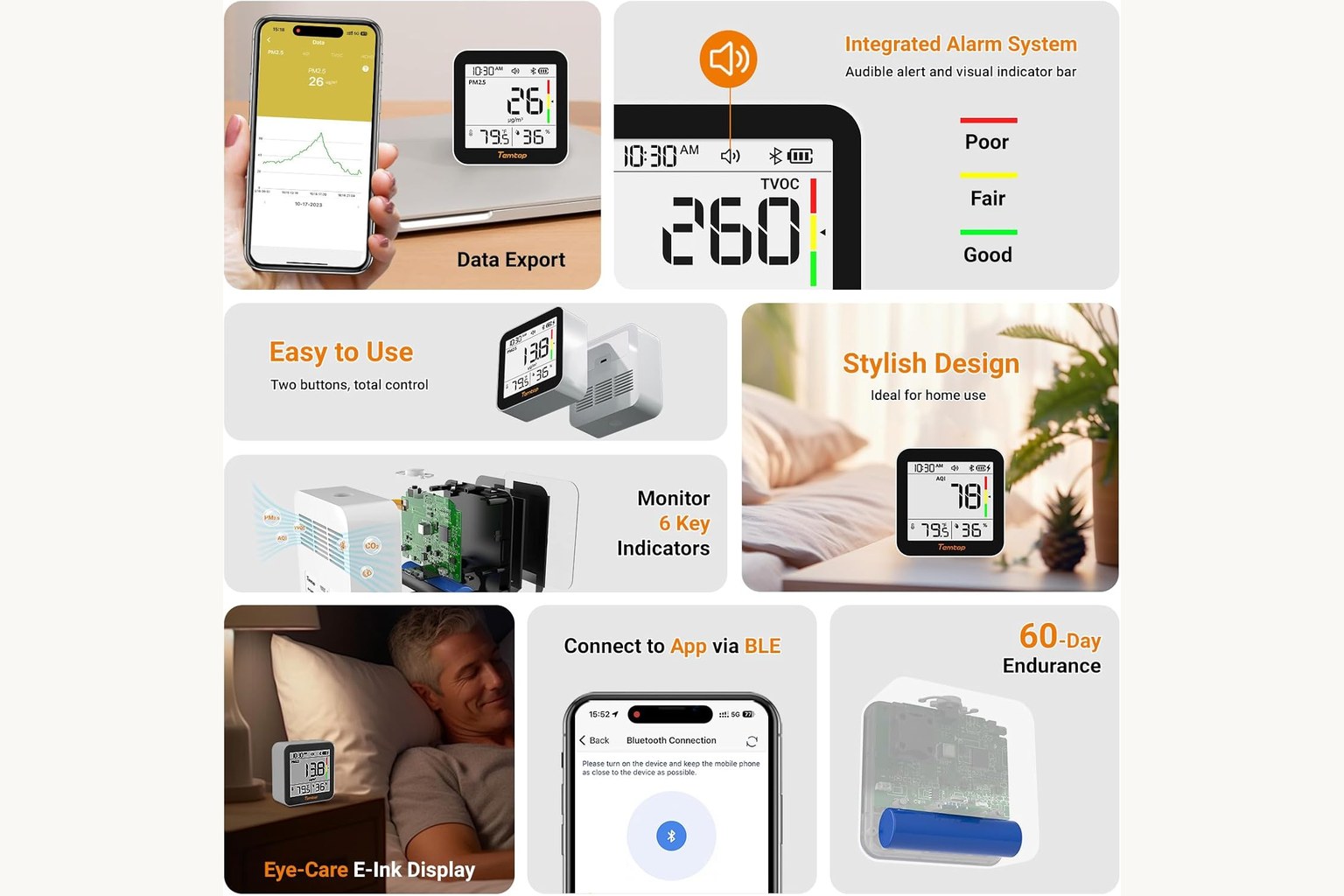
A second video explicitly names the M10 Plus and describes its screen, button assignments and reading list: PM2.5, CO₂, TVOCs, temperature and humidity. These are attributed product observations. They do not establish the accuracy of any reading or guarantee that the display will suit every viewing distance. The useful buying question is whether having those readings on the device is the access method you want.
The app report is both encouraging and limiting
An iPhone app-store report titled “App mostly works” explicitly refers to an M10+. The user says connection is fine and most device settings can be updated. They also say the clock changed when the device linked, but the AM/PM indication remained wrong and could not be corrected. This is a concrete interaction problem, and it matters if you want to understand when a recorded event happened or simply expect a dependable clock display.
The report is dated February 10 without a visible year. That prevents treating it as a current app-version verdict. It remains useful as a documented example of a task that worked alongside a task that frustrated one user. We do not claim that the issue affects all M10+ users, persists in the current release or has been fixed. If the clock and its relationship to the app matter to you, check that behavior with the version you will actually use.
The same user says the app requested account registration but allowed that step to be skipped. Treat that as one observed app session, rather than a permanent guarantee about registration requirements. Before buying, determine how much of the experience you need from the app and what account arrangement you are comfortable accepting. A bypass in one report does not settle every future setup path.
Reading explanations need enough context
The M10+ app user also criticizes its reference information for using terms such as good and bad without numeric reference values. That matters because a qualitative label can be easy to read while still leaving you unsure where the displayed number sits within a range. The access problem is not merely finding a value; it is understanding how the app explains the value it has shown.
For a buyer who wants a simple device readout, this may be an acceptable limitation. For someone hoping the app will teach them to interpret unfamiliar readings, it is more consequential. Decide whether you are comfortable learning the display from the product's own instructions and checking the meaning of each view, rather than relying on a short label alone. The described app criticism is a reason to inspect the explanation workflow before relying on it.
Do not respond to missing context by assuming the most reassuring interpretation. A general label is not a complete description of room conditions. Follow the particular reading you are interested in, keep its units and time context consistent, and make a note of the activity you are comparing. Keeping that context makes comparisons easier, even when the app’s short explanation does not answer all your questions about the displayed value.
A sensible role for the device display
The strongest reason to consider the M10+ is that initial readings are available on the unit. If the monitor will sit within comfortable view, this can make checking it simpler than opening a phone every time. That is a reasoned fit for a desk or another regularly visited location, subject to the supplied placement instructions. It is not evidence that the display is equally readable in every light or from across a room.
Before purchase, imagine the exact moment of use. Will you look at a number while sitting nearby, pick the device up, or ask someone else to read it? Will you need a history view afterward? The initial videos establish a device readout, but they do not establish every history or export task you might associate with a connected monitor. Keep those additional requirements separate and verify them explicitly.
If the app is essential to your plan, the weaker daily-access grade deserves attention. An otherwise acceptable device display may not compensate for a time-display problem or unclear explanations in the companion app. Conversely, if your routine is deliberately centered on the hardware, inspect how much of that routine can be completed on the unit before deciding whether the reported app friction is material to you.
Power and placement require a modest plan
Battery operation in an unboxing is useful, but it is not a runtime test. We cannot infer all-day portability, a charging interval or long battery service life from the monitor turning on while unplugged. Treat the battery as an observed capability with an unestablished duration here. If frequent travel or long periods away from power are part of your brief, seek explicit support for that use before making the purchase.
The presenter also observes a USB-C cable. Check the supplied charging instructions and normal power arrangement for the exact product you receive. For a home desk, plan a cable route and a location that keeps the display accessible. A monitor you have to move every time you need the outlet may make day-to-day comparisons less consistent, even if the underlying readings are easy to obtain.
When moving between rooms, record the new location and follow the product's own startup or settling instructions. The observation that the unit needed time after unpacking does not establish how it behaves after every move. It does suggest a useful expectation: turning on a monitor is the beginning of a reading routine, rather than proof that the first visible value answers every room question immediately.
Ownership checks that would change the decision
If you buy the M10+, use the initial period to confirm the tasks that matter to you: turning it on, reading the chosen metric, connecting the app if needed and checking the displayed time. Give particular attention to the clock after linking the app, because that is the step at which the reported AM/PM problem appeared. It makes the reported AM/PM problem actionable as a compatibility question instead of letting it remain a vague concern about the whole product.
Keep the model name, instructions and app version together in your purchase notes. If you encounter a problem, that information is more useful than comparing your unit with a different M10-family product discussed online. For cleaning, charging and any sensor care, use the instructions for the exact M10+ supplied. Check any calibration steps in those instructions rather than borrowing a procedure from another Temtop model.
Consider also who will maintain the app connection. If the monitor is intended for shared use, another person should be able to understand the chosen display without relying on your memory of its labels. A short explanation of what you are following and where the time information comes from may be more valuable than configuring every available setting. The goal is a repeatable information habit that matches the product's actual access route.
Alternatives for different priorities
Aranet4 Home is a better-supported starting point for portable standalone CO₂ access, with explicit sustained-use accounts. It has a narrower monitoring role, so it is not a direct substitute if your brief includes particle and VOC displays. Qingping Gen 2 is worth comparing for a more thoroughly described touchscreen experience and on-device history, while planning a normal powered location around its reported short battery duration.
GoveeLife has a concrete video demonstration of pairing, history, brightness and night-mode controls. That may appeal if convenient app adjustments are central to your decision, though its humidifier-mist account shows the importance of interpreting readings in context. Airthings View Plus and IQAir AirVisual Pro offer still different app and screen routines. The choice should follow your reading and interaction requirements before the overall grade.
Buying verdict
Temtop M10+ provides an accessible initial device readout, with observed battery operation and an explicit app connection report. Its weaker daily-access grade reflects specific friction in that app account: an uncorrected AM/PM indication and explanations the user found insufficiently numerical. Those details warrant a careful workflow check, rather than either dismissing the whole model or assuming the complaint is irrelevant.
Choose it if the exact M10+ device routine meets your needs and you can verify the app tasks you rely on. Prefer an alternative when long portable use, a richer on-device history or a smoother documented connected workflow is the decisive requirement. The available experience supports a qualified usability recommendation, with room for the buyer's actual routine to determine the fit.
Temtop M10+
Temtop
A buyer who wants initial readings on the unit and can check the exact M10+ app tasks before relying on them.
M10+ videos show an initial device readout and operation on the built-in battery. One explicit M10+ iPhone app report says connection and most settings worked but describes an AM/PM indication the user could not correct. The same person wanted numeric context alongside the app’s qualitative reference labels. The report has a February 10 date without a visible year, so it is not a current-version verdict. Battery operation at unboxing does not establish a runtime or long-term experience.
Reasons to choose it
- Battery operation is observed while unplugged at unboxing.
- Initial readings are accessible on the unit.
- One M10+ app user reports successful connection and most settings updates.
Tradeoffs to know
- One user could not correct the app-linked AM/PM indication.
- The same report finds the reference labels short on numeric context.
- Initial use does not establish sustained battery life or sensor behavior.
Think twice if: You need established all-day battery endurance, a proven rich data workflow or an app experience without the reported time-display friction.
Published specifications
- App report scope
- Explicit M10+ iPhone account; year not visible
- Observed initial use
- On-device readings while operating unplugged
Ratings
Editorial score 6.5
Readout and useful interpretation7
Initial readout is accessible, while one M10+ app user finds reference labels insufficiently numerical.
Setup and placement7
The unboxing supports initial power and placement only, with time needed after unpacking.
Daily access and control5.5
A connected M10+ app session can update most settings, but one user cannot correct AM/PM.
Sources & further reading
youtube.com review
airthings.com product information
pcmag.com review
breathesafeair.com review
airpurifierfirst.com review
youtube.com review
breathesafeair.com review
youtube.com review
youtube.com review
youtube.com review
youtube.com review
youtube.com review
User reports at apps.apple.com
youtube.com review
youtube.com review
Keep reading
Something changed? Help us keep this useful.
Send a correction →