Amazon Smart Air Quality Monitor Review (2026): Useful Alexa Helper, Not a Standalone Meter
A closer look at Amazon’s budget air monitor: Alexa routines, PM2.5/VOC/CO sensing, LED-only alerts, calibration, app limits, missing CO2/radon, and the CO-alarm warning to know before checkout.
The Amazon Smart Air Quality Monitor is the budget Alexa pick for alerts and routines, not the right choice for buyers who need a local screen, CO2 ventilation data, radon monitoring, exportable history, or a certified CO alarm.
MSRP
—
Amazon
$69.99
at writing · 2026-05-18
Buyer fit
Best Alexa budget pick: the small warning light for Alexa routines, not a standalone diagnostic monitor.
MSRP
—
Amazon
$69.99
at writing · 2026-05-18
Score breakdown
How this product scored
Same rubric, but focused on one product so the reasons behind the score stay readable.
Sensor coverage and fit
Amazon Smart Air Quality Monitor scored 5.7 for sensor coverage and fit based on repeated source themes around cheap Alexa routines, PM/VOC/CO plus comfort readings, no screen, no CO2/radon, not a CO alarm, and limited data access.
Reading trust and calibration
Amazon Smart Air Quality Monitor scored 6.0 for reading trust and calibration based on repeated source themes around cheap Alexa routines, PM/VOC/CO plus comfort readings, no screen, no CO2/radon, not a CO alarm, and limited data access.
Display, alerts, and actionability
Amazon Smart Air Quality Monitor scored 6.8 for display, alerts, and actionability based on repeated source themes around cheap Alexa routines, PM/VOC/CO plus comfort readings, no screen, no CO2/radon, not a CO alarm, and limited data access.
App, history, and data access
Amazon Smart Air Quality Monitor scored 6.5 for app, history, and data access based on repeated source themes around cheap Alexa routines, PM/VOC/CO plus comfort readings, no screen, no CO2/radon, not a CO alarm, and limited data access.
Setup, power, and placement
Amazon Smart Air Quality Monitor scored 7.4 for setup, power, and placement based on repeated source themes around cheap Alexa routines, PM/VOC/CO plus comfort readings, no screen, no CO2/radon, not a CO alarm, and limited data access.
Reliability, support, and caveats
Amazon Smart Air Quality Monitor scored 6.2 for reliability, support, and caveats based on repeated source themes around cheap Alexa routines, PM/VOC/CO plus comfort readings, no screen, no CO2/radon, not a CO alarm, and limited data access.
Before You Buy
The Amazon Smart Air Quality Monitor is easy to overbuy and easy to underrate. If you already use Alexa, it can feel wonderfully practical: a little plug-in box notices smoke, dust, humidity, VOCs, or a possible CO change and turns that into phone alerts, Echo announcements, or routines for a purifier, fan, or dehumidifier. If you are shopping for a serious standalone air meter, though, the same product can disappoint fast because there is no numeric screen, no CO2, no radon, and no way around the Alexa app.
That is the regret check: do you want an inexpensive Alexa trigger, or do you want a room dashboard? In our full air quality monitor ranking, Amazon ranked #6 as the best Alexa budget pick, behind broader monitors like Airthings, Qingping, Aranet, IQAir, and Temtop. This deeper review is for the buyer who likes the $69.99-at-capture idea but wants to know which annoyances will actually matter after setup.
Use the product links to recheck the exact B08W8KS8D3 listing, current price, seller, condition, and availability before buying. If this helps you avoid trusting the wrong air number, those links also help support KB4UB.
Quick Verdict
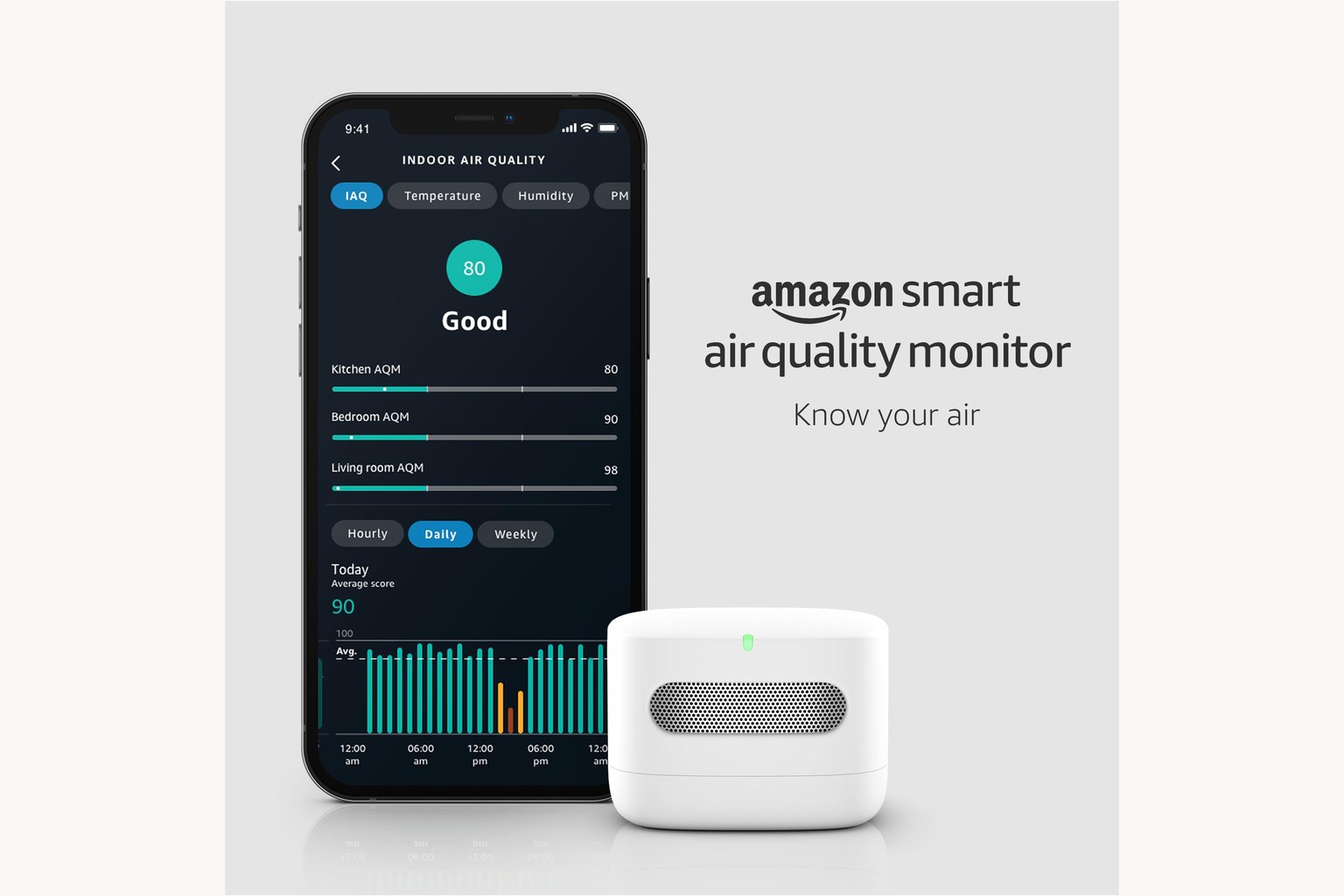
Buy the Amazon Smart Air Quality Monitor if your home is already built around Alexa and you want cheap alerts or automations more than a serious local display. It tracks five advertised factors: PM2.5, VOCs, carbon monoxide, humidity, and temperature. Amazon says it can show a color-coded LED status, send the air quality score to the Alexa app, trigger phone notifications, make Echo announcements, and run routines when indoor air quality changes.
That makes it useful in the right lane. One Amazon customer quote says, “Extremely easy to set up,” and another says they use automations to know when to turn on an air filter. A YouTube reviewer described setup as “really easy” and said they were using the phone view in about “10 or 15 minutes.” Those are exactly the reasons this product exists.
The limits are just as important. Amazon’s own page says the monitor “doesn’t have a microphone or a speaker to sound an alarm,” that Alexa is not built in, and that it “does not measure Carbon Dioxide (CO2) or Radon.” It is also “not a substitute for a carbon monoxide alarm.” So the verdict is narrow: good Alexa helper, weak standalone monitor.
Score Breakdown
- Sensor coverage and fit: 5.7/10. PM2.5, VOC, CO, humidity, and temperature are useful for Alexa routines, but no CO2 and no radon keep it far behind broader air monitors.
- Reading trust and calibration: 6.0/10. The available material supports real household event detection, but not enough independent lab validation to treat this like a precision instrument.
- Display, alerts, and actionability: 6.8/10. The LED, Alexa notifications, Echo announcements, and routines are the best part. The missing screen is the reason it does not score higher.
- App, history, and data access: 6.5/10. Alexa app access is convenient for quick checks but weaker for people who want deep graphs, easy navigation, or exportable data.
- Setup, power, and placement: 7.4/10. Plug it in, add it in Alexa, and let it calibrate. Placement still matters because cooking, sprays, vents, humidifiers, and dust sources can skew what the sensor sees.
- Reliability, support, and caveats: 6.2/10. Amazon identity, a visible current listing, and product support help, but CO-alarm confusion and Alexa dependence are serious caveats.
What Feels Great Right Away
The best first impression is how quickly the monitor becomes part of an Alexa home. Amazon’s setup instructions are basically: plug it in, open the Alexa app, add the device, then ask “Alexa, what’s the indoor air quality?” That is not a small advantage for buyers who do not want another brand account, another air-quality app, or another dashboard to learn.
The automation hook is the real reason to buy it. Amazon says routines can activate “air purifiers, dehumidifiers and fans” when the indoor air quality score changes. A hands-on transcript makes the same point in owner language: the reviewer used it so “smart air purifiers are behaving how I would like them to.” If you have allergies, a dusty workshop corner, a basement project, a cat-litter area, or a purifier that you already control with Alexa, that can feel genuinely useful.
It is also compact and quiet enough to disappear until something changes. The color LED gives you a quick status hint, and Echo announcements can turn invisible events into something you act on. For a budget device, that is the pleasant surprise: it does not need to be the best air monitor to be the thing that nudges you to run a purifier sooner.
The Daily-Use Annoyances
The first annoyance is the missing screen. The light tells you whether something is broadly okay or not, but it will not give you a clear CO2 number, PM trend, or pollutant breakdown from across the room. If you want glanceable data, Qingping, IQAir, Aranet, or Temtop make more sense.
The second annoyance is that everything interesting lives through Alexa. Amazon says the device has no built-in Alexa, microphone, or speaker; for voice control, alerts, and full routines you need the Alexa app or an Echo device. That is fine if you already live there. It is a bad fit if you are trying to keep air monitoring separate from a smart-home account.
The third annoyance is alert context. Cooking, toast, candles, cleaning sprays, painting, sanding dust, humidifiers, and nearby vents can all change the readings. Some of those are real air events, not false alarms. They still get annoying if the app does not help you understand whether to ventilate, filter, move the monitor, or ignore a short spike. One reviewer noted the LED can turn red for bad air quality and added that you may need to cover it in the evening if the light bothers you.
Readings, Calibration, and the CO Warning
The useful readings are mostly household-event readings. In one basement project, a reviewer said the monitor tracked dust “almost instantaneously” while sanding and showed VOC levels getting high during painting, which gave them a reason to open a door and run a fan. That is the good version of this product: it catches a thing you are doing and turns it into a practical next step.
Calibration deserves patience. Another transcript says the unit was usable quickly, but that “it takes about two days for that initial calibration period.” That matters because a new air monitor can make people anxious on day one. Give it time to settle, keep it away from obvious sources, and look for patterns instead of treating one spike like a diagnosis.
The CO feature needs the strongest caution. Amazon’s own language says the device can register carbon monoxide levels, but “is not a substitute for a carbon monoxide alarm” and “is not certified as a CO alarm or detector.” Keep certified CO alarms installed and tested. Treat Amazon’s CO reading as extra context, not life-safety coverage.
How It Compares
Amazon is not trying to beat Airthings View Plus as a broad home-air monitor. Airthings costs much more, but it adds radon, CO2, PM, VOC, humidity, temperature, pressure, and stronger whole-home context. If radon risk is part of the reason you are shopping, Amazon is the wrong pick.
It also is not a Qingping or IQAir-style room display. Qingping Gen 2 is much better when you want a readable bedside or desk screen for CO2 and particle trends. IQAir AirVisual Pro is the better fit if you want PM2.5 plus CO2, outdoor comparison, forecast context, and deeper history. Aranet4 is narrower than Amazon, but far better for the single question Amazon cannot answer: is this room under-ventilated?
Temtop M10+ is the more traditional cheap screen pick, while Eve Room is the Apple Home VOC and comfort lane. GoveeLife is cheaper PM2.5 trend watching for Govee homes. Amazon’s advantage is not sensor depth; it is low-cost Alexa action. If that sentence excites you, keep reading. If it sounds like a compromise, buy a monitor with the sensor and display you actually wanted.
Who Should Buy It
Buy the Amazon Smart Air Quality Monitor if you already use Alexa, own compatible purifiers or fans, and want a low-cost way to turn air changes into reminders or routines. It fits kitchens, basements, hobby spaces, laundry rooms, bedrooms, and purifier-adjacent spots where PM2.5, VOCs, humidity, temperature, or CO context would change what you do.
It is especially sensible if you do not need a screen because you already check Alexa often, or if you mainly want alerts when something goes wrong. At the saved Amazon price check, the 1-pack monitor-only configuration was $69.99, in stock, and sold through the normal Amazon.com buy box, which keeps the value argument simple.
The best buyer is realistic about what this is: a small Alexa-connected warning light and routine trigger. It will not replace a purifier, a radon test, a CO2 meter, or a certified CO alarm. It can still be worth owning if it makes your existing smart-home gear respond faster.
Who Should Skip It
Skip it if CO2 is the reason you started shopping. Bedrooms, offices, classrooms, meeting rooms, and crowded living spaces often need ventilation feedback, and this monitor does not measure CO2. Start with Aranet4, Qingping, IQAir, Airthings, or another CO2-capable pick instead.
Skip it if you want radon, formaldehyde-specific testing, exportable raw data, a bright local screen, or a privacy-minimal setup that does not depend on Alexa. Also skip it if you expect a carbon-monoxide safety device. The CO reading may be useful context, but Amazon’s own warning is clear: it is not a certified CO alarm or detector.
Finally, skip it if app graphs frustrate you. The Alexa features are useful, but the public record is thinner on deep history, easy data export, and long-term independent accuracy checks. If you know you will want to study trends, not just trigger routines, this is probably too simple.
Bottom Line
The Amazon Smart Air Quality Monitor is a good budget pick only when you buy it for the right job. It is not a complete air-quality dashboard, and the missing CO2, missing radon, LED-only display, Alexa dependence, and CO-alarm warning keep its score at 6.4/10 in the parent ranking.
What it does well is more specific: it notices common household air events, shows them in Alexa, and can turn them into alerts or routines for gear you already own. That can be enough for an Alexa household that wants a cheap nudge to run a purifier, dehumidifier, or fan.
Bottom line: buy it as an Alexa helper, not as your only air-quality instrument. Before checkout, recheck ASIN B08W8KS8D3, the 1-pack monitor-only configuration, current seller, current price, return window, and stock. If you are still comparing sensor coverage, use our best air quality monitors guide to choose the monitor that matches the pollutant you actually care about.
Feature breakdown
Full feature list
Grouped feature details are expandable so buyers can go deep when they want, without turning the whole review into a spec landfill.
Full feature list
7 features
+
Full feature list
7 features
Sensors
[object Object]
Buyer Lane
Best Alexa budget pick
Safety Caveat
Registers CO levels but is not certified as a CO alarm or detector and is not a substitute for certified CO alarms.
Commerce Snapshot
[object Object]
Source Signal Count
40
Source Family Posture
[object Object]
Display And Connectivity
[object Object]
Tell us what this page missed
These pages get better when real buyer complaints make it back into the scoring model. If something important is underweighted, say it.
Rate this review
Give it a score from 1-10 and tell us what to improve.
0/4000 characters