
The recommendation
Consider the Move 2 for a room-changing home routine when its physical controls matter and setup and adapter organization are acceptable.
Grades at a glance
| Product | Overall | Carry and placement | Buttons and control selection | Connection and charging-port chores |
|---|---|---|---|---|
| Sonos Move 2 | 7.7 | 7.0 | 9.0 | 7.0 |
Does it fit your life?
A home routine is the strongest starting point
The Sonos Move 2 is most interesting here for someone who wants a speaker that changes rooms and has distinctive physical controls. The historical 6 Months Later review describes room-to-room movement, an indented volume bar, and dedicated forward and backward skip controls. Those observations give you specific interactions to assess if you prefer operating a speaker directly after putting it down. The strongest reason to consider it is that combination of movement and controls within a home. 6 Months Later Move 2 review.
A different historical review from Tay describes carrying heft and a system update that interrupted the reviewer's initial setup plan. That update was a chore in one system at that time. It is useful as a reminder to prepare a home setup before depending on it, rather than evidence of a present defect or a prediction of your own installation. Tay Move 2 review.
The ordinary-use score is 7.7/10 overall. The controls are the strongest area; carrying and connection chores receive more qualified marks. Consider the Move 2 if a home-centered, room-changing routine appeals to you, with time allowed to understand setup and any adapter arrangement your chosen source needs.
Moving between rooms is a concrete use case
The 6 Months Later account describes using the Move 2 in different rooms. This is a useful form of portability to distinguish from carrying something all day in a bag. For your purchase, identify the places in your home where you would actually move it. A desk, another room, and a regular storage position create a clearer decision than the broad idea of taking a speaker anywhere. Room-to-room account.
Tay describes the Move 2 as somewhat heavy. Keep that personal reaction beside the room-changing appeal rather than assuming that a movable product is effortless to carry. A short move might be entirely acceptable to you while a longer journey is not the routine you want. The point is to judge the load in the actual task, not turn one person's description into a universal comfort finding. Reported heft.
The 7/10 carrying and placement score reflects this combination of useful room-changing flexibility and meaningful carrying burden. If your plan is mostly to leave the speaker in one place, ask whether movement is truly a feature you value. If you plan to move it several times a day, examine the whole path: picking it up, carrying it past other belongings, and giving it a sensible resting position at the next stop.
Choose the destination as carefully as the journey
A room-changing speaker still needs a place to sit at each destination. Use the physical-control description in the 6 Months Later review to plan those places. Can you approach the top controls in your preferred position? Would the speaker be behind a monitor or tucked beneath something that makes reaching over awkward? Those are layout questions you can settle before buying. Move 2 control and movement discussion.
Consider whether the second room will be a regular destination or an occasional one. A regular destination may justify reserving a clear position. For an occasional move, you might prefer a speaker whose placement feels less involved to you. Reserve space where you will actually use it, rather than relying on a convenient-looking spot you rarely visit. The Move 2's appeal is strongest when its movement and direct controls fit a routine you can already describe.
For example, a clear desk might leave the top controls easy to approach, while a shelf beneath another shelf might not. Walk through those two positions before deciding where the speaker belongs. If one destination requires shifting other objects every time, decide whether you would really make the move as often as you imagine. The useful arrangement is one you can repeat without reorganizing the room.
The indented volume bar gives a distinct reference
The 6 Months Later reviewer describes the indented volume bar as making adjustment easier without looking directly at the top of the speaker. That is a favorable personal account of a tactile reference. It supports the 9/10 control-selection score, while stopping short of claiming that every person will find it equally easy in every position. Indented volume-bar account.
If you like operating a speaker by touch, this is the interaction to try first. Place it where you expect it to sit and approach the volume control from your normal position. Do you understand the reference it provides? Can you distinguish the action you want from the surrounding controls? A meaningful demonstration uses your intended reach rather than only a close-up explanation of the design.
For someone who uses a phone for every adjustment, the tactile reference may be a secondary benefit. For someone who frequently walks past and changes a setting, it may be central. The score recognizes a concrete favorable observation, but your purchase should follow the action you repeat most. You do not need to value every control equally to find the layout worthwhile. Identify the one or two interactions that would make the speaker easier to live with in your home.
Dedicated skip controls simplify one kind of choice
The same historical review identifies dedicated forward and backward skip buttons. That is a specific layout distinction from a playback button that shares several actions. It gives a buyer a clear physical action to examine, particularly if skipping is a frequent part of the routine. Dedicated skip-button description.
Consider whether you usually select a new item from the phone or simply move forward and backward within what is already playing. The latter habit may make dedicated skip controls more valuable. If you mainly choose individual content on a screen, the physical skip arrangement may matter less than the overall source workflow. Keep those tasks distinct rather than assuming a favorable physical interface answers every content-selection question.
In a shared home, agree on the simple actions anyone should be able to perform on the speaker. Someone may only want pause and volume, while another person wants to skip frequently. Have the likely users examine those actions from the intended resting position. The favorable review supports a clear starting point; it does not remove personal preferences about touch, reach, or where a control should be. Choose the interface because its particular arrangement suits the users, not because it has accumulated a long list of controls.
Initial setup deserves time before the first outing
Tay describes wanting to get on the road, then discovering that the home Sonos system needed an update before the Move 2 setup could proceed as intended. The account says setup worked out after the system was brought up to date. The relevant observation is that an initial system task interrupted a planned quick departure in that historical setup. Historical setup-update account.
The practical lesson for a buyer is to separate first setup from the first occasion on which the speaker is needed. If you are planning to use it at a particular time, allow an earlier session to understand the steps. That is ordinary preparation, not a forecast that you will encounter the same update or any particular delay. Your present system and software may differ from the reviewer's.
The 7/10 connection and charging-port score retains this setup chore alongside the wired-adapter arrangement discussed below. It does not state that a current app is defective. A buyer already comfortable managing a home system may see setup as an acceptable part of the purchase. Someone who expects a purely immediate first-use routine should investigate the exact steps more closely. The important question is how much preparation you are willing to make before the product becomes part of your day.
A wired source calls for an adapter plan
The 6 Months Later review describes line-in through a Sonos USB-C line-in adapter. Tay also describes purchasing an adapter for a wired source in its historical account. These observations establish an extra component in the reported routine. They do not establish current pricing, present package contents, or compatibility with every source you might connect. Move 2 line-in adapter account, companion adapter description.
If wired input is part of your plan, identify the exact source and the connection path before choosing the speaker. Where would the adapter live when the speaker changes rooms? Would it remain with the source, travel with the speaker, or need its own storage place? These are ordinary organization questions that can affect convenience even when the hardware arrangement is understood.
Do not count the adapter route as a feature you will use unless you have an actual source for it. Conversely, do not ignore it if wired use is the main reason for buying. The presence of a USB-C connector is not a complete description of the source path. Ask to see the intended arrangement and confirm exact accessories separately from the historical review. A clear plan for the additional component is part of assessing whether this routine suits you.
Make the home routine specific
The Move 2 recommendation works best when you can describe a small set of ordinary tasks. For example, you may want to move it from a work area to another room, use volume and skip directly, and return it to a regular location afterward. The historical room-changing and control accounts support considering that kind of routine, while the setup account reminds you to prepare the system first. Movement and controls, initial setup context.
If your intended routine is more complicated, break it into separate requirements. Which source do you need in each location? Will anyone else use the controls? Does a wired source stay in one room? The answers can reveal whether you are valuing movement that you will actually use or imagining flexibility without a clear purpose.
This also helps distinguish one-time work from recurring work. Initial setup may be something you accept before regular use. Managing an adapter during every move might be a recurring chore you care about more. The evidence does not quantify how often either task will affect you. It identifies the kinds of work described by the reviewers so you can decide which belongs in your own purchase criteria.
Alternatives for a simpler carrying priority
If your main desire is a defined carry handle, read the Bose SoundLink Max review and Soundcore Boom 2 review. CNET describes the Max's grippy handle with noticeable heft. The Breakdown With Luke's Boom 2 review describes straightforward handle carrying. These are personal handling observations to compare, rather than universal comfort rankings. Max handle account, Boom 2 handle account.
If physical control choice is your priority, the JBL Charge 6 review provides another arrangement: SoundGuys describes raised playback controls and a separate power and pairing strip. Compare that with the Move 2's indented volume bar and dedicated skip controls. Decide which set of actions you want to perform directly in the places you expect to use the speaker. Charge 6 controls.
None of these alternatives should be treated as a substitute for checking your source route. The Max's separate auxiliary input, the Boom 2's reported Bluetooth-source routine, and the Move 2's adapter-based line-in are different arrangements. A handle or control preference can narrow the shortlist, but a required source connection should still be resolved before purchase. Compare the work, not only the appearance of the objects.
An adapter needs a storage decision
A fixed wired source and a moving speaker create a small storage decision. The Move 2's line-in route uses a separate adapter in the 6 Months Later review. You could plan to keep that component with the source or bring it along when changing rooms. Before buying, decide which arrangement leaves you with the fewest items to find at the moment you want to reconnect. Move 2 line-in arrangement.
For example, if a wired player stays at a desk, picture the return from another room. Where are the cable and adapter waiting, and can you approach the speaker's connection without moving the rest of the desk? If the wired source travels too, include its cable and the adapter when deciding what you would carry. That is a different task from moving the speaker alone, even if you only need to do it occasionally.
If wired input is optional for you, give it an appropriately small part of the decision. The indented volume bar and dedicated skip controls may matter every day, while the adapter stays unused. If wired input is essential, make the complete arrangement part of a demonstration. Confirm the exact accessory you would buy and where it belongs in your setup; a socket on the speaker is only one part of that plan.
The final fit
The Move 2 receives 7/10 for carrying and placement, 9/10 for buttons and control selection, and 7/10 for connection and charging-port chores, giving 7.7/10 overall. The strongest case is a room-changing home routine in which the tactile volume reference and separate skip controls matter, with preparation and any adapter organization accepted as part of the purchase.
Before choosing, evaluate the carrying task between your actual destinations, try the controls from the intended resting position, and understand initial setup before the day you need it. If wired input matters, include the adapter in that plan and confirm the exact current arrangement separately. These checks address the specific reasons for the recommendation.
Return to the seven-speaker comparison for the complete selection. Continue with the Max for a separate auxiliary input and handle, the Boom 2 for its reported handle-led routine, or the Flip 7 if changing carry attachments is more relevant than moving a speaker within a home system.
Sonos Move 2
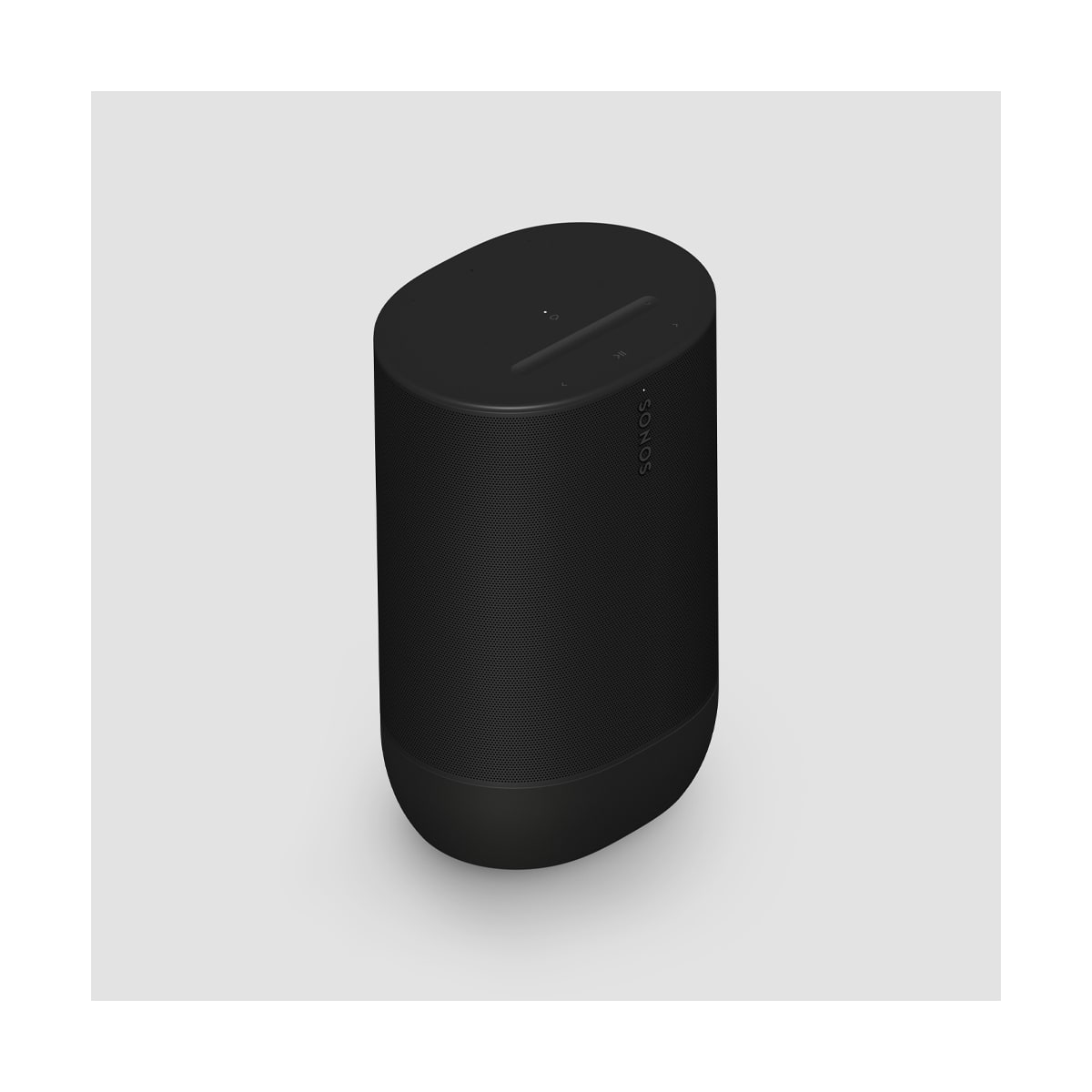
Sonos
Buyers who want room-to-room use with an indented volume reference and dedicated skip controls.
Room-changing use and tactile physical controls, balanced by reported heft, historical setup work, and an adapter-based wired route.
Reasons to choose it
- Historical review describes room-to-room use.
- Indented volume bar supplies a distinct physical reference.
- Dedicated forward and backward skip controls are identified.
Tradeoffs to know
- Another reviewer describes carrying heft.
- One historical system needed an update during initial setup.
- Reported line-in use requires a separate adapter arrangement.
Think twice if: You require an immediate unprepared first-use routine or have not planned a necessary wired-input adapter.
Published specifications
- Model
- Sonos Move 2
- Review focus
- Carrying, physical control selection, and connection chores
Further reading
Ratings
Editorial score 7.7
Carry and placement7
Room-to-room flexibility is favorable, with reported carrying heft retained.
Buttons and control selection9
The historical review describes an indented volume reference and dedicated skip controls for direct ordinary operation.
Connection and charging-port chores7
One historical setup required a system update; a separate line-in adapter adds component management. Neither establishes current app behavior.
Sources & further reading
youtube.com review
youtube.com review
youtube.com review
youtube.com review
youtube.com review
Keep reading
Something changed? Help us keep this useful.
Send a correction →