
The recommendation
Shortlist the Boom 2 for its handle and physical controls if Bluetooth-source use and deliberate rear connector access fit your needs.
Grades at a glance
| Product | Overall | Carry and placement | Buttons and control selection | Connection and charging-port chores |
|---|---|---|---|---|
| Anker Soundcore Boom 2 | 8.4 | 9.0 | 9.0 | 7.0 |
Does it fit your life?
The practical case for the Boom 2
The Anker Soundcore Boom 2 is a strong ordinary-use candidate if you want a clear carry handle and physical controls for common actions. The Breakdown With Luke describes straightforward carrying and identifies power, playback, volume, and Bluetooth controls. The appeal is a straightforward sequence: pick it up by the handle, put it down, and reach for the controls you use most. The Breakdown With Luke review.
The Car Detailing Channel supplies a separate historical account. It shows rear connector access and app choices for lights. Those details help explain the tradeoff: common controls are on the speaker, while rear port access and some selections still ask you to do additional work. The Car Detailing Channel review.
The ordinary-use result is 8.4/10 overall, strongest for carrying and control selection. Put the Boom 2 on your shortlist if those are frequent tasks. Investigate another arrangement if a direct auxiliary source is essential or if you want every choice to happen through the physical buttons alone.
A handle you intend to use
The Breakdown With Luke's favorable carrying description is concrete: the reviewer likes the handle and says carrying the speaker around is easy in their use. It is a personal handling observation, not a measurement of what every buyer will feel. For your decision, the important question is whether a handle-led routine suits the journey you actually make. Handle-carry account.
A buyer moving a speaker between a workbench and another room may want a defined grasp above all else. Someone carrying a bag with limited interior space may care more about how the entire object fits with other belongings. The favorable handle account answers only part of that second question. Evaluate the space and carrying arrangement you need, rather than letting one positive observation stand in for the whole journey.
The 9/10 carrying and placement score rewards the direct reported routine while keeping its personal nature intact. It does not imply universal hand comfort or establish an exact carrying load. If you want to move the speaker often, evaluate the handle in the way you plan to use it. Consider the beginning and end of the trip as well as the carry itself: where you grasp, where you set it down, and whether you need a free hand for something else.
Give it a useful position at home
The handle invites movement, but ordinary placement includes access after the move. Use the reported physical controls and rear connector location to plan where the Boom 2 would sit. A regular position should let you reach the common controls without having to retrieve a phone for every small action, while leaving a workable route to the rear ports when you need them. Controls and rear layout.
If the speaker will live on a crowded work surface, consider whether you prefer to turn it for connector access or leave room behind it. If it will move between locations, decide where cables will stay. Neither choice requires a complicated setup, but both belong in the buying decision. The product's carry convenience should be judged alongside the space you are willing to give it.
Imagine putting it down while your other belongings are still in your hands. Do you have a clear destination, and are the controls facing the direction you want? This is a practical planning exercise, not a prediction that the speaker will behave differently on every surface. It helps you identify whether the handle solves your actual task or merely makes the product seem portable in the abstract.
App selections are an optional decision to examine
The Car Detailing Channel's historical review describes using the app to switch lights, change their settings, and adjust brightness. This is an observation about selections shown in that review's app, not confirmation of every current version or device arrangement. It supports the distinction between common physical operations and the more particular choices the reviewer made on a phone. Historical app light selections.
If light settings matter to you, decide whether you are happy making those choices on the phone. Some buyers may choose a preferred setting once and rarely revisit it. Others may want to change it frequently. The same app task can be a small setup step or a recurring interaction depending on that preference. Do not treat optional app control as either automatically essential or automatically burdensome.
If the purchase depends on a particular setting, look at that setting in the intended arrangement before deciding. The practical question is whether you can find and select what you want. The reviewer's favorable response to the app does not replace that personal check. Equally, you need not use every app option to benefit from the physical controls. Choose a routine in which the phone handles the decisions you prefer and the speaker handles the actions you want nearby.
Be precise about the two USB roles
The Boom 2 has two different USB jobs to keep straight. The Car Detailing Channel identifies USB-C as the input for charging the speaker and USB-A as the output for supplying another device. If you intend to use both, plan the two cable connections separately rather than treating the rear panel as a set of interchangeable sockets. Specific connector account.
That distinction matters when planning which cable goes where. Separate the task of connecting the speaker to power from the task of connecting another device to the speaker's output. If you intend to use the second role, identify both ends of the cable you will need. A familiar USB label is not enough to settle the entire arrangement, and a historical sample does not establish which cable a present seller includes.
Start with the cables you actually intend to connect. Keep your purchase checklist specific: intended input, intended output if relevant, cable route, and access to each connector. If you only need to charge the speaker, the output role may have no value to you. There is no reason to count an unused connector as an advantage simply because it appears in the feature list.
The rear cap is a recurring access step
The Car Detailing Channel shows a rubber cap over the rear connector area. For this review, the relevant point is access: approaching the ports involves managing that cap. Leave room to reach it when choosing the speaker's usual position. Rear connector-cap account.
Think about where the speaker will sit when you connect a cable. If it will be near the back of a desk, are you willing to turn it or reach behind it? If you will charge it in a separate place, will you carry the cable or leave one there? The answer can make the same rear-access arrangement feel routine to one buyer and needlessly involved to another.
The 7/10 connection and charging-port score retains the cap and the distinct connector roles as ordinary chores. It also reflects the source-route limitation discussed next. A favorable handle does not remove those steps, and a useful set of buttons does not make every cable task direct. Read the categories as a description of where the work occurs. The Boom 2 is especially attractive if you like its reported carrying and control routine and are comfortable accepting a more deliberate connector routine in exchange.
A direct auxiliary source needs another option
The Breakdown With Luke describes the Boom 2 as a Bluetooth-source speaker without a direct auxiliary connection in the reviewed arrangement. The Car Detailing Channel also notes the absence of an auxiliary port. These are product-specific source-route observations; they should not be stretched into promises about every form of interoperability. Luke's source-route account, companion auxiliary-port observation.
If you intend to connect an older player with a wired output, settle that requirement before choosing the Boom 2. A USB connection used for power is not automatically the listening route you need. For a buyer who only intends to use a Bluetooth source, the auxiliary limitation may be irrelevant. For someone whose source must connect by cable, it can be the deciding reason to choose a different speaker.
The Bose SoundLink Max review is useful in that case. CNET identifies a separate auxiliary listening input on the Max and distinguishes it from the USB-C charging connection. Compare the actual cable routine rather than assuming all portable speakers offer interchangeable source paths. Max connector roles.
How the Boom 2 differs from the Flip 7
The JBL Flip 7 review reaches the same overall ordinary-use grade through a different physical arrangement. Smart Home Sounds demonstrates push-lock carry pieces in its review. The Boom 2's handle account is the more relevant starting point if you want a defined grasp, while the Flip 7 deserves attention if changing attachments matters to you. Flip 7 attachment demonstration.
SoundGuys' Flip 7 review anticipates losing the unused attachment, rather than reporting an actual loss. That is an organization tradeoff to compare with how you would store and move a handle-led speaker. You might prefer managing fewer interchangeable pieces, or you might value the flexibility enough to give the spare a regular home. Flip 7 spare-piece concern.
The tied grade does not mean the products are interchangeable. Your choice should follow which arrangement solves the task you repeat. Carrying a speaker by a handle, attaching it to a bag, selecting an app light setting, and preparing a wired source are separate decisions. A useful comparison keeps them separate until you know which ones matter to you. The guide provides the broader view; the individual reviews explain the precise actions behind each recommendation.
A purchase plan that matches the recommendation
Begin with a handle trial in the way you expect to carry the Boom 2. Then put it down in a realistic position and locate the physical controls you intend to use. Finally, inspect the rear access and identify the source route. Those three steps follow the evidence behind the recommendation and make the product's everyday organization easier to evaluate.
If app light selection is important, add that specific task to the demonstration. If a wired source is essential, resolve it before spending time on secondary controls. Confirm the exact seller package separately; these historical personal reviews do not certify a current accessory bundle. The best choice is the one whose required routine you understand and are willing to repeat.
The Boom 2 receives 9/10 for carrying and placement, 9/10 for buttons and control selection, and 7/10 for connection and charging-port chores, yielding 8.4/10 overall. Shortlist it for the reported handle and direct physical actions, with deliberate rear access and a Bluetooth-source routine accepted. Return to the full comparison guide, or read the Max, Flip 7, and Charge 6 reviews for three distinct alternatives.
Anker Soundcore Boom 2
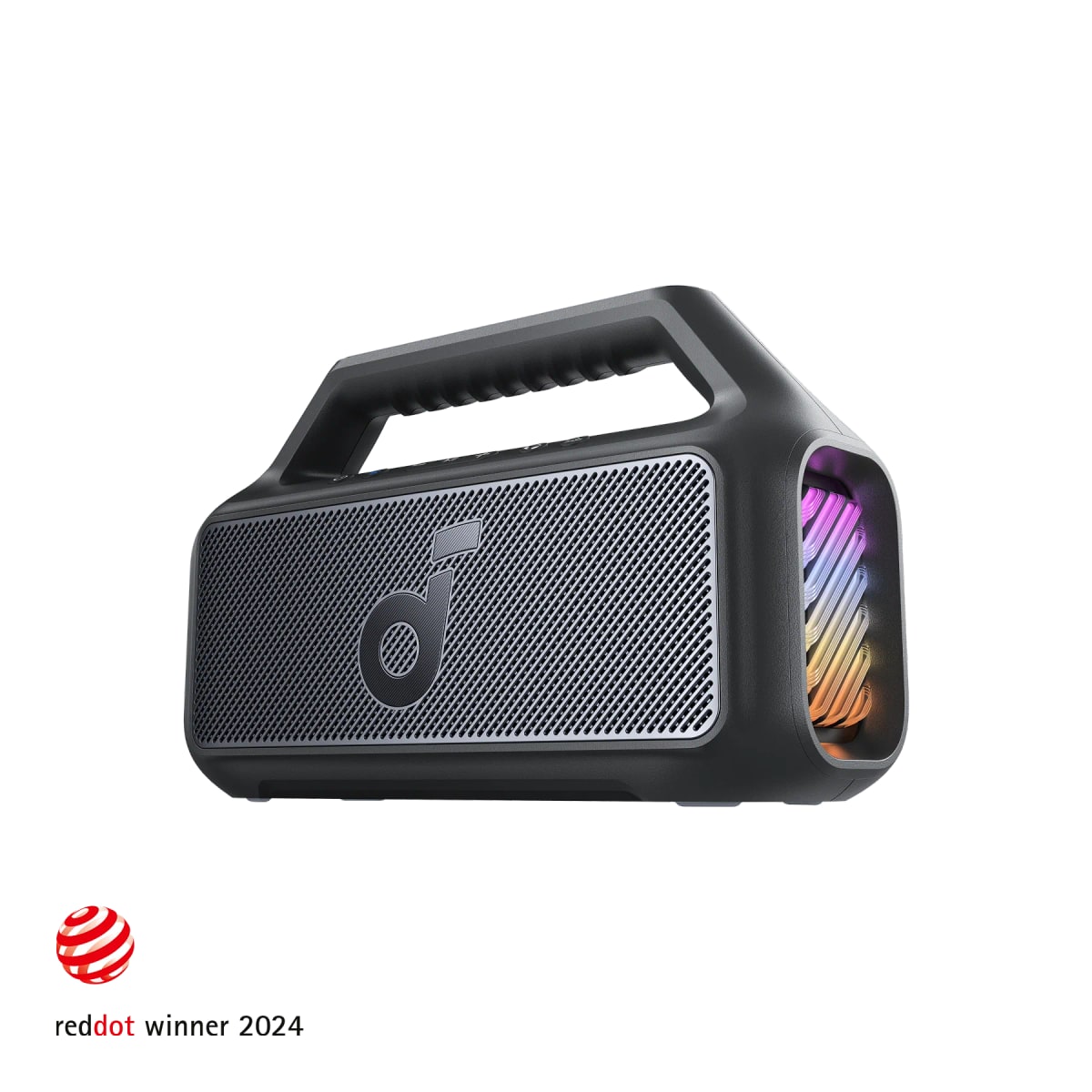
Anker
Buyers who prefer a handle-led routine and direct physical core controls.
A straightforward reported handle and physical controls, with rear-cap access and distinct USB roles to manage.
Reasons to choose it
- The review describes straightforward handle carrying.
- Physical power, playback, volume, and pairing controls are identified.
- Historical app light selections provide an additional control route.
Tradeoffs to know
- Rear connector access involves a cap.
- USB-C input and USB-A output are separate roles.
- The reports describe a source routine without a direct auxiliary input.
Think twice if: A direct auxiliary listening input is a required part of your source arrangement.
Published specifications
- Model
- Anker Soundcore Boom 2
- Review focus
- Carrying, physical control selection, and connection chores
Further reading
Ratings
Editorial score 8.4
Carry and placement9
The reviewer describes direct handle carrying; this remains a personal handling account.
Buttons and control selection9
Core physical controls are identified, with historical app choices for lights as a separate selection task.
Connection and charging-port chores7
A rear cap and distinct USB-C input and USB-A output add access and cable choices; direct auxiliary input is absent in these reports.
Sources & further reading
youtube.com review
youtube.com review
youtube.com review
youtube.com review
youtube.com review
Keep reading
Something changed? Help us keep this useful.
Send a correction →