
The recommendation
Consider the Max when its handle and separate auxiliary input address real tasks, after evaluating heft and the shortcut you intend to use.
Grades at a glance
| Product | Overall | Carry and placement | Buttons and control selection | Connection and charging-port chores |
|---|---|---|---|---|
| Bose SoundLink Max | 7.0 | 7.0 | 7.0 | 7.0 |
Does it fit your life?
Who should put the Max on a shortlist
The Bose SoundLink Max is worth examining if you want a defined carry handle and a separate auxiliary input for a wired source. Its ordinary-use story is straightforward but qualified. CNET's historical review describes grip on the handle alongside noticeable carrying heft, then distinguishes the USB-C charging connection from the auxiliary listening input. Those specific observations are more useful to a buyer than a broad claim that the speaker is easy to live with. CNET SoundLink Max review.
A control reservation comes from Danny Pops, who describes finding the Spotify shortcut behavior confusing and preferring the phone. That is one person's workflow, rather than evidence that everyone's shortcut will misbehave. If your preference is to choose content on a phone anyway, the reservation may matter less than it would to someone buying for direct shortcut use. Danny Pops SoundLink Max review.
The Max receives 7/10 overall for the three ordinary-use areas covered here. Consider it when the handle and dedicated wired-input arrangement match your habits. Read further if your priorities are prolonged carrying, one-cable simplicity, or a shortcut you expect to use without thinking about it.
Carrying involves both a grasp and a load
CNET describes the handle as grippy while emphasizing that the Max feels hefty, close to five pounds in the reviewer's account. These observations belong together. A clear place to put your hand can make an object more manageable without making its load disappear. The relevant decision is whether you want this particular combination for the distances and situations you have in mind. Handle and heft account.
Think through a typical trip from one room to another, and then the less convenient trip when you are also carrying other belongings. If the Max will mainly move between a shelf and a nearby table, the defined handle might be the feature you notice most. If you intend to carry it with several other items for a longer journey, the reported heft deserves more attention. Those are conditional buying scenarios, not assumptions about anyone's strength or comfort.
The 7/10 carrying and placement score reflects that balance. The routine is workable in the historical account, with a meaningful physical burden retained. Avoid interpreting the handle's favorable description as a universal comfort finding. Personal hand position, your usual journey, and whether you prefer carrying the speaker separately all remain questions for your own evaluation.
Decide where it belongs between moves
A handle-led design invites you to imagine moving the speaker, but its resting position deserves just as much attention. Use the Max's reported handle and separate connector roles as the starting point for a placement plan. Where will it sit most of the time? Will you want to connect a cable there? Can you approach the controls without lifting it? CNET physical and connector discussion.
For a regular desk position, leave enough room to see which cable you are connecting and to retrieve the speaker without rearranging the surrounding objects. For occasional use in another room, consider whether you want to carry a cable along or keep the whole routine at one location. The answer may be different for a speaker that rarely moves and one that changes rooms several times in a day.
Try to distinguish the benefit you want from the object you like looking at. A convenient handle is most valuable when you use it. A separate auxiliary input is most valuable when you have an actual source for it. If neither task is part of your routine, you may be assigning importance to features that do little practical work for you. The strongest purchase case is one you can describe in terms of repeated actions.
The shortcut deserves a personal trial
Danny Pops describes the shortcut changing Spotify selections in a way the reviewer found difficult to predict, then says the phone remained the preferred way to choose content. Keep the historical and personal context beside that observation. The account does not establish present app behavior or a general defect; it shows how one shortcut failed to simplify one person's selection routine. Historical shortcut experience.
If the shortcut is central to your interest in the Max, ask to see the exact function you intend to assign and use. Would it start the content you want, switch an input, or serve another purpose? Do you understand what will happen before pressing it? These are practical questions about predictability, and they are more useful than judging a shortcut solely by the number of functions associated with it.
If your phone is already the comfortable place to choose content, you may not need the shortcut to do much. That preference does not invalidate the reviewer's reservation; it changes its importance to you. The 7/10 control-selection score recognizes an available direct control while retaining a concrete account of confusion and a return to the phone. It rewards neither unused complexity nor an assumption that every person wants the same shortcut.
Separate choosing content from ordinary playback
Before evaluating controls, decide which tasks you want the speaker to handle directly. Starting a particular playlist and pausing what is already playing are different needs. Danny Pops' reservation concerns selecting content through a Spotify shortcut. It should not be expanded into a claim that all ordinary operations on the Max are confusing. Shortcut-specific reservation.
Imagine a shared room where one person chooses the content and another occasionally pauses it. The two users may want different things from the interface. If you are the person organizing the source, a phone-based routine may be perfectly acceptable. If you want anyone in the room to select a predefined action on the speaker, the shortcut needs closer investigation. The distinction helps avoid paying for a feature whose main purpose you have not settled.
During a demonstration, describe a short sequence in ordinary language rather than asking whether the interface is simple. “I want to choose this source and then use the speaker for basic operation” gives you something concrete to evaluate. If the proposed shortcut does not simplify that sequence for you, assess the Max on the routine you will actually use. There is no need to pretend an optional control is decisive when you would naturally reach for the phone.
The USB-C and auxiliary connections do different jobs
CNET explicitly distinguishes the Max's USB-C charging connection from its auxiliary listening input. In that historical review, plugging a source into USB-C was not the wired listening route; the reviewer identifies the auxiliary input for that task. This is a useful connector distinction because it prevents a familiar plug shape from being mistaken for a complete connection plan. CNET connector-role explanation.
If your intended source has a wired output, begin by identifying the whole path from that source to the speaker. Do you have the appropriate connection at the source end? Where would the cable run? Would you change between wired and wireless use frequently? The Max's separate input arrangement may suit someone who prefers a dedicated place for the wired source, while feeling less convenient to someone who wants a single shared connection.
The 7/10 connection and charging-port score reflects the need to choose the correct path and manage separate roles. It is not a judgment about the result of listening through either connection. Avoid assuming that a cable which fits the charging connector also performs the source task you have in mind. Resolve the practical connection before you rely on it, using your intended device arrangement where possible.
Planning a desk with a wired source
A desk buyer should treat cable management as part of the purchase. CNET's auxiliary-input description suggests a useful evaluation sequence: identify the wired source, trace the intended cable path, and decide how you will reach the input when changing arrangements. No current bundle assumption is needed to do that planning. Historical review accessories do not establish what an individual seller supplies today. Historical input description.
If the source will remain connected most of the time, a separate listening input may be easy to accommodate. If the speaker will frequently move away from the desk, consider whether unplugging and restoring that arrangement fits your habits. Neither is inherently the better routine. The buying question is whether the speaker's connector organization matches the way you want to move between those two uses.
It is also useful to decide who owns the setup task. In a shared space, will one person connect the wired source and leave it ready, or will several people bring different devices? A clear arrangement can be more valuable than extra options that nobody understands. Use the Max's reported input separation as the basis for that discussion. Ask for the actual connection you need to be demonstrated rather than assuming a general feature description covers it.
Alternatives if carrying is the deciding task
The Soundcore Boom 2 review is worth reading if a clear carry handle is the main reason you are considering the Max. The Breakdown With Luke describes straightforward handle carrying. That favorable personal account is useful for comparison, without promising identical comfort or load perception for another person. Boom 2 handle account.
The connector comparison is especially relevant: the Boom 2 reports describe a Bluetooth source routine without a direct auxiliary alternative, whereas CNET identifies the Max's separate auxiliary input. If you actually need a wired source, do not let a favorable handle account override that requirement. Boom 2 source-route discussion, Max auxiliary input.
For a different carrying arrangement, the JBL Charge 6 review considers a detachable handle usable in two forms. SoundGuys' account gives you a concrete mechanism to compare with the Max's grippy handle. Think about whether you want to change the arrangement or simply grasp and move the speaker. The answer depends on your journey and storage preferences rather than a universal hierarchy of handles. Charge 6 carry choices.
Max or Flex for the way you use a speaker
If you are also considering the Flex second generation, compare the task that would make you choose Bose in the first place. The Max offers the handle and separate auxiliary input described by CNET. The second-generation Flex has dedicated playback and configurable shortcut controls in its own reviews. These are useful differences to investigate; the Max reviews' references to the original Flex do not settle the newer Flex choice. Max handling and inputs, Flex second-generation controls.
A buyer with a wired player already on the desk should start with the required input. A buyer who mainly wants to pause without finding a phone should start with the physical controls. Someone carrying the speaker from one room to another should try the grasp and consider the load. Giving one of those needs priority makes the comparison useful instead of turning it into a list of overlapping features.
The shortcut deserves its own decision. Danny Pops' Max experience concerns a historical Spotify selection routine, while the second-generation Flex review describes configurable choices. Neither tells you how a particular function will behave with your present account and devices. If that function is why you want the speaker, ask to see it before buying. If it is incidental, choose on the input and handling tasks you already know you need. Max shortcut account.
When the Max makes a clearer choice
The Max becomes easier to judge when you already have a source that calls for its dedicated auxiliary input. In that situation, the input role is a concrete requirement and the handle is an additional preference to assess. If you have no wired source in mind, do not invent one merely to justify the purchase. Evaluate the carry and control routine you actually expect instead. CNET's historical connector explanation supports the first decision; the reviewer's reported grip and heft support the separate handling question. Keeping those decisions distinct prevents an unused connection from overshadowing a carrying task you will repeat. Max input and handling.
The final buying test
The Max's three category marks are 7/10 for carrying and placement, 7/10 for buttons and control selection, and 7/10 for connection and charging-port chores, producing 7/10 overall. This describes a workable ordinary routine with meaningful qualifications in each area. It is a reasonable option when the handle and separate wired input do jobs you actually need.
Before choosing, answer three questions. Are you comfortable with the reported carrying heft? Does the shortcut perform a task you value, or would you naturally use the phone? Have you identified the correct wired input for your source? A clear answer to these questions is more informative than a general impression of the product family.
Return to the full comparison guide for all seven choices. Read the Boom 2 review for another handle-led routine, the Charge 6 review for detachable carry options, or the Move 2 review if your main interest is a speaker that changes rooms within a home setup.
Bose SoundLink Max
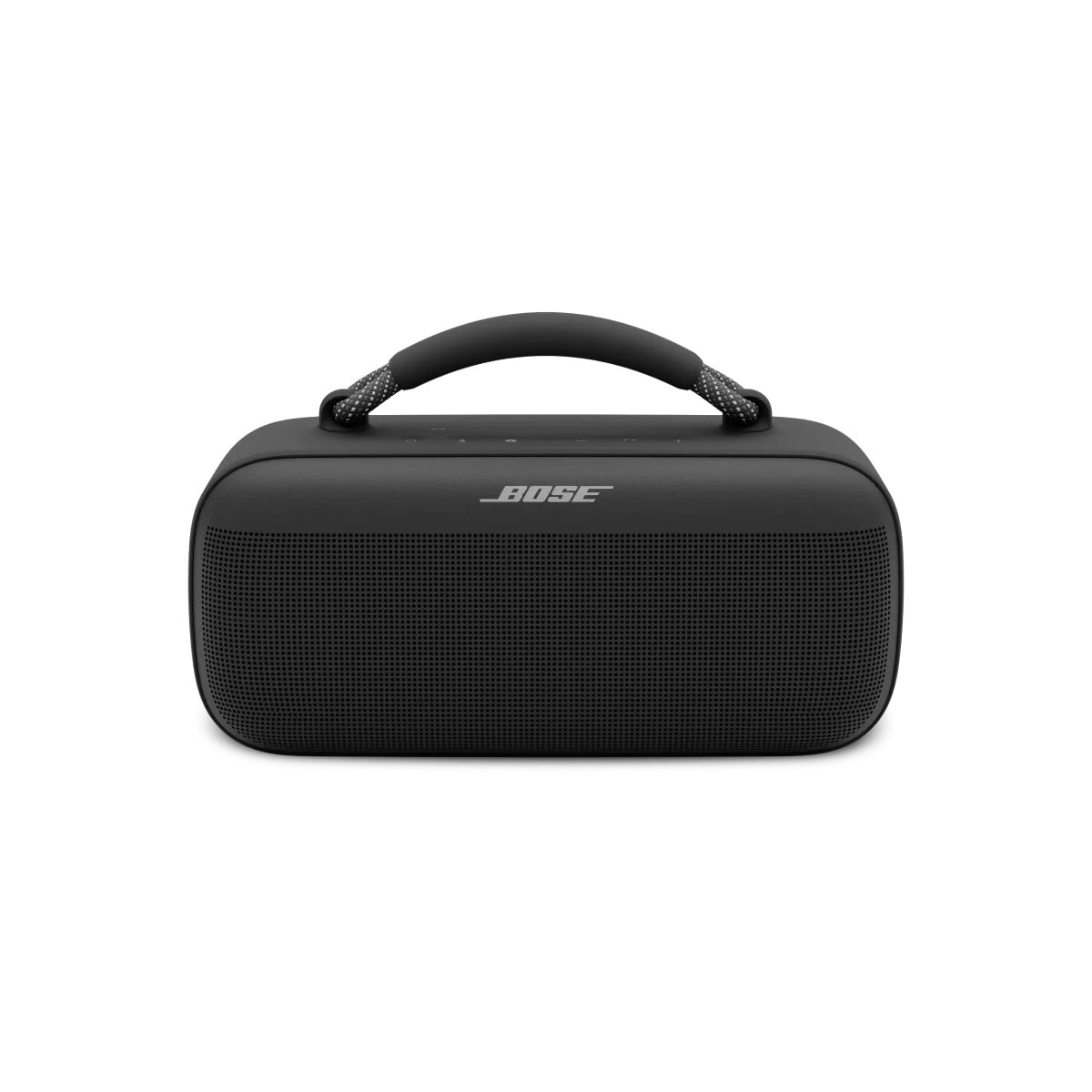
Bose
Buyers who want a defined handle and a separate auxiliary listening input.
A grippy carry handle and distinct auxiliary source input, with reported heft and one historical shortcut-selection reservation.
Reasons to choose it
- CNET describes grip on the handle.
- A separate auxiliary input defines the wired-source route.
- USB-C charging and auxiliary source roles are distinguished in the review.
Tradeoffs to know
- CNET describes noticeable carrying heft.
- One historical reviewer found Spotify shortcut selection confusing and preferred the phone.
- A wired source needs the auxiliary route described in the review.
Think twice if: You expect minimal carrying burden or depend on a shortcut whose exact selection behavior you have not evaluated.
Published specifications
- Model
- Bose SoundLink Max
- Review focus
- Carrying, physical control selection, and connection chores
Further reading
Ratings
Editorial score 7
Carry and placement7
Reported handle grip makes movement manageable, with meaningful carrying heft retained.
Buttons and control selection7
A historical reviewer found the Spotify shortcut confusing and preferred phone selection; this is a personal workflow.
Connection and charging-port chores7
CNET distinguishes USB-C charging from auxiliary listening input, requiring the appropriate source path.
Sources & further reading
youtube.com review
youtube.com review
youtube.com review
youtube.com review
youtube.com review
Keep reading
Something changed? Help us keep this useful.
Send a correction →