Reviewed in order: CalDigit TS4 Thunderbolt 4 Dock · OWC 11-Port Thunderbolt Dock · Anker 575 USB-C Docking Station 13-in-1 · Plugable USB-C Triple Display Docking Station (B08DDH5CPW) · Dell Universal Dock UD22 · UGREEN Revodok Pro 210 USB-C Docking Station 10-in-1 · Satechi Dual Dock Stand
Best USB-C Docking Stations in 2026: Thunderbolt, DisplayLink, and Budget Picks That Fit Your Laptop
Seven current docks ranked by the details that decide whether your monitors wake, your laptop charges, and your desk gets simpler instead of fussier.
We compared premium Thunderbolt docks, mainstream USB-C docks, DisplayLink options, a budget MST dock, and a MacBook stand dock so you can match the dock to your laptop before the return window turns into a troubleshooting plan.
00 · quick verdict
CalDigit TS4 is the safest overall pick for a serious Thunderbolt desk, OWC is the easier Thunderbolt alternative, and Anker is the mainstream USB-C choice. Plugable, Dell, UGREEN, and Satechi are worth considering only when their narrower jobs match your setup.
Current winner
CalDigit TS4 Thunderbolt 4 Dock
Start with the TS4 if you want the safest high-end dock and your laptop can actually use what it offers.
MSRP
—
Amazon
$379.99
at writing · 2026-05-15
01 · best picks
The short list worth starting with.
#1 · Best overall
CalDigit TS4 Thunderbolt 4 Dock
MSRP
—
Amazon
$379.99
at writing · 2026-05-15
Start with the TS4 if you want the safest high-end dock and your laptop can actually use what it offers.
#2 · Best Thunderbolt 4 alternative
OWC 11-Port Thunderbolt Dock
MSRP
—
Amazon
$229.99
at writing · 2026-05-15
Choose the OWC if the TS4 feels like too much dock but a no-name USB-C hub feels too risky.
#3 · Best mainstream USB-C dock
Anker 575 USB-C Docking Station 13-in-1
MSRP
—
Amazon
$199.99
at writing · 2026-05-15
Pick the Anker when you want a conventional USB-C command center and your monitor plan is already known to work with your laptop.
02 · Before You Buy
USB-C dock shopping looks simple until the monitor does not wake up, the laptop charges slowly, or the second screen only works on Windows. The product boxes all sound confident: 10-in-1, 13-in-1, Thunderbolt, USB4, DisplayLink, MST, 100 W. In daily use, those words decide whether your desk gets calmer or becomes a weekly cable-reset ritual.
This guide is here for the part the product page usually skips. We weighed the docks by host compatibility, monitor behavior, charging headroom, heat, driver upkeep, port layout, and whether the exact Amazon listing still appeared to offer a current new item. The expensive pick is not automatically right, and the cheap pick is not automatically foolish. Each dock has a job it can handle well, plus a job that will make you wish you had bought something else.
Use the product links to check current price, seller, condition, and delivery before you decide. If this saves you from the wrong dock, buying through those links also helps keep KB4UB running.
03 · score comparison
Compare the grades before you chase details.
| Grade | #1CalDigit TS4 Thunderbolt 4 Dock | #2OWC 11-Port Thunderbolt Dock | #3Anker 575 USB-C Docking Station 13-in-1 | #4Plugable USB-C Triple Display Docking Station (B08DDH5CPW) | #5Dell Universal Dock UD22 | #6UGREEN Revodok Pro 210 USB-C Docking Station 10-in-1 | #7Satechi Dual Dock Stand |
|---|---|---|---|---|---|---|---|
| Overall UX | 9/10 | 9/10 | 8/10 | 7/10 | 7/10 | 7/10 | 7/10 |
| Compatibility clarity | 9/10 | 9/10 | 8/10 | 7/10 | 8/10 | 7/10 | 6/10 |
| Display reliability | 9/10 | 9/10 | 7/10 | 7/10 | 7/10 | 7/10 | 6/10 |
| Power, heat, and stability | 9/10 | 9/10 | 8/10 | 7/10 | 8/10 | 7/10 | 6/10 |
| Ports and desk fit | 10/10 | 8/10 | 8/10 | 8/10 | 7/10 | 7/10 | 7/10 |
| Setup, software, and support | 9/10 | 9/10 | 8/10 | 7/10 | 7/10 | 7/10 | 7/10 |
| Build quality and durability | 9/10 | 9/10 | 8/10 | 7/10 | 7/10 | 7/10 | 7/10 |
| Use-case fit | 9/10 | 8/10 | 8/10 | 8/10 | 8/10 | 7/10 | 8/10 |
| Evidence confidence | 9/10 | 9/10 | 8/10 | 8/10 | 8/10 | 7/10 | 8/10 |
| MSRP | — | — | — | — | — | — | — |
05 · product-by-product breakdown
Why each pick landed where it did.
#1 · Best overall
CalDigit TS4 Thunderbolt 4 Dock
MSRP
—
Amazon
$379.99
at writing · 2026-05-15
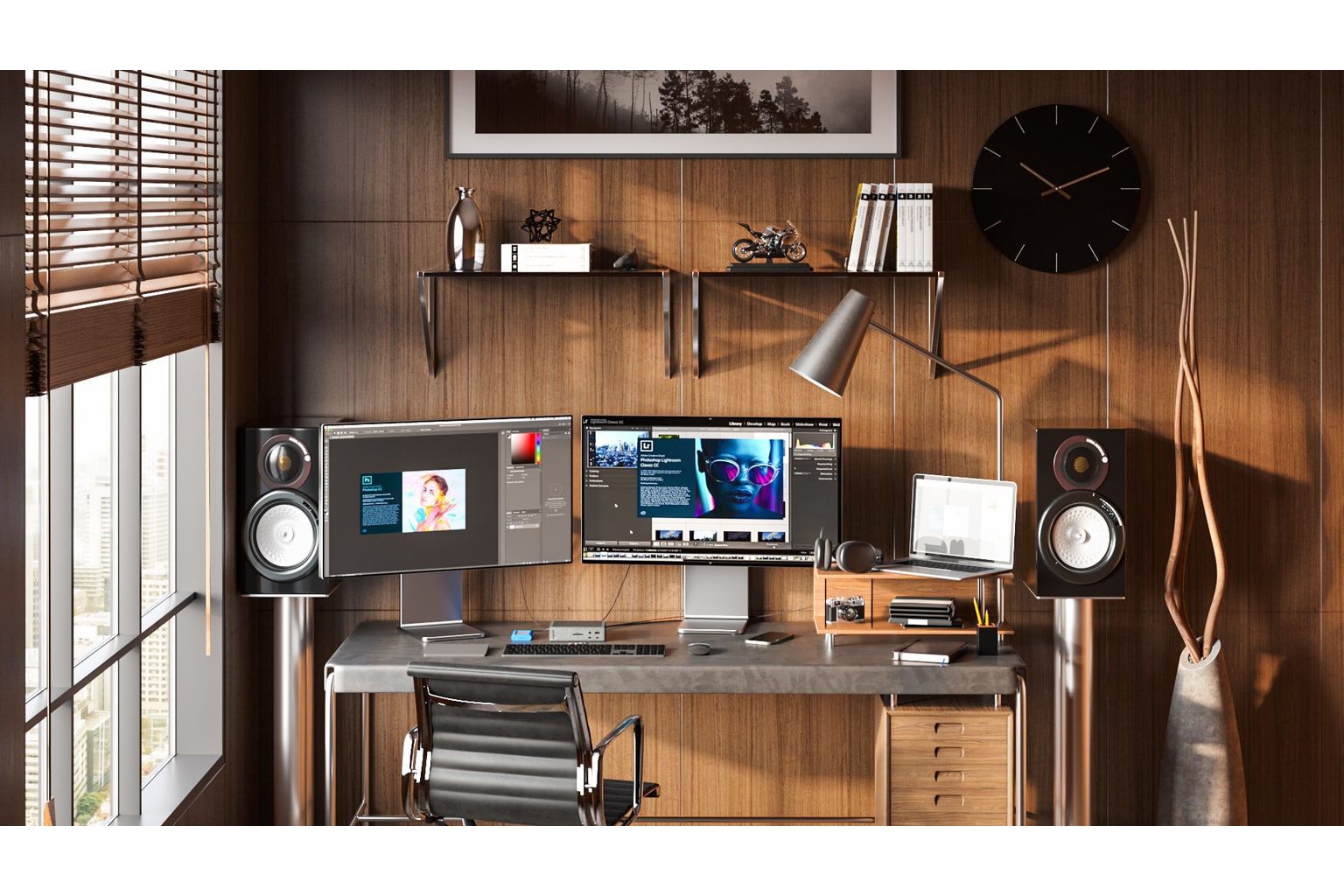
CalDigit has built its reputation around docks that Mac and Windows power users leave plugged in every day, and the TS4 is its big Thunderbolt 4 statement piece. It is meant to turn a laptop into a serious desk: lots of downstream Thunderbolt, 2.5GbE, card readers, audio, and nearly full-size laptop charging. It ranks first because the evidence keeps pointing to the same thing: if your computer actually has Thunderbolt or USB4 and you can stomach the price, it gives you the cleanest mix of ports, power, build, and everyday trust.
liked
People like that it feels like a real desk anchor rather than a travel hub with a power brick. The 18-port layout, 98 W charging, 2.5GbE, and front/back port split solve more edge cases than the cheaper docks, and review material repeatedly frames it as the grown-up replacement for the older TS3 Plus.
complaints
The catch is not subtle: it costs premium money and it only makes sense when the host computer can use Thunderbolt/USB4 properly. It also will not magically bypass Mac external-display limits, and the exact Amazon listing showed low stock when checked, so seller and condition need a last look before checkout.
best for
MacBook Pro, USB4, and Thunderbolt laptop desks that need reliable charging, fast peripherals, Ethernet, and card access without living in dongle chaos.
skip if
Skip it if your laptop only needs HDMI, a few USB-A ports, or bargain USB-C expansion; you would be paying for headroom you may never use.
Biggest issue
The main risks are price, host compatibility assumptions, and the need to confirm current new stock before buying.
Start with the TS4 if you want the safest high-end dock and your laptop can actually use what it offers.
#2 · Best Thunderbolt 4 alternative
OWC 11-Port Thunderbolt Dock
MSRP
—
Amazon
$229.99
at writing · 2026-05-15
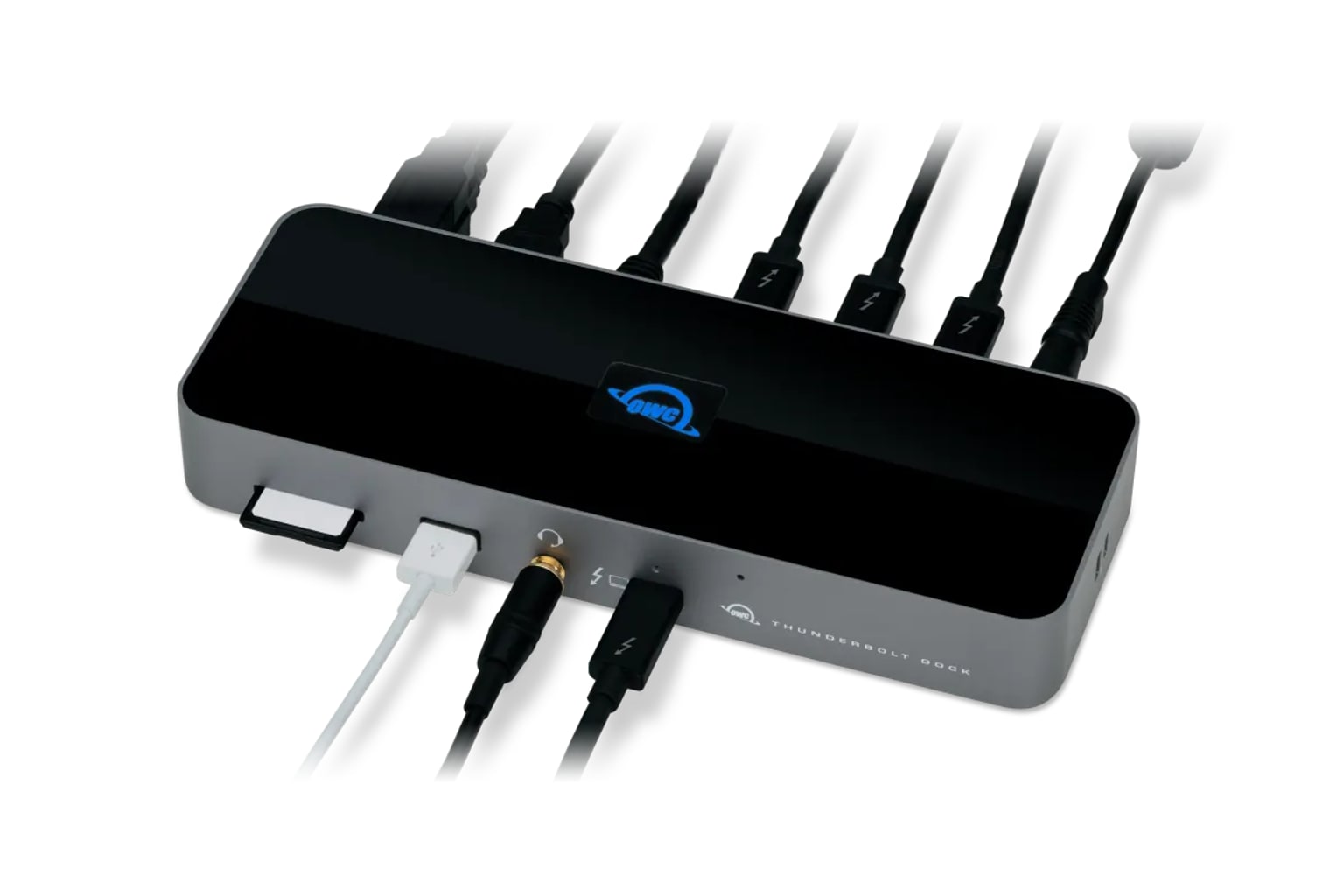
OWC/MacSales has long sold upgrades and accessories to Mac-heavy desks, and this 11-port Thunderbolt dock follows that lane: a calmer, slightly simpler Thunderbolt 4 hub for people who want capability without the TS4’s sprawl. It ranks second because it covers the core desk needs well — 96 W charging, downstream Thunderbolt, SD, Ethernet, and a clear Mac-friendly story — while asking fewer dollars than CalDigit in the captured listing.
liked
The best signs are about straightforward Thunderbolt expansion. The dock gives a laptop one cable, useful rear ports, a front SD slot, and power that fits many work notebooks. Across specs, reviews, and owner comments, the OWC story is unusually consistent: it is not the flashiest dock here, but it does the normal Thunderbolt desk job well.
complaints
It is not as loaded as the TS4: Ethernet is ordinary gigabit, the port count is lower, and the Amazon snapshot showed only one unit left. Buyers should also remember that Thunderbolt docks do not turn base Apple Silicon machines into unlimited external-monitor rigs.
best for
MacBook and Thunderbolt laptop owners who want a clean, capable home-office dock but do not need every premium TS4 port.
skip if
Skip it if 2.5GbE, the widest possible port menu, or bargain pricing matters more than Thunderbolt simplicity.
Biggest issue
The main risks are low-stock/current-seller checks and shoppers confusing it with older or different OWC dock names.
Choose the OWC if the TS4 feels like too much dock but a no-name USB-C hub feels too risky.
#3 · Best mainstream USB-C dock
Anker 575 USB-C Docking Station 13-in-1
MSRP
—
Amazon
$199.99
at writing · 2026-05-15
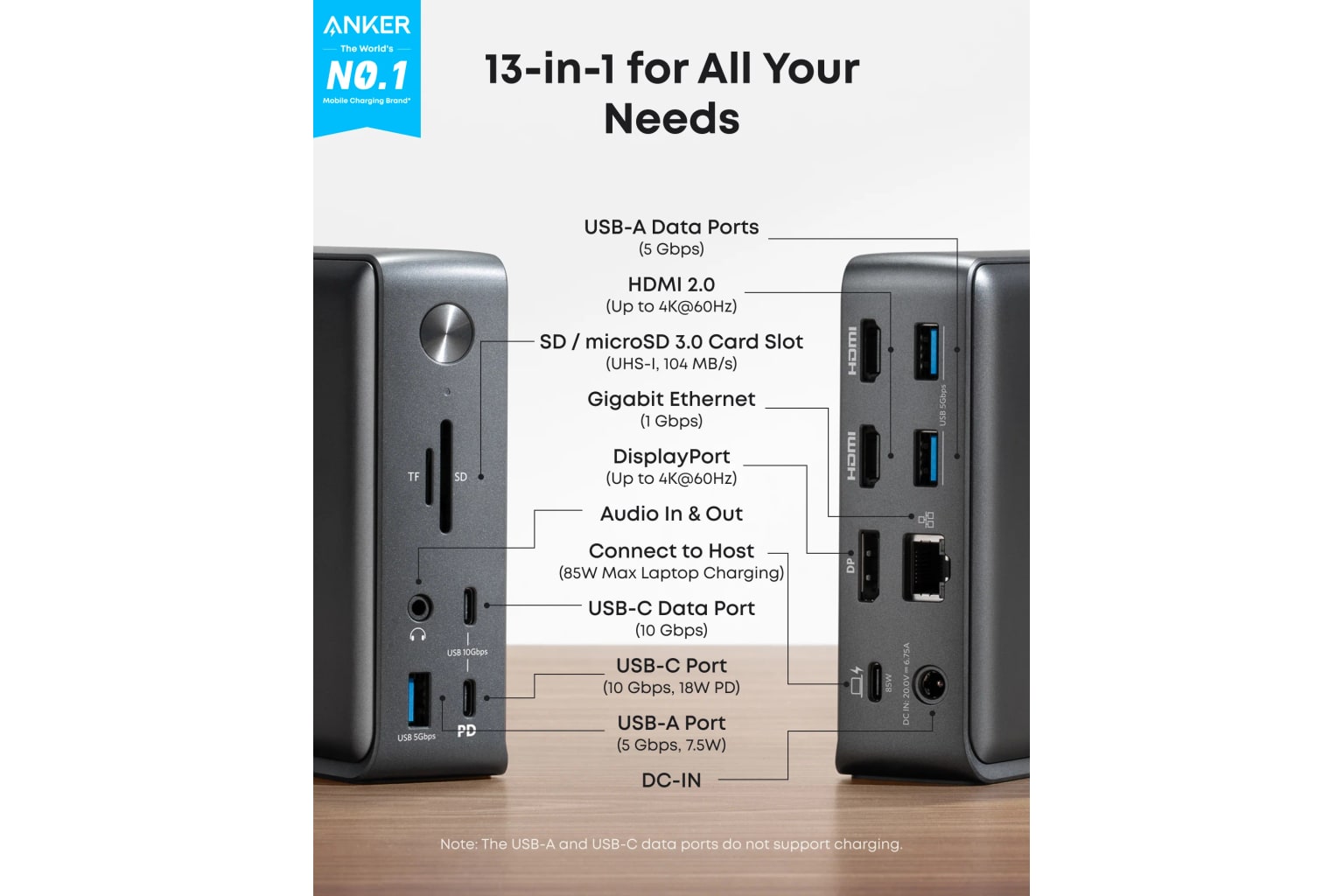
Anker is the familiar accessory brand in this lineup, and the 575 is its big 13-in-1 USB-C desk dock rather than a Thunderbolt flagship. It is built for mainstream laptop owners who want HDMI/DisplayPort, USB-A, Ethernet, card slots, audio, and charging from one box. It ranks third because that port mix is broadly useful, but the display story depends much more on the host computer than the packaging can make obvious.
liked
The appeal is simple: lots of ports, an included desktop-dock shape, 85 W laptop charging, and Anker’s recognizable support/warranty presence. For many Windows USB-C laptops, it is easier to recommend than a pile of little adapters.
complaints
The warning is display compatibility. USB-C Alt Mode and MST details matter, especially for Mac owners, and this is not a DisplayLink escape hatch or a Thunderbolt dock. If the laptop cannot drive the monitor mix you want, the dock cannot fix that after the fact.
best for
Mainstream Windows USB-C laptop desks that need a broad port spread and moderate charging without paying Thunderbolt prices.
skip if
Skip it for base-model Macs with multi-monitor hopes, high-refresh monitor plans, or setups that need Thunderbolt storage bandwidth.
Biggest issue
The repeated risk is shoppers assuming every USB-C port behaves alike; verify host display support before the return window closes.
Pick the Anker when you want a conventional USB-C command center and your monitor plan is already known to work with your laptop.
#4 · Best for triple HDMI desks
Plugable USB-C Triple Display Docking Station (B08DDH5CPW)
MSRP
—
Amazon
$159.95
at writing · 2026-05-15
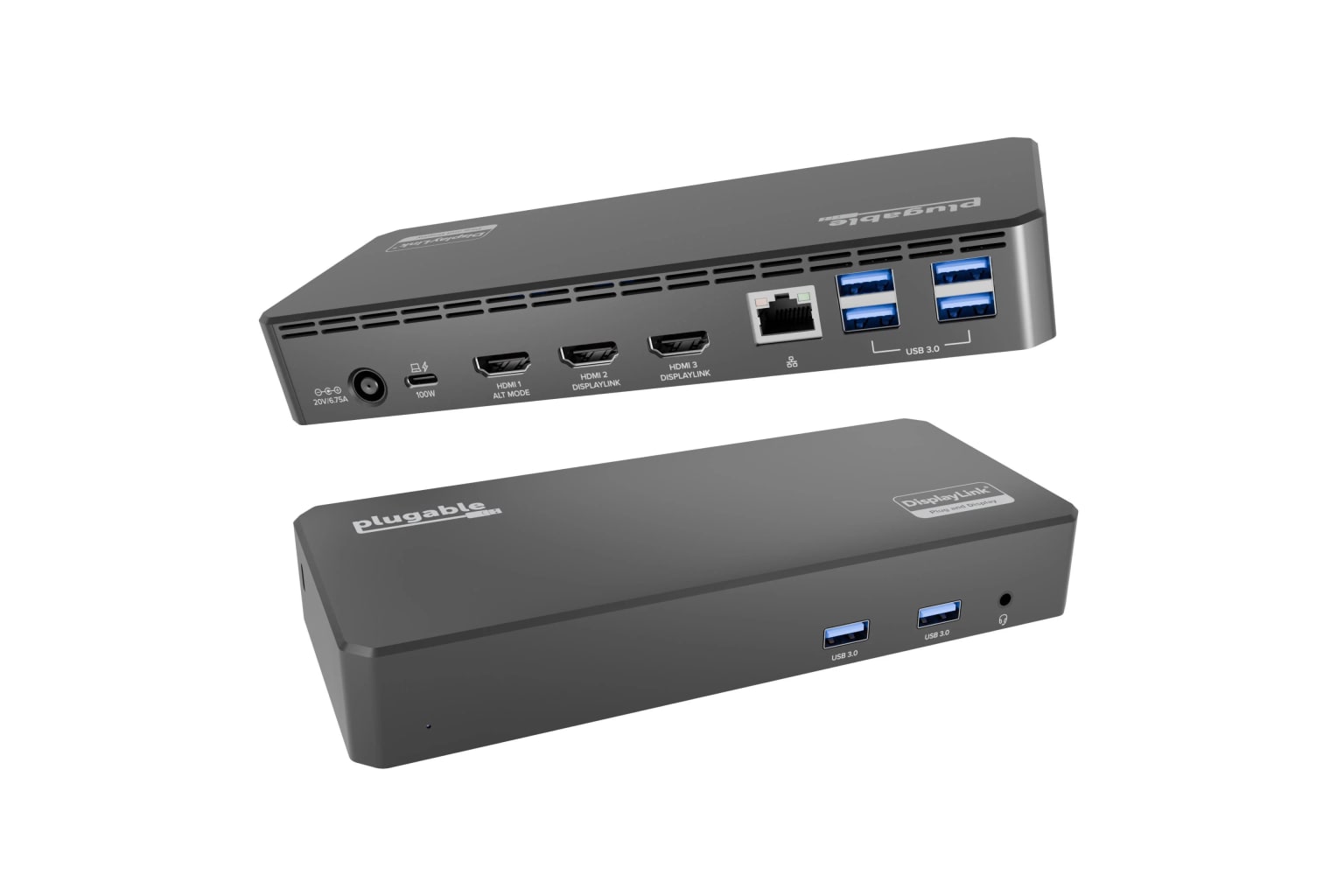
Plugable specializes in docks and adapters for people with awkward monitor requirements, and this B08DDH5CPW triple-display model is the DisplayLink-heavy option in the set. It promises three HDMI outputs and 100 W charging from a USB-C/USB4/Thunderbolt host. It ranks fourth because it solves a very real problem — more screens from laptops that otherwise say no — but the driver and resolution caveats need to be part of the purchase, not fine print you discover later.
liked
The strongest reason to consider it is the clear triple-HDMI lane: one 4K30 display plus two 1080p60 displays, with DisplayLink doing the lifting for two of them. That makes it more useful than a simple MST dock for some Apple Silicon and mixed-host desks.
complaints
The tradeoff is that DisplayLink is software, not magic. Driver installs, CPU/GPU overhead, HDCP limits, sleep/wake behavior, and corporate security settings can all matter. This exact ASIN also matters because an older Plugable option that looked similar did not have the same current new-listing signal.
best for
Spreadsheet-heavy, support-desk, or trading-style workstations that need three HDMI monitors more than gaming refresh rates or protected-video playback.
skip if
Skip it for gaming, DRM streaming on external displays, driver-locked corporate laptops, or anyone who wants a pure hardware Thunderbolt dock.
Biggest issue
The big risks are DisplayLink driver upkeep, lower display specs than Thunderbolt docks, and making sure you are buying this current ASIN rather than an unavailable older Plugable dock.
Choose the Plugable only when the triple-monitor problem is real enough to justify the DisplayLink baggage.
#5 · Best for mixed office fleets
Dell Universal Dock UD22
MSRP
—
Amazon
$171.89
at writing · 2026-05-15
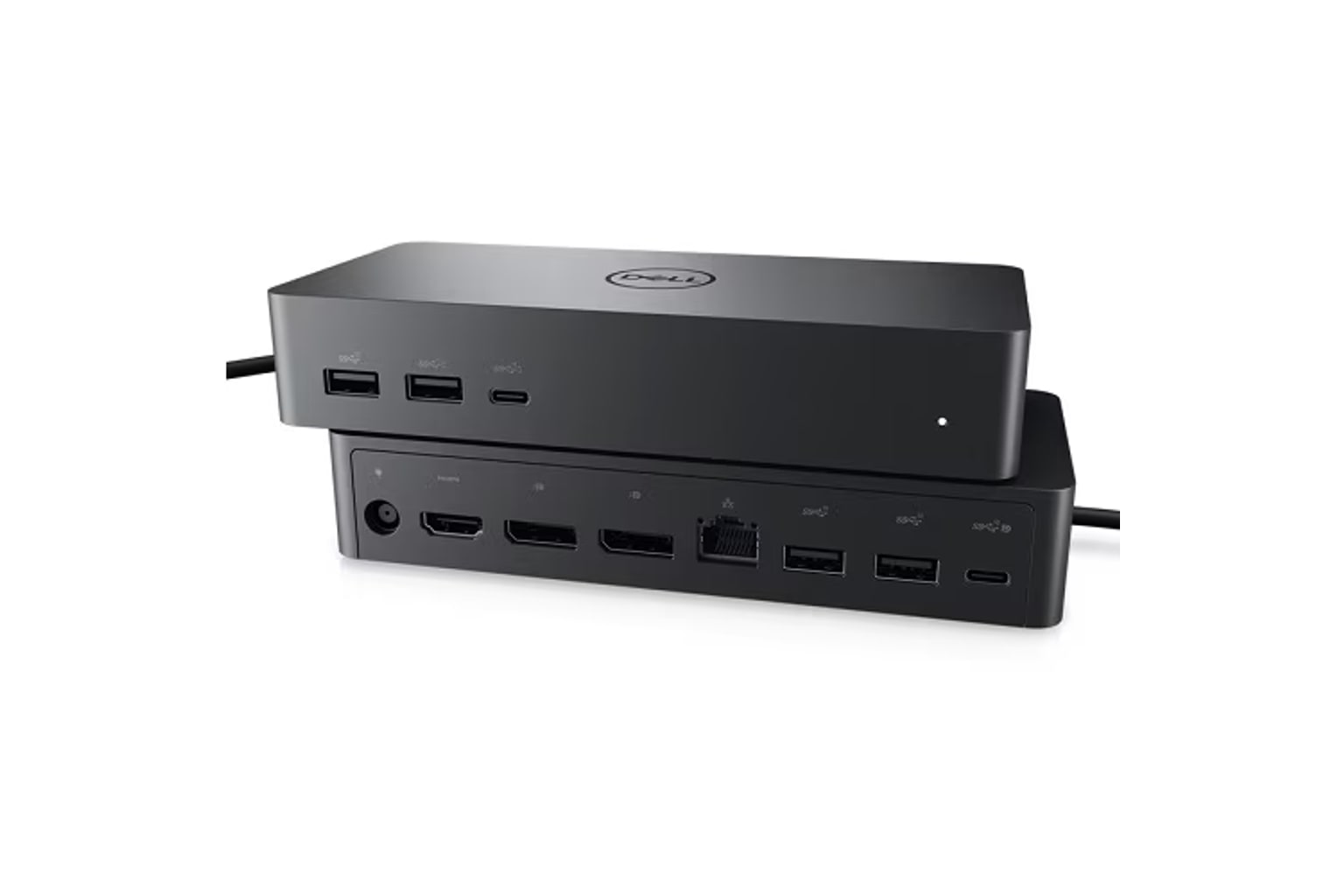
Dell’s UD22 is the enterprise-minded dock here: less glamorous than a creator dock, but built for mixed fleets where Windows, ChromeOS, and some Mac setups may all appear at the same desk. It uses a DisplayLink/universal-dock approach and claims up to four displays in the right configuration. It ranks fifth because that flexibility is useful, but it also means software, firmware, and IT support matter more than the product photo suggests.
liked
The best case for the UD22 is office practicality. It offers 96 W charging, common ports, Dell support channels, and a broad compatibility pitch that can make sense for hot desks or company-issued laptops.
complaints
The owner risk is the universal part. DisplayLink installs, sleep/wake reconnection, dock firmware, and non-Dell host behavior can become support chores. It also has a less exciting port mix than the premium Thunderbolt picks.
best for
Office desks, IT-managed fleets, and mixed-laptop environments where supportability beats creative-port luxury.
skip if
Skip it if you want the cleanest Mac creator dock, driver-free multi-monitor behavior, or a premium port layout for personal gear.
Biggest issue
The main risks are DisplayLink upkeep, exact seller checks, and confusing UD22 evidence with Dell WD-series Thunderbolt docks.
The UD22 is a sensible office tool, not the dock to buy for joy; get it when fleet compatibility is the job.
#6 · Best budget Windows desk pick
UGREEN Revodok Pro 210 USB-C Docking Station 10-in-1
MSRP
—
Amazon
$39.99
at writing · 2026-05-15
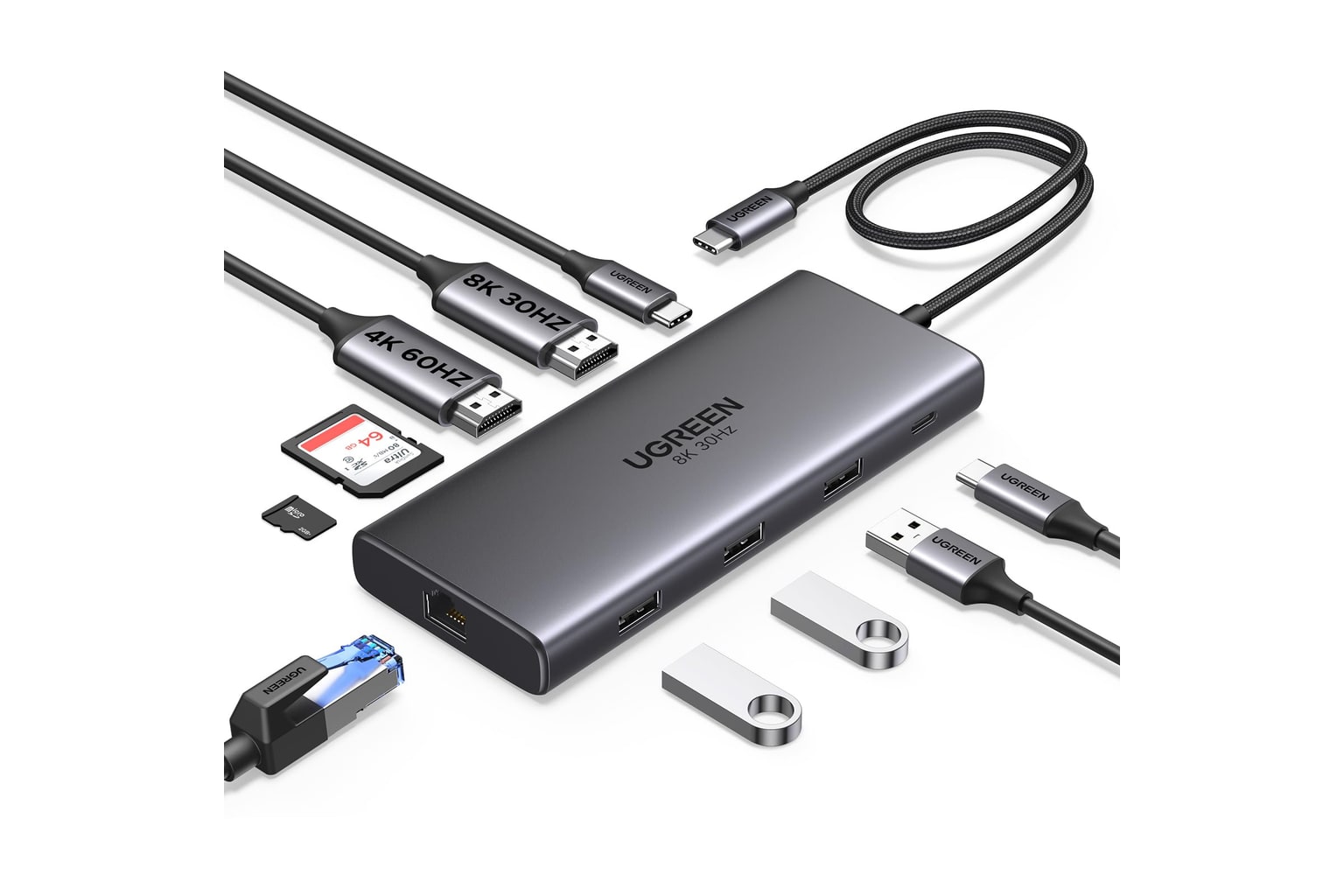
UGREEN’s Revodok Pro 210 is the price-disruptor in this list, a compact 10-in-1 USB-C dock that showed a very low current Amazon price when this guide was prepared. It is trying to give Windows laptop owners a lot of desk ports — HDMI, USB, Ethernet, card readers, and 100 W passthrough — for far less than Thunderbolt money. It ranks sixth because that can be a great bargain, but only when the buyer understands USB-C Alt Mode and MST limits before buying.
liked
The obvious win is cost. At the captured $39.99 new-item price, it can make sense for a spare desk, student setup, or simple Windows workstation that needs ordinary ports more than premium bandwidth.
complaints
The danger is expecting premium-dock behavior from a budget USB-C/MST device. Mac multi-monitor limits, host USB-C capabilities, passthrough charger requirements, heat, and cable sensitivity are where cheap docks can turn from clever to annoying.
best for
Budget Windows desks with known display requirements and a buyer who can test everything during the return window.
skip if
Skip it for mission-critical charging, Mac multi-monitor setups, Thunderbolt storage, or anyone who cannot tolerate troubleshooting.
Biggest issue
The main risks are host compatibility, bargain-dock durability, and confusion with the Revodok Pro 211 listing, which did not show a current new item during the availability check.
Buy the UGREEN for a controlled budget setup, not as a blind replacement for a premium dock.
#7 · Best MacBook stand dock
Satechi Dual Dock Stand
MSRP
—
Amazon
$169.99
at writing · 2026-05-15
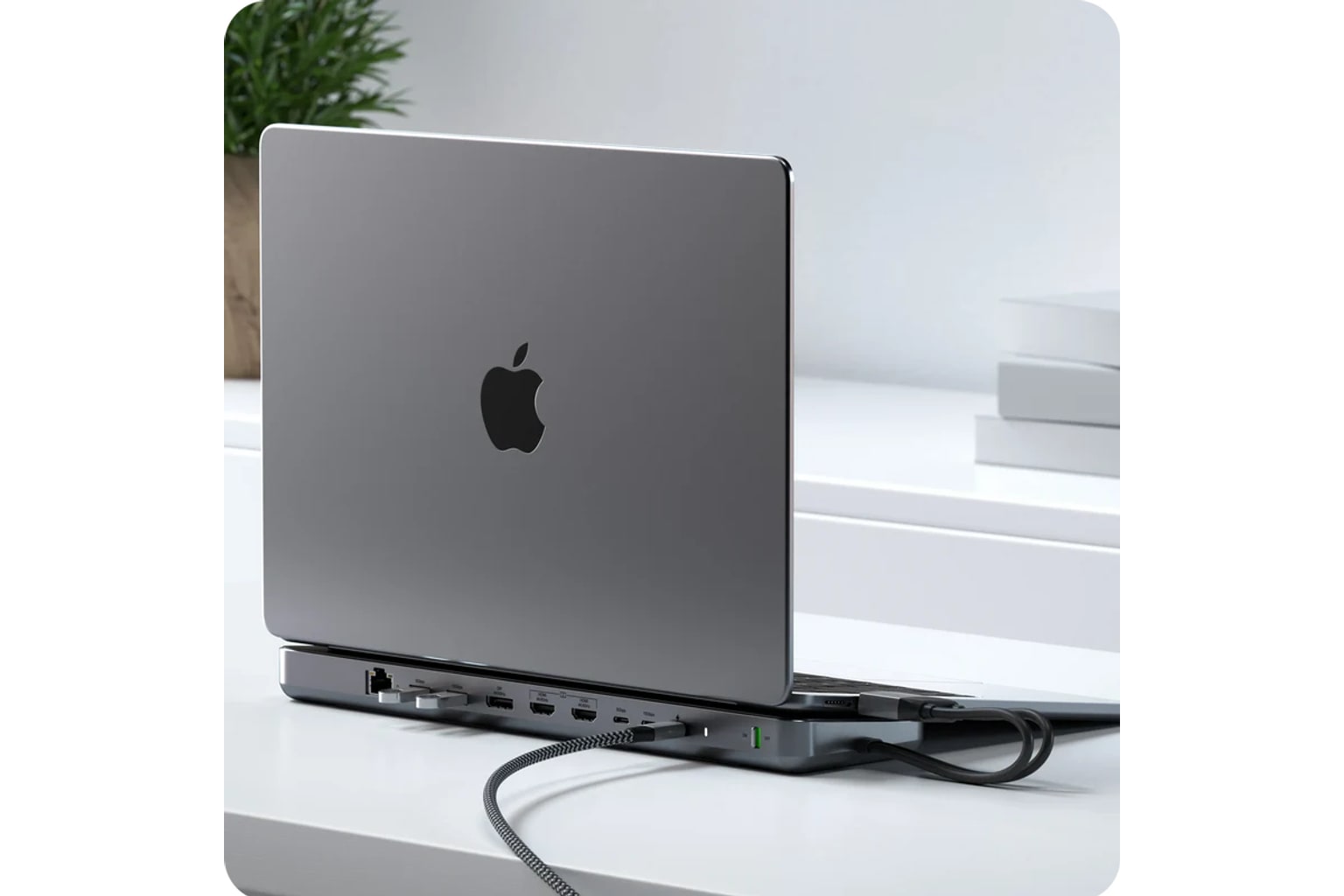
Satechi’s Dual Dock Stand is the oddball: part dock, part laptop riser, part NVMe enclosure. It is aimed at MacBook-style desks where the laptop sits above the dock and the ports hide underneath. It ranks seventh because the design is genuinely neat for the right person, but it is not a general-purpose docking-station answer and the display lane is much narrower than the others.
liked
The appeal is desk shape. The stand can clean up a MacBook workspace, add useful ports, and turn an internal SSD slot into local expansion without another little box on the table. It is more interesting than a basic hub if the laptop is meant to live on top of it.
complaints
The drawback is the same as the charm: it is highly specific. MacBook fit, no real laptop charging role, limited display expectations, SSD heat/compatibility questions, and ergonomic preference all matter. If you just need displays and power, this is the wrong lane.
best for
MacBook owners who want a low stand, hidden dock, card/Ethernet ports, and a built-in NVMe enclosure for desk storage.
skip if
Skip it for Windows-first fleet desks, high-power charging, broad monitor support, or anyone who does not want the laptop parked on the dock.
Biggest issue
The main risks are fit, storage heat, and assuming a clever stand dock can replace a powered Thunderbolt or DisplayLink station.
Choose the Satechi only when the stand-and-storage idea is the reason you are shopping.
05 · How This Review Works
We compared seven current docking-station picks across the lanes people actually shop: premium Thunderbolt, simpler Thunderbolt, mainstream USB-C, value USB-C/MST, enterprise DisplayLink, triple-HDMI DisplayLink, and a MacBook stand dock with storage. Each product here matched a current new Amazon listing during our availability check; two otherwise plausible models were left out when that could not be confirmed.
The score does not include a separate value grade. Price appears in the cards and feature table as buying context, while the scoring focuses on compatibility clarity, display reliability, power and heat, desk fit, setup/support, build quality, use-case fit, and how much confidence the available evidence allows. That matters because a $40 UGREEN dock and a premium CalDigit TS4 are not trying to solve the same desk.
Read the lane label before the rank. DisplayLink can help with screens a laptop cannot natively drive, but it brings software and protected-video limits. Thunderbolt docks are cleaner for the right host, but they do not erase Apple Silicon display limits. Budget USB-C docks can be excellent in the right Windows setup and maddening in the wrong one.
06 · Best Fit for You
Choose CalDigit TS4 if you want the safest high-end dock for a Thunderbolt/USB4 desk and you will use the extra ports. Choose OWC 11-Port Thunderbolt Dock if you want the same general Thunderbolt comfort with a simpler layout and a lower captured price.
Choose Anker 575 if you have a mainstream Windows USB-C laptop and want lots of normal ports without paying for Thunderbolt. Choose UGREEN Revodok Pro 210 only when price matters most and you can verify your laptop's USB-C display behavior during the return window.
Choose Plugable B08DDH5CPW when three HDMI monitors are the problem you actually need solved and you accept DisplayLink. Choose Dell UD22 for office/fleet compatibility where Dell support and universal-dock behavior matter more than premium ports. Choose Satechi Dual Dock Stand only if the MacBook stand, hidden ports, and NVMe enclosure are the whole appeal.
07 · What to Do Next
Before checkout, verify the exact ASIN/model, seller, condition, return window, and whether the listing is still new. Some exact listings were already showing low stock when this guide was prepared, and docking-station names are easy to mix up across older revisions, replacement models, and regional pages.
Then test the dock like you are trying to break the setup while returns are still easy. Plug in every monitor, wake from sleep, close and open the laptop, charge under load, copy files through the fastest port, test Ethernet, run a video call, and see whether the desk stays stable for a full workday. DisplayLink buyers should install the current driver first and confirm any company-managed laptop allows it.
If something fails, do not assume a more expensive cable or another adapter will fix it. The host computer, dock standard, monitor resolution, refresh rate, and operating system are all part of the same purchase.
Feedback loop
Tell us what this page missed.
These pages get better when real buyer complaints make it back into the scoring model. If something important is underweighted, say it.
Rate this review
Give it a score from 1-10 and tell us what to improve.
0/4000 characters