UGREEN Revodok Pro 210 Review: A $40 Dock With a Compatibility Trap
The Revodok Pro 210 is the budget pick in our USB-C dock ranking: useful for a controlled Windows USB-C/MST desk, risky if you assume every USB-C laptop can drive its display claims.
The Revodok Pro 210 is the budget pick in our USB-C dock ranking: useful for a controlled Windows USB-C/MST desk, risky if you assume every USB-C laptop can drive its display claims.
MSRP
—
Amazon
$39.99
at writing · 2026-05-15
Buyer fit
Buy the UGREEN for a controlled budget setup, not as a blind replacement for a premium dock.
MSRP
—
Amazon
$39.99
at writing · 2026-05-15
Score breakdown
How this product scored
Same rubric, but focused on one product so the reasons behind the score stay readable.
Compatibility clarity
Host requirements define the buying decision; verify USB-C DP Alt Mode and MST before trusting dual-display claims.
Display reliability
Monitor promises are realistic only for the intended host, OS, resolution, and refresh combination.
Power, heat, and stability
100W PD class is useful, but budget dock heat and reconnect behavior should be tested under load.
Ports and desk fit
The 10-port mix covers common desk needs well for the price.
Setup, software, and support
No DisplayLink driver is required, but host display behavior, cables, and monitor settings still create setup risk.
Build quality and durability
Appropriate for the budget lane, with less long-term evidence than premium alternatives.
Use-case fit
Strongest when bought as a controlled budget Windows USB-C/MST dock.
Evidence confidence
Exact ASIN, listing, new Amazon signal, and hands-on sources are present; owner/community depth is limited.
Quick verdict
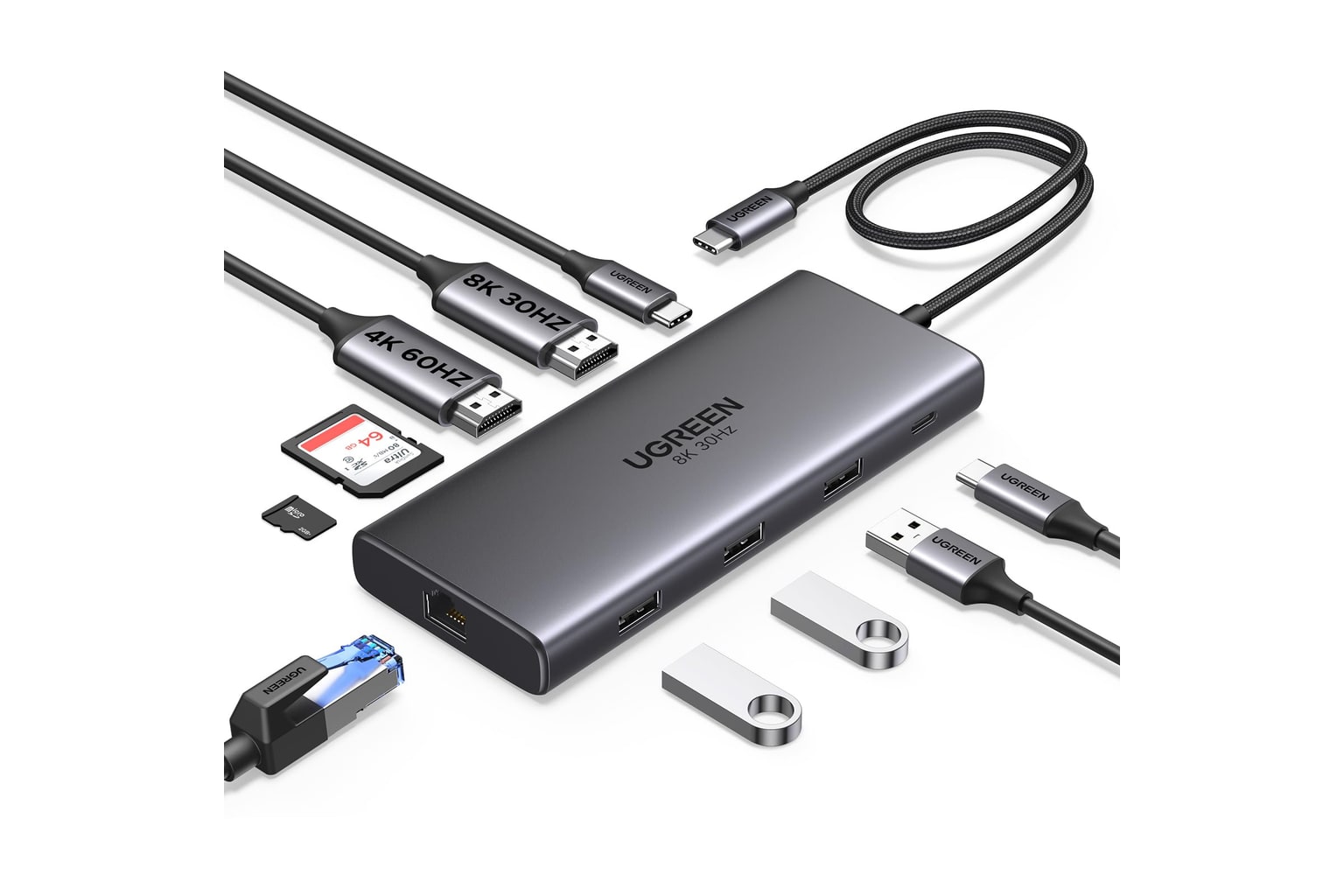
The UGREEN Revodok Pro 210 is the dock I would consider when the budget is tight, the desk is modest, and the host laptop is already known to support the display path you need. UGREEN is a familiar accessory brand, and this 10-in-1 Revodok is trying to be the cheap, useful desk box that adds HDMI, Ethernet, card readers, everyday USB, and 100W-class power pass-through without turning into a premium Thunderbolt purchase.
That does not make it a bad buy. It makes it a narrow buy. The Amazon listing frames this exact ASIN as a "10 in 1 Revodok Pro 210 USB C Dock" with "Dual HDMI 4K@60Hz Single 8K@30Hz," "100W PD," Gigabit Ethernet, and SD/TF card readers. That is a strong port story for roughly a $40 snapshot, but the important phrase is not the headline resolution claim. It is the host requirement: USB-C DisplayPort Alt Mode / MST behavior.
In our full USB-C docking-station ranking, it lands sixth with a 6.8 overall score because it gives the right Windows desk a lot for the money, while asking the buyer to verify more than the safer Thunderbolt and mainstream USB-C picks. If you are buying for a Mac, a mystery work laptop, or a dual-monitor setup where failure would ruin your week, start with the full guide before you buy: see the full comparison. Use the product links to recheck current price, seller, condition, and availability; those details matter a lot at this end of the dock market.
Score breakdown
The Revodok Pro 210 scores 6.8 overall. Its best marks are for clear budget value and port/desk usefulness because the job is simple: give a known-compatible USB-C/MST laptop a fuller desk without premium-dock pricing. Its weakest areas are compatibility clarity and display reliability, not because the listing lacks specs, but because a low-cost dual-HDMI USB-C dock is only as reliable as the laptop, OS, cable, monitor combination, and MST support behind it.
| Metric | Score | What it means in daily use |
|---|---|---|
| Compatibility clarity | 6.7 | You need to verify USB-C DisplayPort Alt Mode and MST behavior before trusting the monitor claims. |
| Display reliability | 6.6 | Dual-HDMI value is real only on the right host; base macOS display limits likely apply. |
| Power, heat, and stability | 7.0 | 100W PD class is useful, but budget docks should still be tested under charge-plus-monitor load. |
| Ports and desk fit | 7.1 | HDMI, GbE, SD/microSD, USB-A, and USB-C cover a lot of normal desk needs for the money. |
| Setup, software, and support | 6.7 | No DisplayLink driver is required, which is nice, but host behavior and cable matching still matter. |
| Build quality and durability | 6.6 | Good enough for the lane, with less long-term confidence than the premium dock picks. |
| Use-case fit | 7.2 | Best as the budget Windows desk option, not as a universal dock for everyone. |
| Evidence confidence | 7.0 | Exact ASIN, listing, new Amazon signal, and hands-on sources are present; owner/community depth is limited. |
What feels great
The immediate appeal is simple: you get the ports most people meant when they said they wanted a dock. The exact product listing name calls out dual HDMI, 100W PD, USB-C and USB-A data ports, Gigabit Ethernet, and SD/TF readers. For a laptop that only has a couple of USB-C ports, that is the difference between a clean desk and a chain of dongles.
A hands-on video for the Revodok Pro 10-in-1 demonstrates the best-case version of the experience: "if you want to run dual monitors off your laptop like I'm doing," the reviewer says, pointing to the two HDMI ports while also showing a mouse, keyboard, microphone, external drive, Ethernet, and card readers attached. That quote matters because it captures the reason this dock exists. It is not trying to be a premium Thunderbolt hub. It is trying to make a basic desk feel complete through one cable.
The other pleasant part is that this is not a DisplayLink dock. There is no DisplayLink driver to install just to get started. For the right Windows USB-C/MST laptop, that can make setup feel more straightforward than a driver-based multi-display dock. Ethernet and card readers also make the Revodok Pro 210 more useful than tiny travel hubs that only solve HDMI and one USB port.
What gets annoying
The same thing that makes the Revodok Pro 210 cheap and simple also makes it easy to buy for the wrong laptop. Its display path depends on the host. A USB-C port that charges your laptop is not automatically a USB-C port that will run the monitor setup you want. With MST involved, Windows and many PC laptops are the more natural target; base macOS external-display limits likely apply, especially for buyers expecting two independent external displays from a plain USB-C dock.
The sources also argue for restraint. We found exact-ASIN Amazon listing evidence, a new Amazon listing signal, and hands-on/transcript material, but not a deep pile of long-term owner reports for this exact Pro 210 ASIN. That means the review should not pretend there is broad proof of years-long stability. Treat the return window as part of the setup plan.
The practical annoyances to test are wake behavior after sleep, lid-close/lid-open display recovery, heat while charging and driving monitors, Ethernet stability, and whether the included/attached host cable reaches your desk cleanly. The listing surfaced "FREE 30-day refund/replacement" language in the captured Amazon text, which is helpful only if you actually test the dock hard before that window closes.
Compatibility and displays
This is the section to read before you click buy. The Revodok Pro 210 is best understood as a USB-C DP Alt Mode / MST dock. It is not the same kind of product as a Thunderbolt 4 dock, and it is not the same kind of product as a DisplayLink dock. That distinction decides whether its dual-HDMI promise feels convenient or disappointing.
The listing language is ambitious: dual HDMI class support, 4K60 claims, and a single-display 8K30 claim. Those numbers are not a guarantee that your exact laptop will run your exact monitors the way you imagine. You need to verify the laptop's USB-C display output, MST behavior, OS support, monitor resolution/refresh targets, and charger requirements. If your workplace locks down display settings or you move between machines, a Dell UD22 or Plugable DisplayLink model may be a better fit. If you have Thunderbolt/USB4 and want the cleanest premium desk, CalDigit TS4 or OWC are safer.
For Mac buyers, be especially careful. The parent guide keeps the caveat blunt: base macOS external-display/MST limits likely apply. If your goal is a dependable dual-monitor Mac setup, do not assume this dock solves Apple Silicon external-display limits just because the listing has two HDMI ports.
How it compares
Compared with the CalDigit TS4 and OWC 11-Port Thunderbolt Dock, the UGREEN is dramatically cheaper and much less reassuring. The premium Thunderbolt docks cost more because they are built around a different host standard and a more predictable desk experience for the right laptop.
Compared with the Anker 575, the UGREEN is the sharper budget play. Anker is the mainstream USB-C choice in the parent ranking because it feels like the safer everyday buy for many Windows desks. UGREEN is the one to consider when the price gap matters and you are willing to verify every display and power detail yourself.
Compared with Plugable's triple-display dock and Dell's UD22, the Revodok Pro 210 avoids DisplayLink software, but it also cannot use DisplayLink to work around as many host display limits. Plugable and Dell make more sense when the display problem is the whole purchase. UGREEN makes more sense when you want a cheap port expander for a known-compatible setup.
That is why the full ranking calls it the value USB-C/MST lane rather than a universal recommendation: read the best USB-C docking-stations guide if you are still comparing host standards.
Who should buy it, and who should skip it
Buy the UGREEN Revodok Pro 210 if you have a compatible Windows USB-C laptop, you want dual HDMI plus Ethernet and card readers on a tight budget, and you are comfortable testing the whole desk immediately. It is also a sensible choice for a secondary desk, a student setup, or a simple office station where the laptop model is known and the monitor targets are modest.
Skip it if you need a dock that behaves predictably across unknown laptops, if your Mac display needs are non-negotiable, if you cannot tolerate wake/reconnect troubleshooting, or if your workday depends on a dual-monitor setup being perfect on day one. Also skip it if you are looking at another UGREEN Revodok variant and assuming the same evidence applies. The Pro 210, Pro 211, Pro 209/DisplayLink, Pro 314/Thunderbolt, 7-in-1, 8-in-1, and 12-in-1 models should not be blended together when you are checking specs or complaints.
The safest buying move is to confirm ASIN B0BXDQS4BD, new condition, seller, return window, and price before checkout. Then test monitors, charging, Ethernet, SD/microSD, sleep/wake, lid behavior, and a long video-call-style workload while returns are still easy.
Tell us what this page missed
These pages get better when real buyer complaints make it back into the scoring model. If something important is underweighted, say it.
Rate this review
Give it a score from 1-10 and tell us what to improve.
0/4000 characters