Satechi Dual Dock Stand Review (2026): A Tidy MacBook Dock With Very Specific Fit Rules
A tidy MacBook stand, USB-C dock, and NVMe enclosure in one low wedge — excellent if that exact desk idea fits, easy to regret if you need a universal dock.
Satechi Dual Dock Stand finished seventh in our USB-C docking-station ranking because its stand-and-storage design is genuinely useful for the right MacBook desk, but its physical fit, display limits, and passthrough-power setup make it a niche pick.
MSRP
—
Amazon
$169.99
at writing · 2026-05-15
Buyer fit
Choose the Satechi only when the stand-and-storage idea is the reason you are shopping.
MSRP
—
Amazon
$169.99
at writing · 2026-05-15
Score breakdown
How this product scored
Same rubric, but focused on one product so the reasons behind the score stay readable.
Compatibility clarity
Satechi Dual Dock Stand scores this way because its host requirements define the whole buying decision, from Thunderbolt-only strengths to DisplayLink/MST caveats that must be checked before purchase.
Display reliability
Satechi Dual Dock Stand is graded on whether its monitor promise is realistic for the intended host: Thunderbolt dual-display behavior, USB-C/MST limits, or DisplayLink's driver-based multi-screen path.
Power, heat, and stability
Satechi Dual Dock Stand gets credit for its tidy stand shape and passthrough charging setup, with penalties where host fit, heat, and display limits add risk.
Ports and desk fit
Satechi Dual Dock Stand is judged by how well its port layout actually cleans up a desk instead of just adding a long list of connectors.
Setup, software, and support
Satechi Dual Dock Stand loses ground when setup depends on DisplayLink drivers, firmware utilities, host settings, or careful cable/display matching.
Build quality and durability
Satechi Dual Dock Stand reflects the available build, brand, and owner-signal confidence for a dock expected to stay plugged in for years.
Use-case fit
Satechi Dual Dock Stand scores higher when it has a clear buyer lane and lower when it is easy to buy for the wrong job.
Evidence confidence
Satechi Dual Dock Stand has exact-listing evidence and several product-matched transcripts, though limited long-term owner coverage keeps confidence below the top picks.
Quick Verdict
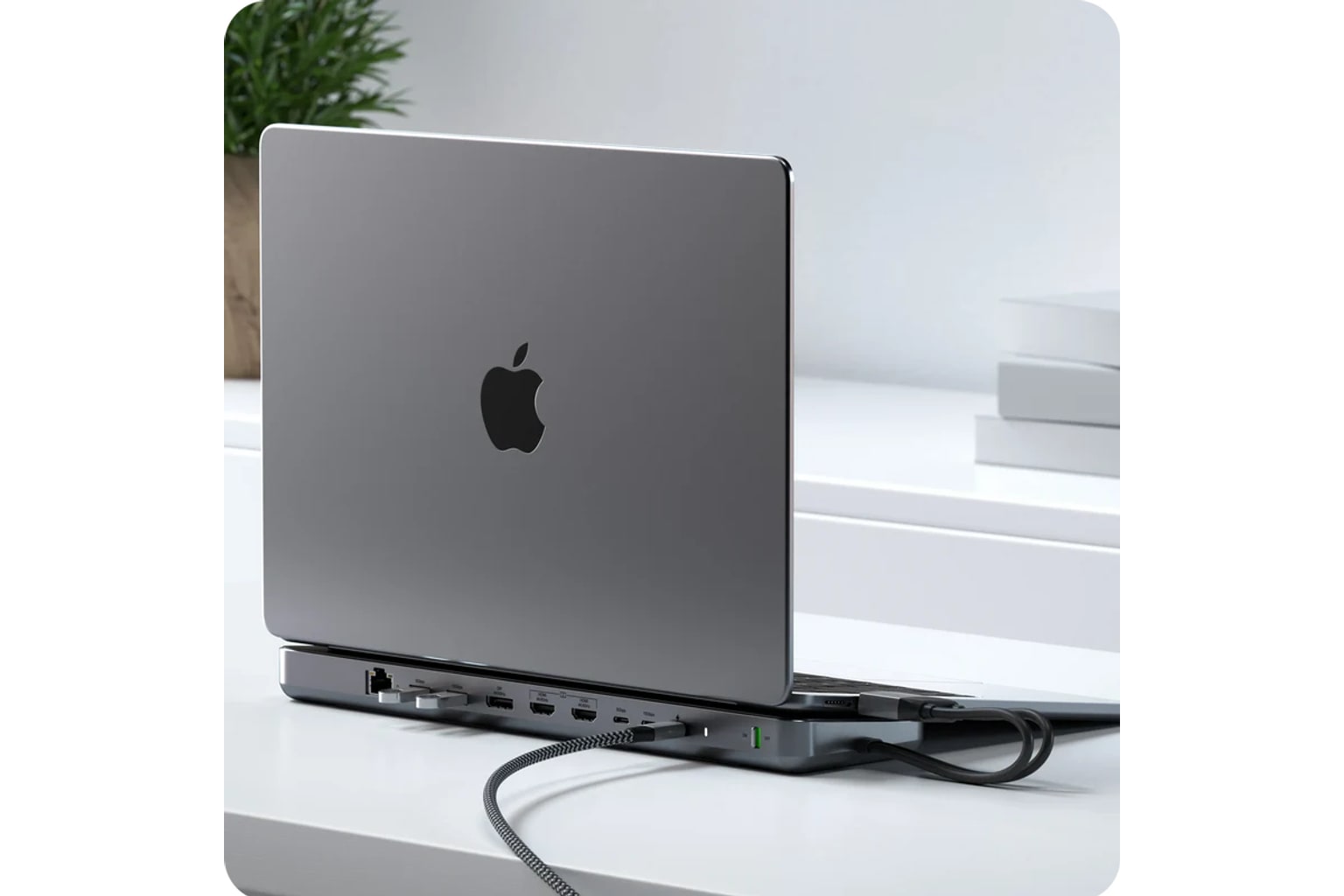
The Satechi Dual Dock Stand is the dock to pause over before buying, because its best trick is also its biggest trap. It is not a normal brick-style dock. It is a low stand that sits under a laptop, hides ports around the back, and adds an NVMe/SATA SSD bay underneath. If that is the desk you want, it can feel unusually tidy. If you just need displays and charging, it is the wrong shortcut.
In our full USB-C docking-stations ranking, the Satechi finished seventh with a 6.7/10 score as the Best MacBook stand dock. That rank is not a punishment; it is a warning label. CalDigit, OWC, Anker, Plugable, Dell, and UGREEN all fit broader dock jobs. Satechi is the specialist for people who like the idea of parking a MacBook directly on the dock and hiding extra storage in the same slab.
The official display caveat is the line to read twice: Satechi says the dock can run up to two external monitors through two HDMI ports or one DisplayPort plus one HDMI, but “Mac M1/M2 are limited to one external monitor in extended mode.” That single sentence decides whether this product feels clever or immediately frustrating.
Use the product links to recheck the current price, seller, condition, exact ASIN B0CFWX61HL, and return window. With this dock, fit and display behavior are not theory. You want to test them on your actual laptop before the return window feels small.
Score Breakdown
The Dual Dock Stand scores 6.7 overall. Its best marks come from desk fit, build confidence, and use-case fit, because Satechi knows exactly what kind of setup it is chasing. Its weaker marks come from compatibility clarity and display reliability, because the product depends on a physical dual-USB-C connection, MacBook-style placement, and host display limits that shoppers can easily misunderstand.
| Metric | Score | What it means in daily use |
|---|---|---|
| Compatibility clarity | 6.3 | Check the exact MacBook or laptop fit, the two USB-C connector spacing, and whether your case blocks the dock. |
| Display reliability | 5.8 | The ports are useful, but M1/M2 extended-display limits and HDMI/DisplayPort pairing rules matter. |
| Power, heat, and stability | 6.4 | Satechi describes 75 W USB-C power delivery while the dock is in use, but this is still a passthrough-style desk setup to test under load. |
| Ports and desk fit | 7.2 | This is the strongest reason to buy it: rear ports, Ethernet, SD/microSD, USB-A, USB-C data, video outputs, and storage in one tidy stand. |
| Setup, software, and support | 7.0 | No DisplayLink driver is the simple part; the real setup is laptop fit, SSD installation, formatting, and monitor matching. |
| Build quality and durability | 7.4 | The evidence favors a polished desk object, though long-term owner evidence is thinner than for the larger dock brands. |
| Use-case fit | 7.5 | It is strong when bought for the stand-and-storage idea, weak as a generic dock replacement. |
| Evidence confidence | 7.5 | Exact listing, official source text, and several video transcripts are present, but owner/community depth is limited. |
What Feels Great Right Away
The immediate appeal is that the Satechi makes a laptop desk look intentional. Instead of a dock box beside the computer and another SSD enclosure somewhere else, the stand itself becomes the dock. Satechi’s own overview frames the Dual Dock Stand as something that sits under the laptop, and that is the whole point: the product is trying to disappear under the MacBook while leaving Ethernet, USB, video, card readers, and storage within reach.
The SSD bay is the part ordinary docks do not give you. Satechi says the enclosure supports both NVMe and SATA SSDs, with NVMe transfers up to 10 Gbps and SATA up to 6 Gbps. It also includes the small installation kit: screw, mini screwdriver, and thermal tape. That matters if your MacBook storage feels cramped and you want a semi-permanent scratch drive, backup drive, or media shuttle without adding another little aluminum box to the desk.
The physical design also has a few thoughtful touches. One hands-on transcript calls out the rear hardware switch and says “a small rubber strip on top ensures your laptop remains securely in place without slipping.” That kind of detail is easy to overlook in a spec table, but it is exactly what determines whether a stand dock feels calm after a week of plugging in monitors, Ethernet, and drives.
If your laptop matches the connector spacing and you like the low wedge angle, this is the product in the lineup with the most charming desk shape. It does not merely add ports; it changes where the laptop lives.
What Gets Annoying After Setup
The annoying part is that the Satechi asks for more physical commitment than a normal dock. A brick-style dock can sit anywhere your cable reaches. This one wants the laptop to sit on top, at Satechi’s angle, with its dual USB-C plugs aligned to the side of the computer. A video transcript gets at the issue plainly: “if you don’t have those two that’s probably a concern.” Cases, port spacing, older laptops, and non-MacBook layouts can turn the cleanest part of the design into the first reason it does not fit your desk.
The SSD setup is useful, but it is still setup. Satechi’s overview shows the drive going in at a 45-degree angle, then being pressed down, secured with the included screw, and covered again. It also notes that an unformatted SSD needs to be formatted on the host device before use. None of that is scary for someone comfortable installing an M.2 drive. It is not the same as plugging in a finished external SSD, though.
Heat is the other thing I would watch early. The available evidence does not give us a deep long-term owner pile for this exact dock, so the honest move is not to claim a widespread failure pattern. Test the dock with charging, monitors, Ethernet, and a real file copy to the installed SSD. If the stand is lifting the laptop for cooling and also holding warm storage underneath it, you want to know how your setup behaves before you trust it as a permanent desk base.
Compatibility and Display Reality
This is not a DisplayLink dock, and that is both nice and limiting. There is no DisplayLink driver path to manage, but there is also no DisplayLink workaround for host display limits. The dock depends on what your laptop can actually output through the connected USB-C ports.
Satechi’s official display language is specific: with one DisplayPort and two HDMI ports, the dock supports up to two external monitors in extended mode through either two HDMI ports or one DisplayPort plus the HDMI port farthest from it. The same official text says “Mac M1/M2 are limited to one external monitor in extended mode.” That caveat should shape the whole buying decision for Apple Silicon owners. Two video ports on the dock do not automatically mean two independent external displays from every MacBook.
The USB-C ports also need careful reading. In Satechi’s overview, the two USB-C data ports are described as 5 Gbps and 10 Gbps, followed by the note that they “would not support either charging or video output.” The separate USB-C power-delivery port is for charging and is described as charging your device up to 75 W while the dock is in use. So the clean setup is possible, but only if your charger, laptop power needs, display plan, and port expectations all line up.
That is why this Satechi sits behind the safer general-purpose docks in the parent ranking. It can make one MacBook desk lovely. It should not be bought as a universal answer to every USB-C monitor problem.
How It Compares
Compared with the CalDigit TS4 and OWC 11-Port Thunderbolt Dock, the Satechi is more interesting physically and less reassuring technically. CalDigit and OWC are the better choices if your main goals are Thunderbolt/USB4 bandwidth, broader desk expansion, and a more traditional dock that can stay put while laptops change. Satechi is better only if the low stand and built-in SSD bay are the reason you are shopping.
Compared with the Anker 575, the Satechi is less conventional. Anker is a mainstream USB-C desk dock for people who want lots of ordinary ports and can verify USB-C Alt Mode behavior. Satechi is for someone who wants the laptop perched on the dock and local storage tucked underneath. Compared with UGREEN’s budget Revodok Pro 210, Satechi is not the cheap HDMI-and-Ethernet play; it is the cleaner MacBook-desk object with more fit risk.
Compared with Plugable’s triple-HDMI DisplayLink dock and Dell’s UD22, the Satechi is not the right problem-solver if the whole purchase is about driving more monitors from difficult hosts. Plugable and Dell make more sense when software-based display expansion, office support, or fleet compatibility matters. Satechi makes sense when the desk itself is the product: laptop stand, hidden dock, card/Ethernet/USB access, and storage in one place.
If you are still deciding between these lanes, start with the broader comparison: read our full USB-C docking-stations guide.
Who Should Buy It, and Who Should Skip It
Buy the Satechi Dual Dock Stand if you have a compatible MacBook-style laptop, you like a low stand instead of a flat desk setup, and the NVMe/SATA enclosure is genuinely useful to you. It is especially sensible for a tidy personal desk where the laptop normally stays in one spot, the monitor plan is modest, and you want Ethernet, card readers, USB-A, USB-C data, and external storage without spreading little boxes across the table.
Skip it if you need a broad office dock that works across random laptops, if your laptop has a case that may block the dual connector, if you need more than 75 W charging confidence, or if two independent Apple Silicon external displays are the whole reason you are buying. Also skip it if you do not actually want your laptop sitting on the dock. That sounds obvious, but it is the easiest way to talk yourself into the wrong product: liking the idea of the design more than the physical desk it creates.
My bottom line is the same as the parent guide: choose the Satechi only when the stand-and-storage idea is the reason you are shopping. Confirm ASIN B0CFWX61HL, check current-new availability, then test fit, monitors, sleep/wake, charging, Ethernet, card readers, and the SSD bay immediately. If it passes that real desk test, it can be one of the neatest products in the category. If it does not, a more boring dock will make you happier.
Tell us what this page missed
These pages get better when real buyer complaints make it back into the scoring model. If something important is underweighted, say it.
Rate this review
Give it a score from 1-10 and tell us what to improve.
0/4000 characters