OWC 11-Port Thunderbolt Dock Review (2026): The Calmer Thunderbolt 4 Runner-Up
A Mac-friendly Thunderbolt dock for buyers who want one-cable desk comfort without the CalDigit TS4’s larger port menu.
A strong Thunderbolt 4 runner-up with 96 W charging, a sensible 11-port layout, and fewer software chores than DisplayLink docks, but only if your laptop and monitors fit the Thunderbolt display lane.
MSRP
—
Amazon
$229.99
at writing · 2026-05-15
Buyer fit
Choose the OWC if the TS4 feels like too much dock but a no-name USB-C hub feels too risky.
MSRP
—
Amazon
$229.99
at writing · 2026-05-15
Score breakdown
How this product scored
Same rubric, but focused on one product so the reasons behind the score stay readable.
Compatibility clarity
OWC 11-Port Thunderbolt Dock scores this way because its host requirements define the whole buying decision, from Thunderbolt-only strengths to DisplayLink/MST caveats that must be checked before purchase.
Display reliability
OWC 11-Port Thunderbolt Dock is graded on whether its monitor promise is realistic for the intended host: Thunderbolt dual-display behavior, USB-C/MST limits, or DisplayLink's driver-based multi-screen path.
Power, heat, and stability
OWC 11-Port Thunderbolt Dock gets credit for captured charging specs and source signals around desk stability, with penalties where passthrough power, low-cost hardware, or driver stacks add risk.
Ports and desk fit
OWC 11-Port Thunderbolt Dock is judged by how well its port layout actually cleans up a desk instead of just adding a long list of connectors.
Setup, software, and support
OWC 11-Port Thunderbolt Dock loses ground when setup depends on DisplayLink drivers, firmware utilities, host settings, or careful cable/display matching.
Build quality and durability
OWC 11-Port Thunderbolt Dock reflects the available build, brand, and owner-signal confidence for a dock expected to stay plugged in for years.
Use-case fit
OWC 11-Port Thunderbolt Dock scores higher when it has a clear buyer lane and lower when it is easy to buy for the wrong job.
Evidence confidence
OWC 11-Port Thunderbolt Dock has listing evidence, product-specific transcripts, and official/retail sources; thinner long-term owner depth controls the remaining confidence gap.
Quick Verdict
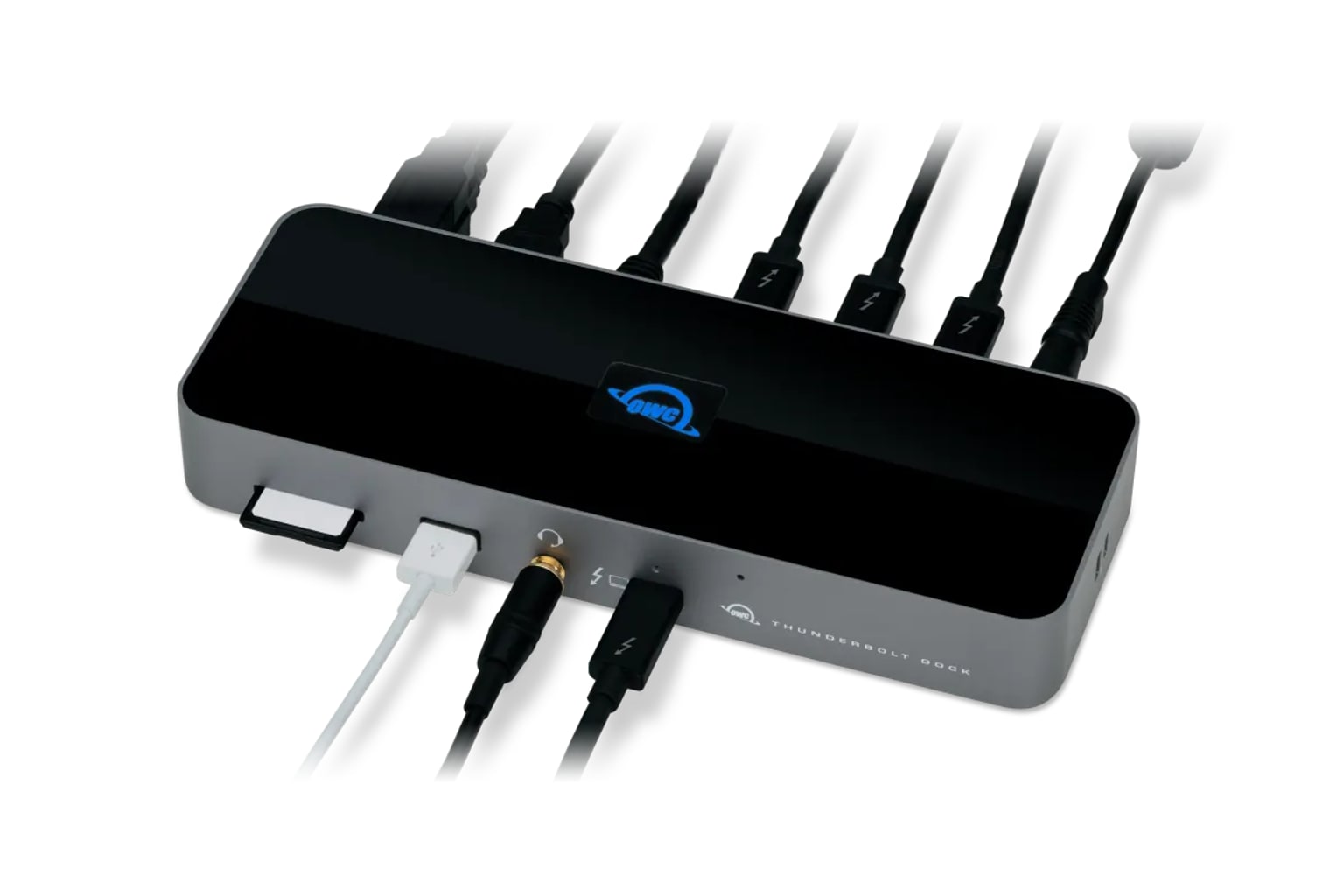
OWC is the runner-up I would look at when the CalDigit TS4 feels bigger, busier, or pricier than your desk really needs. The 11-Port Thunderbolt Dock still belongs in the premium Thunderbolt lane: 96 W laptop charging, 11 total ports, downstream Thunderbolt, SD, gigabit Ethernet, and a no-DisplayLink setup path for the right host.
The important pre-buy question is not whether it has enough ports. It is whether your laptop can actually use the Thunderbolt display path you are buying. The exact Amazon listing frames the promise as “96W Charging” with “Single 8K Display or Dual 5K displays,” while the review transcript for this exact model calls out a Thunderbolt 4 host port with “up to 96 watt of power.” That is the appeal: one cable, enough power for many MacBooks and work laptops, and fewer driver chores than a DisplayLink dock.
It ranks #2 in our full USB-C docking-stations guide at 8.5/10 because it is a cleaner Thunderbolt alternative, not because it beats the TS4 on raw port ambition. Before buying, use the product links to check current price, seller, condition, stock, and return window; that supports KB4UB and matters here because the captured Amazon snapshot showed low stock.
Score Breakdown
- Compatibility clarity: 8.8/10. The buying lane is fairly clear: this is for Thunderbolt 4, Thunderbolt 3, USB4, or compatible USB-C hosts, but the safest experience comes from a real Thunderbolt setup rather than a random USB-C port.
- Display reliability: 8.5/10. The display promise is strong for the right machine, but Mac display limits still matter. Do not assume a base Apple Silicon Mac suddenly becomes a universal dual-monitor workstation just because the dock is capable.
- Power, heat, and stability: 8.5/10. The 96 W host charging class is useful for many laptops and leaves this feeling more desk-ready than small hubs. Buyers with power-hungry workstations should compare the laptop's charger wattage before replacing it.
- Ports and desk fit: 8.3/10. Eleven ports cover the normal desk: Thunderbolt, USB, SD, Ethernet, and audio. It is simpler than the TS4, which is a strength if you want less sprawl and a weakness if you need every premium connector.
- Setup, software, and support: 8.5/10. No DisplayLink is the nice part. The setup work shifts to checking host compatibility, monitor count, cable quality, and OS limits before your return window closes.
- Build quality and durability: 8.6/10. OWC has a stronger Mac-accessory support story than random marketplace docks, but the available owner/community signal for this exact ASIN is thinner than I would like.
- Use-case fit: 8.4/10. It makes the most sense as a calmer Thunderbolt desk dock for MacBook and Thunderbolt laptop owners.
- Evidence confidence: 8.6/10. Confidence is solid thanks to the exact listing, official/retail details, and product-specific review transcripts, though long-term owner reports are thinner than I would prefer.
What Feels Great After Setup
The best version of this dock is boring in exactly the way a dock should be. You plug in one cable and your laptop gets power, displays, wired networking, storage, and desk peripherals without turning the back of the computer into a porcupine.
The port mix is also more sensible than it sounds on a spec sheet. The exact listing calls out “3 x Thunderbolt, 4 x USB, GbE, SD,” which lines up with how many people actually build a desk: one or two displays, an Ethernet run, a card reader for camera or media work, and enough USB for keyboard, webcam, mic, or external storage. The transcript also emphasizes “three Thunderbolt four ports delivering speeds of up to 40 gbps,” which is the part that keeps the OWC from feeling like a generic USB-C dongle.
Weeks later, the biggest convenience should be the absence of little rituals. You are not installing DisplayLink just to make the dock useful. You are not buying a stand-dock for a very specific MacBook shape. You are getting a traditional Thunderbolt desk hub from a brand that Mac buyers already know. That is why it stays so high in the ranking.
What Gets Annoying
The main annoyance is that Thunderbolt clarity does not eliminate display math. OWC can advertise a high-end display path, but your laptop, operating system, cable, monitors, and refresh-rate target still decide what happens on your desk. If you are buying this to fix a Mac that only supports one external display, slow down and verify your exact model first.
The second annoyance is name confusion. OWC sells a lot of docks and hubs, and this 11-port Thunderbolt Dock should not be blended with the OWC Thunderbolt Hub, Thunderbolt Go, or older OWC dock names when you read reviews or compare photos. A stray search result can make the wrong product look like the right deal.
Finally, the commerce detail deserves a last click. The captured Amazon snapshot was $229.99, but it also showed “Only 1 left in stock - order soon” and did not cleanly capture seller/ships-from details. That is not a product flaw, but it is a real purchase-risk detail: verify the exact ASIN B097TVLB4F, new condition, seller, return window, and included cable before checkout.
Compatibility and Displays
Treat the OWC as a Thunderbolt 4 dock first and a generic USB-C dock second. That mindset prevents most regret. If your laptop has Thunderbolt or USB4 support, this is the kind of dock that can make a desk feel clean without a driver stack sitting between you and your monitors. If your laptop only has a basic USB-C charging/data port, the experience may not match the listing language.
For displays, the exact listing's “Single 8K Display or Dual 5K displays” language is a capability claim, not a guarantee that every Mac or Windows laptop will run your preferred monitor pair. Base Apple Silicon Mac limits, USB-C fallback behavior, monitor adapters, and cable quality can all change the outcome. That is why this review keeps the caveat visible even though the score is strong.
The practical test is simple: while returns are easy, connect every monitor, close and open the laptop, wake it from sleep, run a video call, copy files through the fastest storage path, and leave charging under load. If the desk survives that without dropouts or weird wake behavior, the OWC is doing its job.
How It Compares
OWC's job in this category is to be the easier Thunderbolt alternative, not the everything-at-once champion.
- CalDigit TS4: Choose the TS4 if you want the safest premium Thunderbolt dock and will actually use the extra ports, higher-end desk fit, and stronger top-pick confidence. Choose the OWC if the TS4 feels like too much dock.
- Anker 575: Choose Anker for a mainstream Windows USB-C desk where Thunderbolt is not the point. OWC is the better fit when Thunderbolt is the point.
- Plugable triple-display and Dell UD22: Those are DisplayLink/universal-dock lanes. They can solve monitor-count problems OWC is not trying to solve, but they bring software and protected-video caveats.
- UGREEN Revodok Pro 210: UGREEN is the price-first MST lane. OWC is the safer buy when you care more about Thunderbolt comfort than the cheapest path to more ports.
- Satechi Dual Dock Stand: Satechi is a MacBook stand with storage appeal. OWC is a traditional desk dock.
If you want the full ranking context before choosing, read the complete guide to the best USB-C docking stations.
Who Should Buy It, and Who Should Skip It
Best for: MacBook, Thunderbolt 3/4, and USB4 laptop owners who want a capable one-cable desk dock with 96 W charging, SD, gigabit Ethernet, downstream Thunderbolt, and fewer software chores than DisplayLink docks.
Skip if: You need 2.5GbE, the widest possible port menu, a built-in SSD bay, bargain pricing, or a guaranteed multi-monitor workaround for a laptop with strict external-display limits.
Who will forgive the flaws: Someone who wants a clean, trustworthy Thunderbolt desk and is willing to verify exact host/display support before buying.
Who will get annoyed fast: Someone buying by port count alone, mixing adapters and older monitors, or assuming every USB-C laptop behaves like a Thunderbolt laptop.
Bottom line: The OWC 11-Port Thunderbolt Dock is a strong runner-up because it feels like the sane middle path: more confidence than cheap hubs, less excess than the TS4. Buy it for that lane, not as a magic fix for every monitor problem.
Tell us what this page missed
These pages get better when real buyer complaints make it back into the scoring model. If something important is underweighted, say it.
Rate this review
Give it a score from 1-10 and tell us what to improve.
0/4000 characters