Dell Universal Dock UD22 Review (2026): A Sensible Office Dock With a DisplayLink Catch
A practical Dell universal dock for mixed laptop fleets, but the driver policy, monitor plan, and exact UD22 listing matter more than the product photo.
Dell UD22 is the office-fleet DisplayLink pick in our USB-C docking-station ranking: 10 ports, 96 W charging, Gigabit Ethernet, and broad compatibility for desks where supportability matters more than premium ports.
MSRP
—
Amazon
$171.89
at writing · 2026-05-15
Buyer fit
The UD22 is a sensible office tool, not the dock to buy for joy; get it when fleet compatibility is the job.
MSRP
—
Amazon
$171.89
at writing · 2026-05-15
Score breakdown
How this product scored
Same rubric, but focused on one product so the reasons behind the score stay readable.
Compatibility clarity
Dell Universal Dock UD22 scores this way because its host requirements define the whole buying decision, from Thunderbolt-only strengths to DisplayLink/MST caveats that must be checked before purchase.
Display reliability
Dell Universal Dock UD22 is graded on whether its monitor promise is realistic for the intended host: Thunderbolt dual-display behavior, USB-C/MST limits, or DisplayLink's driver-based multi-screen path.
Power, heat, and stability
Dell Universal Dock UD22 gets credit for its 96 W charging class and office-desk stability, with penalties where driver layers, host policy, or charging under load add risk.
Ports and desk fit
Dell Universal Dock UD22 is judged by how well its port layout actually cleans up a desk instead of just adding a long list of connectors.
Setup, software, and support
Dell Universal Dock UD22 loses ground when setup depends on DisplayLink drivers, firmware utilities, host settings, or careful cable/display matching.
Build quality and durability
Dell Universal Dock UD22 reflects the available build, brand, and owner-signal confidence for a dock expected to stay plugged in for years.
Use-case fit
Dell Universal Dock UD22 scores higher when it has a clear buyer lane and lower when it is easy to buy for the wrong job.
Evidence confidence
Dell Universal Dock UD22 has enough exact-model evidence and a current new Amazon listing, though thinner long-term owner coverage keeps confidence below the top picks.
Quick Verdict
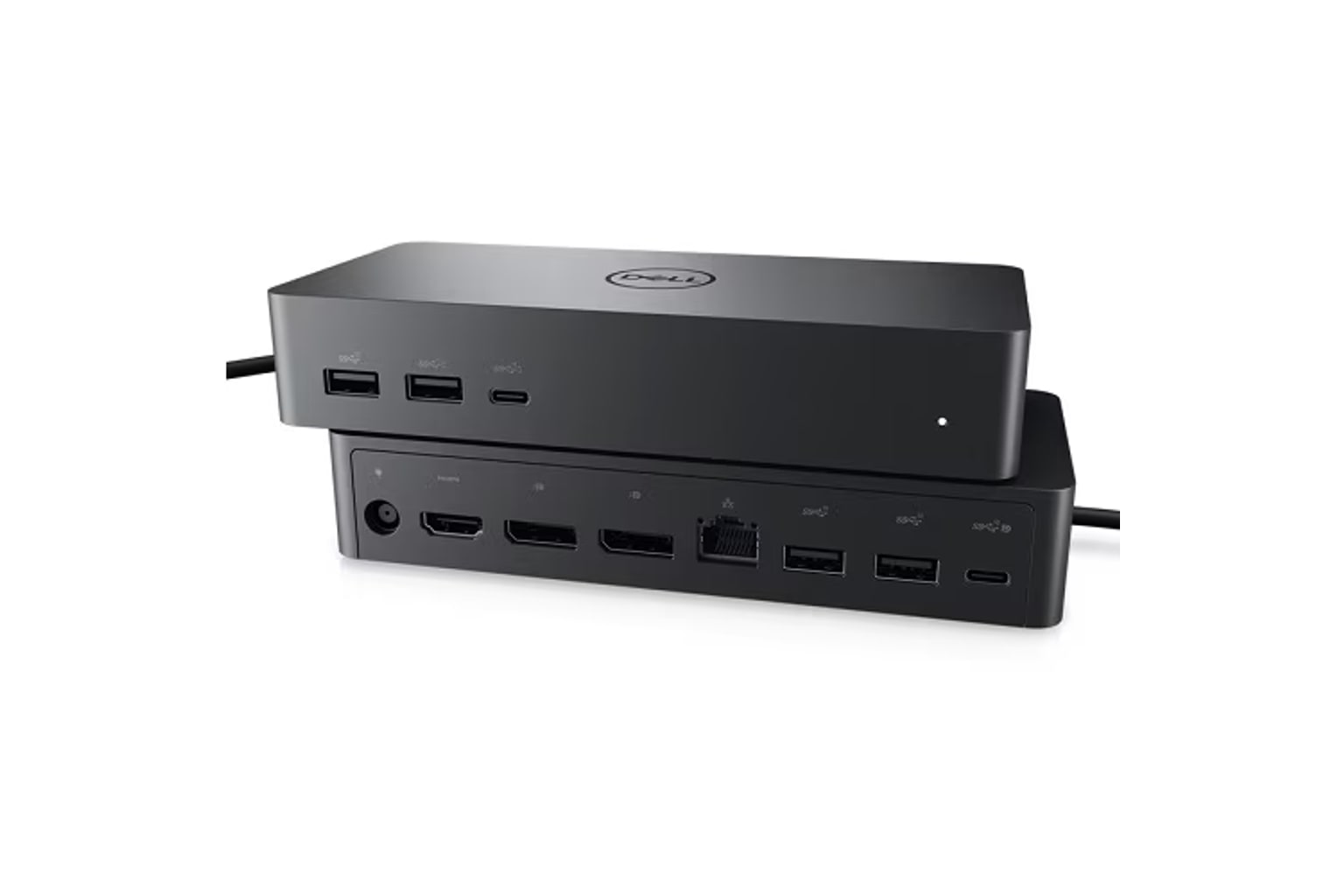
The Dell Universal Dock UD22 makes the most sense on a shared office desk, not as a personal splurge dock. Its appeal is practical: one USB-C/DisplayLink dock that can sit in a hot desk, charge many office laptops at up to 96 W, expose the usual HDMI, DisplayPort, USB-C, USB-A, and Gigabit Ethernet connections, and give IT a Dell support path when something goes sideways.
That is also why it needs a careful review before checkout. The UD22 ranked fifth in our full USB-C docking-stations ranking with a 7.4/10 score. It did not beat the CalDigit TS4, OWC Thunderbolt Dock, or Anker 575 for a clean personal desk. It earned its spot because mixed laptop fleets are a real problem, and DisplayLink can solve display-count headaches that ordinary USB-C docks cannot — as long as the software is allowed.
The catch is software. A secondary review page sums up the core reality well: “Full four-display setups depend on DisplayLink.” Another line is even more useful for setup: “DisplayPort #2 does not work until the DisplayLink driver is installed.” If your company blocks drivers, if your Mac expectations are fuzzy, or if you want no-maintenance multi-monitor behavior, that sentence should slow you down.
Use the product links to check current price, seller, condition, exact ASIN B0B5YC6TS4, and return window. The research snapshot found a new Amazon listing at $171.89, but also “Only 1 left in stock - order soon,” so availability deserves a fresh look.
Score Breakdown
- Compatibility clarity: 7.6/10. The UD22 has a clear lane once you name it correctly: USB-C plus DisplayLink for mixed office fleets. The risk is shoppers treating it like a generic Dell dock or confusing it with WD19, WD22TB, or WD22TB4 Thunderbolt docks.
- Display reliability: 7.3/10. Quad-display support is the headline, but the reliable version depends on the host, DisplayLink driver, monitor mix, and OS permissions. That is useful flexibility, not magic.
- Power, heat, and stability: 7.6/10. The 96 W charging class covers many office laptops, and the dock is meant to stay planted on a desk. Still, charging under load plus multiple displays should be tested early.
- Ports and desk fit: 7.0/10. Ten ports, Gigabit Ethernet, HDMI, DisplayPort, USB-C, and USB-A are useful for ordinary desks. It lacks the premium extras, card readers, and cleaner enthusiast layout of higher-ranked docks.
- Setup, software, and support: 6.9/10. Dell support and enterprise features help, but DisplayLink install/update behavior, firmware tools, and company-managed laptop rules make setup more involved than driver-free Thunderbolt.
- Build quality and durability: 7.4/10. The Dell office-dock identity helps confidence, but exact long-term owner evidence was thinner than ideal.
- Use-case fit: 8.0/10. This is its strongest score. Buy it for office/fleet compatibility, hot desks, and supported multi-display setups.
- Evidence confidence: 7.5/10. There was enough exact-model evidence to keep confidence reasonable, including a current new Amazon listing, but long-term owner reports were thinner than for the top picks.
What Feels Great Right Away
The best part of the UD22 is not glamour; it is relief from having to ask which laptop the desk is for. For a company desk where someone might bring a Dell, HP, Lenovo, Chromebook, or Mac, a universal DisplayLink dock can be easier to standardize than a pile of model-specific adapters.
The port spread is office-focused in the right way. The Amazon listing lists “Number of Ports 10,” “Total USB Ports 6,” Gigabit Ethernet, HDMI, USB-A, USB-C, and a 14.7-ounce body. A YouTube transcript uses the overexcited but basically useful summary: “HDMI, Display Port, USBC, USBA, Gigabit, Ethernet, it's all here.” Strip away the sales tone and that is the UD22’s daily promise: keyboard, mouse, webcam, Ethernet, monitor cables, and charging can live at the desk while the laptop gets one main cable.
The other real win is supportability. I would still verify the exact warranty terms before buying, but the broader point fits the product: Dell support channels matter more in an office fleet than they do for a random home hub.
Weeks later, the UD22 should feel best when it becomes boring infrastructure. Nobody praises the dock; they just sit down, plug in, get power, get wired networking, and see their displays come back in the expected places. That is a good outcome for this lane.
What Gets Annoying After Setup
The annoyance is that universal still has homework attached. DisplayLink can make a dock more flexible, but it also adds a driver layer. If the driver is missing, blocked by IT, outdated, or behaving badly after an OS update, the dock stops feeling like a simple cable-cleanup box and starts feeling like a support ticket.
The most concrete setup warning is the DisplayPort #2 note: “DisplayPort #2 does not work until the DisplayLink driver is installed.” That is the kind of detail buyers usually learn only after plugging everything in. It means a partial setup may appear to work, then the last monitor becomes the problem.
Mac buyers should be especially careful. The parent guide already warned that DisplayLink, MST, Thunderbolt, and Apple Silicon limits are easy to mix up. The UD22 can be useful around Macs, but the driver-dependent caveat should stay visible. Do not buy it because the phrase four displays sounds like a clean Mac workaround.
The commerce side is annoying too. The exact ASIN matters, and Dell dock names blur together quickly. Dell’s dock names blur together, so do not treat WD19, WD22TB, or WD22TB4 information as UD22 evidence. Before checkout, confirm the listing is Dell Universal Dock UD22 / 210-BEXR / B0B5YC6TS4, not a nearby Dell dock with a different display path.
Compatibility and Display Reality
Think of the UD22 as an office DisplayLink dock first. It is not the cleanest Thunderbolt dock, not the cheapest USB-C/MST dock, and not the best creator dock. Its job is to stretch across more host computers than a simple USB-C Alt Mode dock can.
The useful display claim is the quad-display class. A secondary review page says Dell’s table documents “4x Display 3840x2160 @ 60Hz” and immediately adds that “Full four-display setups depend on DisplayLink.” That combination is the whole purchase: big capability, software condition.
Without the driver, expectations need to be lower. The same source says basic video can use HDMI plus DisplayPort 1 or the rear USB-C display output before the full DisplayLink path is active. That makes the UD22 more forgiving than a total all-or-nothing setup, but it does not remove the software requirement for the full desk.
For Windows 10/11 office laptops, especially Dell-managed environments, the support story is strongest. For ChromeOS and macOS, verify the exact DisplayLink support path, security permissions, monitor arrangement, protected-video needs, and whether company policy allows the driver. Then test wake from sleep, lid-open behavior, monitor order, Ethernet, webcam/mic devices, charging under load, and heat during a full workday while returns are easy.
How It Compares
Compared with the CalDigit TS4, the Dell UD22 is less premium and less satisfying for a high-end Thunderbolt desk. CalDigit is the safer personal/creator pick if your laptop supports it and you will use the extra ports.
Compared with the OWC 11-Port Thunderbolt Dock, Dell trades the cleaner Thunderbolt path for broader universal-dock behavior. Choose OWC when Thunderbolt is the point; choose Dell when mixed laptops and Dell support matter more.
Compared with the Anker 575, the Dell is more enterprise and more driver-dependent. Anker is nicer for a known-good mainstream Windows USB-C desk that does not need DisplayLink. Dell is more interesting when ordinary USB-C display support will not cover the fleet.
Compared with Plugable’s triple-HDMI DisplayLink dock, Dell is the office-fleet version of the DisplayLink idea. Plugable is better when three HDMI monitors are the exact problem. Dell is better when the support path, 96 W charging class, and Dell dock identity matter.
Compared with UGREEN Revodok Pro 210, Dell is more expensive and support-oriented. UGREEN is for price-first MST setups where you can test fast. Compared with Satechi Dual Dock Stand, Dell has no MacBook stand or storage angle; it is pure office infrastructure.
If you are still choosing the lane, start with the full best USB-C docking-stations guide before buying one dock to solve the wrong problem.
Who Should Buy It, and Who Should Skip It
Buy it if: you manage or use a mixed office desk, can install and maintain DisplayLink, need up to 96 W laptop charging, want common office ports, and value Dell support more than premium enthusiast features.
Skip it if: you want the cleanest Mac creator dock, a driver-free Thunderbolt setup, built-in card readers, 2.5GbE, high-end storage bandwidth, or a guaranteed multi-monitor fix on a laptop whose display limits you have not checked.
Who will forgive the flaws: an IT-managed office, hot-desk user, or Windows-heavy team that already has a DisplayLink policy and mainly wants predictable desks.
Who will get annoyed fast: someone buying for a personal Mac desk, someone blocked from installing drivers, or anyone expecting a universal dock to mean every monitor wakes perfectly on every laptop.
Bottom line: the Dell UD22 is a sensible office tool. It is not the dock to buy for joy, and that is okay. Buy it when fleet compatibility is the job, then test the exact monitors, driver, firmware path, Ethernet, charging, and wake behavior before the return window closes.
Tell us what this page missed
These pages get better when real buyer complaints make it back into the scoring model. If something important is underweighted, say it.
Rate this review
Give it a score from 1-10 and tell us what to improve.
0/4000 characters