Plugable USB-C Triple Display Docking Station (B08DDH5CPW) Review: Great If Three HDMI Screens Are the Actual Problem
A focused triple-HDMI DisplayLink dock for one 4K screen plus two 1080p screens — not a magic shortcut to three driver-free 4K monitors.
A focused triple-HDMI DisplayLink dock for one 4K screen plus two 1080p screens — not a magic shortcut to three driver-free 4K monitors.
MSRP
—
Amazon
$159.95
at writing · 2026-05-15
Buyer fit
Choose the Plugable only when the triple-monitor problem is real enough to justify the DisplayLink baggage.
MSRP
—
Amazon
$159.95
at writing · 2026-05-15
Score breakdown
How this product scored
Same rubric, but focused on one product so the reasons behind the score stay readable.
Compatibility clarity
Host requirements define the decision: USB-C, USB4, Thunderbolt, Alt Mode, and DisplayLink can all be involved, so the buyer must match the laptop and OS before purchase.
Display reliability
Useful for the advertised one-4K-plus-two-1080p HDMI setup, but not a native three-4K or no-driver display solution.
Power, heat, and stability
The 100 W power class and desk-stability cues are positives, with remaining risk around charging load, heat, cable sensitivity, and DisplayLink behavior.
Ports and desk fit
The HDMI, USB, Ethernet, audio, and front/back layout should clean up the right desk without pretending to be a premium Thunderbolt hub.
Setup, software, and support
DisplayLink driver requirements, OS permissions, and managed-laptop policies are central to whether setup feels easy.
Build quality and durability
Plastic construction is acceptable for a stationary desk dock, but it does not have the heavier premium feel of stronger Thunderbolt options.
Use-case fit
The triple-HDMI DisplayLink lane is clear and valuable when that is the specific problem being solved.
Evidence confidence
There is enough exact-model evidence and a current Amazon listing, though owner/community coverage is thinner than for the best-supported products.
Quick verdict
The Plugable USB-C Triple Display Docking Station (B08DDH5CPW) is not the dock to buy just because it has a long spec list. I would buy it when the desk problem is painfully specific: you want three HDMI monitors from a USB-C, USB4, or Thunderbolt laptop, and you are comfortable using DisplayLink for part of that setup. That is why it landed at No. 4 in our full USB-C docking-stations ranking rather than competing with cleaner Thunderbolt docks like the CalDigit TS4 or OWC 11-Port Thunderbolt Dock.
The appeal is real. Plugable's current listing frames the core promise as up to three extended HDMI displays — "1× 4K @ 30Hz via Alt Mode, 2× 1080p @ 60Hz via DisplayLink" — and that is the sentence to read twice before checkout. It is a strong fit if your actual monitor layout matches that promise. It is a poor fit if you were hoping three HDMI ports meant three full-speed 4K displays, no driver decisions, and no OS-specific display caveats.
If you are comparing this against the rest of the category, start with our full USB-C docking-stations ranking: /review/best-usb-c-docking-stations-ux-review-2026. Then use the product links to recheck the exact ASIN, current price, seller, return window, and availability; that also helps support KB4UB if this review saves you a return.
Score breakdown
Overall score: 7.4 / 10. The score is less about raw port count and more about whether this dock solves the right problem for the right host. It scored best for use-case fit because the lane is clear: triple-HDMI productivity desks where DisplayLink is acceptable. It scored lower for setup and software because the two extra displays depend on the DisplayLink path, not simple plug-and-play USB-C video.
Compatibility clarity is a 7.2 because the dock can work across newer Windows, macOS, ChromeOS, USB-C, USB4, and Thunderbolt contexts, but the rules matter. Display reliability is a 7.4 because the advertised layout is useful when matched correctly: one 4K 30Hz HDMI output plus two 1080p 60Hz HDMI outputs. Ports and desk fit is stronger at 7.7; the dock gives you HDMI, USB, Ethernet, audio, and laptop power in a desk-friendly single-cable setup. Setup, software, and support sits at 7.0 because drivers and permissions can decide whether the dock feels clever or annoying.
That makes the Plugable a good alternative pick, not a universal recommendation. It is the dock for the buyer who already knows the monitor count is the hard part.
What feels great
The best thing about this Plugable is how direct its promise is. If your laptop normally leaves you one monitor short, this dock is trying to turn that desk into a proper three-screen workstation without asking you to replace the computer. The published feature set — 100 W power class, 12 ports, Gigabit Ethernet, six USB 5Gbps-class ports in the listing language, and three HDMI outputs — is exactly the kind of setup that can make a desk feel calmer after the first successful install.
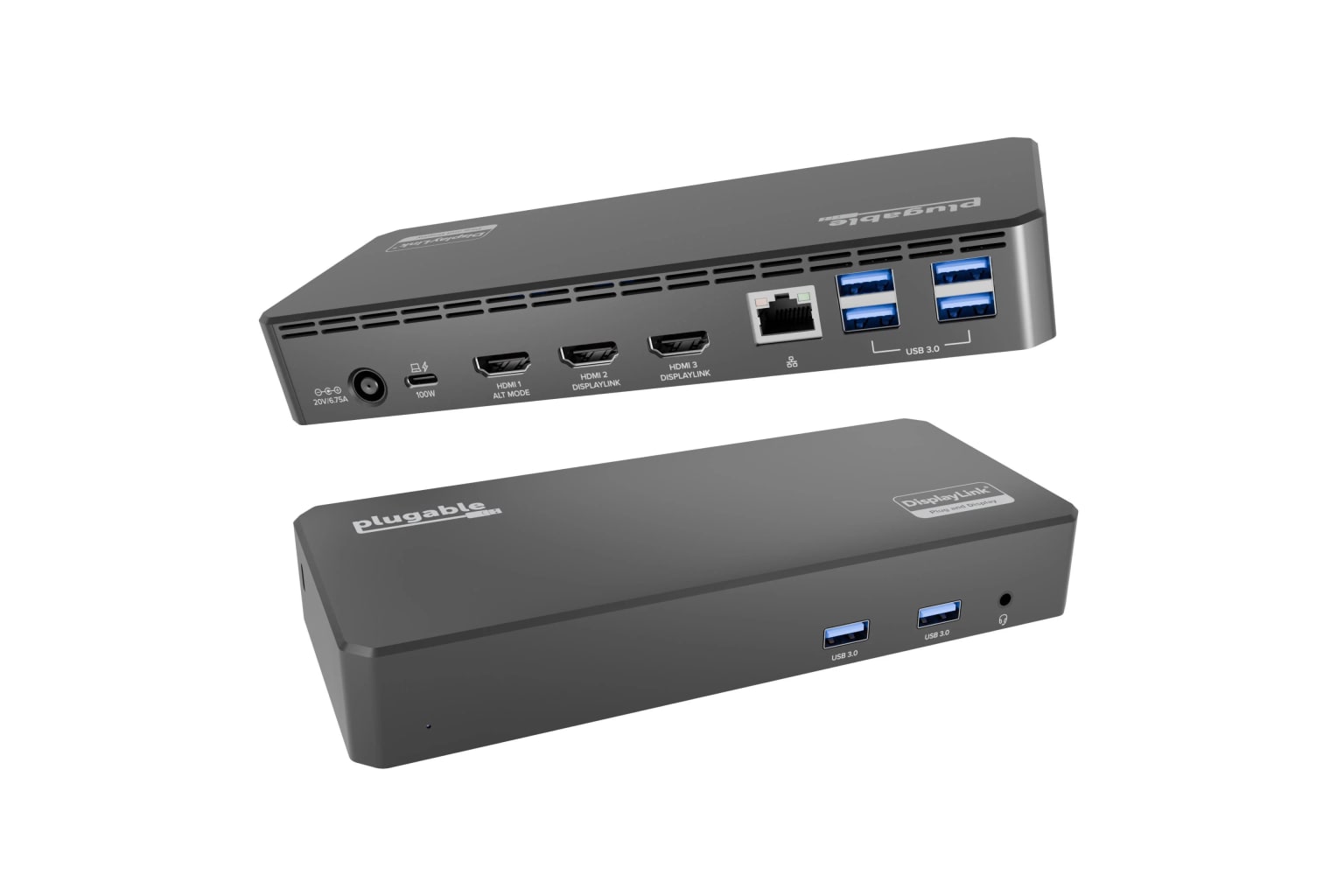
The physical design also sounds appropriately practical rather than showy. In a reviewer transcript, The Review Rewind describes it as compact, with two USB ports and audio on the front while most of the cable-heavy connections sit on the back. That kind of layout matters more than it sounds. Frequently touched ports stay reachable, while HDMI, Ethernet, power, and the host cable can live behind the dock where they belong.
The other strength is Plugable's support ecosystem. The broader Plugable site points buyers toward support, drivers, firmware, a dock finder, and warranty resources. I would not treat that as proof that every setup will be effortless, but it is better than buying a mystery dock where the driver path disappears the first time macOS or Windows changes something.
What gets annoying
The annoying part is that the dock's best trick is also the thing you have to manage. Plugable's driver page says DisplayLink-based devices "require DisplayLink software to be installed for Windows and macOS in order to work." For a personal laptop, that may be a five-minute install. For a work laptop with managed security settings, it can become the entire purchasing decision.
Display expectations also need to stay grounded. A reviewer summed up the key limitation clearly: the first HDMI output supports 4K at 30Hz, but “if you had three 4K monitors and you wanted that 4K resolution uh you couldn't have that.” That is not a hidden flaw if you read the spec, but it is exactly the kind of mismatch that leads to returns.
Build feel is another calibrated caveat. The same reviewer described the shell as plastic and not especially premium, while also noting that a dock mostly just sits on the desk. I would not make that a dealbreaker for a stationary office setup. I would care more if you plan to move the dock often, yank cables daily, or expect the heavier feel of a premium Thunderbolt dock.
Compatibility and displays
This is the section to read before you buy. The Plugable B08DDH5CPW is best understood as a hybrid display dock: one HDMI path uses USB-C DisplayPort Alt Mode for up to 4K at 30Hz, while two additional HDMI outputs use DisplayLink at up to 1080p at 60Hz. That is why it can be attractive for Apple Silicon MacBook owners who run into native external-display limits, but it also explains why software and protected-video caveats matter.
The Mac caveat should stay visible: DisplayLink is needed for multi-monitor Apple Silicon, and HDCP-protected video is not supported. In normal office work — spreadsheets, dashboards, presentations, browser windows, chat, email, coding, and conferencing — that trade can be perfectly acceptable. If your desk revolves around protected streaming apps, color-critical creative work, high-refresh gaming, or three sharp 4K panels, this is the wrong lane.
For Windows buyers, the same rule applies in a different way: confirm the host supports the display path you plan to use, install the current DisplayLink driver, and test wake-from-sleep, lid-open behavior, Ethernet, video calls, and every monitor during the return window. A dock can look perfect on paper and still become irritating if your laptop, OS image, USB-C port, monitor mix, and company security settings do not agree.
How it compares
Against the CalDigit TS4 and OWC 11-Port Thunderbolt Dock, the Plugable is less elegant but solves a different problem. The premium Thunderbolt docks are cleaner choices for serious Thunderbolt desks when your host and display limits already line up. They feel like safer long-term hubs. The Plugable feels more like a targeted workaround for people who specifically need more external screens than their laptop natively wants to drive.
Against the Anker 575, the Plugable is more display-specialized. Anker is the better mainstream USB-C choice when you want a broad port mix and fewer software questions. Plugable wins only if the three-HDMI layout is the deciding feature.
Against Dell UD22, Plugable is the more obvious pick for a personal or small-office triple-HDMI desk. Dell makes more sense in office or fleet contexts where Dell's universal-dock behavior and support channel matter. Against the UGREEN Revodok Pro 210, Plugable costs more in the price snapshot, but it offers a clearer DisplayLink triple-monitor lane. Against the Satechi Dual Dock Stand, there is little overlap: Satechi is for a MacBook stand-and-storage setup, while Plugable is for monitors first.
Who should buy it, and who should skip it
Buy the Plugable USB-C Triple Display Docking Station (B08DDH5CPW) if your desk has three HDMI monitors or a very clear two-to-three-monitor plan, you are fine installing DisplayLink, and your work is mostly productivity, analysis, meetings, browser tabs, office apps, and general multitasking. It is especially interesting when a laptop's native display limit is the problem you are trying to work around.
Skip it if you cannot install drivers, cannot tolerate occasional display troubleshooting, need protected-video playback through the dock, want three 4K monitors, or would be happier with a native Thunderbolt dock that asks fewer questions. Also skip it if you are not sure which Plugable model you are buying. Be careful not to mix this current B08DDH5CPW/UD-3900PDZ-style listing with older or nearby Plugable families such as UD-3900PDH, UD-3900/UD-3900Z, UD-6950 variants, or UD-MSTH2 unless you are deliberately comparing them.
My bottom line: this is a useful, focused dock when the triple-HDMI promise matches your real desk. It is not the dock to buy casually because the name sounds universal.
Tell us what this page missed
These pages get better when real buyer complaints make it back into the scoring model. If something important is underweighted, say it.
Rate this review
Give it a score from 1-10 and tell us what to improve.
0/4000 characters