
The recommendation
Keep it on the shortlist if today's file-saving and recovery route meets your needs.
Grades at a glance
| Product | Overall | Paper, roll and label handling | Buttons and ordinary setup selection | Connection and routine care chores |
|---|---|---|---|---|
| Phomemo 241BT | 7.7 | 9.0 | 7.0 | 7.0 |
Does it fit your life?
On this page
Updated October 16, 2026. Research checked October 16, 2026. The reports describe historical experiences; current app and driver behavior may differ.
Direct paper placement, more involved recovery · The small-label change is easy to visualize · Calibration uses a button sequence · An interruption that needed explanation · Documentation can change the experience · Repeated designs need a repeatable file route · Compare alternatives by the chore you want to change · Is the 241BT the right fit? · Make changeover and repeat work separate decisions · About the review and official guide
Ordinary task comparison
| Ordinary task | Score out of ten | Reason |
|---|---|---|
| Paper, roll and label handling | 9.0 | The reviewer adjusts guides directly; an official guide adds paper orientation and cover context. |
| Buttons and ordinary setup selection | 7.0 | Calibration and later recovery require distinct blink sequences and support in the report. |
| Connection and routine care chores | 7.0 | The historical manual/software route is taxing, with repeated design recreation described. |
Overall: 7.7 out of ten for these ordinary tasks. The score describes the reported handling, selection, and connection chores; use the specific tradeoffs below to judge the fit for your station.
Direct paper placement, more involved recovery
The Phomemo 241BT has a useful case for buyers who expect to change between shipping stock and smaller labels: the reviewer identifies PM-241BT and shows guide adjustment, while an official Phomemo guide explains paper orientation and cover closure. Those accounts make the physical change easy to picture. The reviewer received the printer and shipping labels from Phomemo; the separate guide is brand-produced.
The reason to hesitate is what follows that placement. The reviewer encounters a media-tracking interruption, finds the manual unhelpful for resolving it, and contacts support before a reset allows the job to continue. They also say designs could not be saved in the app used then, requiring them to start again for a repeat job. Both are historical experiences, so check the present instructions and software before treating either as today's limitation.
Keep the 241BT on the shortlist if you like its paper arrangement and can confirm a satisfactory way to preserve and reopen the labels you make. A finished shipping PDF and a design created inside an app place different demands on the workflow. Choose around the job you will repeat, with recovery and file-saving considered alongside the guide adjustment.
The small-label change is easy to visualize
In the review, the paper is placed in the printer and the guides are adjusted to its size. The reviewer then performs a feed-related calibration action. Separating those two stages is helpful: one is the physical job of positioning stock, while the other is a control sequence used to prepare the printer for it.
The official guide provides additional mechanical context. It describes opening the cover, placing consecutive stock with the printing side upward, aligning the paper edge, adjusting the guides, and closing the cover. That is manufacturer guidance rather than an independent user experience. It supports understanding the paper path, without adding another satisfied owner or proving that every stock type behaves the same.
For a buyer, the important question is how often the guides and stock will change. If you want shipping labels and a second small-label job, plan a place for whichever supply is not installed. The reports do not establish an internal multi-roll store or automatic switching between different supplies. A guide adjustment can be straightforward while the whole change still needs a little desk space.
Also consider whether you want to leave the printer ready between sessions. A stable station can keep the spare supply and reference material together. A shared table asks you to restore those pieces before each use. This is an ordinary practical implication of external stock and guide adjustment, not a measured setup-time comparison.
An interruption that needed explanation
During the small-label job, the reviewer asks for multiple copies, gets only one, and sees a rapidly flashing light. They consult the manual, encounter a wrong-media-tracking explanation, and say they do not understand how to fix it. They then contact support and report being helped to reset the printer, after which they continue printing.
Both the interruption and the successful continuation matter. Retelling only the recovery would hide the extra work; retelling only the error would imply the job never became usable. The account supports a qualified view: the routine could be completed, but this reviewer needed assistance and another control sequence to do it.
Do not infer a frequency from that one episode. It does not establish that every small-label change will fail, that all users will need support, or that the same reset is appropriate for every error. It is still a useful warning against assuming that physically fitting the paper settles every aspect of changeover.
When shopping, look for current model-specific explanations of the ordinary recovery tasks you might need. A clear description can matter more than a long feature list when you return to the printer after weeks away. This is especially relevant if several people might use the same station and would not all remember a less common button sequence.
Documentation can change the experience
The reviewer finds the foldout-style manual overwhelming and says getting to the printing stage was taxing. Their difficulty is tied to the material and software they received then. It should not become a blanket claim that all present instructions are poor, but it is relevant context for someone who values a clear setup guide.
The official video demonstrates the mechanical steps in a different format. That can help a shopper understand what the paper change involves, while remaining a brand-produced account. It is not evidence that the reviewer would have avoided every problem by watching it or that support is unnecessary.
Before buying, examine the current support material for the exact model and the tasks you intend to perform. Can you identify how to place the stock, prepare a changed size, and interpret a recovery message? You do not need to memorize it in advance. The point is to know that the information you would rely on is clear enough for your own preferences.
Repeated designs need a repeatable file route
The reviewer's other significant complaint is that designs could not be saved in the app used at the time. They report having to start again when they wanted more of the same labels. That makes the issue particularly relevant to a shop that repeats a small set of custom stickers or product labels.
This is a historical observation, not a claim about today's application. Current saving, template, and export features need checking before they become the reason to choose or reject the printer. It would be equally unsupported to assume that the limitation must still exist or that an update has certainly resolved it.
Separate creating a design from printing an existing file. If your normal job begins with a finished PDF, the ability to preserve an app-created design may be less central. If your normal job begins with arranging text or artwork inside the app, it can determine how much work returns the next time you need the label. The review makes that distinction worth examining without promising a particular current capability.
A useful pre-purchase exercise is to write down the file you want to repeat and where its editable version will live. Then check the current route from that file to this printer. That is more concrete than assuming that the presence of templates or Bluetooth guarantees the repeated job you have in mind.
Compare alternatives by the chore you want to change
The Brother QL-1110NWB offers the most distinct physical alternative in this group. Its reviewer describes notched spool loading and separate feed and cutting actions, along with an established network connection. The proprietary stock arrangement is an explicit drawback. Compare it if your main concern is making paper changes and common physical actions easier to remember, while accepting the supply restriction.
The JADENS JD268BT has a useful phone-PDF demonstration. Its supplied-unit first-look reviewer finds the printer inside the app, chooses file printing, and opens a saved sample label. The export/import step remains part of that historical routine, while the shown Mac route is USB. Its separately requested holder also needs space and should not be assumed to come with every printer order.
The MUNBYN RW403B is interesting for its described side opening and documentation. One supplied-unit reviewer praises the picture guides; another demonstrates several top-button functions. Phone outcomes differ, with one successful in-app connection and another report of two Android failures followed by a working wired-driver route. It may change the documentation experience you want, but it does not establish a universal easier connection.
The Rollo USB X1038 is the relevant comparison if you want to build around a computer. Its reports show manual driver installation, a paper-size correction after an initial failed attempt, and rear-fed connected labels. One attempt with a single leftover label did not work. It offers a more deliberately wired workflow, with its own setup and file-preparation chores rather than an escape from all selection work.
Nelko's PL70e-BT report emphasizes rear loading, a direct blue side release, bulky cables, and individual app imports. It also describes one jam with two-inch round labels. The source title says PL70e while the BT suffix is unspoken. If you want small-label flexibility, that bounded report is a useful reminder to examine the actual stock and recovery path rather than choosing by a broad label-printer description.
Is the 241BT the right fit?
Keep the Phomemo on the shortlist if the guide adjustment suits your planned supplies and the current design-saving and recovery workflow meets your needs. The reports make the mechanical change easy to picture. They also show why the later steps deserve equal attention: an approachable paper path is only part of a repeatable job.
Pause if you need custom labels to be recreated effortlessly from a saved app design and have not confirmed that function in the current software. Also pause if you strongly dislike consulting blink-sequence instructions when something unusual happens. The reported recovery is manageable in the end, but the extra work is part of the decision.
Before ordering, confirm the exact 241BT model, the stock you intend to use, today's instructions, and the route for preserving and reopening your repeat files. Place the printer and spare supply in the desk plan together. This keeps the decision focused on the job you want to repeat, rather than on a successful demonstration of a single sample.
Make changeover and repeat work separate decisions
Start with the two labels you expect to use most often. If one is a shipping PDF and the other is a small custom design, put the supplies and files side by side. For each change, you need a place for the removed stock, guides positioned for the incoming supply, and the correct file ready to open. The Phomemo accounts help explain those stages without establishing that switching supplies preserves every setting automatically.
Then consider what happens next week when you need the custom design again. If the finished file is all you need, work out where you will save and find it. If you expect to edit the text or artwork, confirm that the current software preserves the editable version you need. The reviewer's inability to save designs matters particularly to that second case. A one-time sample can look satisfactory while leaving the repeat job unresolved.
Finally, examine the current recovery instructions for the changed stock. Would you be comfortable consulting them after an unfamiliar light or message? The reviewer did continue after support helped with a reset, but that outcome does not establish which remedy your own interruption would require or what future support will provide. Clear guidance is part of the buying decision for anyone who dislikes interpreting blink sequences.
Judge the three parts together: placing the paper, reopening the intended file, and understanding the occasional recovery action. The 241BT's approachable guide adjustment is a reason to consider it. A satisfactory present answer about saving your repeat work is a reason to keep considering it.
About the review and official guide
Phomemo supplied the reviewer's printer and shipping labels. The separate quick-start video is an official Phomemo demonstration, not an independent owner report. The app and manual observations are historical, with no current-version guarantee. This review draws on those reported physical and selection tasks rather than claiming our own testing, print quality, output speed, universal device support, carrier acceptance, or durability.
Phomemo 241BT
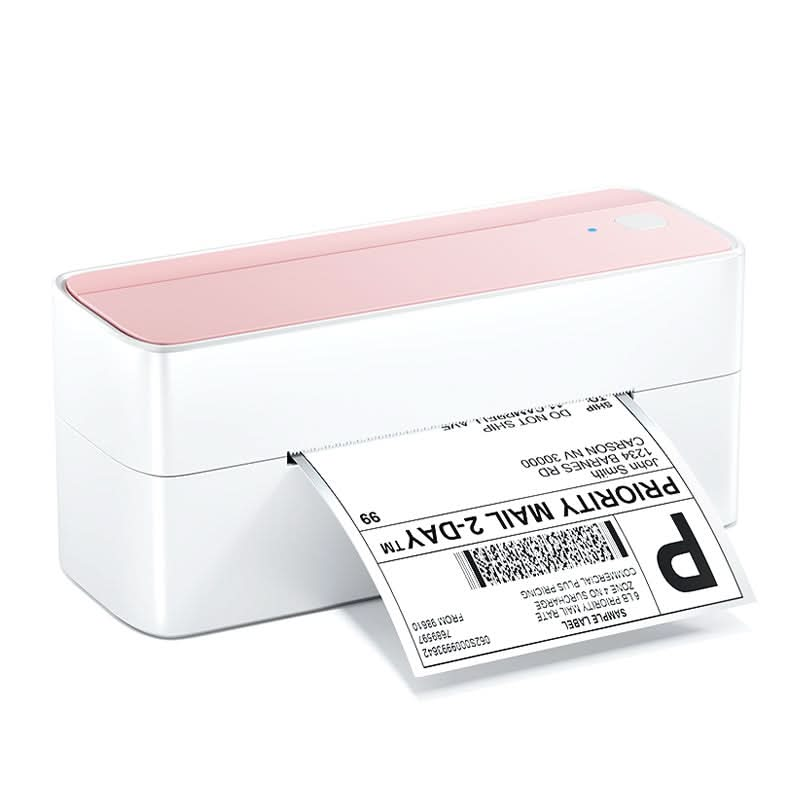
Phomemo
A buyer who wants small-label guide adjustment and has checked the current saving and recovery workflow.
Small-label placement is clearly described, while the supplied-unit reviewer encounters confusing recovery and repeat-design chores.
Reasons to choose it
- Adjustable guides demonstrated for smaller stock
- Official guide explains the physical paper path
- Reviewer completes the reported recovery after support
Tradeoffs to know
- Media-tracking interruption requires explanation and reset
- Reviewer finds the supplied manual taxing
- App used then could not save the reviewer's designs
Think twice if: You depend on unverified app-design saving or strongly dislike reference-based recovery sequences.
Further reading
Ratings
Editorial score 7.7
Paper, roll and label handling9
The reviewer adjusts guides directly; an official guide adds paper orientation and cover context.
Buttons and ordinary setup selection7
Calibration and later recovery require distinct blink sequences and support in the report.
Connection and routine care chores7
The historical manual/software route is taxing, with repeated design recreation described.
Sources & further reading
youtube.com review
youtube.com review
youtube.com review
youtube.com review
youtube.com review
youtube.com review
youtube.com review
youtube.com product information
youtube.com review
youtube.com review
Keep reading
Something changed? Help us keep this useful.
Send a correction →