
The recommendation
Choose T9 for deliberate room-priority selection and clearly separated display information. Check your intended mix of scheduled times and location-based behavior in the current app; the reviewed restriction is historical.
Grades at a glance
| Product | Overall | Reading ordinary display information | Changing ordinary on-device settings | App and schedule workflow |
|---|---|---|---|---|
| Honeywell Home T9 Smart Thermostat with Sensor | 7.7 | 8.0 | 8.0 | 7.0 |
Does it fit your life?
Who it suits
T9 is worth considering when choosing participating rooms is an everyday task you want to manage deliberately. Its display separates the current reading, desired setting and room priority, and the review shows changing the room selection. The bigger purchasing question is the routine in the app: an older review found a compromise between custom times and location-based behavior.
This review assesses ordinary display reading, wall controls and app routines from the linked accounts and instructions. App observations describe the versions reviewed.
The pictured thermostat
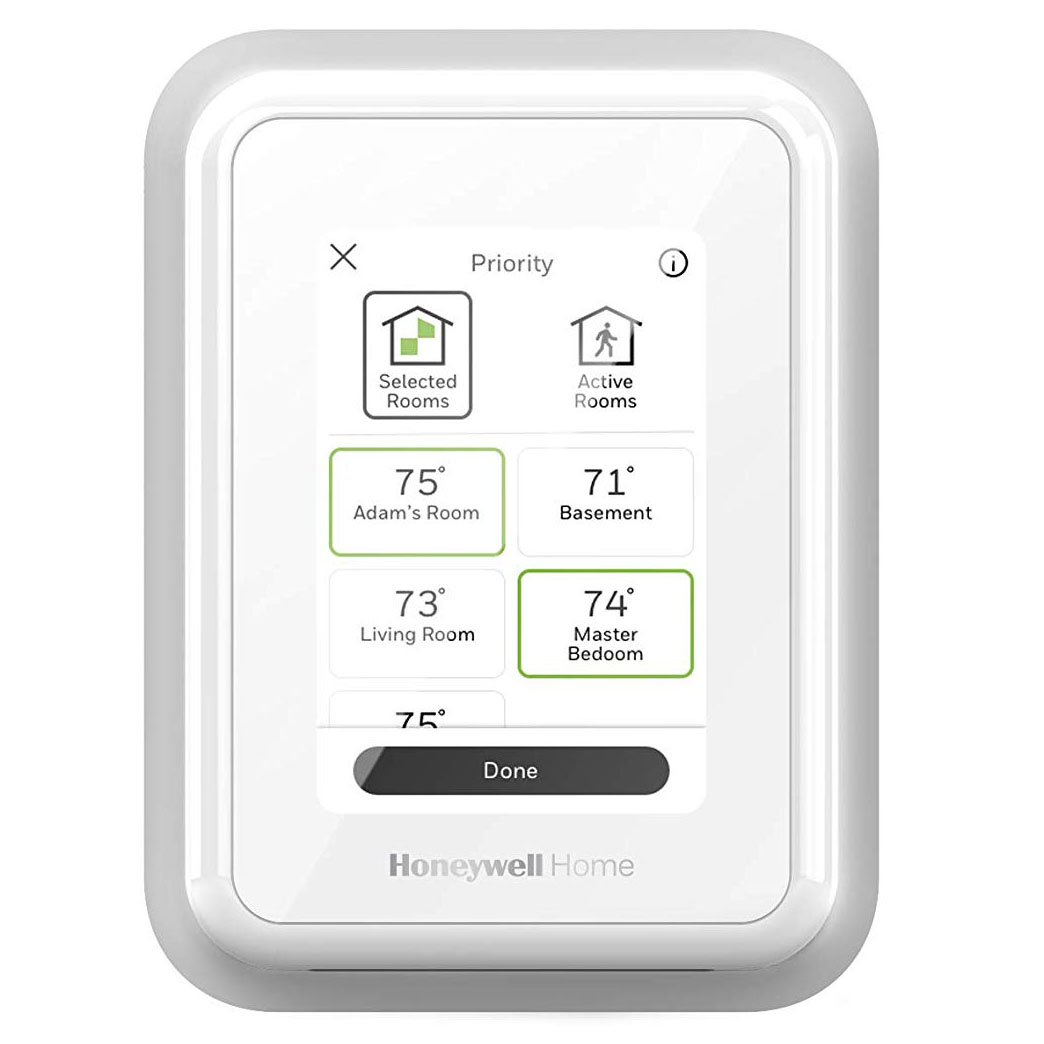
Product illustration: Honeywell Home T9 thermostat shown with a room-selection screen. The photo illustrates appearance; it does not establish display readability in your room or measured performance.
Reading the everyday display
The T9 user guide labels the large current indoor reading separately from the smaller desired setting, humidity and room-priority information. Read them in that order when you approach: current value, chosen value, then which rooms are prioritized. A quick glance at the largest number alone leaves out part of what this interface is telling you.
The guide instructs you to press the center temperature area to wake the screen. If the menu is missing, wake it before looking for the menu icon. This is a documented reading sequence, not a hands-on assessment of brightness or visibility across a room. The cited copy is the June 2022 guide; its current link from the manufacturer’s website has not been verified.
Making a change at the wall
The hands-on reviewer selects two rooms and returns to the main view. The useful task is choosing which rooms participate rather than assuming all named rooms are always selected. Someone who changes the room selection as household activities change may appreciate having that choice exposed. It also adds a check to a quick visit: look at the priority information, not only the large number. The review supports the selection steps; the score is about operating those choices.
Editing the routine in the app
The older Honeywell Home app account describes a compromise: custom schedules could not be freely combined with geofencing in the version reviewed. The reviewer used a Sleep schedule option within geofencing as a workaround. If your household wants both fixed times and location-based routines, this is the first task to inspect in the current app. Do not choose on the assumption that two individually listed options necessarily work together in exactly the way you intend. Equally, this historical account does not establish that today’s app retains the same restriction.
Everyday-use scorecard
| Everyday job | Score / 10 | What decides the score |
|---|---|---|
| Reading ordinary display information | 8 | The guide separates current and desired readings, with a wake step and smaller secondary information. |
| Changing ordinary on-device settings | 8 | The review demonstrates choosing participating rooms and returning to the main view. |
| App and schedule workflow | 7 | An older app review describes a compromise between custom schedules and geofencing. |
Overall everyday-use score: 7.7/10. The score helps compare these three interaction jobs; your preferred way to use the wall and phone still decides the fit.
The routine to try before choosing
Start a demonstration from the sleeping display, wake it, find the menu, and inspect the current room priority. Then change the participating rooms and return to the main view. The hands-on review shows a two-room selection; the useful question is whether you can tell which selection you made when you return.
Evaluate the app as a separate chore. Describe the fixed times and location-based behavior you actually want, then inspect whether that combination is available. The older review’s Sleep option within geofencing was a workaround for that reviewer. It does not establish either that the restriction persists today or that a later version has removed it.
The alternative worth comparing
T9 puts room-priority inspection at the center of its appeal. Sensi Touch 2 is the stronger choice here if your main job is changing day groups and times in a weekly routine: its review walks through those edits directly. Compare the actual chores, because a clear schedule editor does not answer the same question as a room-priority screen.
Read the Sensi Touch 2 Smart Thermostat review or return to the seven-thermostat guide.
Honeywell Home T9 Smart Thermostat with Sensor
Honeywell
Households that want to inspect and choose room priorities and do not mind a wake step before opening menus.
T9 organizes the current reading, desired setting and room-priority information separately. Its room-selection controls are useful, while an older app review describes a scheduling compromise.
Reasons to choose it
- The guide distinguishes current and desired readings and identifies priority information.
- The hands-on review demonstrates manually selecting participating rooms.
Tradeoffs to know
- The display may need waking before the menu appears; secondary information is smaller.
- The reviewed app constrained combining custom schedules with geofencing.
Think twice if: Households that need a schedule-and-location routine without first checking how the current app combines those choices.
Published specifications
- Routine focus
- Households that want to inspect and choose room priorities and do not mind a wake step before opening menus.
- Wall interaction
- A room-selection interface worth learning before purchase
Ratings
Editorial score 7.7
Reading ordinary display information8
The guide separates current and desired readings, with a wake step and smaller secondary information.
Changing ordinary on-device settings8
The review demonstrates choosing participating rooms and returning to the main view.
App and schedule workflow7
An older app review describes a compromise between custom schedules and geofencing.
Sources & further reading
d1unzhqf5a606m.cloudfront.net product information
youtube.com review
youtube.com review
Keep reading
Something changed? Help us keep this useful.
Send a correction →