TP-Link Deco XE75 Pro Review (2026): Wi-Fi 6E Value With 2.5GbE Caveats
What to know before buying TP-Link’s AXE5400 3-pack: easy Deco setup, 6 GHz placement, one 2.5GbE port per node, HomeShield upsells, and when Wi-Fi 7 is worth paying for.
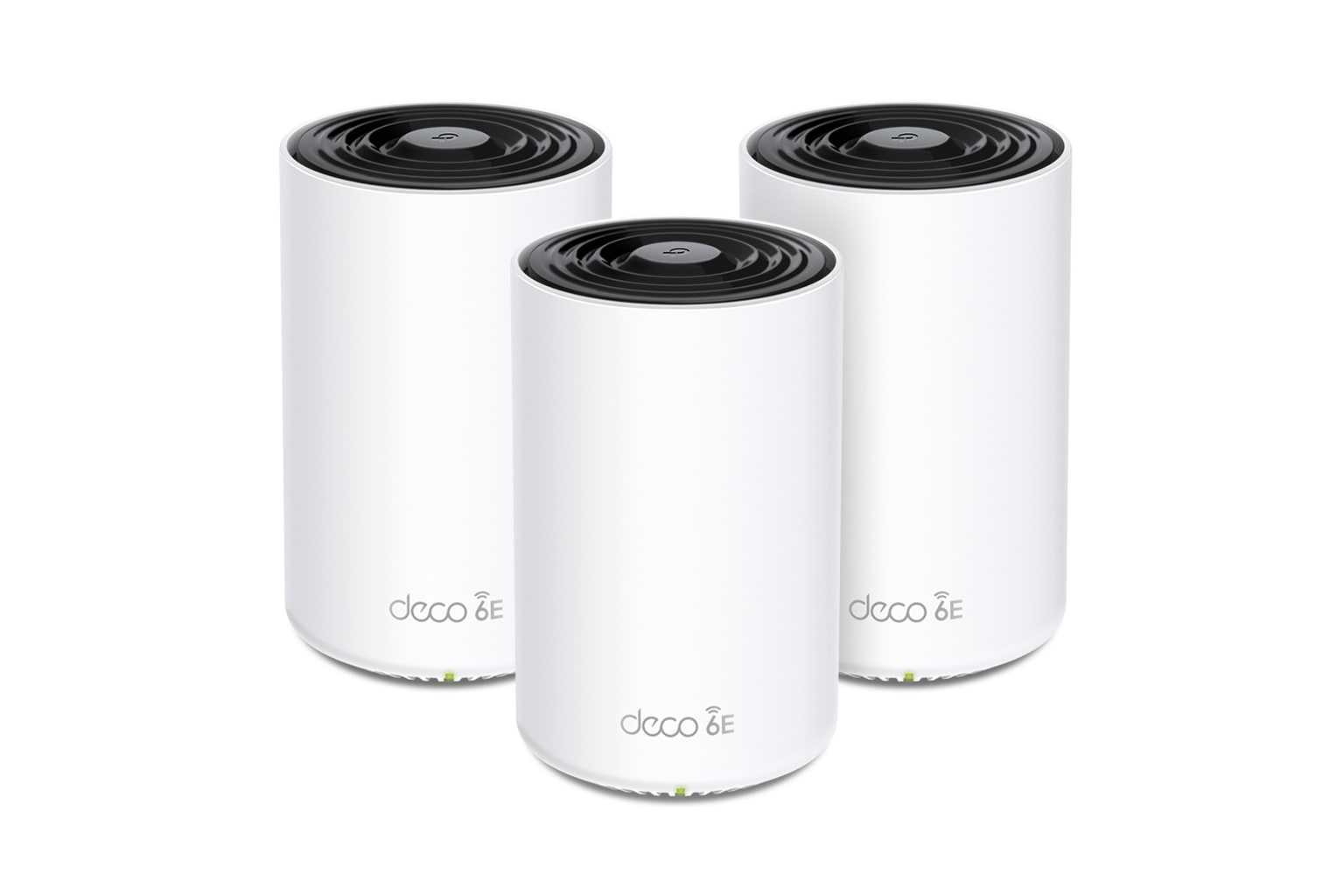
TP-Link Deco XE75 Pro is the value pick in our Wi-Fi mesh ranking: easy to set up, far cheaper than the Wi-Fi 7 kits at our captured check, and still useful for 6E backhaul — as long as you understand the one-2.5GbE-port limit and HomeShield paid tiers.
MSRP
$399.99
Amazon
$249.98
at writing · 2026-05-06
Buyer fit
It gives budget buyers a real Wi-Fi 6E mesh path with 6 GHz and a 2.5GbE port at a much lower current price. It loses future headroom versus Wi-Fi 7 and can still run into HomeShield and 6 GHz range caveats. Current Amazon-new availability was verified for ASIN B0B8B8MCF1 at $249.98 during Stage 1/2 checks.
MSRP
$399.99
Amazon
$249.98
at writing · 2026-05-06
Score breakdown
How this product scored
Same rubric, but focused on one product so the reasons behind the score stay readable.
Coverage & roaming reliability
Coverage, roaming, satellite stability, and placement evidence from official specs plus review/source patterns. Product-specific scoring used the Stage 3 source rows and Stage 2 dossier caveats.
Setup & app clarity
Setup walkthroughs, app clarity, device/node visibility, troubleshooting, and how much the kit asks of non-expert buyers. Product-specific scoring used the Stage 3 source rows and Stage 2 dossier caveats.
Backhaul & port flexibility
Wired backhaul support, port count/speed, WAN/LAN options, and whether the hardware fits modern ISP and wired-device setups. Product-specific scoring used the Stage 3 source rows and Stage 2 dossier caveats.
Firmware stability & support
Visible update/support activity, known caveats, support docs, and whether the ownership trail looked calm or watchful. Product-specific scoring used the Stage 3 source rows and Stage 2 dossier caveats.
Controls & subscription posture
How much useful security, parental control, privacy, and network management is included without an ongoing paid tier. Product-specific scoring used the Stage 3 source rows and Stage 2 dossier caveats.
Performance headroom
Throughput, latency, multi-client room-to-room performance, and whether the spec class leaves room for modern clients. Product-specific scoring used the Stage 3 source rows and Stage 2 dossier caveats.
Quick Verdict
TP-Link Deco XE75 Pro is the mesh kit to buy when you want better whole-home Wi-Fi without paying flagship Wi-Fi 7 money. The promise is simple: a three-node Wi-Fi 6E system with a clean 6 GHz lane, one 2.5GbE port on every node, and Deco’s low-drama app setup. The regret it helps avoid is overbuying a bleeding-edge router for a house still full of Wi-Fi 5, Wi-Fi 6, and ordinary gigabit devices.
That is why it ranked #4 as the Best value in our Best Wi-Fi Mesh Systems in 2026. TP-Link Deco BE63, NETGEAR Orbi 770, and ASUS ZenWiFi BQ16 Pro sit higher because they have newer radios, richer ports, or much more headroom. But at our captured Amazon-new check, the exact 3-pack ASIN B0B8B8MCF1 was in stock from Amazon.com at $249.98, while the higher-ranked Wi-Fi 7 systems cost much more.
The ownership story is refreshingly normal: easy app setup, useful node/client visibility, real wired-backhaul support, and enough speed for many larger homes. PCMag called the XE75 Pro “a breeze to install and manage,” while HighSpeedInternet said, “You shouldn’t have problems getting the XE75 Pro system up and running in no time flat.” Use the product links to recheck today’s price, seller, pack size, new-condition availability, return terms, and exact Pro AXE5400 variant before checkout; those links also help support KB4UB.
Score Breakdown
- Coverage and roaming reliability: 8.0/10. The 3-pack is claimed for up to 7,200 sq ft, and the reviewed signal/throughput story is strong. Placement still matters, especially if the 6 GHz link has to fight dense walls or floors.
- Setup and app clarity: 8.1/10. Deco’s app-led setup is one of the easier lanes here. The catch is that the web interface is thin, so buyers who want deep router controls should look elsewhere.
- Backhaul and port flexibility: 7.8/10. One 2.5GbE port plus two Gigabit ports per node is excellent at this price. It is not the same as BE63’s richer port spread or ASUS’s 10G hardware.
- Firmware stability and support: 7.6/10. TP-Link support pages showed recent XE75 Pro firmware activity into 2026, which is a good sign for an older-generation value pick.
- Controls and subscription posture: 6.5/10. Basic HomeShield controls are included, but stronger parental/security tools sit behind paid tiers.
- Performance headroom: 7.6/10. Wi-Fi 6E and 160 MHz channels still have real life left. Wi-Fi 7 buyers, 5G/10G internet users, and heavy wired-device households should move up.
What Feels Great Right Away
The nicest thing about the XE75 Pro is that it does not ask you to become a network hobbyist just to get useful modern Wi-Fi. The nodes are identical white cylinders, the app walks you through modem power cycling and network naming, and satellites can join automatically after the main Deco is online. PCMag’s setup notes are almost suspiciously calm: “Within seconds, the Deco router was recognized,” then after saving settings and testing internet connectivity, the second node was “automatically added to the network.”
Once it is running, the Deco app gives the everyday visibility most people actually use: online/offline clients, node signal strength, which device is connected to which node, upload/download activity, bandwidth priority, HomeShield, and smart actions. HighSpeedInternet liked the app layout too, writing that it “does an excellent job of spreading out and categorizing all your settings into four tabs.”
That matters because mesh annoyances usually show up as small household mysteries: the TV buffers in one room, a laptop sticks to the wrong node, or a child’s device needs a quick pause. Deco is not the deepest control surface in this roundup, but it puts the common fixes where normal people can find them.
Ports, Backhaul, and Speed Are the Value Story
The Pro part of XE75 Pro mostly comes down to the port that cheaper mesh kits often skip. Each node has one 2.5GbE WAN/LAN port and two auto-sensing Gigabit ports. PCMag called that 2.5GbE port “a useful feature if your ISP offers gigabit or better speeds,” and that is exactly the appeal: you get a multi-gig entry point without buying a flagship Wi-Fi 7 set.
The 6 GHz band is the other reason this kit still deserves attention. It can act as a cleaner wireless lane for backhaul or compatible clients, which helps if your home is crowded with older 2.4 GHz and 5 GHz traffic. A ShortCircuit transcript put the simple version well: Wi-Fi 6E opens “an entirely new range of six gigahertz Spectrum” and can help with “high bandwidth file transfers.”
But do not turn that into fantasy math. One 2.5G port per node means you can run into choices: multi-gig WAN, wired backhaul, or a fast wired device may compete for the same best jack. If you want multi-gig WAN plus multiple wired 2.5G LAN devices at every node, Deco BE63 or ASUS BQ16 Pro is the more honest lane.
The 6 GHz Band Is Useful, Not a Wall-Piercing Cure
The hidden question with any Wi-Fi 6E mesh kit is whether your house lets the 6 GHz band do its job. In open or moderately friendly layouts, the XE75 Pro can feel like a bargain: clean wireless backhaul, strong close-range client speed, and less competition with crowded older bands. In a chopped-up house with plaster, masonry, metal, or dense floors, the same 6 GHz link can become pickier.
That is why the official 7,200 sq ft claim should be treated as a starting point, not a promise. One YouTube reviewer using a two-pack said they “didn’t have that much luck” with the claimed footage in an old, long apartment, then added that the system was still “stellar” for their front/back placement. That is the real-world lesson: layout beats box math.
If you have Ethernet, the XE75 Pro gets much easier to recommend. TP-Link’s own Ethernet-backhaul support page says, “Set up all Deco units wirelessly first using the Deco app, then connect the Ethernet cables. The Ethernet backhaul activates on its own.” Wired backhaul is the cheat code for making this cheaper Wi-Fi 6E kit feel calmer in a difficult home.
The App Is Friendly; HomeShield Is Where the Fine Print Starts
Deco’s app-first approach is a win for most buyers and a warning for a few. HighSpeedInternet wrote that the XE75 Pro’s web interface is “a barren landscape compared to other standalone routers and mesh systems,” then added that everything you need is probably in the Deco app anyway. That is a fair summary: if you want a friendly home mesh, great. If you want advanced channel choices and router nerd knobs, less great.
The bigger fine-print item is HomeShield. PCMag says you can use HomeShield for web filters, blocked websites, bedtime rules, and a basic scan for performance issues, password strength, and firmware updates. Then comes the line to remember: “For more robust parental controls and network security tools, you’ll have to subscribe to TP-Link’s HomeShield Pro service.”
That does not ruin the XE75 Pro. eero, Orbi, and TP-Link all have some version of the paid-feature problem, and at this price the hardware value is still strong. Just do not buy it assuming every parental-control, security, traffic-stat, or usage-reporting feature is permanently included in the box price.
What Gets Annoying Once You Live With It
The most likely annoyance is not setup. It is the feeling that the system is making decisions for you without giving every manual override you might want. HighSpeedInternet almost gave the XE75 Pro a perfect performance score, then pulled back because “the lack of channel selection control is problematic.” The review’s blunt summary: “your speeds depend wholly on the channel the AI selects, which may or may not be optimal for your setting.”
There are also testing traps. TP-Link’s slow-speed troubleshooting page warns that the speed test in the Deco app measures only the main Deco unit’s connection speed, “not the speed that individual connected devices receive.” That is the sort of detail that can waste an afternoon if one bedroom still feels slow while the app proudly reports a strong main-router result.
And because this is the value pick, the limits show up faster for ambitious networks. No Wi-Fi 7, no 320 MHz channels, no MLO, no USB storage, and no pile of multi-gig ports. None of that is shocking at the captured price. It only becomes annoying if the “Pro” name makes you expect a flagship.
How It Compares
The XE75 Pro is the cheap smart buy in this group, not the spec-sheet champion.
- TP-Link Deco BE63: Our best overall pick. BE63 is newer, faster, Wi-Fi 7, and much better for wired-device-heavy homes thanks to more 2.5GbE ports per node. Choose XE75 Pro if the lower price matters more than Wi-Fi 7 headroom.
- NETGEAR Orbi 770: The premium large-home pick. Orbi is the safer mainstream upgrade if you want a newer Wi-Fi 7 system and broad coverage, but it costs far more and still has paid-service caveats.
- ASUS ZenWiFi BQ16 Pro: The power-user pick. ASUS is the opposite of Deco value: expensive, huge, deeply configurable, and loaded with 10G ports. Buy ASUS if you know exactly why you need it.
- Amazon eero 6+: The simple setup pick. Eero is friendlier for hands-off households, but the XE75 Pro gives you 6 GHz and a 2.5GbE port.
- Google Nest Wifi Pro: The Google Home fit. Nest adds Matter/Thread appeal, but its gigabit ports and limited settings make the XE75 Pro a better network-hardware value for many buyers.
Who Should Buy the TP-Link Deco XE75 Pro
Buy the XE75 Pro if you want to fix whole-home Wi-Fi without turning your router into a new hobby. It is a strong fit for budget-conscious larger homes, gigabit-to-2.5G internet plans, families that want an easy app, and people who can place nodes thoughtfully.
It is especially attractive if you have or can add Ethernet between nodes. Wired backhaul reduces the pressure on 6 GHz placement, makes satellite behavior less mysterious, and lets the cheaper kit punch above its price.
It also makes sense as a “good enough modern” upgrade. If your devices are mostly Wi-Fi 6/6E or older, and your internet plan is not racing toward 5G or 10G, the XE75 Pro may deliver the improvement you actually feel: fewer dead spots, easier device management, and a cleaner connection in busy parts of the house. That is not glamorous. It is exactly why the value pick exists.
Who Should Skip It
Skip the XE75 Pro if you are buying for Wi-Fi 7 clients, multi-gig fiber above 2.5G, or a network closet full of wired devices. You will run out of headroom before the flagship kits do.
Skip it if you need lots of manual router controls. Deco is friendly because it hides complexity; that is great until you want channel selection, deeper web-console settings, or the kind of admin surface ASUS gives power users.
Skip it if your home’s dead zones are caused by brutal construction rather than an old router. 6 GHz will not bully its way through every wall. In that case, plan for Ethernet backhaul, more careful placement, or a different kit with the node count and port layout your house actually needs.
Finally, skip it or budget carefully if advanced parental controls and security reports are the reason you are upgrading. HomeShield’s paid tiers are part of the ownership math.
Bottom Line
Buy the TP-Link Deco XE75 Pro if: you want a three-node Wi-Fi 6E mesh kit with easy setup, 6 GHz, Ethernet backhaul support, and one 2.5GbE port per node at a much lower captured price than Wi-Fi 7 systems.
Skip it if: you need Wi-Fi 7, many multi-gig ports, deep manual controls, or subscription-free advanced parental/security tools.
Bottom line: XE75 Pro is not the most futureproof mesh system in our ranking. That is the point. It is the value pick because it gives ordinary households the upgrades they are most likely to notice — better whole-home coverage, cleaner backhaul options, and a real multi-gig entry point — without demanding flagship money. Buy the exact Pro AXE5400 3-pack, recheck the Amazon-new offer before checkout, and place the nodes like 6 GHz has boundaries, because it does.
Feature breakdown
Full feature list
Grouped feature details are expandable so buyers can go deep when they want, without turning the whole review into a spec landfill.
Full feature list
10 features
+
Full feature list
10 features
Bands
Tri-band: 2.4 GHz, 5 GHz, and 6 GHz
Backhaul
6 GHz wireless backhaul and documented Ethernet backhaul support; TP-Link says Ethernet backhaul can be mixed with Wi-Fi backhaul and activates automatically after cabling
Controls
TP-Link HomeShield with basic free tools and paid Security+ / Advanced Parental Controls / Total Security packages for advanced functions
Checked Kit
TP-Link Deco XE75 Pro AXE5400 tri-band Wi-Fi 6E mesh system, 3-pack
Speed Class
AXE5400; TP-Link lists tri-band speed up to 5,400 Mbps with 160 MHz support
Setup Caveat
Router-mode and access-point wiring rules differ; set up Deco units wirelessly first before connecting Ethernet backhaul per TP-Link support guidance
Ports Per Node
1 x 2.5GbE WAN/LAN port plus 2 x Gigabit Ethernet ports per node
Claimed Coverage
Up to 7,200 sq ft for the 3-pack; placement, floors, and wall materials still matter
Price At Writing
$249.98 USD new Amazon.com offer captured 2026-05-06T08:41:56Z for ASIN B0B8B8MCF1
Wireless Standard
Wi-Fi 6E / 802.11ax with 6 GHz support
Tell us what this page missed
These pages get better when real buyer complaints make it back into the scoring model. If something important is underweighted, say it.
Rate this review
Give it a score from 1-10 and tell us what to improve.
0/4000 characters