SteelSeries Aerox 5 Wireless Review (2026): Light, Button-Heavy, and Picky
A closer look at the Aerox 5 Wireless open shell, thumb-button layout, battery claims, SteelSeries GG setup, Amazon caveats, and why it is a careful-fit pick rather than a safe default.
The SteelSeries Aerox 5 Wireless is the lightweight extra-button pick in our gaming-mouse ranking: useful for mixed-genre players who want more controls than an ultralight FPS mouse, but risky if you dislike open shells, awkward thumb reaches, or uncertain listings.
MSRP
—
Amazon
$139.99
at writing · 2026-05-15
Buyer fit
Best lightweight extra-button pick: The Aerox 5 Wireless is the wildcard. It earns a place because the lightweight extra-button lane is real, but it is the pick that most needs a careful hand-fit and listing check before purchase.
MSRP
—
Amazon
$139.99
at writing · 2026-05-15
Score breakdown
How this product scored
Same rubric, but focused on one product so the reasons behind the score stay readable.
Shape and grip comfort
SteelSeries Aerox 5 Wireless scores 7.6/10 for shape and grip comfort. Score reflects shell shape, hand-fit warnings, grip comfort, and long-session caveats from owner/reviewer evidence.
Tracking and control
SteelSeries Aerox 5 Wireless scores 7.8/10 for tracking and control. Score reflects sensor confidence, control feel, polling practicality, glide, and whether the performance benefits are likely to matter in real games.
Buttons, clicks, and wheel
SteelSeries Aerox 5 Wireless scores 7.9/10 for buttons, clicks, and wheel. Score reflects button layout, click feel, wheel behavior, side-button reach, and repeated control complaints.
Battery and connection
SteelSeries Aerox 5 Wireless scores 8.1/10 for battery and connection. Score reflects connection reliability, battery expectations, charging, sleep/wake behavior, and dongle or cable caveats.
Software/firmware friction
SteelSeries Aerox 5 Wireless scores 7/10 for software/firmware friction. Score reflects setup workload, app and firmware annoyances, onboard memory behavior, account requirements, and how much software gets in the buyer’s way.
Use-case fit
SteelSeries Aerox 5 Wireless scores 7.8/10 for use-case fit. Score reflects how clearly the mouse fits its intended lane versus buyers who would be happier with a different shape, weight, or button layout.
Durability confidence
SteelSeries Aerox 5 Wireless scores 6.7/10 for durability confidence. Score reflects warranty/support context, owner complaints, build confidence, and whether known issues look rare or worth planning around.
Before You Buy
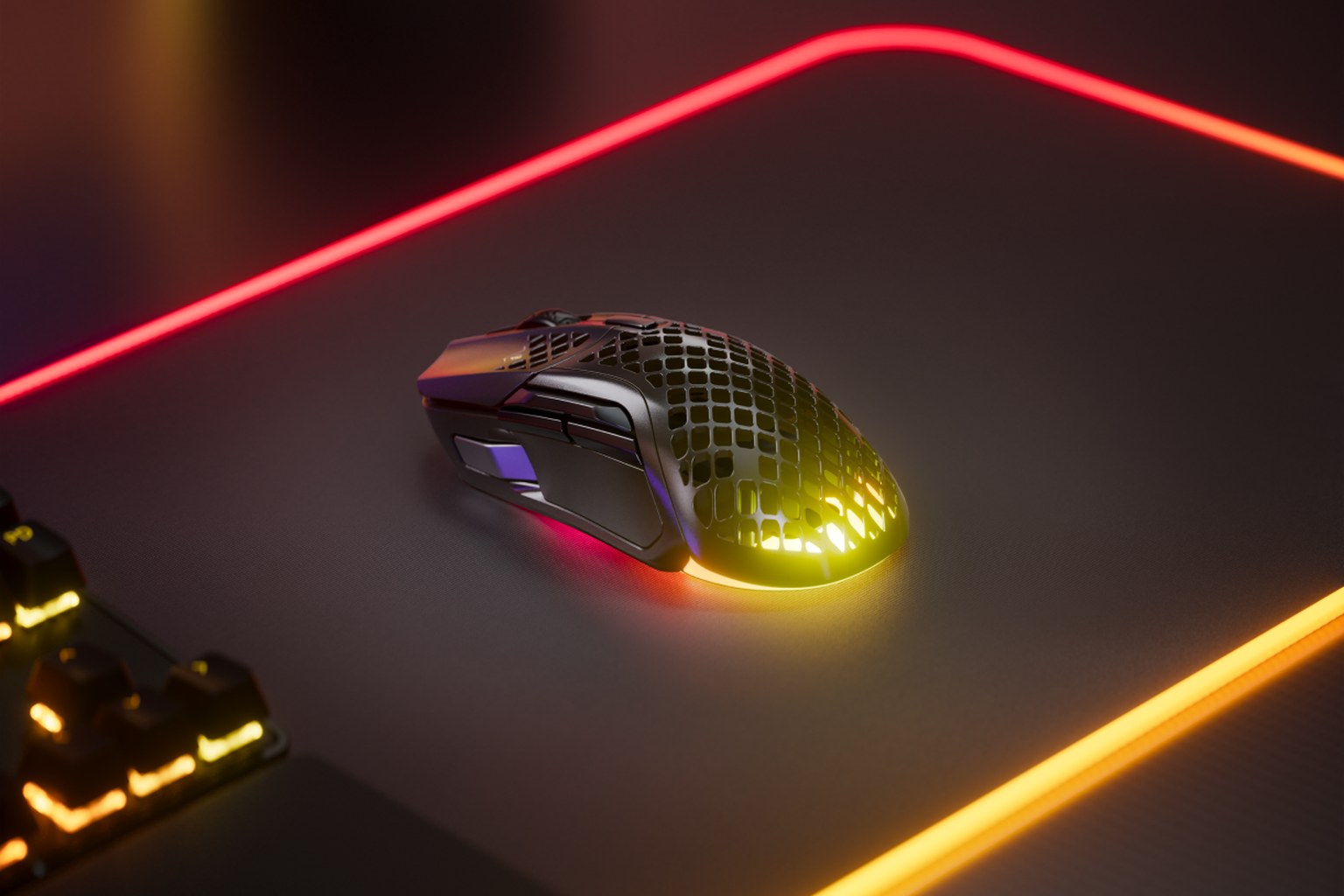
The SteelSeries Aerox 5 Wireless is the mouse in this set that can look perfect in a spec table and still be wrong in your hand. It is light at 74 g, wireless, USB-C, and packed with more controls than the Viper V3 Pro or Logitech Superlight 2. It also has an open honeycomb shell, a busy thumb area, and fewer broad owner signals than the safer picks above it.
That makes it interesting, not automatic. If you bounce between shooters and ability-heavy games, the Aerox 5 Wireless promises the thing a lot of players want: extra inputs without dragging around a heavy G502-style utility mouse or a true MMO grid. The regret risk is buying it because “nine buttons” sounds useful, then discovering that one of those thumb controls is awkward for your grip or that the open shell never feels clean and solid to you.
In our best gaming mice ranking, it lands at #8 as the Best lightweight extra-button pick with a 7.6/10 overall score. Use this deeper review to decide whether its lightweight control idea fits your hand and games. Then use the product links to check current price, seller, color, condition, bundle contents, and availability; KB4UB may earn from qualifying purchases, which helps support this work.
Quick Verdict
The short version: the Aerox 5 Wireless is for players who want a lighter middle ground between pure FPS mice and big control mice. It is not the best overall gaming mouse here, and we would not call it the safest buy. But the lane is real. If the Razer Viper V3 Pro and Logitech Superlight 2 feel too button-light, while the G502 X Plus and Corsair Scimitar feel too bulky or specialized, this is the kind of mouse that starts to make sense.
SteelSeries’ own product copy makes the promise clearly: a “holey shell reduces weight to 74g,” there are “9 PROGRAMMABLE BUTTONS,” and the mouse supports both 2.4GHz wireless and Bluetooth. That is the appeal in one sentence: more controls than a tournament FPS shell, less mass than the obvious utility alternatives.
The catch is that the extra controls are not equally easy to use. One hands-on transcript said the side cluster includes “two standard” buttons and a vertical thumb switch, but warned that “if you prefer a laidback hand position this button might be out of play.” That is the whole review in miniature. The Aerox 5 Wireless can be a clever mixed-genre tool, but only if your thumb actually likes the layout.
Score Breakdown
The Aerox 5 Wireless finished with a 7.6/10 overall score. Its strongest category is battery and connection at 8.1, mostly because the spec sheet gives it flexible wireless modes and a long Bluetooth claim. Buttons, clicks, and wheel land at 7.9 because the extra-button idea is useful, but the placement is not as universally easy as a simpler two-button FPS mouse or a full MMO grid. Tracking and control score 7.8: good enough for the mixed-genre role, but not the reason to choose it over the higher-ranked FPS picks.
The lower marks explain why it sits at #8 rather than higher. Shape and grip comfort score 7.6 because the open shell and thumb cluster need a hand-fit check. Software/setup lands at 7.0 because SteelSeries GG gives useful control but is another app to deal with. Durability confidence is the weakest score at 6.7, not because we found a single fatal flaw, but because this kept pick had thinner broad owner corroboration than the top mice and the open-shell design invites more personal tolerance questions.
So treat the score as a warning label, not a dismissal. This is a good idea with caveats, best for buyers who know why they want the extra buttons and are willing to verify the listing before checkout.
What Feels Great After Setup
What feels good immediately is the weight-to-control mix. The Aerox 5 Wireless gives you a light wireless body with a side panel that can handle more than back/forward browser buttons. For players who map melee, push-to-talk, pings, utility, weapon swaps, or MMO-lite abilities, that can feel freeing. You get some of the convenience of a control mouse without the desk presence of a G502 X Plus or the full thumb grid of the Scimitar Elite Wireless.
The shell is also part of the magic if you like airy mice. SteelSeries describes the design as an “Ultra Lightweight” mouse with AquaBarrier protection where “interiors are shielded from water splashes, dust, and dirt” and rated IP54. That does not make it a waterproof mouse, and it does not make the holes disappear under your palm, but it explains why SteelSeries is comfortable pairing an open shell with daily-use claims.
The wireless story is convenient on paper: 2.4GHz for gaming, Bluetooth for slower desktop use, USB-C charging, and a dongle extender cable. One transcript said “latency has been a non-issue in my trial,” which is the kind of everyday note that matters more than a DPI number. If the shape works for you, the Aerox 5 Wireless can feel like a neat little compromise: fast enough for shooters, but not stripped down when the game asks for more buttons.
Setup, Fit, and Daily Use
The first setup question is not DPI. It is thumb reach. The Aerox 5 Wireless asks more from your thumb than a normal two-side-button mouse, and that can be either the reason to buy it or the reason to return it. A hands-on reviewer described the shape as “pretty safe and just comfortable for relaxed style grips” with large hands, but also added, “if you have super small hands i don’t know about recommending this mouse.” That caveat is worth taking seriously.
The second setup question is whether you want SteelSeries GG on the machine. The software can handle lighting, macros, and profiles, and the wider SteelSeries GG page describes “Profiles that Stick With You” for loading custom gear profiles when a game is in the foreground. That is useful if you actually map different controls for shooters, MOBAs, MMOs, and desktop work. It is less delightful if all you want is a simple mouse that feels finished out of the box.
One transcript also called out a surprisingly practical issue: “there is no 1600 default dpi,” so the reviewer had a day where something felt off before changing settings. That is not a disaster, but it is exactly the sort of small setup annoyance that turns a clever mouse into homework. Plan on spending a few minutes in GG, checking your DPI steps, disabling RGB if you want more battery life, and testing every side control in the games you actually play.
The Annoyances to Know Before Buying
The biggest annoyance is the side-button layout. SteelSeries can accurately say there are nine programmable buttons, but not every buyer will experience those as nine equally natural buttons. One transcript was blunt that “the vertical button might seem rigid during rapid ingame interactions,” while another reviewer said they wished SteelSeries had “prioritized two good side buttons” instead of the flick-button idea. That does not make the layout useless. It means you should buy it for the controls you can reach comfortably, not for the number on the box.
The open shell is the other personal-risk item. Some people love the lighter, airier feel. Others never stop noticing the holes, worry about dust, or simply prefer a solid palm surface. SteelSeries’ AquaBarrier language helps with splash and dust confidence, but it does not change the feel under your hand. If you already know honeycomb shells bother you, this is not the mouse that will magically change your mind.
Battery also needs careful reading. SteelSeries advertises an extensive 180-hour battery claim, but that is tied to the lower-power side of the wireless story; 2.4GHz gaming, RGB, and polling settings will shorten real use. A transcript noted that battery reporting “can sometimes misjudge,” even though it had not caused a mid-game failure for that reviewer. Treat the battery claim as a ceiling, not a promise for your exact setup.
Current Amazon and Listing Check
Commerce is unusually important with this pick. During research, we captured Amazon-new search/listing signals on May 15, 2026, and the product record uses ASIN B09Z66S64T with a $139.99 price-at-writing snapshot. At the same time, the research notes flagged adjacent rows, tentative ASIN candidates, and the need to reject renewed, refurbished, pre-release, or bundle-only listings unless they are clearly chosen.
In practical terms: do not just click the first row that says Aerox. Confirm the listing says SteelSeries Aerox 5 Wireless, not the wired Aerox 5, a different color with a different price, a marketplace bundle, or a renewed unit. Check seller, condition, delivery date, included dongle/cable contents, and return policy before checkout. That advice matters more here than on the top FPS picks because this was the one mouse in the parent guide where we most wanted shoppers to double-check the exact listing.
If the exact Aerox 5 Wireless is discounted and the listing is clean, the value story improves. If it is sitting near full MSRP while safer mice are on sale, be pickier. The mouse’s role is specific enough that price and listing identity can change the recommendation quickly.
How It Compares
Compared with the Razer Viper V3 Pro, Logitech Superlight 2, and DeathAdder V3 Pro, the Aerox 5 Wireless is less of a pure aim tool and more of a compromise. The higher-ranked FPS mice are easier to recommend if you mostly play shooters and care about the lowest-distraction shape. They have simpler button layouts, cleaner roles, and stronger confidence in this research set.
Compared with the Razer Basilisk V3 and Logitech G502 X Plus, the Aerox 5 Wireless is much lighter and less desk-work focused. It gives up the more substantial solid-shell utility feel those mice offer, but it is easier to swing around in faster games. If you want scroll-wheel tricks, thumb rests, and productivity shortcuts, the heavier control mice are safer. If you want extra in-game binds without that bulk, the Aerox is the interesting one.
Compared with the Corsair Scimitar Elite Wireless, the Aerox is not an MMO replacement. The Scimitar is the hotbar specialist. The Aerox is for mixed-genre players who need a few more thumb options, not a full grid. And compared with the Logitech G305, the Aerox is more ambitious, lighter, rechargeable, and more expensive. Budget buyers should not stretch for it unless the button layout is exactly the reason they are upgrading.
Who Should Buy It — and Who Should Skip It
Buy the SteelSeries Aerox 5 Wireless if you play a mix of shooters, MOBAs, ARPGs, MMOs, and desktop shortcuts, and you keep wishing ultralight FPS mice had just a few more controls. It fits best for medium-to-large right hands, relaxed claw or palm-leaning grips, and buyers who are curious about open-shell mice rather than suspicious of them. It also makes more sense if you are willing to spend a few minutes tuning SteelSeries GG and testing whether each side control earns its place.
Skip it if you want the safest overall gaming mouse recommendation. The Viper V3 Pro, Superlight 2, and DeathAdder V3 Pro are cleaner FPS picks. Skip it if you want a true MMO grid; that is Scimitar territory. Skip it if you want a solid ergonomic workhorse for gaming and office use; the Basilisk V3 or G502 X Plus will feel more natural to many people. And definitely skip it if honeycomb shells make you think about dust, cleaning, or grip every time you put your hand down.
The Aerox 5 Wireless is a wildcard in a good way: specific, useful, and a little weird. Just make sure you are buying the weirdness you actually want. For the broader context, compare it with the full gaming mouse ranking.
Tell us what this page missed
These pages get better when real buyer complaints make it back into the scoring model. If something important is underweighted, say it.
Rate this review
Give it a score from 1-10 and tell us what to improve.
0/4000 characters