Samsung Odyssey G9 G95C Review (2026): Huge 49-Inch Curve, Real Desk Demands
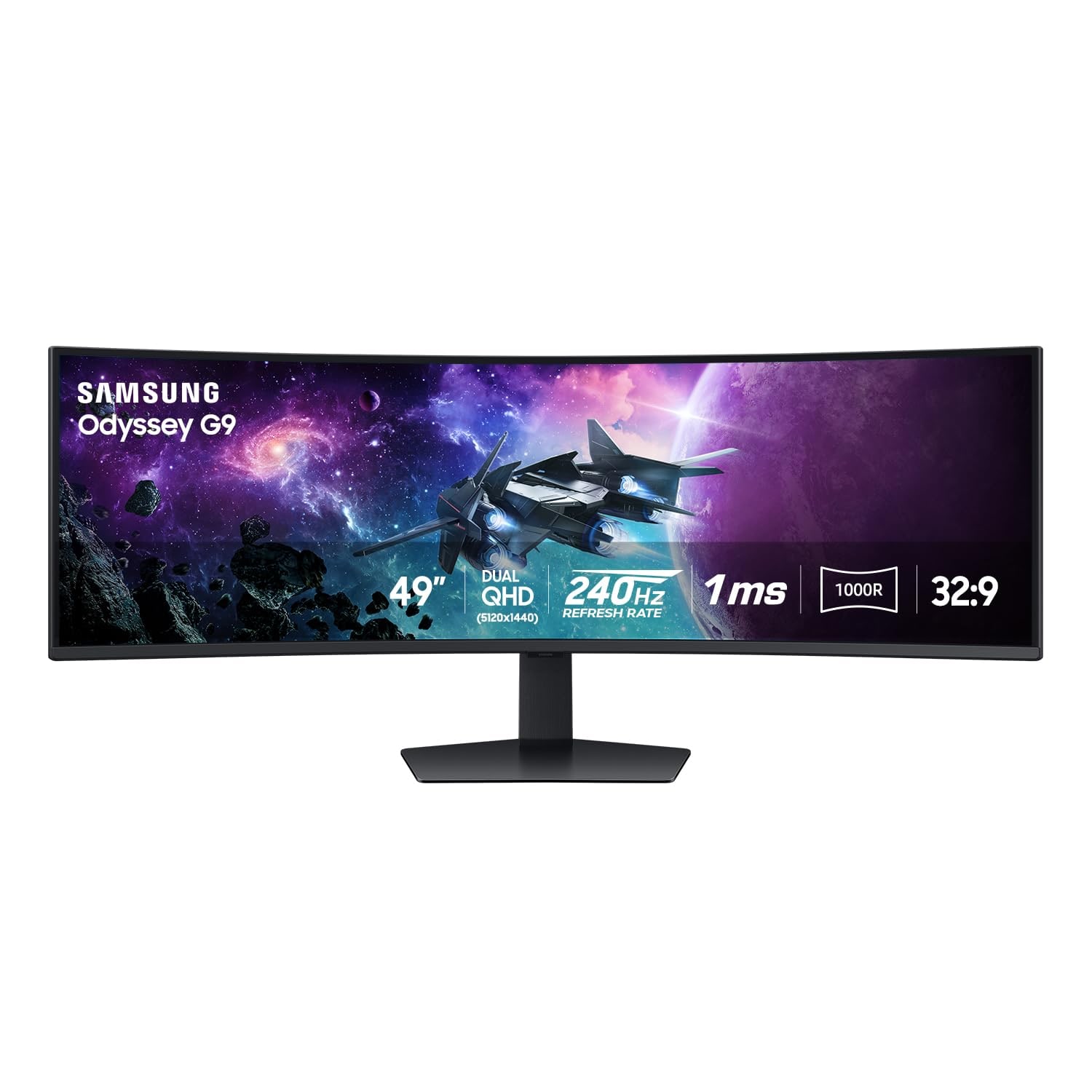
A 49-inch DQHD, 240 Hz VA super-ultrawide for PC gamers and timeline-heavy work, with huge upside if your desk, GPU, apps, and patience are ready for 32:9.
Samsung Odyssey G9 G95C is the super-ultrawide pick in our computer monitor ranking: thrilling for supported games and broad work layouts, but much less forgiving than a normal 27-inch 4K monitor.
MSRP
—
Amazon
$899.99
at writing · 2026-05-15
Buyer fit
The huge curved-canvas pick for buyers who already know they want 49 inches, 5120 x 1440, and 240 Hz, and have the desk and GPU to make it sane.
MSRP
—
Amazon
$899.99
at writing · 2026-05-15
Score breakdown
How this product scored
Same rubric, but focused on one product so the reasons behind the score stay readable.
Text clarity and comfort
The DQHD canvas is huge for timelines and side-by-side windows, but it is not the same crisp 4K-per-27-inch feel as the Dell picks.
Panel quality and consistency
VA contrast and DisplayHDR 1000 help the entertainment story, while ultrawide panel uniformity, size, and return risk deserve caution.
Motion and gaming setup
This is the reason it ranks: 240 Hz, adaptive-sync signals, and a wraparound view can be spectacular in games that support 32:9.
Connectivity and desk setup
The setup asks for a big desk, careful cabling, GPU horsepower, and realistic expectations around consoles and unsupported aspect ratios.
HDR, color, and creator fit
It can look punchier than ordinary IPS and has HDR credentials, but it is not the OLED or color-critical pick in this set.
Reliability and support
Current new-listing pricing was clean, but large Samsung ultrawides carry enough firmware, QC, and return anxiety to keep this score cautious.
Use-case fit
A great fit for the person who already wants one giant curved monitor; a poor fit for small desks or simple plug-and-play shoppers.
Source confidence
Exact G95C rows are present, with clear warnings to avoid mixing in OLED G9/G95SC evidence.
Quick Verdict
Samsung's Odyssey G9 G95C is not the monitor you buy because you vaguely want a bigger screen. It is the monitor you buy because one huge, curved 32:9 canvas is the whole point. In our Best Computer Monitors in 2026 guide, it ranks #4 as the Best super-ultrawide, with a 7.9/10 overall score: lower than the safer Dell 27-inch picks, but much more dramatic when it fits your desk and games.
The draw is obvious the first time a supported game or editing timeline uses the width properly. One reviewer said that in supported esports titles, the extra peripheral view felt like being "borderline cheating." Another called video editing on the wide timeline "a godsend." That is the G95C at its best: not a normal monitor, but one huge wraparound workspace.
The catch is that the workspace needs preparation. You need a large desk, a strong GPU, titles and apps that behave at 32:9, and a realistic plan for the stand, cables, mounting, and returns if your panel has problems. Captured May 15 price checks for ASIN B0DHJBWY52 ranged from $699.99 to $899.99, with the later dossier showing Amazon.com seller signals. Treat that as sale volatility, not a stable MSRP. Use the product links to recheck current price, seller, delivery, return policy, exact G95C identity, and to support KB4UB before buying.
Score Breakdown
- Text clarity and comfort: 7.8/10. The 5120 x 1440-class DQHD canvas is excellent for wide timelines and side-by-side windows, but it does not feel like two crisp 27-inch 4K panels stitched together.
- Panel quality and consistency: 7.5/10. VA contrast and DisplayHDR 1000 help movies and games look punchier than ordinary IPS, while ultrawide uniformity, panel QC, shipping, and return risk keep the score cautious.
- Motion and gaming setup: 9.4/10. This is the reason it exists: 240 Hz, adaptive-sync signals, and a wraparound view that can be spectacular when a game supports 32:9.
- Connectivity and desk setup: 7.2/10. The monitor asks for a huge desk, careful cabling, GPU horsepower, and realistic expectations around consoles and unsupported aspect ratios.
- HDR, color, and creator fit: 7.9/10. HDR credentials and VA contrast help, but this is not the OLED pick or the color-critical work monitor in this set.
- Reliability and support: 6.8/10. The current new-listing check was clean, but large Samsung ultrawides carry enough firmware, QC, and return anxiety to deserve careful testing.
- Use-case fit: 7.8/10. Great for the person who already wants one giant curved display; poor for small desks or shoppers who want a simple monitor.
- Source confidence: 7.8/10. Exact G95C rows are present, but adjacent OLED G9, Neo G9, older G9, and 57-inch Odyssey evidence must stay out of this decision.
What Feels Great After Setup
The best version of the G95C is wonderfully unreasonable. Instead of two monitors with bezels, mismatched scaling, and one screen always slightly off-angle, you get one continuous 49-inch curve. For racing, flight sims, open-world games, wide strategy interfaces, editing timelines, trading dashboards, and research-heavy desks, that can feel less like a monitor upgrade and more like changing the room.
The strongest reviewer notes land on the same point. A reviewer moving from multiple displays said the G95C gave him "an insane amount of screen real estate on a single panel." For video editing, he said seeing more of the timeline made scrubbing footage easier. Another reviewer said the extra width let him keep "three to four windows open", which is exactly the promise if you live in documents, browser tabs, chats, source windows, timelines, or dashboards.
The 240 Hz refresh is not a footnote, either. It is the strongest motion score in the computer-monitor set, above the Dell 4K/120 Hz options and the Samsung OLED M9's 165 Hz lane. If your PC can feed it and your game supports the shape, the G95C can feel fast and huge at the same time, which is rare.
Setup, Desk, and GPU Checks
Measure before you fall in love with the spec sheet. One transcript puts it bluntly: "you will need a very large desk to accommodate this super ultrawide monitor." The same source described the monitor as just under 35 lb and noted a heavy-duty stand, VESA compatibility, cable management, height adjustment, swivel, and tilt. That sounds reassuring, but it also means you should think through desk depth, stand footprint, sight distance, arm weight limits, and whether you can safely handle the box.
The GPU check is just as important. This is a 5120 x 1440-class display at up to 240 Hz, so it can ask much more of a PC than a basic 1440p monitor. One review source recommended RTX 4070, 4080, or 4090-class hardware to push frame rates. You do not need maximum settings in every game to enjoy the monitor, but you should not buy it assuming every midrange PC will make the 240 Hz headline feel effortless.
Connectivity is gaming-first rather than laptop-dock-first. The source material mentions DisplayPort, HDMI, USB 3.0 ports, PC-in, audio out, and no speakers. It is not trying to replace the Dell UltraSharp U2725QE as a Thunderbolt/KVM office hub, and no verified USB-C power-delivery story belongs in the buying case.
Gaming, Work, and 32:9 Reality
The G95C is brilliant when software cooperates and awkward when it does not. In supported games, the wraparound view can make racing, sims, open worlds, and some competitive titles feel more immersive or more informative. In unsupported games, you may be playing at 16:9 with black bars or dealing with menus, HUDs, cutscenes, and field-of-view behavior that were never designed for this shape.
One reviewer said it directly: "gaming on a super ultra wide will not work for every title." That sentence should stay in your head while shopping. If you mostly play console games, older PC titles, competitive games with aspect-ratio limits, or games where ultrawide support is inconsistent, the G95C can become a very expensive screen that spends too much time pretending to be smaller.
For work, the same width can be either a gift or a distraction. A creator source loved the room for editing, research, and multiple windows, then admitted the extra windows could also make it easier to watch YouTube or Netflix while working. If you are disciplined with window layouts, the G95C can replace a multi-monitor desk. If you already get lost in tabs, the monitor will not fix that for you.
Annoyances, Reliability, and Model-Name Traps
The most important reliability advice is not glamorous: test your exact unit hard while the return window is open. Large curved ultrawides are more stressful to ship, harder to repack, and more annoying to return than ordinary 27-inch monitors. Check dead or stuck pixels, uniformity, flicker or scanline behavior, HDR modes, sleep and wake behavior, the full refresh-rate setup, and the games or apps you care about most.
Also keep the model names straight. Samsung sells several 49-inch Odyssey G9 variants, and the product evidence repeatedly warns not to mix this G95C with OLED G9/G95SC/G91/G93 models, Neo G9 models, older CRG9/G9 units, or the 57-inch Odyssey. One reviewer explained that his choice came down to the G95C and its VA panel versus nearby OLED models. That distinction matters because the strengths, burn-in risks, HDR behavior, prices, and refresh rates are not interchangeable.
The 6.8 reliability score is not saying the G95C is a bad monitor. It is saying this category punishes casual buying. A clean current-new Amazon signal helps, but firmware, panel QC, return hassle, and exact model matching deserve more attention than they would on a small office display.
How It Compares to the Other Monitor Picks
The Dell S2725QC is the better default for most people. It gives you 27-inch 4K sharpness, 120 Hz, and USB-C desk cleanup without demanding a giant desk or a gaming PC that can drive 32:9 at high refresh rates.
The Dell S2725QS is the simpler value pick. If your desk already has cables and you just want a sharp 4K/120 Hz display, it is far easier to recommend than the G95C.
The Dell UltraSharp U2725QE is the premium office-hub alternative. It is not as thrilling, but Thunderbolt 4, KVM, and high-power laptop charging make more sense for a MacBook or work-laptop desk.
Samsung's OLED M9 is the better Samsung pick if you want rich contrast, media, smart-TV features, and a normal 32-inch 16:9 shape. It carries OLED desktop caveats, but it does not ask your games and desk to accept a 49-inch curve.
The Dell P2424HT solves a completely different problem: touch-first office work. It is the opposite of the G95C in almost every way, which is the point. The G95C wins when the giant curved canvas is the reason you are shopping.
Final Buying Advice
Buy the Samsung Odyssey G9 G95C if you can already picture why 32:9 belongs on your desk. The strongest buyers are PC gamers who play supported titles, sim and racing fans, editors who want a wider timeline, traders or analysts who live in dashboards, and multitaskers who would rather manage one enormous curve than two or three separate screens.
Skip it if you are trying to talk yourself into the idea. A small desk, console-first setup, modest GPU, color-critical work, frequent screen recording for 16:9 output, or a low tolerance for return-window testing all point toward a safer monitor. The Dell 27-inch picks are less exciting, but they are also much easier to live with.
The checkout rule: do not buy the G95C until you have measured the desk, checked GPU expectations, searched your favorite games or apps for 32:9 behavior, confirmed the exact ASIN B0DHJBWY52, and planned the first-week tests. If all of that sounds reasonable instead of exhausting, this is the kind of over-the-top monitor that can be genuinely delightful.
Tell us what this page missed
These pages get better when real buyer complaints make it back into the scoring model. If something important is underweighted, say it.
Rate this review
Give it a score from 1-10 and tell us what to improve.
0/4000 characters