Razer Basilisk V3 Review (2026): Useful Wired Control, Not an FPS Flagship
A closer look at the Basilisk V3’s wheel, thumb rest, 11 controls, cable feel, Synapse setup, comfort fit, and why it still makes sense below the lighter FPS picks.
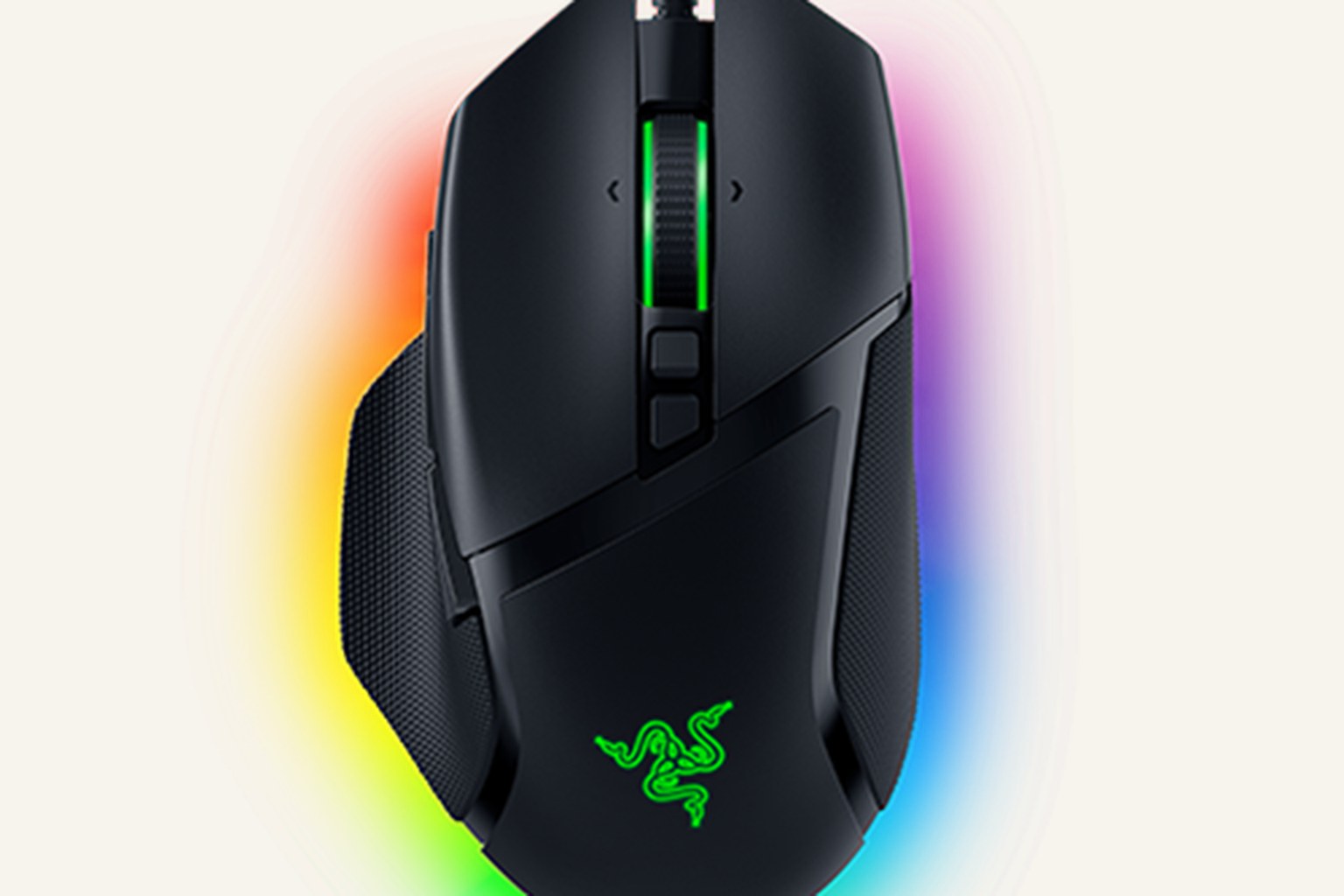
The Razer Basilisk V3 is the wired control/value pick in our gaming-mouse ranking: heavier and less FPS-focused than the top three, but excellent for buyers who want a comfortable right-handed shell, useful buttons, and a scroll wheel they will actually use every day.
MSRP
—
Amazon
$69.99
at writing · 2026-05-15
Buyer fit
Best wired control pick: The Basilisk V3 is the value/control pick, not the performance-purist pick. It is the mouse to consider when a good wheel and useful buttons matter as much as aim feel.
MSRP
—
Amazon
$69.99
at writing · 2026-05-15
Score breakdown
How this product scored
Same rubric, but focused on one product so the reasons behind the score stay readable.
Shape and grip comfort
Razer Basilisk V3 scores 8.1/10 for shape and grip comfort. Score reflects shell shape, hand-fit warnings, grip comfort, and long-session caveats from owner/reviewer evidence.
Tracking and control
Razer Basilisk V3 scores 7.7/10 for tracking and control. Score reflects sensor confidence, control feel, polling practicality, glide, and whether the performance benefits are likely to matter in real games.
Buttons, clicks, and wheel
Razer Basilisk V3 scores 9/10 for buttons, clicks, and wheel. Score reflects button layout, click feel, wheel behavior, side-button reach, and repeated control complaints.
Battery and connection
Razer Basilisk V3 scores 8.5/10 for battery and connection. Score reflects connection reliability, battery expectations, charging, sleep/wake behavior, and dongle or cable caveats.
Software/firmware friction
Razer Basilisk V3 scores 7.2/10 for software/firmware friction. Score reflects setup workload, app and firmware annoyances, onboard memory behavior, account requirements, and how much software gets in the buyer’s way.
Use-case fit
Razer Basilisk V3 scores 8.4/10 for use-case fit. Score reflects how clearly the mouse fits its intended lane versus buyers who would be happier with a different shape, weight, or button layout.
Durability confidence
Razer Basilisk V3 scores 7.7/10 for durability confidence. Score reflects warranty/support context, owner complaints, build confidence, and whether known issues look rare or worth planning around.
Before You Buy
The Razer Basilisk V3 is easy to misread if you only compare gaming mice by weight. Next to the Viper V3 Pro, Superlight 2, and DeathAdder V3 Pro, it looks heavy and old-fashioned: wired, about 101 g, right-handed, covered in buttons, and built around a scroll wheel that does more than most people expect. That is exactly why it still deserves a closer look.
This is the mouse for the buyer who wants one desk mouse to play games, browse, edit, work, and map shortcuts without paying wireless flagship money. The regret risk is not that the Basilisk V3 is bad. It is buying it for the wrong job: low-sensitivity FPS, a cable-free desk, or a no-software setup. In our best gaming mice ranking, it lands at #4 as the Best wired control pick with an 8.1/10 overall score. Use this deeper review to decide whether its wheel, thumb rest, and extra controls will feel useful every day or like chores you did not ask for. Then use the product links to check current price, seller, color, condition, and availability; KB4UB may earn from qualifying purchases, which helps keep this work going.
Quick Verdict
Buy the Basilisk V3 if you want a wired, comfortable, feature-heavy mouse for mixed gaming and desktop work. It is not the pure performance winner in this group, but it is one of the easiest recommendations for people who actually use their scroll wheel, side buttons, and DPI clutch outside a single shooter.
The case for it is strong because formal reviews, retailer specs, and hands-on transcripts tell the same story. Tom’s Hardware called out the Basilisk line’s “right-handed ergonomic shape fit for palm and claw grippers” and said the V3 proves its “versatility from MMORPGs to FPS titles and, simply, getting work done.” PCWorld was even more direct, calling it “the mouse you’ll want if you use your mouse’s wheel in games.” That is the lane.
The catch is just as clear. PCWorld listed the cons as “quite heavy and bulky” and “limited to wired connectivity only.” A YouTube hands-on with Razer’s Speedflex cable said it “does a good job at minimizing drag,” but added that “you can definitely still notice that it’s there.” If you mainly play competitive FPS and already know you want low weight, our top three picks make more sense. If you want control density, a useful wheel, and a lower price, the Basilisk V3 is still a smart buy.
Score Breakdown
- Shape and grip comfort: 8.1/10. The right-handed shell, thumb rest, and textured side areas work best when your hand settles into the shape instead of hovering over it. Small-to-medium palm grip is the safest fit, with claw also plausible.
- Tracking and control: 7.7/10. The Focus+ / 26K-class sensor and wired 1000 Hz connection are not the problem. The score is lower than the FPS leaders because weight and cable feel matter when aim is the whole point.
- Buttons, clicks, and wheel: 9/10. This is the reason to buy it. The 11 programmable controls, tilt wheel, free-spin/tactile modes, and thumb clutch give it a real desk-and-game advantage.
- Battery and connection: 8.5/10. There is no battery to charge and no dongle to lose. The cable is the tradeoff.
- Software setup: 7.2/10. Razer Synapse unlocks the button, DPI, RGB, and wheel behavior, but it is another app to install and maintain.
- Use-case fit: 8.4/10. Excellent for mixed gaming, productivity, MOBAs/MMOs-lite, and anyone who wants more controls. Weaker for ultralight FPS buyers.
- Durability confidence: 7.7/10. Review coverage is positive, but support/forum rows around scroll behavior, Synapse, USB detection, and total failure are enough to keep this from a spotless score.
What Feels Great After Setup
The Basilisk V3 feels best when you stop treating it like a Viper or Superlight rival and start using the controls. The wheel is the star. You can use a tactile notched scroll for precise steps, switch to free spin for long pages, and use tilt inputs as extra shortcuts. In daily desktop work, that can feel more useful than another few grams shaved off the shell.
The buttons also land in a friendlier place than a spec list suggests. One hands-on transcript said the thumb button is “super easy to access” and “feels very natural,” with the wheel tilt also “very natural just to flick with the side of my finger.” That matters because extra buttons only help if you can hit them without shifting your grip. For browser back/forward, push-to-talk, DPI shift, grenade/melee, spreadsheet shortcuts, timeline scrubbing, or MMO/MOBA commands, the Basilisk V3 gives you more room to build muscle memory.
The shape is the other comfort win. The thumb rest makes the mouse feel planted, the side pieces are described in one transcript as “fantastic and very grippy,” and the shell gives palm and relaxed claw users a real place to rest. TechGearLab’s testing framed the fit honestly: palm grip was “exceptionally comfortable,” especially for small or medium hands, while large-hand fingertip and claw use were possible but less natural. That lines up with the score. It is comfortable because it invites your hand onto the mouse, not because it disappears under your fingers.
Setup, Fit, and Daily Use
Plan on spending a little time in Razer Synapse. Out of the box, the Basilisk V3 is a normal wired mouse with a familiar ergonomic shell. The value comes when you tune DPI stages, remap the thumb clutch, set wheel behavior, and decide whether RGB is fun or unnecessary. If you hate software, that setup step can sour the whole purchase. If you like customizing controls once and keeping them, it is part of the appeal.
Fit is the bigger physical question. At roughly 101 g, this is not a modern ultralight. A reviewer talking through the weight joked about the “100 plus grams” reaction, then made the useful point that weight depends on the mouse and how you use it. On a bigger ergonomic shell, the mass can feel reasonable for palm grip and desktop control. It feels less reasonable if you are throwing low-sensitivity flicks across a large pad.
The cable is similar. Razer’s Speedflex-style cable is better than old stiff braided cords, but it does not become wireless. If your desk is tidy, your sensitivity is moderate, and the cable has room to move, it may fade into the background. If you already know cable drag annoys you, do not talk yourself into it just because the rest of the mouse is strong.
Also check the exact listing. The parent ranking uses ASIN B09C13PZX7 and a $69.99 MSRP/price snapshot, but Basilisk variants and bundles can sit near each other in search results. Confirm wired Basilisk V3, new condition, seller, color, and return terms before you buy.
The Annoyances to Know Before Buying
The first annoyance is simple: it is not light. That does not make it a bad mouse, but it makes it a worse fit for the buyer chasing an esports-feeling setup. If you play mostly Valorant, Counter-Strike, Apex, or other aim-first games at low sensitivity, the Viper V3 Pro, Superlight 2, or DeathAdder V3 Pro should be checked first.
The second annoyance is that the best feature is also the thing with the most moving parts. The HyperScroll wheel is useful because it has tactile/free-spin behavior, tilt inputs, and software control. That complexity gives you more convenience, but it also creates more ways for a setting, firmware state, debris, or mechanism to become annoying. iFixit’s troubleshooting page lists “Unresponsive Scroll Wheel,” “Razer Synapse Application Errors,” “Outdated Firmware or Software,” and “HyperScroll™ Actuator Failure” among the issues users may investigate. That is not proof every Basilisk V3 will fail. It is a reminder to keep the wheel clean, update deliberately, and test every mode during the return window.
The harshest owner/forum example is a Razer Insider thread where one user wrote that the mouse “suddenly stopped working” and that the laptop, Synapse, device manager, and firmware updater could not see it. Treat that as a real failure report, not a trend by itself. The broader picture is still positive, especially for the price. But if you cannot tolerate any support dance around Synapse, USB detection, or wheel behavior, a simpler mouse may make you happier.
How It Compares
The Basilisk V3 is the wired control/value pick, so the comparisons should start with use case, not brand loyalty.
- Razer Viper V3 Pro: Better overall and much better for serious FPS. Choose the Basilisk only if extra controls, wheel behavior, and price matter more than ultralight wireless aim feel.
- Logitech G PRO X Superlight 2: Safer lightweight FPS shape. It is less interesting for shortcuts and desktop work, but far easier to recommend for players who want the mouse to disappear.
- Razer DeathAdder V3 Pro: The better ergonomic FPS pick. If you like right-handed support but want low weight and wireless, start there.
- Logitech G305: Cheaper wireless and simpler, but less premium-feeling and less feature-rich. Great if budget wireless is the priority.
- Logitech G502 X Plus: The closer utility rival if you want wireless, lots of controls, and a G502-style layout. It costs more and is still not a pure FPS mouse.
- Corsair Scimitar Elite Wireless MMO: Better for true hotbar/MMO players who need a thumb grid. The Basilisk is more general-purpose.
- SteelSeries Aerox 5 Wireless: Lighter wireless extra-button wildcard. The Basilisk has the stronger control-wheel identity and a more settled evidence base.
For the full score grid and all eight picks, go back to our Best Gaming Mice in 2026 guide.
Who Should Buy It — and Who Should Skip It
Buy the Razer Basilisk V3 if:
- you want one mouse for mixed gaming, work, browsing, and shortcuts
- you care about scroll-wheel behavior as much as raw aim performance
- a right-handed ergonomic shell with a thumb rest sounds comfortable
- you want more controls without moving to a full MMO grid
- you are fine with a wired connection and a little Synapse setup
- the current price is well below premium wireless FPS mice
Skip it if:
- your main goal is a low-weight competitive FPS mouse
- you want a clean wireless desk
- you use your left hand
- you hate RGB/control software
- you prefer small fingertip mice
- you want the simplest possible mouse with fewer parts to think about
Bottom line: the Basilisk V3 is not the mouse to buy because it beats the FPS flagships at their own game. It is the mouse to buy because it is comfortable, useful, and surprisingly capable when your real life includes games, tabs, documents, spreadsheets, launchers, and shortcuts. If that sounds like your desk, it is one of the best values in this ranking.
Tell us what this page missed
These pages get better when real buyer complaints make it back into the scoring model. If something important is underweighted, say it.
Rate this review
Give it a score from 1-10 and tell us what to improve.
0/4000 characters