OBSBOT Meet 2 Review (2026): Tiny 4K Webcam, Smart Tradeoffs
OBSBOT packs 4K, autofocus, gestures, magnetic mounting, and app effects into a travel-size webcam. The trick is knowing when the clever parts help — and when heat, crop, or cable quirks matter.
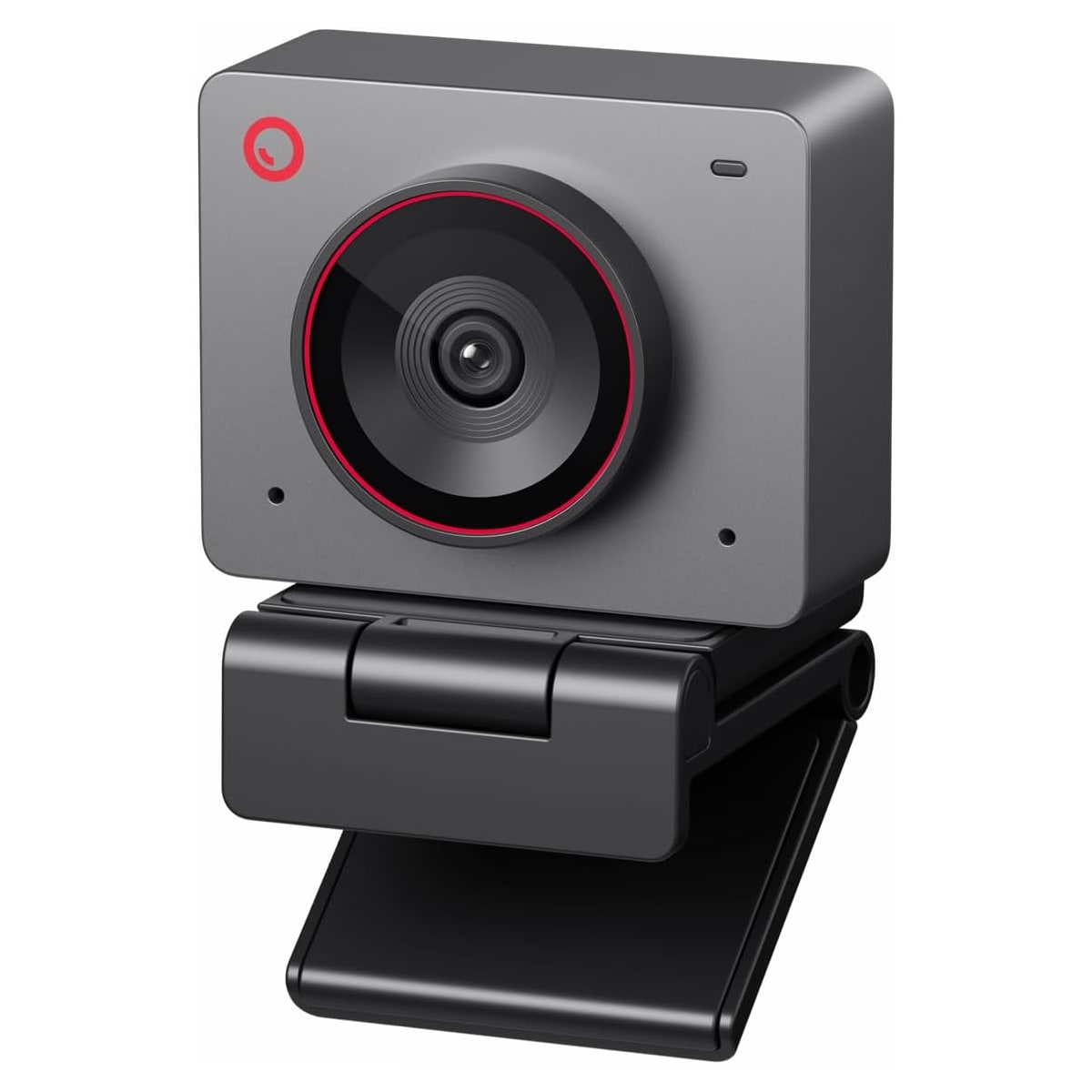
The OBSBOT Meet 2 is the compact 4K wildcard in our webcam ranking: genuinely fun for one-person desks and portable setups, but less ideal for wide rooms, physical tracking, or buyers who hate camera software.
MSRP
—
Amazon
$129
at writing · 2026-05-14
Buyer fit
A tiny, feature-heavy 4K webcam with strong desk appeal; watch heat, digital framing limits, removable-cap loss, and app dependence.
MSRP
—
Amazon
$129
at writing · 2026-05-14
Score breakdown
How this product scored
Same rubric, but focused on one product so the reasons behind the score stay readable.
Image quality and bad-light handling
Strong compact 4K image story for the price, with useful low-light claims and hands-on praise, but lighting still matters for crop and app effects.
Focus and exposure stability
Autofocus is a genuine strength in transcript evidence, while heavy digital zoom and framing still deserve realistic expectations.
Mic and call audio
Dual noise-canceling mics are credible call backup audio, not a replacement for a headset or dedicated USB microphone.
Mounting, privacy, and hardware
Tiny body, magnetic mount, 1/4-inch thread, and magnetic privacy cap are practical wins, with the loose cap as the caveat.
Software and compatibility friction
OBSBOT Center adds real controls, effects, hotkeys, and firmware features, but buyers who hate camera apps will find it less hands-off.
Reliability, heat, and support
Amazon explicitly says the webcam may get hot during use; official page capture and long-term owner/support evidence are thinner than ideal.
Use-case fit
Excellent fit for one-person small desks and portable 4K setups; weaker for group rooms or true physical tracking needs.
Evidence confidence
Exact ASIN/current Amazon signal and many transcript rows support the verdict, while official-source and long-term owner coverage remain gaps.
Quick Verdict
The OBSBOT Meet 2 is what happens when a webcam company tries to squeeze the fun parts of a smarter camera into something barely larger than a set of earbuds. It is tiny, magnetic, 4K, autofocus-equipped, and packed with OBSBOT Center tricks that can make a small desk feel more polished than a normal office webcam would.
The checkout question is not whether the Meet 2 is clever. It is whether its kind of cleverness matches your day. The smart framing is digital rather than physical, so heavy zoom can soften the image. The privacy cap is magnetic and easy to remove, which also means easy to lose. Amazon’s own listing says the camera may get hot during use. Those are worth knowing before checkout, not reasons to panic if your use case is simple one-person calls.
That is why the Meet 2 ranked #5 in our Best Webcams in 2026 guide as the Best compact 4K pick. Buy it if you want a portable 4K webcam with autofocus, gestures, magnetic mounting, and playful app controls. Skip it if you need wide group framing, physical pan-and-tilt tracking, or a camera that asks almost nothing from you after you plug it in.
Score Breakdown
Overall score: 7/10. The Meet 2 earns that score because it packs a lot into a very small body: 4K30, 1080p60, autofocus, AI framing, HDR, gesture controls, dual mics, USB-C, a magnetic stand, a tripod thread, and a removable magnetic privacy cover. The score does not climb higher because the smarter features lean on software and digital crop, long-call heat deserves caution, and the official product-page capture was weaker than I would like.
- Image quality and bad-light handling: 8 — The 4K/1/2-inch-sensor claim and hands-on footage support the Meet 2 as a strong little image device for the price. Amazon says the larger sensor expands light capture for “clearer, brighter images,” and one reviewer said the camera “perform[s] excellently in low lighting” (source). Keep that in context: lighting still matters, especially for app effects and heavy crop.
- Focus and exposure stability: 8 — Autofocus is a real strength. One hands-on transcript says “the focus how fast that focus is it's so good” and praises the “good color tone” (source). That is the kind of daily-use win you notice when you lean in, hold something up, or move around a little.
- Mic and call audio: 7 — The dual mics are usable for calls. A reviewer said the built-in mic was “perfect for those Zoom calls or any kind of virtual meetings,” which is encouraging, but I would still treat it as webcam audio, not a headset replacement (source).
- Mounting, privacy, and hardware: 8 — The magnetic stand, tiny body, 1/4-inch thread, and magnetic cap are the ownership highlights. They make the camera easy to place, reposition, and carry.
- Software and compatibility: 7 — OBSBOT Center unlocks the fun stuff: image controls, blur/bokeh, filters, hotkeys, gesture zoom, firmware updates, and manual framing. That is great if you like tuning. It is extra baggage if you wanted a boring plug-it-in camera.
- Reliability, heat, and support: 5 — Amazon explicitly says the Meet 2 “may get hot during use” and frames it as normal. That is not an automatic dealbreaker, but it belongs in the decision before long meetings.
- Use-case fit: 8 — Excellent for one-person desks, small setups, and people who want compact 4K with features. Less convincing for group rooms or buyers whose real need is physical tracking.
What Feels Great Right Away
The first delight is size. Amazon describes the Meet 2 as weighing 40.5 grams and being “as big as earbuds” (source). That sounds like marketing fluff until you picture the desk: a little cube-like camera you can drop onto a magnetic mount, move between a monitor and a laptop, or throw into a bag without feeling like you packed studio gear.
The magnetic mount is not just cute. One reviewer described setting the mount on top of a monitor, dropping the camera onto it, and letting “magnetism handle the rest,” then added that it makes angle adjustment easier than a traditional threaded mount (source). You still get the 1/4-inch thread if you want a tripod, so the Meet 2 does not trap you in one mounting style.
The camera also has that small-gadget magic when the gestures work. In one demo, holding up a hand toggled auto-framing and an “L” gesture controlled zoom; the reviewer called the zoom quality “really good” and “impressive quality” (source). This is the Meet 2 at its best: not merely sharper than a laptop webcam, but more fun to use.
What Gets Annoying After the Glow Wears Off
The first annoyance is that the Meet 2’s smart framing is digital, not physical. It can crop, zoom, and re-center you, but the camera body is not panning and tilting like an OBSBOT Tiny-style model. That matters because zooming in can soften the image. In one demo, after gesture zoom, the reviewer joked the image was “a little fuzzy” because he was “hella zoomed in” (source). Funny line, useful warning.
The second caveat is field of view. One review called out a roughly 70-degree view, which is fine for a single person at a desk but not great for a small group or a whiteboard. If you want the camera to swallow the whole room, this is the wrong shape of product.
The heat note is also real. Amazon’s listing says the camera may get hot during use because of its performance and frames that as normal. I would not treat that as a dealbreaker by itself, but I would treat it as a long-call caution until stronger owner evidence says otherwise.
Finally, one reviewer said the included USB 2 cables did not work reliably for them until they switched to a USB 3 cable they already owned. That is one source, not a trend, but it is exactly the kind of small setup surprise that can ruin the first ten minutes before a meeting.
Setup and Daily Use Notes
Basic setup should be easy: plug in the USB-C connection, select the Meet 2 in Zoom, Teams, Meet, OBS, or your recording app, and use the magnetic mount or tripod thread to place it where your face is actually lit. One transcript describes it as “Plug and Play” and says it shows up as a source for video and audio across “popular or unpopular platforms” (source).
The deeper setup lives in OBSBOT Center. That is where the Meet 2 becomes more than a tiny 4K camera: image tuning, brightness, filters, beauty settings, background blur/bokeh, manual PTZ-style digital controls, hotkeys, and firmware updates. One reviewer called OBSBOT’s bokeh effect “the cleanest bokeh effect” they had seen from a webcam app, then added that “it also has a lot to do with your lighting” (source). Translation: the software can be genuinely useful, but it cannot repeal physics.
Cable quality is the setup caveat I would not ignore. One hands-on reviewer said the included USB 2 cables “sometimes didn't work” and the camera did not show up until they switched to a USB 3 cable they owned (source). That is one source, not a proven epidemic, but if your desk runs through a dock or hub, keep a known-good USB-C/USB 3 path handy before blaming the camera.
How It Compares With the Other Picks
Against the Logitech Brio 505, the Meet 2 is more exciting and less boring. The Brio 505 is still the safer work-call default because its privacy shutter, Logitech controls, and mainstream desk-call role fit more people with fewer caveats. Choose the Meet 2 if you specifically want compact 4K, gestures, magnetic mounting, and app effects.
Against the Anker PowerConf C200 2K, the Meet 2 is the feature-rich step up. Anker is the practical value pick: cheaper, simple, and good enough for many desks. OBSBOT gives you 4K, more playful controls, a smaller body, and a more premium-feeling gadget story, but it also asks you to care about its app and digital framing behavior.
Against the Logitech MX Brio, the choice is fixed-desk polish versus compact cleverness. MX Brio is better for someone who wants a heavier premium Logitech 4K webcam on a stable monitor. Meet 2 is easier to like if portability, size, and magnetic placement matter.
Against the Insta360 Link 2 Pro, remember the tracking difference. The Insta360 is the premium smart-framing choice for presenters and movement. The Meet 2 is a small fixed-body camera using digital crop. If tracking is the core need, go premium. If compact 4K with occasional framing tricks is enough, the OBSBOT is the more desk-friendly wildcard.
See the full category ranking in Best Webcams in 2026.
Who Should Buy It
Buy the OBSBOT Meet 2 if you want a small 4K webcam that feels smarter and more flexible than the usual office rectangle. It makes the most sense for one-person work calls, small desks, portable setups, casual streaming, and buyers who will actually use autofocus, gesture controls, OBSBOT Center tuning, background blur, or the magnetic mount.
Skip it if you need a wide group-room camera, hate installing camera software, want physical pan-and-tilt tracking, or spend hours in calls and want stronger long-term heat evidence before buying. Also skip it if losing a small magnetic cap would drive you mad.
For the broader context, see where it lands in Best Webcams in 2026, then check the current Amazon price and color/ASIN before buying.
Tell us what this page missed
These pages get better when real buyer complaints make it back into the scoring model. If something important is underweighted, say it.
Rate this review
Give it a score from 1-10 and tell us what to improve.
0/4000 characters