NETGEAR Nighthawk RS500 Review (2026): Fast 6 GHz, Pricey Caveats
What to check before buying the RS500: strong 6 GHz range evidence, 2.5GbE limits, Nighthawk app setup, browser controls, paid Armor/parental-control boundaries, and the exact Amazon-new listing caveat.
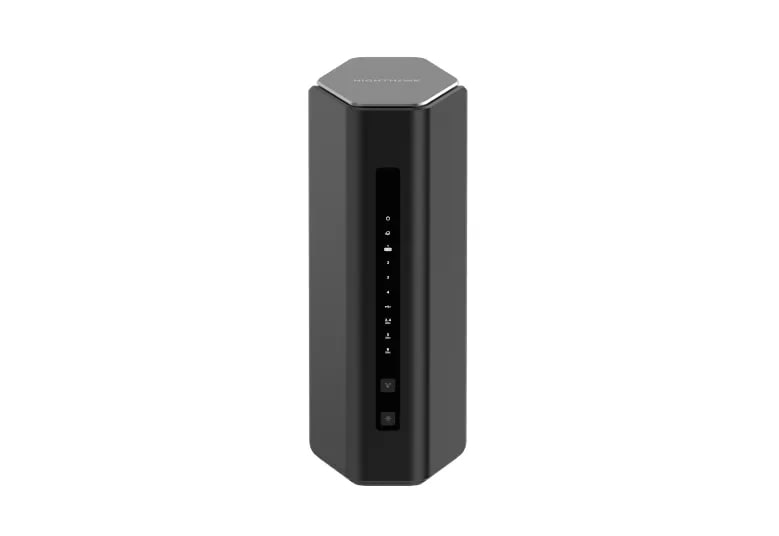
NETGEAR Nighthawk RS500 is the premium range pick in our home-router ranking: a strong standalone tri-band Wi‑Fi 7 Nighthawk with real 6 GHz headroom, but not the cleanest value or the easiest subscription-free buy.
MSRP
$399.99
Amazon
$399
at writing · 2026-05-17
Buyer fit
Premium standalone Wi-Fi 7 lane with tri-band/6 GHz performance headroom and recognizable Nighthawk setup, held back by 2.5GbE limits, account/app friction, paid Armor/parental-control boundaries, and unclear mesh expansion.
MSRP
$399.99
Amazon
$399
at writing · 2026-05-17
Score breakdown
How this product scored
Same rubric, but focused on one product so the reasons behind the score stay readable.
Coverage & reliability
Coverage, range, roaming/connection stability, and wall/distance evidence from official claims, formal reviews, transcripts, retailer pages, and owner reports. The score reflects official claims, support docs, formal reviews, retailer details, and owner reports for this router.
Setup & recovery
First-run setup, app/web clarity, modem/ISP recovery, firmware update flow, and whether troubleshooting looks approachable for the intended buyer. The score reflects official claims, support docs, formal reviews, retailer details, and owner reports for this router.
Speed headroom
Wi-Fi generation/bands/channel limits plus WAN/LAN/USB hardware, with score credit only when that headroom fits likely real homes. The score reflects official claims, support docs, formal reviews, retailer details, and owner reports for this router.
Controls & subscriptions
Included controls, VPN/security/parental features, local admin depth, privacy/account posture, and clarity around paid tiers. The score reflects official claims, support docs, formal reviews, retailer details, and owner reports for this router.
Firmware & support trust
Visible firmware/support docs, warranty/support posture, update cadence, and whether available evidence suggests calm or watchful long-term ownership. The score reflects official claims, support docs, formal reviews, retailer details, and owner reports for this router.
Fit & value clarity
How cleanly the router matches its role and price without making the wrong buyer pay for specs they cannot use. The score reflects official claims, support docs, formal reviews, retailer details, and owner reports for this router.
Quick Verdict
NETGEAR Nighthawk RS500 is the router you consider when a cheap replacement feels too small, but you do not want to blanket the house with mesh nodes. It is a standalone tri-band Wi‑Fi 7 Nighthawk with 2.4, 5, and 6 GHz radios, a 2.5Gbps WAN port, one 2.5Gbps LAN port, three gigabit LAN ports, USB, Nighthawk app setup, and a browser path through routerlogin.net.
That is why it ranked #3 as the Best premium range pick in our Best Home Wi‑Fi Routers in 2026. The RS500 has the clearest 6 GHz/range upside in this home-router set, but it sits behind ASUS RT-BE86U and TP-Link Archer BE230 because the fine print is less tidy: paid security and parental-control tiers, account/app setup snags, only 2.5GbE ports, and no safely verified mesh path.
At writing, the captured Amazon-new evidence used exact ASIN B0DG71H4GD at $399.00, with Amazon.com recorded as seller and shipper. A later direct Amazon fetch hit an interstitial, so treat the price as a captured snapshot and recheck the current seller, new condition, return terms, and whether any Armor trial applies before buying. Use the product links for that final check; those links also help support KB4UB.
Score Breakdown
- Coverage and reliability: 8.6/10. This is the RS500’s best score. NETGEAR claims up to 3,000 sq ft and 120 devices, and the strongest hands-on evidence points to unusually good 6 GHz and 5 GHz range for a one-box router.
- Setup and recovery: 6.8/10. You get both the Nighthawk app and a browser setup path, which is good. The score drops because one reviewer hit a same-SSID/password migration bug, and HighSpeedInternet criticized the NETGEAR-account handoff during setup.
- Speed headroom: 8.5/10. Tri-band Wi‑Fi 7, 320 MHz 6 GHz support, and two 2.5GbE ports are strong for many homes. They are not enough for 5Gbps or 10Gbps fiber buyers.
- Controls and subscriptions: 6.1/10. WPA/WPA2/WPA3, guest Wi‑Fi, VPN support, firmware updates, and browser controls help. Armor and fuller parental controls are the rub.
- Firmware and support trust: 7.3/10. NETGEAR has visible support paths, routerlogin.net, automatic firmware-update claims, and Nighthawk documentation, but support/warranty wording needs a final source check.
- Fit and value clarity: 6.9/10. The RS500 makes sense when you specifically want a premium standalone 6 GHz Nighthawk. It is not the cleanest value in the ranking.
What Feels Great Right Away
The satisfying part of the RS500 is that it feels like a real upgrade the moment your devices can use it. It is not just a Wi‑Fi 7 badge on a budget dual-band box. It has a 6 GHz radio, 5.8Gbps-class 5 GHz and 6 GHz claims, and enough Ethernet to connect a multi-gig modem plus one fast wired client or switch.
The best hands-on language comes from the landpet YouTube review, which called the router “fantastic” and “actually very good in terms of performance.” In that same test path, the reviewer said that at 20 feet indoors there was “pretty much not a drop at all,” and even from across the street he was “still getting 945 megabits per second.” That is not a promise for your walls, but it is the kind of range evidence that explains why the RS500 earned the premium range lane.
HighSpeedInternet’s formal testing supports the same direction. Its review recorded a Wi‑Fi 7 client at 2,418 Mbps from 2 feet, 1,455 Mbps at 40 feet, and 943 Mbps at 120 feet across the street on 6 GHz. For a standalone router, that is the RS500’s strongest argument: if your home has compatible clients and a sensible router location, the 6 GHz lane can feel genuinely fast instead of theoretical.
Setup, App, and Daily Controls
The RS500 gives you two ways in, and that matters. You can use the Nighthawk app for a guided phone setup, or you can use a browser through routerlogin.net. One hands-on reviewer put it plainly: if your computer is connected by Ethernet, “you don’t even need to get the Nighthawk app.” That fallback is important if you dislike app-only routers.
The app is friendlier but intentionally shallow. The landpet transcript describes it as “a very very simplified app” for the basics: Wi‑Fi name and password, guest network, speed test, connected devices, firmware updates, basic pause/unpause controls, and Armor prompts. If you want the richer settings, the browser interface is where the useful knobs live: VPN, Wi‑Fi schedules, site/app blocking, DHCP rules, file sharing, and even a VLAN option noted by the reviewer.
The catch is the first setup. HighSpeedInternet criticized the flow for requiring a NETGEAR account and juggling cellular/account steps. The YouTube reviewer also hit a more specific annoyance: the router “wouldn’t allow me to pick my same Wi‑Fi name and password” during migration. Changing the SSID or password fixed it, and he framed it as an easy workaround, not a reason to reject the router. Still, that is exactly the kind of small setup problem that can ruin a Saturday if you expected every device to reconnect automatically.
Ports, Speed, and the 2.5GbE Ceiling
The RS500 has enough wired hardware for a lot of good home networks: one 2.5Gbps internet/WAN port, one 2.5Gbps LAN port, three gigabit LAN ports, and USB storage/media sharing support. If your internet plan is 1Gbps to 2.5Gbps and you want one fast wired desktop, NAS, or switch, that layout can work.
It is not the same as the more expensive Nighthawk RS models, and that distinction matters at $399. HighSpeedInternet’s opening verdict says the RS500 “has more Wi‑Fi bandwidth than the 2.5Gbps max internet speed it supports,” which is the cleanest way to explain the mismatch. The router can talk a big Wi‑Fi 7 game, but the internet port stops at 2.5Gbps.
The landpet RS-family comparison makes the same point from the hardware side. The reviewer noted that the RS500 has two 2.5Gbps ports while higher models move into 10G territory, and even the RS300 had a surprising three 2.5Gbps ports in that comparison. So the RS500 is the premium pick in this KB4UB set because it is tri-band and strong at range; it is not the pick for 5Gbps/10Gbps fiber, a 10G NAS plan, or buyers who want every port to feel future-proof.
Subscriptions, Security, and Parental Controls
This is the part to understand before checkout, because it changes how the RS500 feels after the trial period. Basic router security is not missing: official and review evidence includes WPA/WPA2/WPA3, guest Wi‑Fi, VPN support, automatic firmware updates, a browser UI, a free OpenVPN server noted by HighSpeedInternet, and basic app controls.
The fuller family/security story costs extra. HighSpeedInternet says to “expect to pay extra if you want all the parental control and security features it offers.” The YouTube setup walkthrough describes the app’s parental controls as “super basic” pause/unpause behavior, then says more advanced parental controls require a separate subscription. It also notes NETGEAR Armor in the app with a 30-day trial.
One caveat is especially important: the source record notes that NETGEAR’s product page mentions a 1-year Armor trial for purchases on NETGEAR.com, but that should not be assumed for Amazon unless the live Amazon offer says it. If you are buying because you want security features, parental controls, VPN/privacy extras, or Bitdefender-backed Armor, check the exact plan terms before you pay for the router.
Range, Reliability, and Placement Reality
The RS500 has better range evidence than most standalone routers in this small set, but the usual home-Wi‑Fi rules still apply. The reviewer who saw strong 20-foot, 50-foot, and across-the-street results also gave the useful caveat: “range will vary drastically by location,” especially with floors, walls, thick walls, and other obstructions.
That is the right way to read NETGEAR’s up-to-3,000-sq-ft claim. It is a claimed maximum, not a guarantee that your far bedroom, basement office, or brick addition will behave. The best reason to buy the RS500 is not that it magically ignores physics; it is that the available formal and hands-on evidence shows strong 6 GHz/5 GHz performance when the layout is cooperative.
Reliability signals are mostly calm but not spotless. The same YouTube reviewer said that after changing the network name, “everything was golden,” with no drop problem in his use. He also hoped a firmware update would resolve the SSID/password migration quirk. That makes the issue watchful, not catastrophic: test the exact rooms and devices that matter during the return window, especially if you are migrating many smart-home devices with an old SSID.
Mesh and Expansion Caveat
Do not buy the RS500 as if it were a clear mesh system unless NETGEAR’s current support material for your exact plan proves it. The early feature matrix treated the Nighthawk extender ecosystem as an expansion angle, but the stronger product-specific notes are more cautious: the official RS500 page did not clearly verify a mesh mode, and HighSpeedInternet says the RS500/RS700S do not support mesh networking.
That does not mean you can never extend coverage with another NETGEAR product. It means this review should not sell the RS500 like an eero or Deco kit. If you already know you need multiple nodes, wired backhaul, room-to-room roaming, or a clean app-managed mesh from day one, Amazon eero 7 is the simpler app-first router in this parent ranking, and a true mesh-system comparison may be a better place to start.
The RS500 is strongest as one powerful central router. Put it where a central router can actually work: open air, away from cabinets, with the modem and important wired devices nearby. If the modem is trapped in a bad corner, a one-box premium router may still leave the same annoying room unhappy.
How It Compares
The RS500 is easiest to judge against the other routers in the parent ranking.
- ASUS RT-BE86U: Our #1 overall pick. ASUS is dual-band with no 6 GHz, but it gives stronger wired headroom, deeper ASUSWRT controls, VPN/segmentation tools, AiMesh, and no mandatory security subscription at a much lower captured Amazon price.
- TP-Link Archer BE230: Our value Wi‑Fi 7 pick. It is also dual-band and less premium, but its captured Amazon-new price was under $90, with dual 2.5GbE ports and enough setup/control depth for many homes.
- Amazon eero 7: The simple setup pick. Eero is dual-band and less configurable, but it is easier to hand to a non-technical household and has a clearer app-first expansion story.
- TP-Link Archer AX21 V5: The cheap Wi‑Fi 6 baseline. It is not a RS500 competitor on speed or range headroom, but it is the sanity check for homes that should spend around $50 instead of chasing Wi‑Fi 7.
The short version: buy RS500 for standalone tri-band Wi‑Fi 7 and 6 GHz range upside. Buy ASUS for controls and wired value. Buy TP-Link BE230 for cheap Wi‑Fi 7. Buy eero for easy setup. Buy AX21 only when your home and internet plan are genuinely simple.
Who Should Buy the NETGEAR Nighthawk RS500
Buy the RS500 if you want one serious standalone router and your home can actually benefit from tri-band Wi‑Fi 7. The best fit is a larger or busier house with Wi‑Fi 7 or Wi‑Fi 6E clients, a 1Gbps to 2.5Gbps internet plan, and at least one wired device or switch that can use the 2.5GbE LAN port.
It also fits buyers who like the Nighthawk style: app setup when you want guidance, browser controls when you want more settings, guest Wi‑Fi, VPN options, firmware updates, and a recognizable NETGEAR support path. If you have used Nighthawk routers before and mostly want more wireless headroom plus a 6 GHz lane, the RS500 makes sense.
The happiest buyer will tolerate the subscription prompts because the core router does what they bought it for: strong standalone coverage, fast modern-client performance, and enough controls outside the app to avoid feeling trapped. For that buyer, the RS500 is not the cleanest bargain, but it can feel like a confident premium upgrade.
Who Should Skip It
Skip the RS500 if you are allergic to paid security or parental-control add-ons. Some useful basics are included, but the fuller Armor and Smart Parental Controls story is not as clean as ASUS’s subscription-free posture in this ranking.
Skip it if you have 5Gbps or 10Gbps internet, or if your wired network plans revolve around 10G NAS, workstation, or switch gear. The 2.5GbE WAN/LAN pair is practical, but it is a ceiling.
Skip it if you need verified mesh expansion. This is a standalone-router recommendation, not a whole-home mesh promise. Also skip it if you want the best value above all else: TP-Link Archer BE230 gives a lot of current Wi‑Fi 7 utility for far less money, while ASUS RT-BE86U ranked above the RS500 because its controls and wired hardware are easier to justify.
Finally, skip it if your home is full of older clients and your current router problems are mostly bad placement or thick-wall coverage. A 6 GHz Wi‑Fi 7 router cannot fix every layout. Test your worst rooms before the return window closes.
Bottom Line
Buy NETGEAR Nighthawk RS500 if: you want a premium standalone tri-band Wi‑Fi 7 router, have a 1-to-2.5Gbps plan, own newer Wi‑Fi clients, and value 6 GHz range headroom more than the lowest price.
Skip it if: you need 10G ports, want subscription-free advanced family/security controls, require verified mesh expansion, or would be better served by a cheaper dual-band router.
Bottom line: RS500 is the strongest one-box 6 GHz range play in our home-router ranking, and the evidence gives it real performance credibility. Its #3 rank is not a warning away from the router; it is calibration. The hardware is appealing, but the account/app setup quirks, paid-control boundaries, 2.5GbE ceiling, and Amazon-new check caveat are exactly the details to catch before checkout regret starts.
Tell us what this page missed
These pages get better when real buyer complaints make it back into the scoring model. If something important is underweighted, say it.
Rate this review
Give it a score from 1-10 and tell us what to improve.
0/4000 characters