Logitech MX Vertical Review (2026): Large-Hand Fit to Check Twice
MX Vertical is the Logitech vertical mouse to consider when Lift feels too small, but the tall shell, Unifying receiver, and ordinary wheel deserve a close look before checkout.
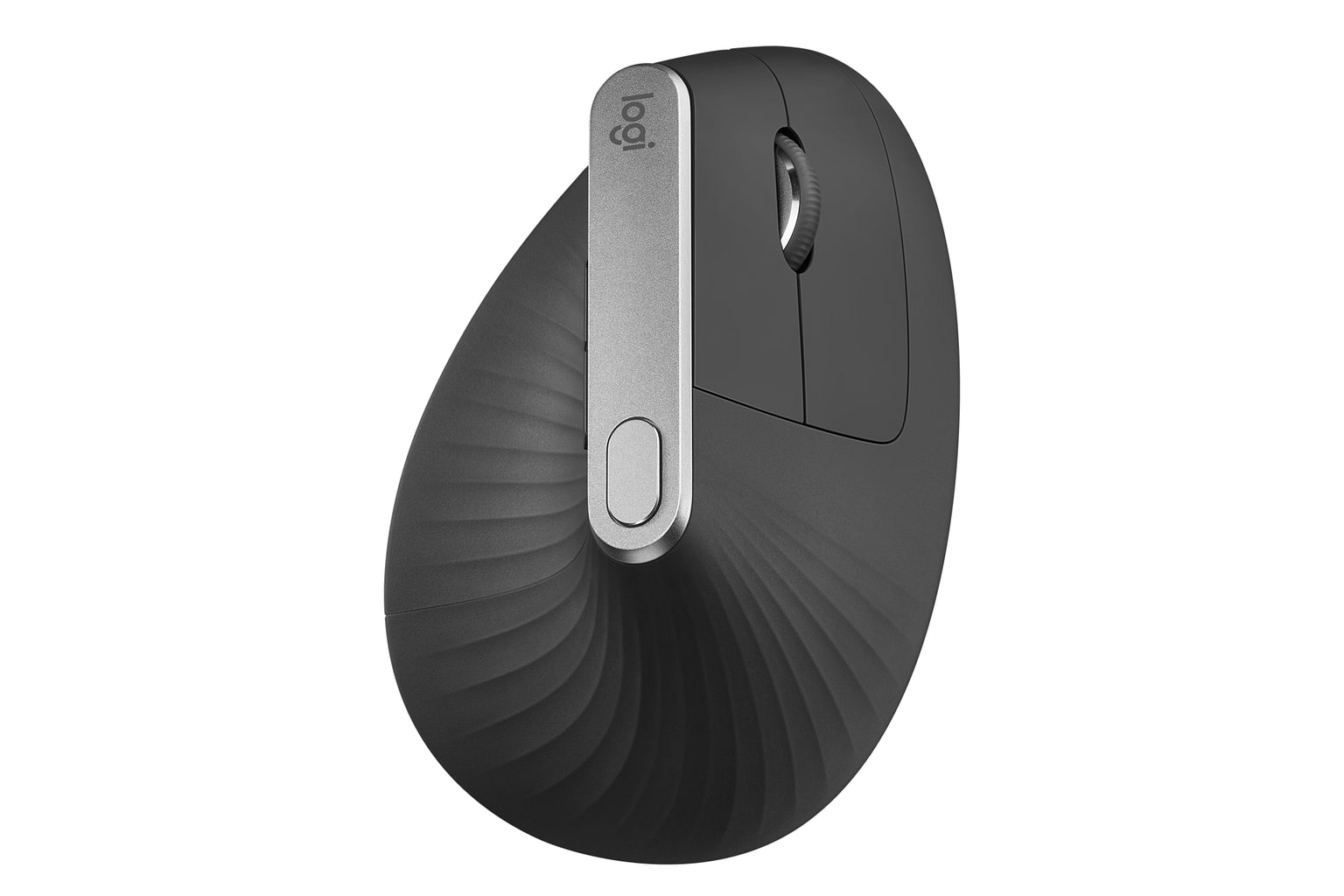
Logitech MX Vertical is the large-hand vertical pick in this set: comfortable when the fit is right, rechargeable, accurate, and customizable. The traps are small hands, left-handed use, travel, Logi Bolt expectations, and MX Master-style scroll hopes.
MSRP
$119.99
Amazon
$74.99
at writing · 2026-05-06
Buyer fit
Premium large-hand vertical pick for right-handed buyers who want USB-C charging and a taller Logitech shell.
MSRP
$119.99
Amazon
$74.99
at writing · 2026-05-06
Score breakdown
How this product scored
Same rubric, but focused on one product so the reasons behind the score stay readable.
Comfort and posture fit
The tall 57-degree shell is the reason to buy MX Vertical, especially if Lift feels too small, but the same height makes it wrong for small hands and takes a few days of adaptation.
Controls, buttons, and scroll
The basics are all here: left/right click, wheel click, back/forward, and a DPI button. The score drops because the top DPI button can be awkward and the wheel is ordinary rather than MX Master-style.
Tracking and desk behavior
The 400–4000 DPI sensor and pointer-speed tuning are strong for office work, and the tall shape can reduce wrist movement once dialed in.
Setup, software, and connectivity
Bluetooth, Unifying, three-device switching, and Logi Options+ are useful, but the older Unifying receiver is the important 2026 caveat.
Durability and maintenance
USB-C rechargeable power, a 240 mAh battery, and mainstream Logitech support help. The bigger concern is buying an older premium design and expecting every newer Logitech convenience.
Workspace fit
This is a desk mouse. At 125 g with a tall shell and no captured receiver storage, it is less happy in a laptop bag than Lift or a smaller conventional mouse.
Quick Verdict
Logitech MX Vertical is the large-hand answer in this ergonomic-mouse lineup. It keeps normal mouse movement, but turns your hand into a taller 57-degree handshake position with USB-C rechargeable power, Bluetooth, a Unifying receiver, three-device switching, and Logi Options+ customization.
That is why it ranked #3 in our parent guide as Best for larger hands, with an 8.1/10 overall score. The win is not subtle if the size fits: you get a more supported palm than the smaller Logitech Lift, a conventional moving mouse instead of a thumb trackball, and enough pointer adjustment that one reviewer said he could set it up so he "barely [had] to move" his hand and still found it "super precise" (Adam Talks Tech).
The catch is that MX Vertical is easier to overbuy than it looks. Small hands should usually start with Lift. Left-handed buyers are out. Travelers should pause. And if your desk already uses newer Logi Bolt gear, this older Unifying receiver can become the tiny dongle-shaped annoyance you notice every day.
At the writing snapshot, the kept Amazon offer was the Graphite single-mouse listing for ASIN B07FNJB8TT at $74.99 new from Amazon.com, with used/resale and bulk-pack offers visible but not treated as the kept offer. Use the product links here to check today’s exact price, seller, condition, and availability before buying. See how it stacks up against the rest of the shortlist in Best Ergonomic Mice in 2026.
Score Breakdown
- Comfort and posture fit: 8.3/10. The 57-degree vertical shell is the reason this product exists. It is best for medium-to-large right hands, not small hands and not left hands.
- Controls, buttons, and scroll: 7.8/10. Six usable controls and Logi Options+ customization are useful, but the DPI button placement and standard precision wheel keep it below newer Logitech comfort picks.
- Tracking and desk behavior: 8.2/10. The 400–4000 DPI office sensor gives plenty of range for daily work, and pointer-speed tuning can reduce how much you move the mouse.
- Setup, software, and connectivity: 8.0/10. Bluetooth, Unifying, and three-device switching are strong. The score is held back by the older receiver path.
- Durability and maintenance: 8.0/10. USB-C rechargeable power, a 240 mAh battery, and Logitech’s mainstream support footprint help, but this is still an older premium design.
- Workspace fit: 7.7/10. Great as a desk fixture; less great as a travel mouse. The tall shell, 125 g weight, and missing receiver storage make it less bag-friendly.
The score is saying: buy MX Vertical because the shape fits your hand, not because it is the universal ergonomic mouse.
What Feels Great After Setup
The best MX Vertical moment is when the shell size is exactly right. Your hand lands on a tall, textured body instead of folding over a small compact mouse, and the thumb rest gives you a clear place to settle. Logitech lists it for medium-to-large hands, and that fit lane matters more than almost any spec.
The everyday convenience is also stronger than budget vertical mice. You can pair to multiple devices, adjust pointer speed, customize buttons in Logi Options+, and recharge over USB-C instead of hunting for batteries. One reviewer summed up the setup appeal neatly: the side buttons can handle forward/back, the top button changes sensitivity, and Easy-Switch lets you pair with up to three devices (Adam Talks Tech).
Accuracy is a quiet strength. The official 400–4000 DPI range is not a gaming brag; it is useful because a vertical mouse feels best when you are not dragging your whole arm around. Adam Talks Tech said he did not use a mouse pad and had "no complaints in terms of accuracy and ease of use" (YouTube). That is the practical version of the MX Vertical pitch: less wrist motion, still a familiar cursor.
The design also feels more premium than the cheap vertical-mouse lane. Linus Tech Tips called the look "like a work of art" and pointed to the grippy ribbed texture as both visual and practical (YouTube). You do not need to care about mouse sculpture for that to matter; grip texture is one of the small details that keeps a tall mouse from feeling slippery.
What Gets Annoying
The first annoyance is size. MX Vertical is the larger Logitech vertical mouse, which is exactly the point if Lift is too small. But if your hand is small, the tall shell can make the whole thing feel like you are steering around the mouse instead of resting on it. This is not a flaw to power through; it is a fit mismatch.
The second annoyance is the control story. The scroll wheel is accurate, but it is not MagSpeed, not side scrolling, and not the fancy MX Master wheel people may expect from the MX name. Adam Talks Tech liked the comfort but said the wheel was "a little bit noisy," clicking was not as quiet as newer Logitech mice, and the lack of side scrolling was "one big con" (YouTube). For most office buyers, that is an expectation check rather than a dealbreaker.
The third annoyance is receiver age. MX Vertical uses the older Logitech Unifying receiver, not Logi Bolt. If your desk is already built around Bolt hardware, that matters before checkout. If you mostly use Bluetooth, it may be a non-issue.
Portability is also poor. This is a desk mouse, not a bag mouse. The height that helps larger hands is the same height that makes it awkward for travel.
Setup and Daily Use Checks
Set MX Vertical up during a real work session, not just a two-minute desk test. Pair it by Bluetooth if you can, or use the included Unifying receiver if your computer or office policy prefers a dongle. Then open Logi Options+ and tune pointer speed before judging the shape; the point of this mouse is to move less, not to fling a tall mouse across the desk.
Run four checks before the return window fades. First, rest your whole hand on it and see whether the palm and thumb actually land naturally. Second, test the back/forward buttons and top DPI button during normal browsing. Third, scroll through a long page and decide whether the standard wheel is good enough. Fourth, switch between devices the way you actually work, especially if your setup mixes Bluetooth, Unifying, and newer Bolt devices.
If those checks pass, MX Vertical can feel nicely settled. If one fails, do not keep it because it looks premium. Fit, wheel expectations, and receiver compatibility are the whole purchase.
How It Compares
MX Vertical is the right comparison point only after you know you want a moving vertical mouse.
- Logitech Lift: Lift ranked #1 because it is smaller, quieter, newer in receiver support, and has a left-hand path. Choose Lift for small-to-medium hands. Choose MX Vertical when Lift feels too compact and you want USB-C rechargeable power.
- Logitech MX Ergo S: MX Ergo S ranked #2 because it keeps the mouse planted and uses a thumb trackball. Choose it if desk movement is the problem. Choose MX Vertical if you still want a normal moving mouse.
- Anker 2.4G Wireless Vertical: Anker is the cheap trial. MX Vertical gives you Bluetooth, rechargeable power, better software, and a more premium shell, but it is far less disposable if the shape is wrong.
- ELECOM DEFT PRO: ELECOM is the button-heavy finger-trackball lane. MX Vertical is simpler and more familiar, with fewer setup and maintenance quirks.
See how it stacks up against the rest of the shortlist in Best Ergonomic Mice in 2026.
Who Should Buy It
Best for: medium-to-large right-handed desk workers who want a taller vertical mouse than Logitech Lift, prefer normal mouse movement over a trackball, and like Logitech button customization and multi-device pairing.
Skip if: you have small hands, need a left-handed mouse, travel often, want a quiet-click compact vertical mouse, need Logi Bolt, or expect MX Master-style horizontal/MagSpeed scrolling.
Bottom line: MX Vertical is still a strong large-hand vertical pick, but it should not be the default ergonomic-mouse purchase. Buy it because the tall shell fits your hand and your receiver setup makes sense. If either answer is shaky, start with Lift, MX Ergo S, or a cheap Anker trial instead.
Tell us what this page missed
These pages get better when real buyer complaints make it back into the scoring model. If something important is underweighted, say it.
Rate this review
Give it a score from 1-10 and tell us what to improve.
0/4000 characters