Logitech MX Ergo S Review (2026): A Great Trackball—If Your Thumb Buys In
The MX Ergo S trades mouse sweeping for a planted thumb trackball, quiet clicks, USB-C charging, and Logitech controls—but thumb fit decides the whole thing.
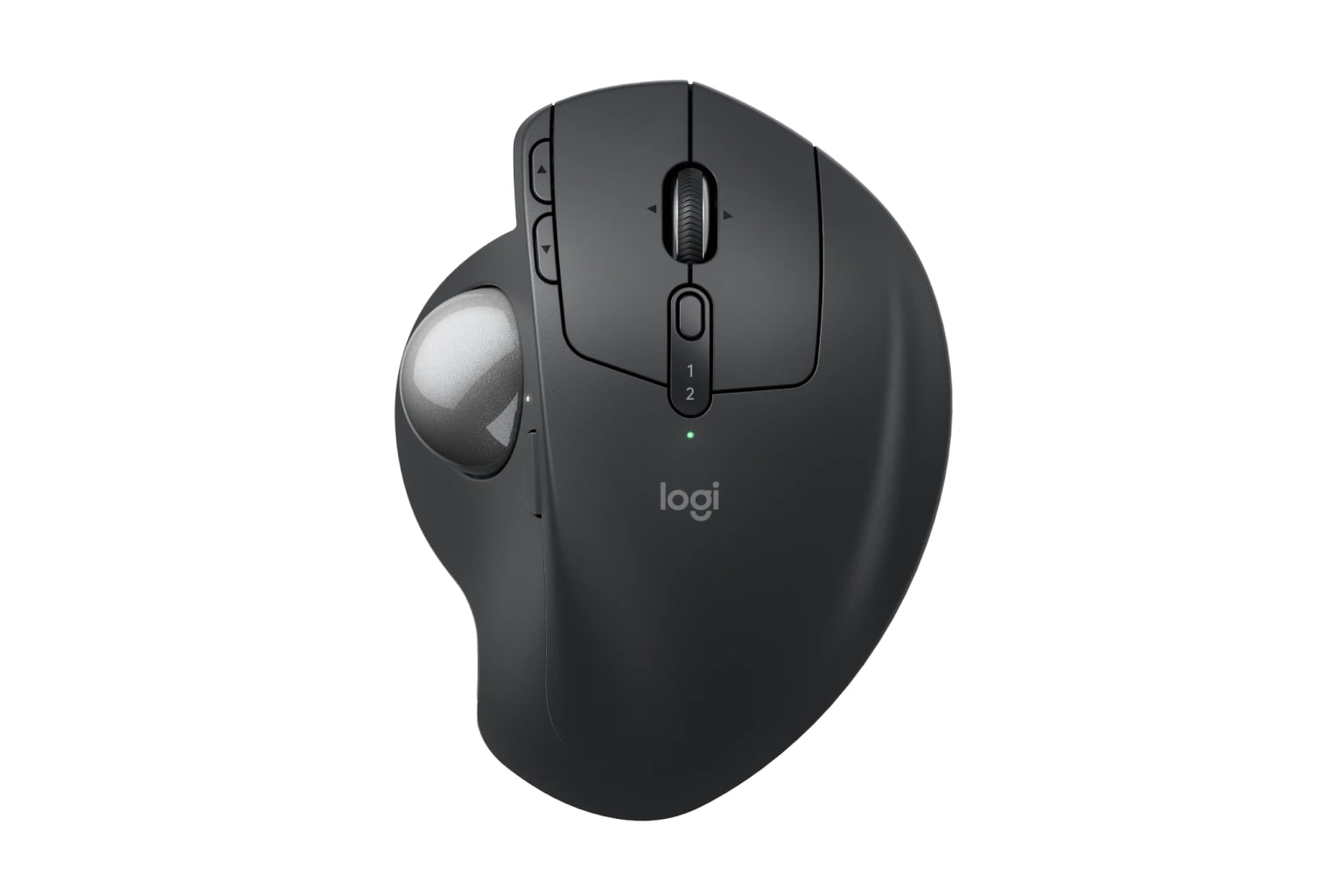
The Logitech MX Ergo S is the best trackball alternative here: a premium right-handed desk mouse for people who want the pointer controlled by the thumb instead of arm travel. It is not for left-handed, travel, or fast-gaming buyers.
MSRP
$119.99
Amazon
$99.99
at writing · 2026-05-06
Buyer fit
Stationary thumb-trackball pick for right-handed desk users who want less whole-arm mouse movement and Logitech’s current productivity ecosystem.
MSRP
$119.99
Amazon
$99.99
at writing · 2026-05-06
Score breakdown
How this product scored
Same rubric, but focused on one product so the reasons behind the score stay readable.
Comfort and posture fit
MX Ergo S is the most convincing non-vertical choice here: it keeps the hand planted, adds a modern USB-C/Logi Bolt update, and gives serious productivity controls. It ranks below Lift only because thumb trackballs are a stronger taste test.
Controls, buttons, and scroll
MX Ergo S is the most convincing non-vertical choice here: it keeps the hand planted, adds a modern USB-C/Logi Bolt update, and gives serious productivity controls. It ranks below Lift only because thumb trackballs are a stronger taste test.
Tracking and desk behavior
MX Ergo S is the most convincing non-vertical choice here: it keeps the hand planted, adds a modern USB-C/Logi Bolt update, and gives serious productivity controls. It ranks below Lift only because thumb trackballs are a stronger taste test.
Setup, software, and connectivity
MX Ergo S is the most convincing non-vertical choice here: it keeps the hand planted, adds a modern USB-C/Logi Bolt update, and gives serious productivity controls. It ranks below Lift only because thumb trackballs are a stronger taste test.
Durability and maintenance
MX Ergo S is the most convincing non-vertical choice here: it keeps the hand planted, adds a modern USB-C/Logi Bolt update, and gives serious productivity controls. It ranks below Lift only because thumb trackballs are a stronger taste test.
Workspace fit
MX Ergo S is the most convincing non-vertical choice here: it keeps the hand planted, adds a modern USB-C/Logi Bolt update, and gives serious productivity controls. It ranks below Lift only because thumb trackballs are a stronger taste test.
Quick Verdict
The Logitech MX Ergo S is the updated premium trackball for people who suspect the problem is not their wrist angle alone—it is all the sweeping, reaching, and nudging a normal mouse asks for. The device stays planted, tilts your hand about 20 degrees, and puts pointer control under your thumb. That can make a crowded desk or multi-monitor setup feel calmer. It can also feel wrong fast if your thumb does not want the job.
That is why it ranked #2 in our Best Ergonomic Mice in 2026, behind the simpler Logitech Lift. Lift is the safer first stop for more people. MX Ergo S is the more interesting answer if you want a stationary desk mouse, USB-C charging, Logi Bolt, quieter clicks than the older MX Ergo lane, a tilt wheel, precision mode, and Logi Options+ controls.
The regret risk is simple: thumb trackballs are personal. Buy this because the planted-control idea solves your desk problem, not because it sounds more ergonomic in the abstract. At the writing snapshot, the kept offer was the base Graphite MX Ergo S ASIN B0D6PTR6MP, captured new at $99.99 from Amazon.com; do not mix it with the original MX Ergo, MX Ergo S Plus, no-featured-offer variants, or used/resale listings. See how it stacks up against the rest of the shortlist in Best Ergonomic Mice in 2026.
Score Breakdown
Overall score: 8.4/10. That score is high because the MX Ergo S solves a real desk problem in a way the vertical mice do not: it reduces whole-arm mouse movement. It did not take the top slot because trackballs are more personal than vertical mice, and the wrong buyer will notice the mismatch fast.
- Comfort and posture fit: 8.5 — The planted shell, soft grip, and 20-degree tilt make sense for medium-to-large right hands. PCMag says that after switching to the trackball, the reviewer had not had the hand/wrist aches they often got with a conventional mouse, and that the "handshake" position felt more natural (source). Calibrated caveat: that is a strong comfort signal, not proof that it fixes pain for everyone.
- Controls, buttons, and scroll: 8.7 — Eight controls, six customizable buttons, a tilt wheel, a precision-mode button, Easy-Switch, and Logi Options+ make this much more than a shell experiment. PCMag especially liked the Actions Ring, saying it "more than made up" for Flow falling short (source).
- Tracking and desk behavior: 8.4 — The trackball is stable and space-saving, with 512–2048 DPI and a precision/speed mode. The same PCMag review warns that it is easy to overshoot at high pointer speed and that the reviewer reached for a regular mouse for light photo editing. That is the line: excellent for office control, not the universal precision tool.
- Setup, software, and connectivity: 8.1 — Bluetooth, Logi Bolt, Easy-Switch for two devices, and Options+ are useful, but software is still the likeliest annoyance. Tom's Hardware quoted one heavy MX Ergo tinkerer calling Logi Options+ "bloated, buggy, and occasionally malware-like" (source). That is sharper than most buyers will feel, but it is a real warning if you hate background apps.
- Durability and maintenance: 8.0 — USB-C, a 120-day battery claim, and quiet main clicks help the daily case. The trackball also pops out for cleaning, which is good because trackballs do need cleaning.
- Workspace fit: 7.4 — The heavy base is wonderful on a desk and bad in a bag. Digital Camera World lists "Lacks portability" as a con, and that matches the spec sheet: with the metal plate, this is a roughly 9.14-ounce planted desk device, not a travel mouse.
What Feels Great Once It Clicks
The delight is not that the MX Ergo S is futuristic. It is that the mouse stops moving. On a crowded desk or a large monitor setup, leaving the whole device planted can make normal cursor work feel calmer. Your palm rests on a broad shell, the thumb ball handles pointer movement, and the base keeps the device from skating away.
The S update also fixes the old MX Ergo buying story. This version brings USB-C charging, Logi Bolt, quieter main clicks, and a current-new Amazon listing for the base Graphite model. Logitech claims up to 120 days of battery life and a one-minute quick charge for 24 hours of use. PCMag said it never had to recharge during about three weeks of regular testing, draining it to around 70% (source). That is the kind of convenience you stop thinking about, which is usually the best kind.
The controls are the other win. The back/forward buttons, tilt wheel, precision mode, Easy-Switch button, and Logi Options+ customization make the MX Ergo S feel like a productivity tool rather than a medical-looking compromise. For people who live in browser tabs, spreadsheets, design timelines, or repetitive office shortcuts, the extra controls matter more than they would on a cheap vertical mouse.
What Gets Annoying
The first annoyance is the obvious one: your thumb has to learn a new job. PCMag says the learning curve "isn't steep" but still required rethinking fine motor control (source). That is fair framing. For normal office work, many people adapt. For games, drawing, fast photo edits, or anyone already prone to thumb discomfort, this may be the wrong experiment.
The second annoyance is upkeep. The ball is easy to pop out, but that does not mean you never have to do it. Dust, skin oil, and desk grit eventually matter with any trackball. If you want the lowest-maintenance ergonomic change, Logitech Lift is simpler.
The third annoyance is the shopping checklist. The base MX Ergo S brings USB-C charging, but Logitech does not include the charging cable. It also supports only two Easy-Switch device profiles, not the three-device routine some MX Master users expect. None of that ruins the mouse; it just makes the purchase less magical if you expected every premium Logitech convenience in one box.
Setup and Daily Use Notes
Setup should be straightforward if your machine matches Logitech's current requirements: Bluetooth Low Energy or the included Logi Bolt USB-A receiver, plus Logi Options+ on recent Windows or macOS if you want customization. Easy-Switch handles up to two devices. That is enough for a desktop/laptop pair, but not the three-device pattern some MX Master users may expect. How-To Geek's structured review notes call out "Only two Bluetooth profiles" as a con (source).
On the desk, the weight is more feature than flaw. PCMag said the heft helps keep the Ergo S from sliding, which is exactly what you want from a stationary trackball (source). In a laptop bag, the same heft becomes the reason not to buy it.
The daily checklist before you keep it should be practical: can your thumb steer comfortably for a full work session, do the side buttons sit where your fingers naturally land, can you live without a left-handed option, do you have a spare USB-C cable, and does Options+ behave on your machine? If any of those fail in the first few days, return friction is easier than trying to force a trackball you already dislike.
How It Compares With the Other Picks
The MX Ergo S is not a slightly fancier Logitech Lift. It is a different bet. Lift is a compact vertical mouse for small-to-medium hands and is the safer default because it still moves like a mouse. MX Ergo S is for the buyer who thinks the movement itself is the problem.
Against the Logitech MX Vertical, the Ergo S is more stationary and more unusual. MX Vertical keeps conventional mouse movement and fits larger right hands; MX Ergo S gives you the planted trackball, stronger current trackball story, and more obvious desk-space advantage. If you want a big moving mouse, choose MX Vertical. If you want to stop moving the mouse body, choose MX Ergo S.
Against the ELECOM DEFT PRO, Logitech is the cleaner mainstream trackball choice. ELECOM has more buttons and finger-ball appeal, but it asks more patience from setup and maintenance. Against the cheap Anker vertical mouse, MX Ergo S is the opposite of a budget trial: pricier, heavier, more capable, and much more specific.
See how it stacks up against the rest of the shortlist in Best Ergonomic Mice in 2026.
Who Should Buy It
Buy the Logitech MX Ergo S if you are right-handed, use a desk most of the day, have medium-to-large hands, want your mouse to stay planted, and are curious enough about thumb control to give it a fair trial. It makes the most sense for office work, coding, research, spreadsheets, browser-heavy days, and multi-monitor setups where constant mouse sweeping gets old.
Skip it if you are left-handed, want a tiny travel mouse, hate peripheral software, play fast-twitch games with the same mouse, do precision drawing/CAD/photo work where a normal pointer feel matters, or already know thumb movement bothers you. Also skip it if you want the cheapest ergonomic experiment; that is what the Anker vertical pick is for.
Bottom line: MX Ergo S is the strongest trackball lane in this guide, not a universal upgrade. If your thumb likes the job, it can make everyday desk work feel calmer. If your thumb hates it, the rest of the spec sheet will not save the purchase.
Tell us what this page missed
These pages get better when real buyer complaints make it back into the scoring model. If something important is underweighted, say it.
Rate this review
Give it a score from 1-10 and tell us what to improve.
0/4000 characters