Logitech MX Brio Review (2026): A Sharp 4K Webcam That Wants a Real Desk
The MX Brio can make a fixed office setup look sharper and more controlled, but its weight, price, LED-light quirks, and software tuning matter before checkout.
The Logitech MX Brio is the premium office 4K pick in our webcam ranking: sharper than the mainstream Logitech lane, packed with controls, and best on a stable desk rather than a travel laptop.
MSRP
—
Amazon
$169.99
at writing · 2026-05-14
Buyer fit
A sharper, heavier Logitech desk webcam with 4K and rich controls; strongest for fixed office setups, less ideal for casual laptop use.
MSRP
—
Amazon
$169.99
at writing · 2026-05-14
Score breakdown
How this product scored
Same rubric, but focused on one product so the reasons behind the score stay readable.
Image quality and bad-light handling
Excellent webcam detail for a fixed desk, with 4K30 and 1080p60 evidence plus better face visibility in hard light; very dim rooms and LED banding still need realistic expectations.
Focus and exposure stability
Autofocus, auto exposure, white balance, HDR, and manual controls are a strength, but difficult lighting can still require tuning instead of blind trust.
Mic and call audio
Dual beamforming mics are genuinely usable for meetings, though the best evidence still treats them as webcam audio rather than a dedicated-mic replacement.
Mounting, privacy, and hardware
Premium-feeling body, twist shutter, magnetic clip, tripod thread, and Show Mode are strong desk wins, with weight and laptop-lid fit as the tradeoff.
Software and compatibility friction
Logi Tune / Options+ controls, Teams/Zoom/Meet positioning, FOV choices, and firmware updates make it capable, as long as the buyer does not resent camera software.
Reliability, heat, and support
The packet is strong on Amazon text and hands-on videos but thinner on long-term owner/support patterns; LED banding and firmware dependence keep this score grounded.
Use-case fit
Best for a permanent office desk where sharper Logitech 4K detail and call-app polish matter; weaker as a travel or bargain webcam.
Evidence confidence
Confidence is medium-high for specs, setup, image controls, and demo behavior, but official support/spec capture and long-term owner evidence remain incomplete.
Quick Verdict
If you are hovering over the Logitech MX Brio because your laptop camera makes every meeting look a little apologetic, the regret check is simple: will this live on a stable desk, and are you willing to tune it once when your lighting is weird? If yes, the MX Brio is one of the more convincing premium office webcams in this set. If no, you may be paying for 4K hardware that your laptop lid, dock, or backlit room never lets shine.
That is why it ranked #4 in our Best Webcams in 2026 as the Best premium office 4K pick. The Logitech Brio 505 is still the safer default for most work-call buyers, and the Insta360 Link 2 Pro is the smarter pick if you want active tracking. The MX Brio is narrower: it is for people who like Logitech controls, want sharper detail than 1080p gives them, and mostly sit in one place.
The upside is real. Amazon text lists 4K30, 1080p60, autofocus, auto exposure, auto white balance, noise reduction, a twist privacy shutter, and Teams/Zoom/Meet positioning. Video evidence adds the ownership texture: one reviewer called it a “high-end 4K USB webcam” and said the body “feels durable and solid” (source). At the writing snapshot, the exact kept product was ASIN B0BFJ4CRKD in Graphite, captured at $169.99 on 2026-05-14T21:35:05Z. Use the product link to check current price and availability before you buy; that also helps support KB4UB if you purchase through it.
Score Breakdown
Overall score: 8/10. That score reflects a strong premium office webcam, not a universally better webcam for every buyer. The MX Brio earns its score with sharper image detail, a better physical package, selectable field of view, Logitech software controls, and practical call-app fit. It loses points because price, weight, LED-light behavior, USB/cable realities, and long-term owner evidence still matter.
- Image quality and bad-light handling: 8/10 — This is the main reason to buy it. Amazon describes 4K30 or 1080p60 capture and “2x better face visibility” in difficult light, while one hands-on review said good light looked strong and very low light still kept the face visible, though a hand movement “blurs out a bit” (source).
- Focus and exposure stability: 8/10 — Autofocus and auto exposure are useful, and the software gives you manual controls when the room disagrees. The caveat is that hard light can still expose the limits of automatic cleanup.
- Mic and call audio: 7/10 — The mics are meeting-usable, not magic. One in-depth demo said the audio was “fine pretty much what you would expect” from a webcam and recommended a lav or wired mic for anything beyond a normal Zoom meeting (source).
- Mounting, privacy, and hardware: 8/10 — The twist shutter, metal-feeling body, magnetic clip, 1/4-inch thread, and Show Mode feel more premium than the cheap Logitech lane. The tradeoff is size and weight.
- Software and compatibility: 8/10 — Logitech controls matter here. A transcript notes settings for sharpness, contrast, white balance, filters, and framing, then says the MX Brio has been “certified with Microsoft Teams, Zoom and Google Meet” while still working elsewhere (source).
- Reliability, heat, and support: 6/10 — The packet is strong on demos and Amazon text but thin on long-term owner failures. LED banding also showed up in one review, so this is not a perfect set-and-forget claim.
- Use-case fit: 8/10 — Excellent for a fixed work desk where you want a premium Logitech image. Less convincing for travel, bargain shopping, or streamer setups built around separate cameras and mics.
- Evidence confidence: 7/10 — Product identity and demo evidence are solid, but official-spec and owner/forum gaps keep the recommendation from sounding more certain than it is.
What Feels Great Right Away
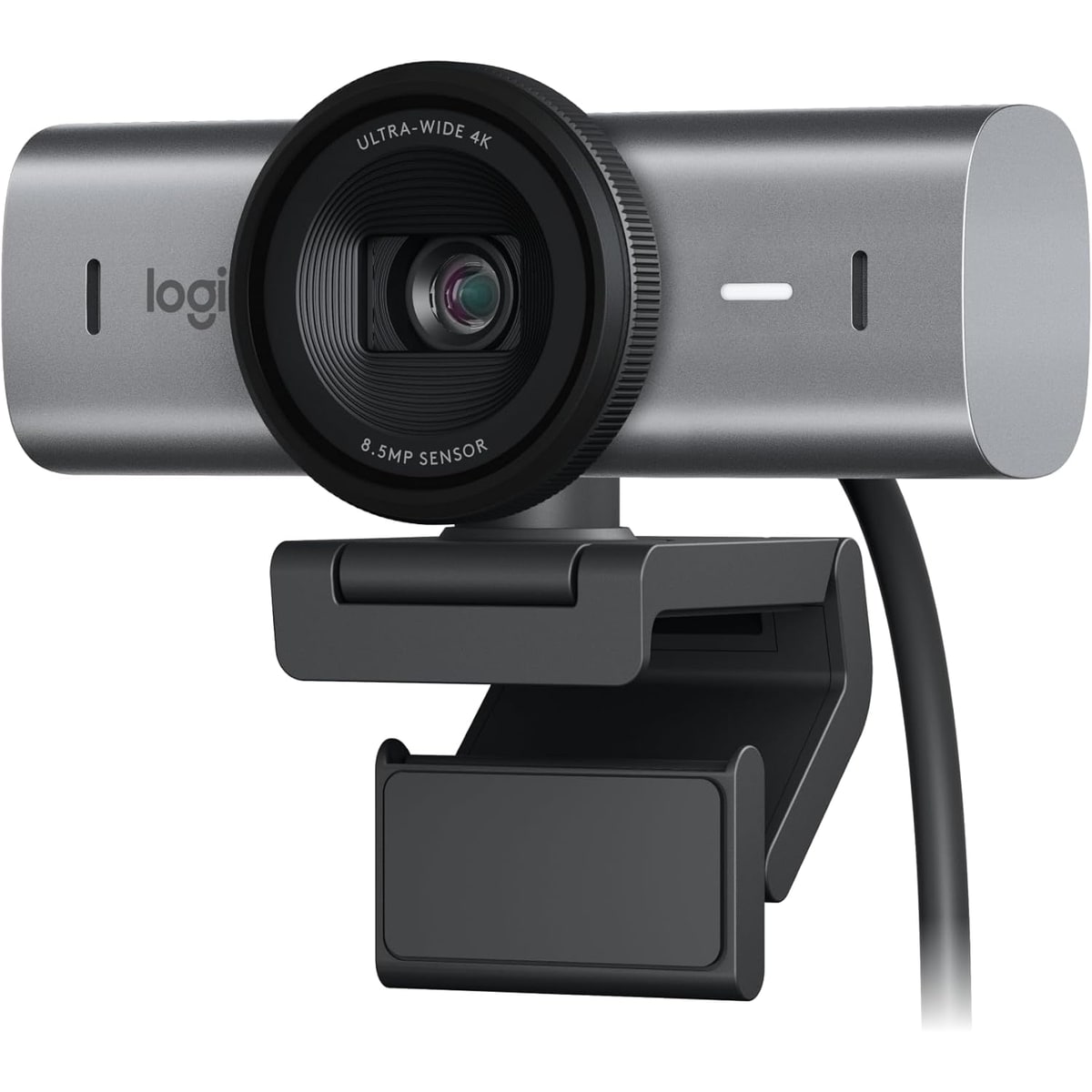
The immediate win is that the MX Brio looks and feels like a serious desk accessory instead of a tiny emergency camera. The body is heavier and more substantial than budget webcams, the shutter twists closed instead of relying on a loose cap, and the camera can sit on a monitor clip or a tripod. One hands-on transcript says setup is basically plug in the USB-C cable and “you're ready to go,” then adds that the camera is magnetized to the clip and has a screw mount underneath for tripod use (source).
The other early delight is detail. In a good room, the 4K sensor gives you more room to crop, more face texture, and a more intentional video-call look than a laptop camera. A reviewer testing different scenes said they were “surprised by the amount of detail” and could see beard hairs in the kitchen shot (source). That is exactly where the MX Brio makes sense: not because everyone needs 4K on a meeting, but because the sensor gives you more headroom before the image falls apart.
The selectable field of view is quietly useful too. The packet evidence lists 65°, 78°, and 90° modes. Wide is nice for a whiteboard or shared room; tight is better when you do not want coworkers seeing every box behind your chair. That daily control is the kind of thing owners appreciate after the first week, not just on the spec sheet.
What Gets Annoying
The MX Brio’s flaws are not dealbreakers for its intended buyer, but they are exactly the things you want to know before paying premium-webcam money. First, the camera is desk-first. The heavier body helps it feel solid, but it can be awkward on small laptop lids or shaky setups. One review mentioned desk movement and suggested a more secure mounting option if you talk with your hands or hit the desk while speaking (source).
Second, difficult LED lighting can still be annoying. A hands-on review praised the camera overall but said “they've got to get this led banding issue resolved” because it was distracting, especially for game streaming or similar uses (source). The same reviewer thought it would be okay for remote meetings, especially with background blur, so this is a calibrated caveat: important for certain rooms, not a reason to dismiss the camera for every office.
Third, do not buy it mainly for the mics or for Windows Hello. The built-in mics are good enough for meetings, but a separate mic or headset still sounds more intentional. And the dossier flags one comparison transcript saying not to expect Windows Hello on the MX Brio the way older Brio 4K buyers might. If Windows Hello is the reason you are shopping Logitech, verify the current official spec before checkout.
Setup and Daily Use Notes
For basic calls, setup should be easy: plug in the camera, choose it in Zoom, Teams, Meet, OBS, or your recording app, and mount it high enough that you are not looking down at everyone. The premium part starts when you open Logitech’s software and tune the picture. That is where the MX Brio can earn its price: field of view, crop, exposure, white balance, HDR, low-light behavior, manual focus, filters, and firmware updates are the levers that separate a good desk image from a random one.
The practical daily checklist is short. Use front light if possible. Keep the camera on a stable monitor or tripod. Avoid questionable hubs if you want the highest capture modes, because the dossier preserves a USB 3 caveat for maximum 4K behavior. If LED lights create banding, try HDR/anti-flicker/settings changes before blaming the camera outright. And if your meetings are important, do a 30-second preview before the call instead of trusting yesterday’s lighting.
Product identity matters here. This review is for the Logitech MX Brio Graphite / ASIN B0BFJ4CRKD. Do not blend it with the older Logitech Brio 4K, Brio 500/505, renewed listings, bundles, or generic Logitech webcam results. The captured Amazon snapshot showed $169.99 and in-stock Amazon fulfillment text, but webcam prices and sellers move quickly, so treat that as a snapshot rather than a promise.
How It Compares With the Other Picks
Against the Logitech Brio 505, the MX Brio is the sharper, more premium Logitech upgrade. The Brio 505 is still easier to recommend to most people because it solves normal work calls with less money and less desk commitment. The MX Brio wins when a fixed desk, 4K detail, richer controls, and a more premium body are worth the extra cost.
Against the Insta360 Link 2 Pro, the MX Brio is less theatrical and more office-stable. The Insta360 is the better choice if you present, move around, teach, or want tracking features badly enough to pay for them. The MX Brio makes more sense if you mostly stay seated and want a polished Logitech image rather than PTZ-style motion.
Against the OBSBOT Meet 2, the MX Brio is the bigger mainstream-brand desk pick. OBSBOT is compact and feature-heavy; the Logitech feels more like a premium office peripheral with a familiar software ecosystem. Against the Elgato Facecam MK.2, the job split is even clearer: Elgato is for tuned creator desks with separate audio, while the MX Brio is a call-first 4K webcam with autofocus and built-in mics.
See the full category ranking in Best Webcams in 2026.
Who Should Buy It
Buy the Logitech MX Brio if you spend real time on video calls, have a stable desk or monitor, and want a sharper Logitech webcam without jumping into a tracking camera. It is especially easy to justify if your work involves client calls, interviews, seated presentations, recorded updates, or any situation where looking clearer makes the meeting feel less amateur.
Skip it if your camera will live on a thin laptop lid, you travel often, your budget is tight, or you refuse to touch camera settings. Also skip it if a built-in webcam mic needs to replace a real microphone, or if Windows Hello is non-negotiable and you have not verified current support.
Bottom line: the MX Brio is not the webcam I would hand to everyone. It is the Logitech upgrade for people who already know their desk is where the camera will live. Give it stable mounting, decent light, and a little setup attention, and it can make everyday calls look noticeably more intentional. Treat it like a magic fix for every room, and it will eventually remind you that even premium webcams still obey light, angle, and audio physics.
Tell us what this page missed
These pages get better when real buyer complaints make it back into the scoring model. If something important is underweighted, say it.
Rate this review
Give it a score from 1-10 and tell us what to improve.
0/4000 characters