Logitech G502 X Plus Review (2026): Buttons, RGB, and the Weight Catch
A closer look at the wireless G502 X Plus: extra controls, scroll-wheel utility, RGB battery tradeoff, G HUB setup, 106 g weight, listing traps, and who should buy it over a lighter FPS mouse.
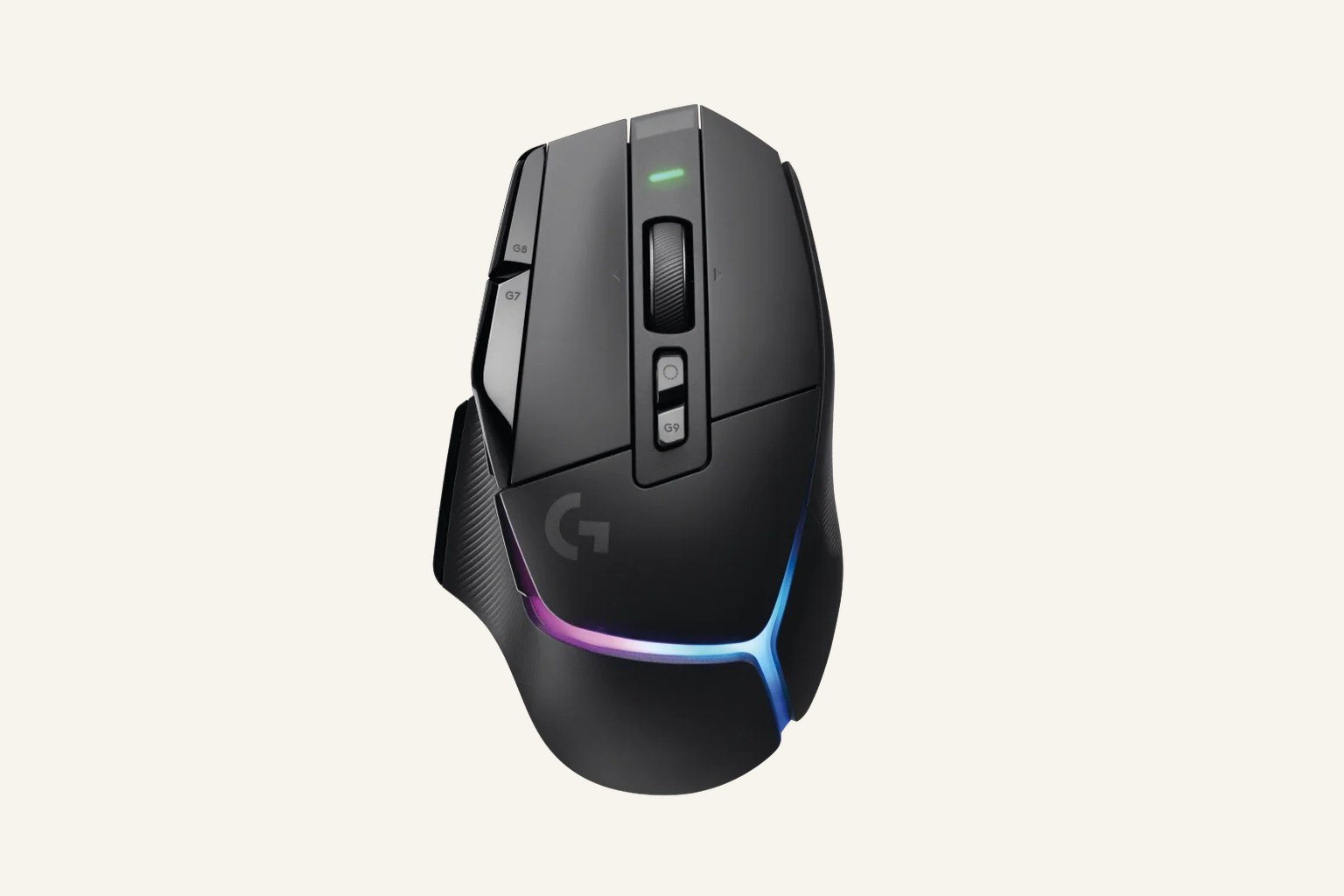
The Logitech G502 X Plus LIGHTSPEED is the best wireless utility mouse in our gaming-mouse ranking because its G502 controls, USB-C charging, LIGHTFORCE switches, HERO sensor, RGB, and POWERPLAY support make sense for mixed gaming and desk work. It is a strong buy for button people, not for players chasing the lightest FPS feel.
MSRP
—
Amazon
$159.99
at writing · 2026-05-15
Buyer fit
The G502 X Plus is the pick when control beats weight. It makes sense if you already know why the G502 layout has fans; it is overkill if you only want to click heads.
MSRP
—
Amazon
$159.99
at writing · 2026-05-15
Score breakdown
How this product scored
Same rubric, but focused on one product so the reasons behind the score stay readable.
Shape and grip comfort
Logitech G502 X Plus LIGHTSPEED scores 7.8/10 for shape and grip comfort. Score reflects shell shape, hand-fit warnings, grip comfort, and long-session caveats from owner/reviewer evidence.
Tracking and control
Logitech G502 X Plus LIGHTSPEED scores 7.5/10 for tracking and control. Score reflects sensor confidence, control feel, polling practicality, glide, and whether the performance benefits are likely to matter in real games.
Buttons, clicks, and wheel
Logitech G502 X Plus LIGHTSPEED scores 8.8/10 for buttons, clicks, and wheel. Score reflects button layout, click feel, wheel behavior, side-button reach, and repeated control complaints.
Battery and connection
Logitech G502 X Plus LIGHTSPEED scores 7.7/10 for battery and connection. Score reflects connection reliability, battery expectations, charging, sleep/wake behavior, and dongle or cable caveats.
Software/firmware friction
Logitech G502 X Plus LIGHTSPEED scores 7.1/10 for software/firmware friction. Score reflects setup workload, app and firmware annoyances, onboard memory behavior, account requirements, and how much software gets in the buyer’s way.
Use-case fit
Logitech G502 X Plus LIGHTSPEED scores 8/10 for use-case fit. Score reflects how clearly the mouse fits its intended lane versus buyers who would be happier with a different shape, weight, or button layout.
Durability confidence
Logitech G502 X Plus LIGHTSPEED scores 7.1/10 for durability confidence. Score reflects warranty/support context, owner complaints, build confidence, and whether known issues look rare or worth planning around.
Quick Verdict
The Logitech G502 X Plus LIGHTSPEED is the mouse in our best gaming mice ranking for people who want control more than minimum weight. It ranked sixth overall, not because it feels weak, but because it is solving a different problem than the Viper V3 Pro, Superlight 2, or DeathAdder V3 Pro. This is the premium wireless G502 lane: more buttons, more wheel utility, RGB, USB-C, and a familiar right-handed shape.
The reason to slow down before buying is that the G502 X Plus can look like an obvious upgrade when it may actually be the wrong kind of mouse. At 106 g, it is much heavier than the FPS-first winners. Its best tricks depend on whether you will map the buttons, use the wheel, tolerate G HUB, and accept the RGB battery tradeoff. One reviewer summed up the Plus-versus-LIGHTSPEED decision bluntly: “you paid 20 extra dollars for RGB.” That is not automatically bad, but it is exactly the kind of detail worth knowing before checkout.
Use this review as a fit check: shape, weight, buttons, lighting, software, and the exact G502 listing. Product links can help you re-check today’s price, seller, color, condition, and bundle contents, and they also help support KB4UB.
Score Breakdown
- Shape and grip comfort: 7.8/10. The familiar right-handed G502-style shell is comfortable if you like a fuller utility mouse with thumb support, but it is not a low, featherweight FPS shape.
- Tracking and control: 7.5/10. The HERO 25K sensor and LIGHTSPEED wireless are more than capable; the lower score is about mass and aim style, not basic tracking failure.
- Buttons, clicks, and wheel: 8.8/10. This is the G502 X Plus at its best: 13 programmable controls, a removable DPI-shift button, a useful scroll wheel, and crisp LIGHTFORCE switches.
- Battery and connection: 7.7/10. USB-C is welcome, POWERPLAY compatibility is a real convenience if you buy into it, and the official battery claim changes sharply with RGB behavior.
- Software and firmware: 7.1/10. G HUB is part of the pitch if you want lighting and button profiles. It is also part of the annoyance if you wanted a simple plug-in-and-forget mouse.
- Use-case fit: 8.0/10. Strong for mixed gaming, shortcuts, and desk use; weaker for pure FPS buyers chasing the lightest possible wireless mouse.
- Durability confidence: 7.1/10. Logitech’s optical-mechanical switch story and two-year warranty help, but the available evidence was more reviewer/transcript-heavy than broad long-term owner consensus.
What Feels Great After Setup
The G502 X Plus makes the most sense when you stop judging it like a Superlight with extra buttons. Its appeal is that the buttons and wheel are the point. The removable DPI-shift button can be flipped or replaced with a cover, which matters if your thumb naturally rests near it. A hands-on transcript noted that the “sniper button paddle is reversible,” so it can flare toward your thumb or away for larger hands. That small physical choice is the kind of detail that keeps a feature from becoming an accidental misclick.
The updated hardware also fixes a few old G502 complaints. Reviewers called out the move to USB-C, smoother PTFE feet, and lighter materials versus older G502 models. One hands-on review said Logitech “finally have a usb-c port for charging,” and another said the PTFE feet give “less friction and provides a smooth Glide.” Those are not flashy spec wins, but they are the things you feel when you charge it, move it across a pad, or switch back from an older mouse.
The shape is still familiar. One reviewer coming from earlier G502 models said the mouse “still has the same rounded shape on the palm rest” and “fits comfortably in my hand.” Another longtime G502 user said that when they gripped the new model, “my worries melted away” because the familiar shape was still there. If that shell already works for your hand, the X Plus feels like a cleaner wireless version of a mouse you understand.
Setup, Battery, and Software Reality
Setup is where the G502 X Plus starts separating buyers who will love it from buyers who will resent it. The box evidence points to the mouse, a LIGHTSPEED USB-A receiver, USB-C charging cable, USB extension adapter, DPI-shift cover, and documentation. That means you can run the receiver closer to your desk and charge over USB-C instead of dealing with an older port. If you use Logitech POWERPLAY, the official page says the G502 X Plus is compatible, which can turn charging into something you almost stop thinking about.
Battery life needs more care. Logitech’s official copy says the G502 X Plus reaches “up to 130 hours of battery life with RGB off and 37 hours when RGB is set to always on.” The parent payload rounded this as up to about 120 hours without RGB and about 37 hours with default RGB lighting claimed, so the practical point is simple: the lighting you paid extra for is also the thing that shortens the battery story. That is fair if the RGB strip makes the mouse feel special on your desk. It is silly if you turn it off immediately and could have bought the non-Plus LIGHTSPEED version.
G HUB is the other reality. You buy this mouse for profiles, LIGHTSYNC, button mapping, DPI behavior, and mixed game/work shortcuts. If you will set those once and use them every day, the software has a purpose. If you dislike peripheral apps, the G502 X Plus asks more patience than a simpler FPS mouse.
The Annoyances to Know Before Buying
The first annoyance is weight. The G502 X Plus is listed around 106 g, which is noticeably lighter than some older G502 memories but still heavy beside the 54 g Viper V3 Pro or the Superlight 2. One reviewer put it fairly: it is “still on the heavier side here,” while also saying it feels noticeably lighter in the hand than older versions. That is the calibrated read. The weight is not a flaw if you want a planted utility mouse; it is a real reason to skip it if fast FPS aim is your priority.
The second annoyance is paying for the Plus model. Multiple included transcripts emphasize that the X Plus is mainly the LIGHTSPEED model with RGB added. One review says the G502 X Plus and LIGHTSPEED are “mostly the same except” the Plus has RGB, and another frames the difference as paying extra for lighting. If you love the look, fine. If you care about battery and price more than the light strip, check the non-Plus version before buying.
The third annoyance is listing identity. The research packet repeatedly warns that Amazon rows can blur the G502 X Plus, older G502 LIGHTSPEED, wired G502 X, renewed listings, and bundles. The parent payload uses ASIN B092CB69Q4 and a $159.99 price-at-writing snapshot, but the safe move is still to confirm exact seller, condition, color, and model on the product page before checkout.
Reliability caveats are moderate rather than scary. Logitech describes the LIGHTFORCE switches as hybrid optical-mechanical switches meant for “speed and reliability,” while keeping crisp tactile feedback. That is a good design story, but the available packet leans heavily on official and reviewer sources, so long-term owner patterns should be treated with normal caution rather than assumed perfect.
How It Compares
Compared with the Razer Viper V3 Pro, Logitech G PRO X SUPERLIGHT 2, and Razer DeathAdder V3 Pro, the G502 X Plus is slower to justify for pure FPS and easier to justify for everything around the game. Those higher-ranked mice are lighter and more focused. The G502 X Plus gives you more controls, more scroll-wheel usefulness, RGB, and a better desk-work crossover story.
The closest philosophical rival in this ranking is the Razer Basilisk V3. Choose the Basilisk V3 if you want a wired control mouse with a much lower price ceiling. Choose the G502 X Plus if you specifically want the G502 layout wireless, USB-C charging, LIGHTSYNC RGB, and POWERPLAY compatibility. The Basilisk ranked higher because it is easier to recommend as a wired value/control pick; the G502 X Plus is more expensive and more specific.
The G305 is the opposite Logitech answer: budget wireless, AA battery, fewer premium touches, and a much easier price. The Corsair Scimitar Elite Wireless is the better pick if you need a real MMO thumb grid. The SteelSeries Aerox 5 Wireless is the lighter extra-button wildcard, but it does not have the same full utility-mouse confidence.
For the full ranking, scoring, and buyer lanes, go back to our Best Gaming Mice in 2026 guide.
Who Should Buy It — and Who Should Skip It
Buy the Logitech G502 X Plus LIGHTSPEED if:
- you already like the G502 shape and want the wireless premium version
- extra buttons, a useful wheel, and shortcuts matter more than minimum weight
- you split time between games, browsing, creative apps, and daily desk work
- you will actually map the 13 programmable controls
- RGB is part of the appeal, not something you will immediately disable to save battery
- USB-C charging and optional POWERPLAY support sound genuinely convenient
- the current listing clearly shows the exact new G502 X Plus LIGHTSPEED variant you expect
Skip it if:
- you mainly play competitive FPS and want the lightest possible mouse
- 106 g already sounds too heavy for your aim style
- you want a budget wireless mouse
- you dislike G HUB or do not want to configure profiles
- you do not care about RGB and can buy the non-Plus LIGHTSPEED version for less
- you need a true MMO grid rather than a utility-button layout
Bottom line: the G502 X Plus is a strong buy for the person who sees the G502 layout as a feature, not clutter. It is overkill if you only want to click heads. If control, convenience, and desk crossover are what you actually want, it earns its place. For the broader field, compare it with the full gaming mouse ranking.
Tell us what this page missed
These pages get better when real buyer complaints make it back into the scoring model. If something important is underweighted, say it.
Rate this review
Give it a score from 1-10 and tell us what to improve.
0/4000 characters