Logitech Brio 505 Review (2026): The Safest Work-Call Webcam for Most Desks
A practical 1080p office webcam with a twist shutter, RightSight framing, Show Mode, and Logitech controls—just do not buy it expecting 4K detail or headset-grade audio.
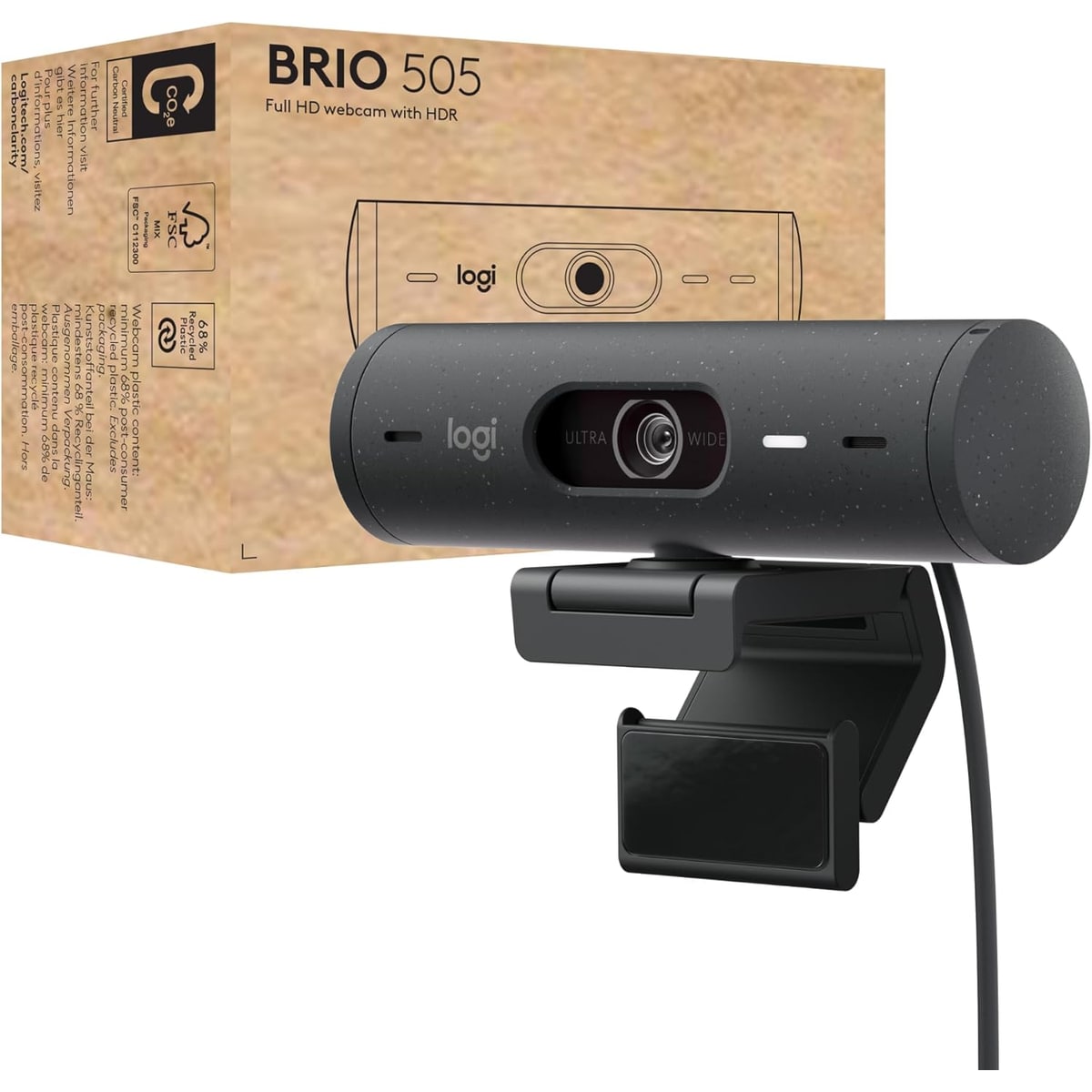
The Logitech Brio 505 is our best overall webcam because it gets the daily work-call stuff right: privacy, framing, light correction, Teams/Meet/Zoom fit, and enough controls without feeling like a creator rig.
MSRP
—
Amazon
$129.99
at writing · 2026-05-14
Buyer fit
The safest mainstream work-call choice: good hardware privacy, useful Logitech controls, and a clear desk-call role, with 1080p detail and thin long-term owner evidence as the limits.
MSRP
—
Amazon
$129.99
at writing · 2026-05-14
Score breakdown
How this product scored
Same rubric, but focused on one product so the reasons behind the score stay readable.
Image quality and bad-light handling
Good enough to beat most laptop cameras for daily calls, with auto light correction helping normal rooms. It is still a 1080p office webcam, not the sharper MX Brio/Brio 4K lane.
Focus and exposure stability
The strongest Brio 505 score: hands-on transcript evidence calls the Brio family autofocus quick and low-drama, and RightSight can keep a moving speaker framed when enabled.
Mic and call audio
The dual noise-reduction mics are credible call backups and Amazon positions them as part of the plug-and-play promise, but the evidence does not support replacing a headset or dedicated mic.
Mounting, privacy, and hardware
The twist privacy shutter, front status LEDs, monitor mount, 90-degree field of view, and Show Mode tilt make the hardware feel built for office desks rather than bare-minimum laptop replacement duty.
Software and compatibility friction
Logi Tune, RightSight, Show Mode, Teams/Zoom/Meet positioning, and Logitech Sync support help the 505 feel manageable in both home-office and IT-heavy setups, as long as the buyer accepts a control app.
Reliability, heat, and support
The product passes the current-new Amazon check, but long-call heat, hub issues, and warranty stories are under-covered in the preserved source set, so this score stays conservative.
Use-case fit
This is the safest mainstream work-call fit in the group: privacy, framing, setup, and software controls line up with what most hybrid workers actually need.
Evidence confidence
The evidence is useful but uneven: Amazon and hands-on video transcripts are solid, while owner/forum and long-term reliability coverage are thinner than ideal.
Quick Verdict
The Logitech Brio 505 is the webcam to buy when you want to avoid a boring but common regret: upgrading from a laptop camera, then spending the next month fighting glare, framing, app settings, and a privacy cover you never quite trust. It is not the sharpest webcam in this ranking. It wins because it is the least weird default for normal work calls.
That is why it ranked #1 in our Best Webcams in 2026. The Brio 505 gives you a 1080p work-call camera, a built-in twist shutter, a wide 90-degree view, RightSight framing, Show Mode for pointing the camera down at your desk, front status LEDs, and Logitech software that can actually help when your face looks too dark or washed out.
The purchase risk is expectation creep. Amazon sells the Brio 505 as a “Full HD 1080p Webcam with auto Light Correction, framing, Dual Noise Reduction mics, Privacy Shutter” for Teams, Meet, and Zoom (source). That is the right mental box. Buy it to make ordinary Zoom/Teams/Meet calls look steadier and more intentional than a laptop webcam. Do not buy it expecting 4K detail, motorized tracking, streamer-grade manual control, or mic audio that replaces a headset.
At the writing snapshot, the exact Amazon listing was ASIN B0BMQQQHC2, captured new at $129.99 from Amazon.com on 2026-05-14. Check current price and availability through the product links before you buy; it supports KB4UB and helps you avoid accidentally buying a Brio 500, older Brio 4K, Brio 100/101, bundle, renewed, or used listing.
Score Breakdown
Overall score: 7/10. That sounds modest for a winner, but it is the point. The Brio 505 is not a spec-sheet monster; it is a balanced office webcam with fewer ways to irritate the average hybrid worker.
- Image quality and bad-light handling: 7/10 — The Brio 505 should make most laptop-camera calls look cleaner, especially with auto light correction. It still has a 1080p ceiling, so it will not give you the sharper detail of Logitech MX Brio or the older Brio 4K lane.
- Focus and exposure stability: 8/10 — This is one of the reasons it wins. In a Logitech comparison transcript, the reviewer says the Brio family autofocus is “pretty quick and snappy” and that they “never had many complaints with the Brio's autofocus” (source). For work calls, boring focus is a feature.
- Mic and call audio: 7/10 — Amazon describes “dual noise reduction mics” and says the camera can “work right out of the box so users look and sound natural” (source). Treat that as meeting-usable backup audio, not a promise that your headset can retire.
- Mounting, privacy, and hardware: 8/10 — The twist shutter is the daily win. A hands-on Brio 505 demo calls out the “shutter built right in” and says you “just twist the top” to open it (source). That is better than a loose cap you lose in a drawer.
- Software and compatibility: 8/10 — Logi Tune, RightSight, Show Mode, Teams/Zoom/Meet positioning, and Logitech Sync support give the Brio 505 a real office identity. The tradeoff is that the best features assume you are willing to use Logitech’s software.
- Reliability, heat, and support: 6/10 — This is the cautious score. The current-new commerce check is clean, but long-call heat, USB hub weirdness, and warranty patterns are not as well covered in the preserved sources as the feature story.
- Use-case fit: 9/10 — For ordinary desks, this is the best fit in the group. It is not the fanciest camera; it is the one most people are least likely to regret.
- Evidence confidence: 7/10 — Amazon product text and hands-on video transcripts are useful. Owner/forum and long-term reliability evidence are thinner, so the caveats stay visible.
What Feels Great After the First Call
The first nice thing is that the Brio 505 feels designed around meetings, not around pretending every buyer is a streamer. The privacy shutter is built into the body. The camera has front LEDs so you can tell when it is active. The 90-degree view gives you room to sit naturally, then software can crop tighter when you do not want your whole room on display.
That last part matters more than resolution. A 4K webcam can still make you look strange if the framing is wrong or the exposure keeps changing. The Brio 505 aims for the calmer version of good: your face is visible, the camera is not hunting constantly, and you can tune the picture without learning a creator app.
RightSight is the feature that sounds gimmicky until you have a call where you shift around, stand up, or need the framing to follow you a little. In a Brio 505 demo, the presenter says that with RightSight enabled, if you are “moving around the room it keeps an eye on you” (source). That is not the same as a motorized Insta360 Link 2 Pro tracking you around a presentation space, but for a normal desk camera it is useful cleanup.
Show Mode is the other small delight. You tilt the camera down toward the desk, and the image flips so you can show a paper, sketch, object, or keyboard area without holding it awkwardly in front of your face. Most people will not use it every day. The people who need it—teachers, managers, repair explainers, anyone who scribbles on paper during calls—will be glad it exists.
What Gets Annoying
The Brio 505’s flaws are not dramatic. They are the kind that only matter if you bought the wrong webcam for the job.
The first limit is sharpness. This is a 1080p camera. If you want crisp product demos, detailed cropping, a polished creator desk, or the ability to zoom heavily without the image falling apart, look at Logitech MX Brio, Insta360 Link 2 Pro, OBSBOT Meet 2, or another 4K pick instead. The Brio 505 wins the work-call lane, not the detail-at-any-cost lane.
The second limit is field of view. Wide sounds great until it shows your doorway, laundry pile, or the person walking behind you. The Brio 505’s 90-degree view is helpful, but you may want to crop it. One Logitech comparison transcript notes that the software can change field of view to 78 or 65 degrees, but also calls that a “digital Zoom” (source). In other words: useful, but not magic.
The third limit is audio. Dual noise-reduction mics are welcome, especially when your laptop mic is muffled or far away, but webcam mics still hear the room. If your calls matter, use a headset, earbuds, or a dedicated mic.
The final caveat is evidence confidence. The preserved material is good on features and demos, thinner on months-later ownership: heat, disconnects, dock behavior, and support stories. That does not make the Brio 505 risky for most buyers. It just keeps the recommendation honest.
Setup and Daily Use Notes
For most people, setup should be pleasantly ordinary: plug in the USB-C cable, choose the Brio 505 in your call app, then use Logitech software if you want framing and image controls. Amazon positions it as certified for Microsoft Teams, Zoom, and Google Meet, and also says it works with Chromebook, Windows, macOS, ChromeOS, and other calling platforms (source). That broad call-app fit is one reason it beats fussier cameras here.
The ownership checklist is simple. First, decide where the camera will sit. A wide view on top of a monitor can be flattering, but it may show too much background until you crop. Second, check your lighting. Auto light correction helps, but no webcam fully fixes a bright window behind you or a dark room with one sad desk lamp. Third, test the mic, then assume a headset is still better if your voice matters. Fourth, twist the shutter closed after calls and notice whether you actually use it. This is the kind of privacy hardware that can become habit.
If your workplace manages devices, the 505 business/TAA lane also matters. The Brio 505 demo notes that Logi Tune can connect into Logitech Sync so an IT organization can manage devices and firmware settings centrally (source). Home buyers do not need to care much about that. Offices buying a batch of cameras probably do.
How It Compares With the Other Picks
The Anker PowerConf C200 2K is the closest “maybe I should spend less” alternative. It gives you a 2K value story and strong basics for the money. The Brio 505 is still the safer overall pick if you want Logitech’s shutter, software controls, call-app positioning, and a more polished desk-call feature set.
The Insta360 Link 2 Pro is the opposite tradeoff. Buy that if you present, teach, move around, or want premium smart framing enough to pay for it. It is more exciting than the Brio 505. It is also more expensive and more dependent on smart features you may not need for ordinary meetings.
Logitech MX Brio is the upgrade if your main complaint is detail. It is sharper, heavier, and better for a fixed office setup where 4K matters. The Brio 505 is easier to recommend when the buyer just wants a trustworthy work-call camera and does not want to overbuy.
OBSBOT Meet 2 is smaller and feature-heavy, Elgato Facecam MK.2 is better for tuned creator desks with separate audio, Dell Pro Webcam WB5023 is the conservative business alternative, and Logitech Brio 101 is the cheap recognizable fallback. The Brio 505 sits above them because it gives the most normal people the fewest unpleasant surprises. See the whole stack in Best Webcams in 2026.
Who Should Buy It
Buy the Logitech Brio 505 if you mostly live in Zoom, Teams, Meet, or browser-based calls; want a real privacy shutter; need better framing than a laptop camera; like having image controls available; and would rather buy the safe office webcam than the flashiest one.
It is especially good for hybrid workers, managers, teachers, remote interviewers, and anyone who wants their desk setup to look intentional without building a mini studio. It also makes sense for offices that want a Logitech-managed camera lane rather than a pile of random cheap webcams.
Skip it if you need 4K detail, want physical gimbal tracking, stream with separate lighting and audio, hate installing camera software, or expect the built-in mic to replace a headset. Also skip it if the Brio 505 is priced too close to a better 4K option when you check out; webcam pricing moves enough that the best default can become a less obvious buy on a bad sales week.
Bottom line: the Brio 505 is the webcam I would tell most work-call buyers to try first. It is practical, private, tunable, and boring in the good way. Buy the exact ASIN, check the current new price, and do not confuse it with Logitech’s many Brio siblings.
Tell us what this page missed
These pages get better when real buyer complaints make it back into the scoring model. If something important is underweighted, say it.
Rate this review
Give it a score from 1-10 and tell us what to improve.
0/4000 characters