Logitech Brio 101 Review (2026): Cheap, Simple, and Easy to Outgrow
A bare-budget 1080p Logitech webcam for basic calls, spare desks, and buyers who need a camera to exist more than they need to look polished.
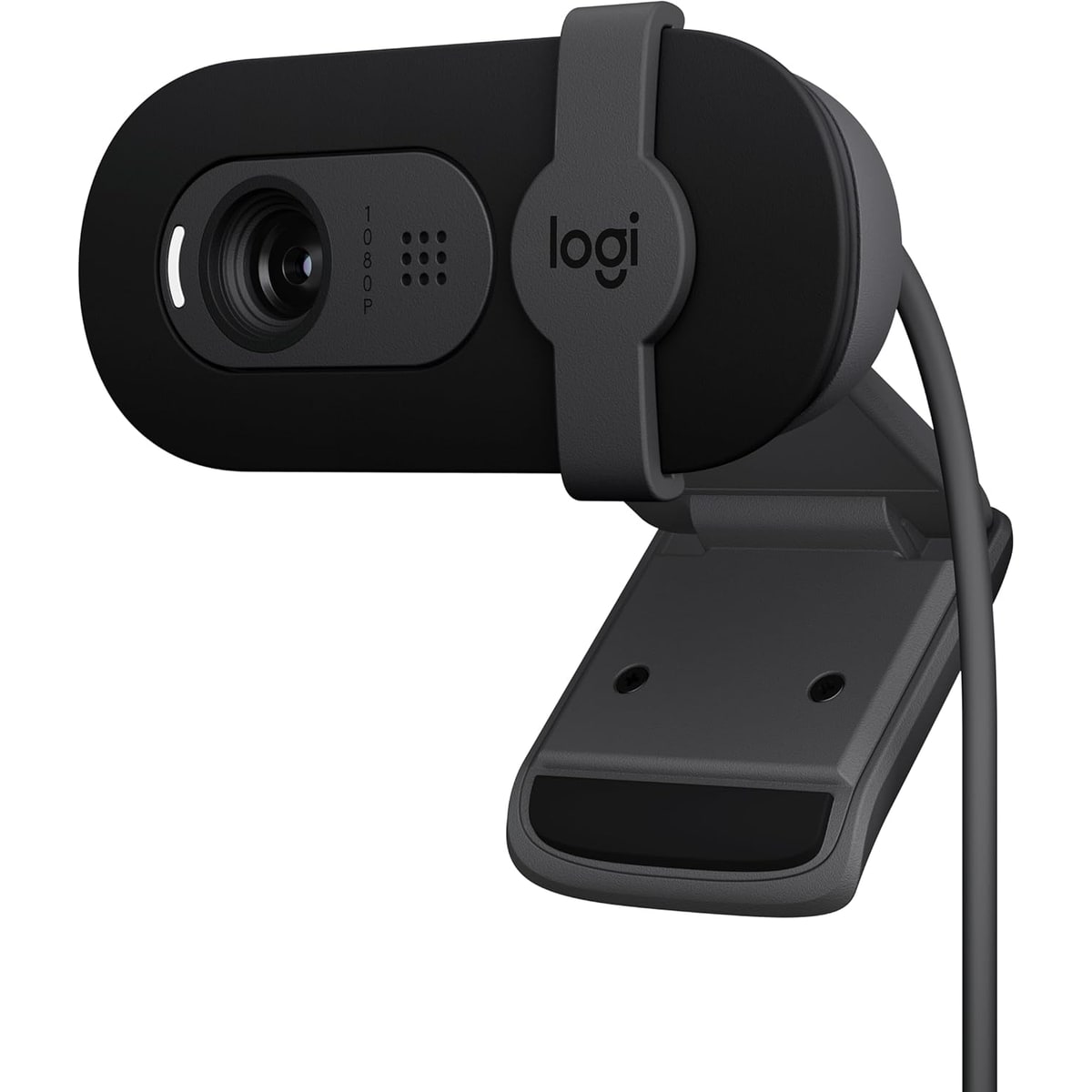
The Logitech Brio 101 is the cheap recognizable fallback in the webcam guide: fine for simple well-lit calls, but easy to outgrow if lighting, framing, audio, or mount quality matter.
MSRP
—
Amazon
$24.99
at writing · 2026-05-14
Buyer fit
The cheap recognizable fallback: fine for basic calls, weak for low light or a polished professional image.
MSRP
—
Amazon
$24.99
at writing · 2026-05-14
Score breakdown
How this product scored
Same rubric, but focused on one product so the reasons behind the score stay readable.
Image quality and bad-light handling
The Brio 101 is a bare-budget Logitech webcam: useful for basic well-lit calls, but limited by fixed focus, narrow framing, basic audio, and lower low-light confidence.
Focus and exposure stability
The Brio 101 is a bare-budget Logitech webcam: useful for basic well-lit calls, but limited by fixed focus, narrow framing, basic audio, and lower low-light confidence.
Mic and call audio
The Brio 101 is a bare-budget Logitech webcam: useful for basic well-lit calls, but limited by fixed focus, narrow framing, basic audio, and lower low-light confidence.
Mounting, privacy, and hardware
The Brio 101 is a bare-budget Logitech webcam: useful for basic well-lit calls, but limited by fixed focus, narrow framing, basic audio, and lower low-light confidence.
Software and compatibility friction
The Brio 101 is a bare-budget Logitech webcam: useful for basic well-lit calls, but limited by fixed focus, narrow framing, basic audio, and lower low-light confidence.
Reliability, heat, and support
The Brio 101 is a bare-budget Logitech webcam: useful for basic well-lit calls, but limited by fixed focus, narrow framing, basic audio, and lower low-light confidence.
Use-case fit
The Brio 101 is a bare-budget Logitech webcam: useful for basic well-lit calls, but limited by fixed focus, narrow framing, basic audio, and lower low-light confidence.
Evidence confidence
The Brio 101 is a bare-budget Logitech webcam: useful for basic well-lit calls, but limited by fixed focus, narrow framing, basic audio, and lower low-light confidence.
Quick Verdict
The Logitech Brio 101 is the webcam you buy when the whole point is not overthinking the webcam. Logitech gives you a cheap, recognizable 1080p USB-A camera with a privacy slider and a built-in mic, and for a spare desk or occasional call that may be enough.
The risk is that “cheap and good enough” can turn into “why do I look like this?” the first time you sit in bad light, need a wider frame, or care about how you sound. The Brio 101 keeps costs down with fixed focus, a narrow 58-degree view, basic audio, and limited flexibility. None of that is shocking at the price. It just decides whether this is a smart bargain or a camera you replace later.
In our Best Webcams in 2026 ranking, the Brio 101 landed #8 as the Best bare-budget baseline. Buy it for a spare camera, school/work backup, or simple well-lit desktop. Skip it for polished client calls, streaming, content creation, bad lighting, wider framing, or any situation where spending a little more now could save you from buying twice.
Score Breakdown
Overall score: 6/10. The Brio 101 earns practical points because it is current, cheap, recognizable, easy to connect, and has a physical privacy slider. It loses points because the camera behavior is basic: fixed focus, 1080p30, narrow framing, modest audio, and weaker low-light confidence than the better webcams above it.
- Image quality and bad-light handling: 5/10 — Logitech’s own Amazon page says RightLight “boosts brightness by up to 50%, reducing shadows,” but do not read that as a rescue plan for a dark room or a window behind you. This is still the budget Logitech lane.
- Focus and exposure behavior: 5/10 — The Amazon comparison table lists fixed focus, no RightSight auto-framing, and a 58-degree diagonal field of view. That keeps things simple, but it also makes the camera less forgiving for object demos, movement, or people who want a more flattering crop.
- Mic and call audio: 5/10 — The single omnidirectional mic is useful because it exists. Treat it as a fallback, not a replacement for a headset or USB mic.
- Mounting, privacy, and hardware: 6/10 — The privacy slider is the best hardware detail. The mount and cable are where the price shows.
- Software and app behavior: 7/10 — One hands-on transcript says “you don’t actually need any software” and that it is “plug in and then it works” (source). That is exactly what the right buyer wants.
- Reliability, heat, and support: 6/10 — The current Amazon identity and basic Logitech support story are clean, but the packet was lighter on long-term owner/forum evidence than on Amazon and YouTube material.
- Use-case fit: 6/10 — It fits a small job well. It does not fit a big job secretly.
- Evidence confidence: 7/10 — Specs, price, and exact-ASIN identity are solid; long-term ownership patterns are less complete.
What Feels Good Right Away
The Brio 101’s best trick is that there is almost no trick. If your desktop has no camera, or your old laptop camera makes you look like a foggy thumbnail, plugging in a $25 Logitech and getting a usable 1080p picture can feel like enough. That matters. Not every webcam buyer wants tracking, HDR menus, a gimbal, a control app, and a new hobby.
The privacy slider is the other immediate win. The Amazon page says, “The integrated webcam cover makes it easy to get total, reliable privacy when you're not on a video call,” and a hands-on transcript calls it a “little slider privacy thing” that is “really easy to slide on and off” (source). That is not glamorous, but it is the kind of feature people actually use.
The low price also changes the emotional math. If this is a backup camera for a child’s school desk, a spare office, a shared family computer, or a desktop that only needs occasional video calls, the Brio 101 can be perfectly rational. The key is not pretending it is a hidden premium webcam. It is a recognizable, current, basic Logitech camera with a shutter and a low captured Amazon price.
What Gets Annoying After Setup
The Brio 101 starts to feel less charming when your setup asks for anything beyond “camera exists.” The narrow 58-degree field of view is good if you do not want half the room in frame, but it can feel cramped if you move around, show objects, or try to fit more than one person. Fixed focus keeps the camera simple, but it also means you should not expect clever refocusing when you lean, hold something up, or change distance.
The mount and cable are also worth noticing before checkout. One comparison transcript says the cable is non-detachable and says there is no tripod mount (source). That is not a catastrophe for a cheap monitor webcam, but it matters if your desk needs a clean cable run, a separate arm, or frequent travel.
Low light is the other obvious limit. Logitech’s Amazon page says RightLight “boosts brightness by up to 50%, reducing shadows,” but budget correction is not the same as a flattering image in a dim room. One transcript described the image as pale or overly white until settings were adjusted. If you regularly take important calls in bad lighting, this is the wrong place to save twenty dollars.
Setup and Daily Use Notes
Setup should be easy if USB-A works for your computer or dock. One transcript shows it plugged into a docking station and says it “just plugs in easily” with USB, with no required software before it works (source). That makes the Brio 101 a sensible emergency camera: keep it in a drawer, plug it in, select it in Zoom, Teams, Meet, or your browser, and get on with the call.
Daily use depends heavily on desk layout. The attached 5-foot cable is fine when the PC, dock, or laptop is nearby. It is less fine if your tower is under a desk, across a large monitor arm setup, or behind cable management. Since the cable is not detachable in the packet evidence, do not assume you can swap in a cleaner USB-C cable later.
The privacy slider is useful, but be careful with it. The comparison transcript warns, “make sure not to cover up the mic if you're actually going to use the mic” (source). That is a small ownership detail, but small details are exactly what matter on cheap gear: the camera can be simple and still need a second of attention before a call.
How It Compares With the Other Picks
Against Anker PowerConf C200 2K, the Brio 101 is cheaper and simpler, but the Anker is the better value upgrade if you can stretch. The C200 brings 2K capture, adjustable field of view, a privacy cover, and more tuning room. If your fear is buying too cheap and replacing the webcam later, Anker is the safer budget step.
Against Logitech Brio 505, the Brio 101 is the stripped-down sibling. The Brio 505 is still only 1080p, but it has the stronger work-call identity: wider framing, better Logitech controls, a better privacy/mount package, and a higher ceiling for normal hybrid work. Choose the 101 only when the budget is the point.
Against Logitech MX Brio or Insta360 Link 2 Pro, the comparison is almost unfair. Those cameras are for people who want sharper images, more controls, smarter framing, or a more premium desk setup. The Brio 101 is for the buyer who would rather spend the difference elsewhere and can live with basic video.
Against Dell Pro Webcam WB5023, the Brio 101 is the cheaper fallback; Dell is the more conservative business-lane pick with a 2K pitch and office accessory feel. For the full ranking, see Best Webcams in 2026.
Who Should Buy It
Buy the Logitech Brio 101 if you need a cheap spare webcam, a simple desktop upgrade, a school/work backup, or a camera for occasional calls in a decently lit room. It makes the most sense when “good enough and available” beats “best possible image.”
Skip it if you take client calls, interview remotely, present often, stream, record content, sit in bad lighting, need a wider frame, want autofocus, or hate fiddly mounts. Also skip it if spending a little more now would save you from replacing it later; the Anker PowerConf C200 2K and Logitech Brio 505 are both safer upgrades for people who use a webcam every week.
For the full budget-to-premium spread, see Best Webcams in 2026, then check the current Brio 101 price before deciding whether “cheap enough” is actually enough.
Tell us what this page missed
These pages get better when real buyer complaints make it back into the scoring model. If something important is underweighted, say it.
Rate this review
Give it a score from 1-10 and tell us what to improve.
0/4000 characters