Logitech Blue Yeti Review (2026): Famous, Flexible, Easy to Misuse
The Blue Yeti is still useful when you need four pickup patterns and real controls, but it is a risky default for noisy rooms, loud keyboards, and casual desk placement.
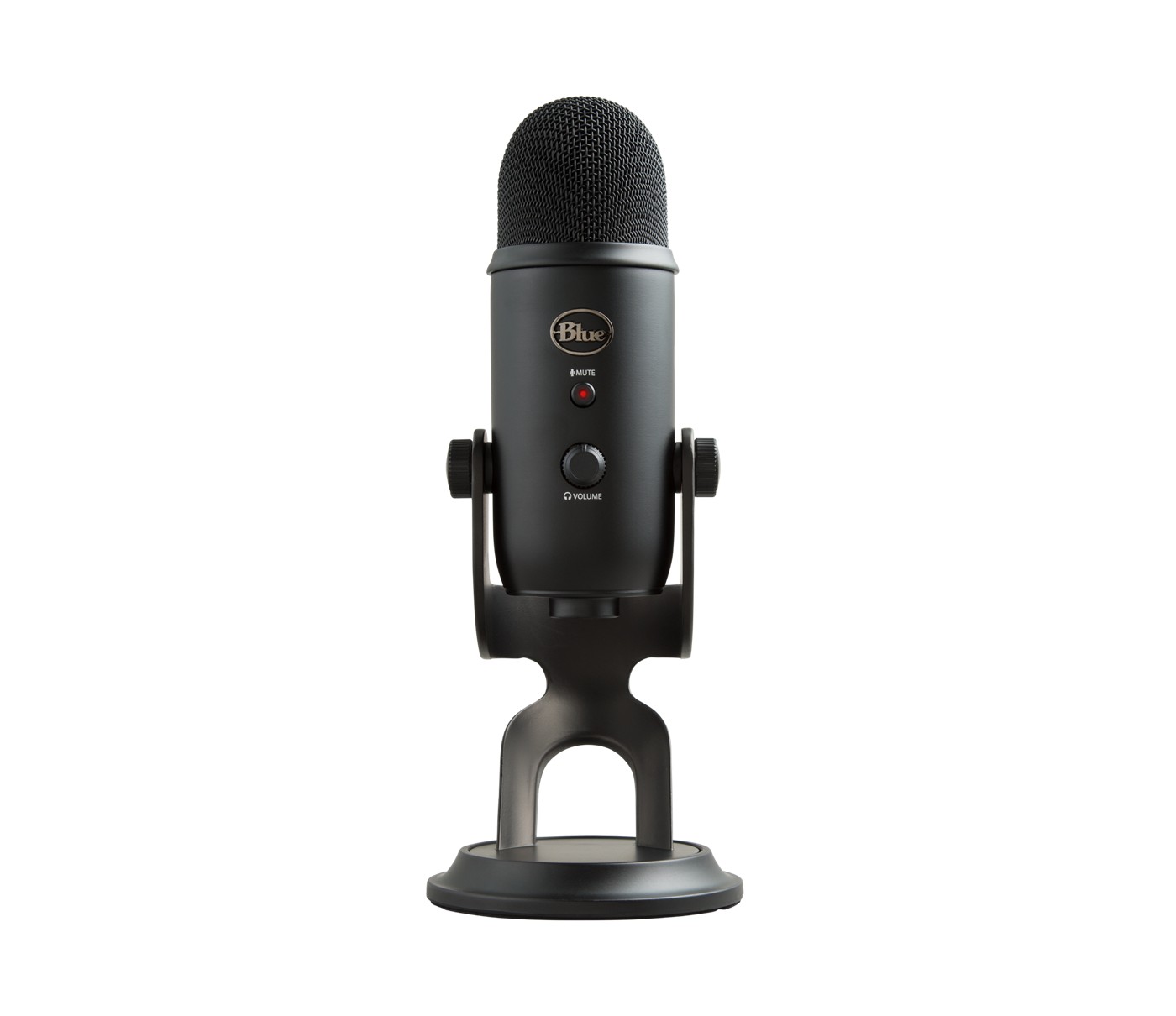
The Logitech for Creators Blue Yeti is the popular caution pick in our USB microphone ranking: flexible, familiar, and feature-rich, but not the safest choice for most untreated desks.
MSRP
—
Amazon
$104.49
at writing · 2026-05-14
Buyer fit
The familiar multi-pattern USB condenser baseline; versatile in controlled setups, risky for noisy desks and casual placement.
MSRP
—
Amazon
$104.49
at writing · 2026-05-14
Score breakdown
How this product scored
Same rubric, but focused on one product so the reasons behind the score stay readable.
Speech sound quality
Clear and full when used close in a controlled room, but easy to make distant or roomy if placed like a desk ornament and boosted with too much gain.
Room and desk-noise rejection
The weakest fit metric: the sensitive multi-capsule condenser design can pick up reflections, fans, keyboards, and desk noise unless placement and room control are disciplined.
Controls and monitoring
Strong physical controls for the price: gain, mute, headphone volume/monitoring, and pattern selection are useful without digging through software.
Software and USB setup
Basic USB behavior is familiar and Blue VO!CE/G Hub can help some buyers, but older mini-USB hardware and uneven software relevance keep it from feeling modern.
Mounting and desk fit
The heavy stand is convenient and stable, but it encourages far-away desk placement and does not isolate thumps as well as a proper arm/shock setup.
Use-case flexibility
Four pickup patterns give it real flexibility for interviews, table capture, stereo experiments, and solo cardioid use, even if most solo buyers only need one mode.
Reliability and support
Build evidence is decent, including all-metal body notes, but exact variant/support and long-term owner proof are not clean enough for a higher score.
Evidence confidence
Good exact commerce identity and multiple YouTube transcript signals; official-page scrape quality is mixed, so reliability and software claims stay conservative.
Quick Verdict
If you are about to buy the Blue Yeti because it is the USB mic you have heard of for years, pause for the one question that decides most of the regret: will it sit close to your mouth in a reasonably quiet room, or will it sit beside a keyboard and try to hear you from across the desk?
That is why it lands at #8 in our Best USB Microphones in 2026 guide as the Popular caution pick, not as a throwaway. The Yeti is capable. It has four pickup patterns, headphone monitoring, gain, mute, a heavy stand, and enough flexibility for solo voice, two-person table recordings, room capture, or stereo experiments. One owner-review transcript says it is “such a versatile microphone” and that “you can use it on nearly any application” (source). That is the honest appeal.
The trap is that versatility is not the same as forgiveness. In another comparison, the reviewer switches between a newer dynamic Yeti GX and the Blue Yeti, then says the Blue Yeti sounds “more distant” and is “picking up more like reflections of my voice off of the walls more background noise” (source). If your room is already fighting you, that is the part to believe before checkout.
Listing check: the checked product is Logitech for Creators Blue Yeti / ASIN B01LY6Z2M6, recorded as available-new on Amazon at $104.49 on 2026-05-14T22:14:12Z. Recheck the live listing for seller, condition, color, bundle, and price. Use the product link to check current availability; buying through it helps support KB4UB.
Score Breakdown
Overall score: 6/10. The Blue Yeti earns that score because it is useful and well-known, but it is not the safest default anymore. Its controls and pickup patterns are real strengths. Its room sensitivity, desk fit, and casual-placement risk are the reasons it sits behind the closer, calmer, or more modern picks.
- Speech sound quality: 7/10 — It can sound clear and full when the room is controlled and the mic is placed correctly. It loses points because many buyers use it too far away and then raise gain to compensate.
- Room and desk-noise rejection: 4/10 — This is the big warning. The multi-capsule condenser design can flatter room reflections, fan noise, and keyboard hits. A dynamic pick like the Shure MV7+ or Samson Q2U is safer for messy rooms.
- Controls and monitoring: 8/10 — Gain, mute, headphone monitoring, volume, and pattern controls are genuinely useful. One transcript calls out “a gain switch mute,” the ability to “plug headphones directly into it,” and a front volume control for on-the-fly adjustment (source).
- Software and USB behavior: 7/10 — Basic USB setup is familiar, and Logitech G Hub / Blue VO!CE may matter for some buyers, but the older Blue Yeti connection and software lane are not as cleanly modern as USB-C rivals.
- Mounting and desk fit: 5/10 — The heavy stand is convenient, but it can encourage bad distance and can carry desk noise. A boom arm, shock mount, and pop filter may be part of the real setup.
- Use-case flexibility: 8/10 — Four pickup patterns are the Yeti’s lasting trick. They are useful for specific table or room jobs and overkill for most solo streamers.
- Reliability and support: 6/10 — The build evidence is decent, but long-term support and exact variant clarity are not as clean as the best picks.
- Evidence confidence: 7/10 — The evidence has lots of YouTube/formal context and exact commerce identity, but the official-page scrape quality is uneven, so the buyer caveats stay visible.
What Feels Great Right Away
The Blue Yeti still has a good first hour if you know what you are buying. It feels like a real object: big, heavy, adjustable, and covered in controls you can understand without opening a manual. The front mute button and headphone volume are easy to reach, the rear gain and pattern knobs make the mic feel more capable than a tiny USB stick, and the included stand gets you recording immediately.
The best part is the pattern switch. Cardioid is the normal solo-voice mode. Bidirectional can help with a face-to-face interview. Omnidirectional can capture a table or room. Stereo is there for experiments where left/right space matters. One reviewer describes “four different pattern selections,” including bidirectional, omnidirectional, cardioid, and stereo, then says the mic is useful for “a lot of different things” (source). That is the Blue Yeti at its best: not the cleanest single-person desk mic, but a flexible little recording appliance.
The build also helps it feel reassuring. In the Yeti GX comparison transcript, the reviewer says the Blue Yeti is “Better Built” and has “an all metal body” (source). Another hands-on clip praises the adjustable stand tension and says it “holds it in place nicely” (source). If you are upgrading from a laptop mic, that physical confidence can feel like a big leap.
Setup and Daily Use Notes
The safe Blue Yeti setup is closer and quieter than many product photos imply. Use cardioid for solo voice, speak into the side of the mic rather than the top, keep the capsule near your mouth, and start with lower gain than you think. If you park it near a keyboard and crank the gain, you are inviting the exact problems people blame on the mic later.
That side-address detail matters. One comparison transcript says, “you should be speaking to the side of that,” and adds that a lot of people talk into the top of the Blue Yeti even though “that's not how that microphone works” (source). This is one of those small setup realities that can decide whether the purchase feels smart or cursed.
For daily use, assume accessories may be necessary. A boom arm lets the mic get close without eating desk space. A shock mount helps if the desk thumps. A pop filter or windscreen helps with plosives. Headphones plugged into the mic make monitoring easier. Also remember that the classic Blue Yeti uses USB type-A to mini-B, while newer rivals often use USB-C; one comparison says “the Blue Yeti uses a type A to mini B” cable (source). That is not fatal, but it is worth knowing before you buy a mic in 2026.
What Gets Annoying
The first annoyance is the one that sinks most casual buyers: the Yeti hears too much when the room is not helping. In the fan-test discussion, the reviewer says that with Smart Lock on, “as I start speaking you hear that fan really loud in here,” and explains that it is “not like a noise reduction filter” but more like a gate (source). That is the reality check. Software tricks cannot turn a sensitive condenser into a close dynamic mic.
The second annoyance is that the famous four-pattern feature is often more than people need. The same comparison says the Blue Yeti’s stereo, bidirectional, cardioid, and omnidirectional options are “way Overkill honestly” because “almost everybody basically just uses it” in cardioid (source). I would soften that slightly: the extra patterns are useful if you actually record interviews or room audio. They are just not a reason for a solo streamer in a loud bedroom to choose it over a cleaner close-talk option.
The third annoyance is desk reality. The stand is sturdy, but sturdy is not the same as isolated. A big condenser sitting on a desk can hear typing, bumps, and room reflections. If you need to add an arm, shock mount, pop filter, and cable management, the cheap-looking purchase can become more involved than expected.
How It Compares With the Other USB Mics
Compared with the Shure MV7+, the Blue Yeti is cheaper and more flexible on pickup patterns, but the Shure is far safer for one voice in an imperfect room. Choose Shure if the problem is keyboard noise, fan noise, room echo, or podcast-style close speech. Choose the Yeti only if you need the extra capture modes and can control the room.
Compared with the Sennheiser Profile USB, the Yeti has more patterns; the Sennheiser has a calmer solo-voice setup and cleaner front-facing controls. Compared with the Samson Q2U, the Yeti feels more like a desk appliance, but the Samson is the better budget answer for close-talk rejection and future XLR. Compared with the Elgato Wave:3, the Yeti is more physical-pattern flexible; Elgato is better when Wave Link and Clipguard are the reason you are buying.
The HyperX QuadCast 2 S overlaps with the Yeti’s “feature-rich condenser on a desk” lane, but adds a more modern RGB/gaming setup. The RØDE NT-USB+ and Audio-Technica AT2020USB-X are cleaner solo condenser lanes for quieter rooms. In the full USB microphone ranking, the Yeti remains because it is famous and still useful, but the safer recommendations now sit above it.
Who Should Buy It
Buy the Blue Yeti if you specifically want a multi-pattern USB condenser and you understand the trade. It makes sense for a buyer who records solo voice sometimes, two-person table conversations sometimes, maybe a room or instrument occasionally, and is willing to learn gain, distance, angle, and room control.
It also makes sense if the current price is low enough and you already plan to add the missing setup pieces: arm, pop filter, better placement, and a quieter recording corner. If you can keep it close and use cardioid most of the time, the Yeti can still produce perfectly usable speech. If you occasionally need bidirectional or omni recording, it does something many simpler USB mics do not.
This is the buyer who will forgive the flaws: someone who wants the Yeti as a flexible tool, not as a magic upgrade that fixes a bad room.
Who Should Skip It
Skip the Blue Yeti if your desk is loud, your room echoes, your fan runs all day, or your mic has to sit far away. In those cases, a close dynamic mic is usually the smarter buy. The Shure MV7+ is the polished premium answer; the Samson Q2U is the budget sanity check.
Skip it if you only need one person on calls, gaming chat, streaming, or voiceover and you never plan to use bidirectional, omni, or stereo. Paying for patterns you do not use is not clever if those same capsules make setup less forgiving. Skip it if mini-USB annoys you, if you want the cleanest modern USB-C setup, or if you hate buying accessories after the fact.
Bottom line: the Blue Yeti is not bad. It is just too easy to buy for the wrong reason. If you need flexibility and have a controlled setup, it can still earn its spot. If you want a safe default for a normal noisy desk, it is the cautionary pick for a reason.
Tell us what this page missed
These pages get better when real buyer complaints make it back into the scoring model. If something important is underweighted, say it.
Rate this review
Give it a score from 1-10 and tell us what to improve.
0/4000 characters