Lenovo ThinkVision M14t Gen 2 Review (2026): Tiny Touch Screen, Real Work
What to know before buying Lenovo’s compact touch portable monitor: 2240×1400 text sharpness, the adjustable base, USB-C-only setup, stylus details, glossy-screen limits, and the marketplace-seller check.
The Lenovo ThinkVision M14t Gen 2 is the touch travel specialist in our portable-monitor ranking: sharp, compact, and unusually flexible for notes, signatures, and document review, but expensive for 14 inches and worth buying only after checking the seller and stylus bundle.
MSRP
$337.07
Amazon
$318
at writing · 2026-05-17
Buyer fit
The right pick when touch, pen-oriented work, compact 14-inch travel size, Lenovo business-display identity, and 2240×1400 text sharpness matter more than screen size per dollar.
MSRP
$337.07
Amazon
$318
at writing · 2026-05-17
Score breakdown
How this product scored
Same rubric, but focused on one product so the reasons behind the score stay readable.
Display readability
Lenovo ThinkVision M14t Gen 2 scores 8/10 for display readability because the panel is usable indoors, but resolution, brightness, or color evidence keeps it behind the sharper and premium picks.
Setup and power reliability
Lenovo ThinkVision M14t Gen 2 scores 8/10 for setup and power reliability because dual USB-C with PD/DisplayPort and business-travel design are strong, but HDMI users need another route.
Stand and portability
Lenovo ThinkVision M14t Gen 2 scores 9/10 for stand and portability because the compact body and adjustable base fit travel work unusually well.
Device and use-case fit
Lenovo ThinkVision M14t Gen 2 scores 8/10 for device and use-case fit because it has a clear buyer lane, but that lane is narrower than the overall winner.
Color and motion fit
Lenovo ThinkVision M14t Gen 2 scores 7/10 for color and motion fit because media/color use is acceptable for the lane, not the reason to buy it.
Reliability and support
Lenovo ThinkVision M14t Gen 2 scores 8/10 for reliability and support because Lenovo business identity is reassuring, while the current marketplace seller needs rechecking.
Evidence confidence
Lenovo ThinkVision M14t Gen 2 scores 8/10 for evidence confidence because the product dossier, parent product set, exact Amazon snapshot, Lenovo PSREF specs, and CNET excerpts are enough for ranking with stated caveats.
Quick Verdict
The Lenovo ThinkVision M14t Gen 2 is the portable monitor to consider when the regret risk is not “I wish I bought the cheapest second screen,” but “I wish my travel screen let me mark up, sign, review, and rearrange documents without fighting the stand.” It ranked #3 in our full best portable monitors review because it solves a narrower problem than the Arzopa Z1RC and ViewSonic OLED: compact touch-first work travel.
Lenovo’s pitch is practical rather than flashy. The M14t Gen 2 is a 14-inch, 2240×1400, 16:10 IPS portable display with 10-point touch, dual USB-C, and an integrated base. CNET framed the value well: it would be “easy to write off the M14t Gen 2” because of its 14-inch size and high price, but the business-travel design is the reason it costs more.
The catch is that you should buy it for the exact lane it wins. At the captured Amazon check, ASIN B0D58LQ7X4 was $318 new, shipped from Amazon, sold by marketplace seller J1ggo, and marked low-stock. That is worth rechecking. So is the stylus bundle: CNET says an active pen costs extra and a passive stylus/felt case are included, while the captured Amazon page did not independently prove every box detail. If touch and the stand will change how you work on the road, keep reading. If you just need more screen area, this is probably too much money for 14 inches.
Score Breakdown
- Display readability: 8/10. The 2240×1400, 16:10 panel is the main reason this 14-inch monitor still feels serious for document work. Lenovo PSREF lists 189 dpi, 1500:1 typical contrast, and 100% sRGB coverage; those are spec-sheet numbers, not a promise that every user will see lab-perfect color.
- Setup and power reliability: 8/10. Dual USB-C with DisplayPort and power delivery is strong for modern laptops, but there is no verified HDMI fallback, and your host still needs USB-C video support.
- Stand and portability: 9/10. This is its best score. The attached base and adjustment range are much better suited to travel work than a flimsy cover stand.
- Device and use-case fit: 8/10. It fits consultants, instructors, reviewers, and note-heavy laptop users very well. It is less universal than a cheaper all-around screen.
- Color and motion fit: 7/10. Fine for office work and light media, but this is a 60 Hz IPS touch panel, not the OLED or high-refresh pick.
- Reliability and support: 8/10. Lenovo’s business-display identity helps, but the captured Amazon seller was not Lenovo or Amazon first-party, so the offer deserves a fresh look.
- Evidence confidence: 8/10. Exact Amazon identity, Lenovo PSREF specs, CNET excerpts, and the parent dossier support the ranking, with open caveats around glare, stylus contents, and seller changes.
What Feels Great Right Away
The first pleasant surprise is that the M14t Gen 2 is not just another 1080p travel slab. On a 14-inch screen, 2240×1400 gives you a noticeably denser workspace for PDFs, dashboards, email, notes, and reference material. CNET called out the “higher 2,240x1,400-pixel resolution” and “almost 200 pixels per inch,” which matters because a small second screen has to make text comfortable or it becomes decoration.
Touch is the other reason to care. Lenovo PSREF says the display “Supports 10-point touch,” and CNET describes it as “a touchscreen with support for an active pen” that can work as a portable whiteboard, notepad, or sketchbook. That makes this monitor feel different from the cheaper picks: you can review a slide, sign a document, tap through a dashboard, or keep a marked-up PDF beside your laptop without reaching for the trackpad every time.
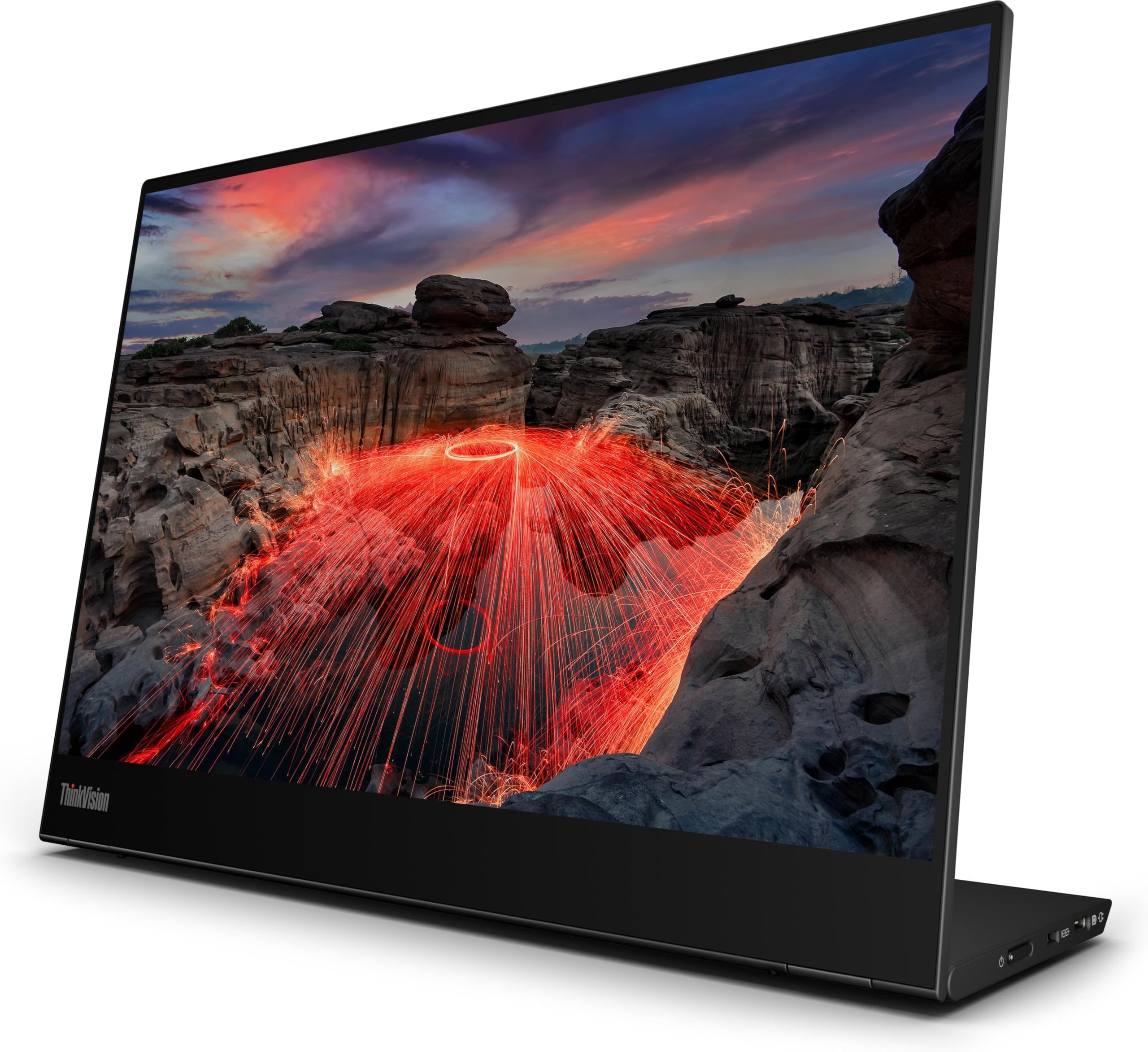
The base is also part of the appeal. Instead of relying only on a folding cover, the monitor has an attached stand system. CNET says the kickstand can “tilt the screen at any angle from 0 to 90 degrees,” and the packet evidence adds pivot plus a small lift range. For travel, that is the difference between a screen that merely stands up and one that can sit upright for reference, rotate for portrait notes, or lie flatter for touch input.
What Gets Annoying After Setup
The biggest annoyance is price. At $318 captured on Amazon, the M14t Gen 2 costs far more than basic 15.6-inch and 16-inch portable monitors, and it is smaller than many of them. That is not automatically bad, but it changes the buying test. If you only want extra spreadsheet space, the Lenovo is easy to overpay for. If touch, compact packing, and the adjustable base will change how you work on the road, the price makes more sense.
The second annoyance is the glossy touch surface. The packet flags Amazon structured text describing the screen as glossy, and touch layers can reflect more than buyers expect. Lenovo’s PSREF brightness line lists “Panel: 300 cd/m²” and “Set: 270 cd/m²,” which is workable indoor brightness, not proof that it will beat bright windows, outdoor tables, or harsh café glare.
The stylus story also needs careful reading. CNET says an active pen is an extra expense and that a passive stylus is included with a felt case, but the captured Amazon page did not independently prove the exact box contents for this marketplace offer. Treat the M14t Gen 2 as touch- and pen-oriented, not as a guarantee that the seller’s current box includes every accessory you have in mind.
USB-C, Power, and Compatibility Checks
The M14t Gen 2 is a USB-C-first monitor. Lenovo PSREF lists two USB-C ports with DisplayPort 1.2 and PD 2.0, and the transcript evidence describes “two USBC ports with display port 1.2 alt mode and power delivery up to 65 watts.” That is exactly the right shape for modern laptop travel: one cable can carry the image, and the second USB-C port can help with power pass-through when the setup supports it.
The important phrase is “when the setup supports it.” Not every USB-C port carries video, and not every laptop, tablet, phone, dock, or cable will behave the same way. Before you buy, confirm that your device supports USB-C DisplayPort Alt Mode, that the included or planned cable is video-capable, and that your charger has enough headroom for both the laptop and monitor.
This is also not the best choice for HDMI-first buyers. The verified spec story is USB-C, not HDMI. Console users, older laptops, desktop GPUs, and people who want a simple mini-HDMI cable should look at a different pick or plan on adapter testing during the return window.
Travel, Brightness, and the Stand
For travelers, the M14t Gen 2’s best feature may be that it behaves like a little work tool instead of a loose panel with a cover. Local evidence describes a lightweight body around 1.3 pounds, while CNET says the compact display weighs under 1.5 pounds. That keeps it in backpack territory, especially for people already carrying a business laptop, charger, and headset.
The stand is the part that should age well. Tilt from upright to flat-ish, portrait use, and a slight lift give you more ways to fit a cramped hotel desk or shared conference table. For signing and annotation, that matters more than another inch or two of screen size.
Brightness is the area to keep humble. The PSREF listing gives a 300 cd/m² panel figure and 270 cd/m² set figure; that is enough to expect normal indoor usability, not enough to promise bright-outdoor comfort. If you often work beside windows, in airports with harsh overhead light, or at outdoor tables, this is a return-window test, not a spec you should trust blindly.
How It Compares
The Lenovo ranks third because touch changes the decision, not because it beats every other portable monitor at the usual jobs.
- Arzopa Z1RC: Start there if you want the best all-around laptop second screen. It gives you a larger 16-inch 2560×1600 workspace for less money, but it does not cover touch or pen-oriented work.
- ViewSonic VX1655-4K-OLED: Choose ViewSonic if image quality is the whole point. Its OLED/4K lane is better for premium viewing and visual review; Lenovo is better for compact annotation and business travel.
- ASUS ZenScreen MB229CF: ASUS is the temporary-office answer. It is much larger and more desk-like, but it is not a backpack-friendly touch travel monitor.
- Arzopa Z1FC: The Z1FC is the cheap high-refresh fun pick. Buy it for 144 Hz gaming, not for signed PDFs or stylus notes.
- MSI PRO MP165 E6: MSI is the basic under-$100 lane. It is easier to justify when you only need a second screen and do not care about touch, sharpness, or the Lenovo stand.
Who Should Buy the Lenovo ThinkVision M14t Gen 2
Buy the M14t Gen 2 if you travel with a modern USB-C laptop and want a compact second screen for documents, notes, signatures, presentations, dashboards, and review sessions. It makes the most sense for consultants, instructors, reviewers, business travelers, and people who would actually use touch instead of treating it as a novelty.
Skip it if you want the biggest screen for the money, a simple HDMI monitor for consoles, a cheap backup panel, high-refresh gaming, OLED contrast, or proven glare control for bright outdoor work. Also skip it if your laptop’s USB-C port cannot output video.
Bottom line: the Lenovo ThinkVision M14t Gen 2 is a strong specialty pick. It earns its #3 spot because it turns a portable monitor into a sharper, touch-friendly travel companion. Just make sure you are paying for touch, the stand, and the compact business fit—not accidentally buying a small expensive screen for a job a cheaper monitor can do. Check the current seller, return window, and stylus/accessory bundle before you buy.
Tell us what this page missed
These pages get better when real buyer complaints make it back into the scoring model. If something important is underweighted, say it.
Rate this review
Give it a score from 1-10 and tell us what to improve.
0/4000 characters