HyperX QuadCast 2 S Review (2026): RGB Showpiece, Room-Noise Catch
The QuadCast 2 S makes a gaming desk look finished and gives you useful controls, patterns, and monitoring, but it still behaves like a condenser mic in a noisy room.
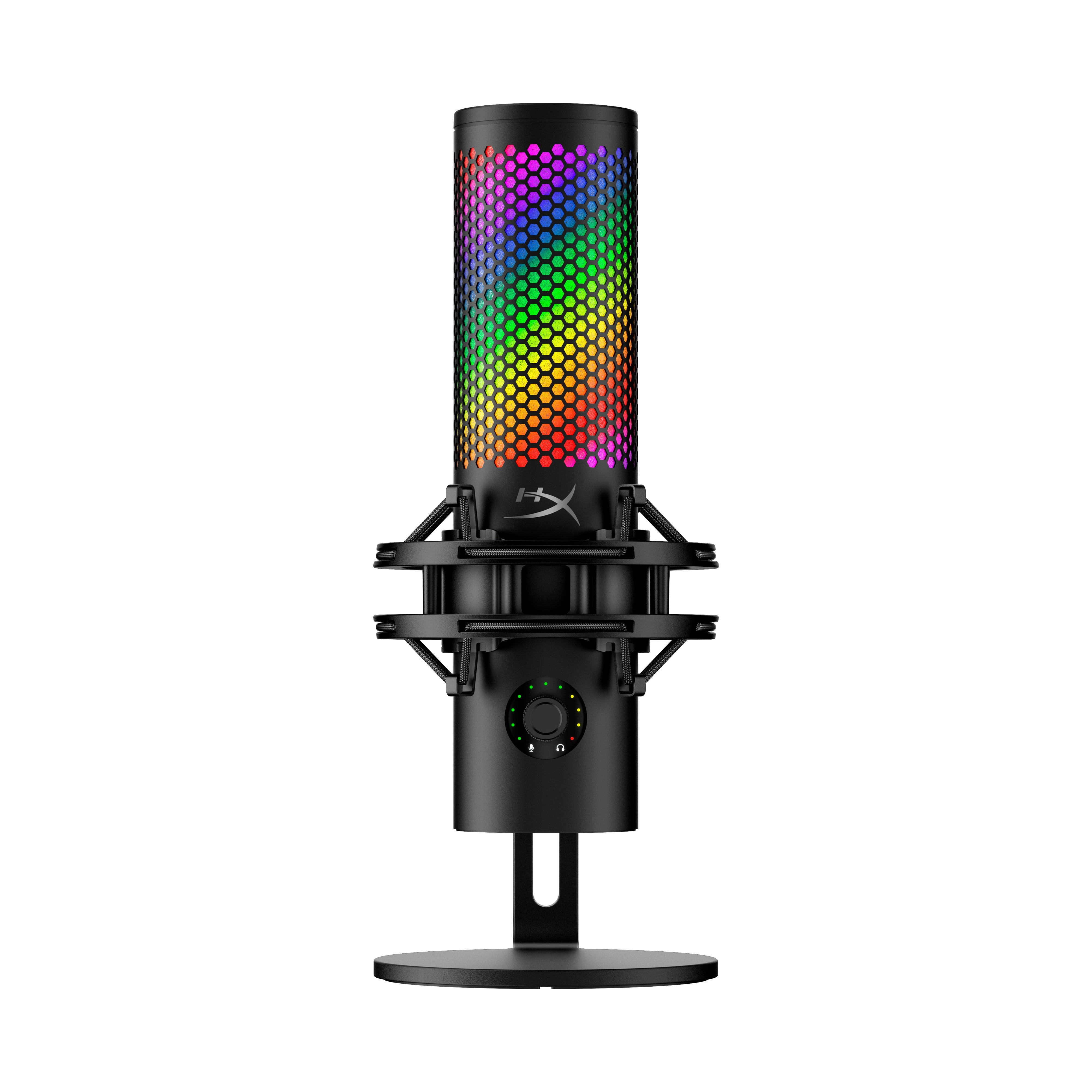
The HyperX QuadCast 2 S is a USB-C RGB condenser for gamers and streamers who want tap mute, four polar patterns, headphone monitoring, and an included shock-mounted stand.
MSRP
—
Amazon
$107
at writing · 2026-05-14
Buyer fit
A feature-rich RGB USB condenser with strong desk hardware and patterns; fun and flexible, but less protective in noisy rooms.
MSRP
—
Amazon
$107
at writing · 2026-05-14
Score breakdown
How this product scored
Same rubric, but focused on one product so the reasons behind the score stay readable.
Speech sound quality
Good USB condenser speech tone with clear mids/treble and enough body for streaming or calls, but not the safest path for every voice or untreated room.
Room and desk-noise rejection
The built-in shock mount, cardioid mode, and close placement help, but keyboard, PC fan, room echo, and plosive evidence keep this score low versus dynamic mics.
Controls and monitoring
Tap mute, status lighting, front multifunction dial, headphone output, monitor mix, and visible pattern feedback make this one of the strongest control packages in the set.
Software and USB setup
NGENUITY is useful for RGB and basic controls, but missing/promised audio features and Mac-software caveats keep the software score capped.
Mounting and desk fit
The included shock-mounted stand, long cable, adapter, and 3/8-/5/8-inch threading are strong; the only real catch is that the stand may be too short for ideal close placement.
Use-case flexibility
Four patterns, USB-C, monitoring, and desk/boom use make it flexible for solo speech, two-person talk, room capture, music experiments, and ASMR-style use.
Reliability and support
Current review evidence is useful, but long-term owner/support evidence is thinner than setup and voice-test evidence.
Evidence confidence
The evidence set has strong YouTube and official/product evidence for setup, controls, and sound, but less owner/forum depth for long-term support.
Quick Verdict
The HyperX QuadCast 2 S is the USB mic for people who want the microphone to be part of the desk, not hidden at the edge of it. RGB grille, tap-to-mute lighting, four pickup patterns, a front control dial, headphone monitoring, and a shock-mounted stand make it feel like a finished gaming setup in one box.
That is why it ranked #6 in our Best USB Microphones in 2026 guide as the Best RGB desk mic. The important fine print is that it is not ranked as the safest voice mic for messy rooms. It scores 7/10 overall because the controls, mount hardware, patterns, and lighting are genuinely useful, while the condenser capsule still hears more room, keyboard, and plosive trouble than a close dynamic mic like the Shure MV7+ or Samson Q2U.
Listing check: the checked product is HyperX QuadCast 2 S / ASIN B0DG9X4WHW, recorded as available-new on Amazon at $107 on 2026-05-14T22:14:12Z. Refresh the live listing for seller, condition, bundle, exact variant, and price before checkout. Use the product link to check current availability, and buying through it helps support KB4UB.
Score Breakdown
Overall score: 7/10. The QuadCast 2 S wins its lane by being the strongest RGB/gaming desk mic package in the group, not by beating every mic on raw voice protection.
- Speech sound quality: 7/10 — The tone is credible for a USB condenser. Podcastage called the QuadCast 2 a “slightly bright microphone” with “clear and open” mids and treble, and still said “for spoken word... I think it works quite well and sounds quite good for a USB microphone” (source). That is a fair read: good enough to stream, chat, and record, but not a magic voice transformer.
- Room and desk-noise rejection: 5/10 — This is the weak spot. Cardioid helps, boom-arm placement helps, and the shock mount helps some, but it is still a sensitive condenser on a desk.
- Controls and monitoring: 9/10 — Tap mute, visual status lights, front dial, headphone output, monitor mix, and pattern control are unusually complete for a gaming mic.
- Software and USB behavior: 6/10 — NGENUITY helps with lighting and basic controls, but audio-processing promises and Mac support are the caveats.
- Mounting and desk fit: 9/10 — The included shock mount/stand, 3/8- and 5/8-inch threading, long USB-C cable, and easy boom-arm path are real strengths.
- Use-case flexibility: 8/10 — Cardioid, omni, bidirectional, and stereo make it more flexible than a simple one-pattern mic, as long as you know when not to use them.
- Reliability and support: 6/10 — The evidence has good current review coverage, but less long-term owner evidence than I would want before scoring it higher.
- Evidence confidence: 7/10 — Strong YouTube and product-page evidence, thinner owner/forum evidence.
What Feels Great Right Away
The first delight is that the QuadCast 2 S looks finished the moment it lands on the desk. You get the mic, desktop stand, shock mount, USB-C cable, USB-A adapter, headphone jack, tap mute, and animated RGB without building a separate audio rig. For a buyer who wants one purchase to make the setup feel more intentional, that matters.
The lighting is not just a dumb glow strip. One QuadCast 2 S reviewer walked through the NGENUITY lighting panel and said, “You can get really creative and granular with it,” after changing effects, colors, angle, and speed (source). That is exactly the buyer lane here. If RGB makes your setup feel more like yours, HyperX gives you more to play with than most mics.
The second immediate win is control feedback. The Provoke Prawn review describes the front wheel as a “multicontrol wheel” that can adjust mic gain, playback volume, and monitoring level, while the top lighting gives a visual cue for the active pickup pattern (source). That reduces one of the common multi-pattern-mic mistakes: accidentally recording in the wrong mode and wondering why the room sounds huge.
Setup can also be refreshingly simple. One review jokes through the process: “step one plug the microphone into your computer... good news there's no step two,” then says to select the HyperX as the default input and you are ready to record (source). That plug-and-play path is part of the appeal.
Setup and Daily Use Notes
The best daily setup is boring but important: cardioid mode, close to your mouth, slightly off-axis, and preferably on a boom arm if your keyboard or PC fans are nearby. The QuadCast 2 S can sit on its included stand, but that does not mean the stand is the best final position.
The strongest warning comes from a QuadCast 2 S review that says the included desktop stand is “a little bit short considering you want this to be generally only a few inches away from your mouth,” and the reviewer admits to slouching to get closer (source). That is the kind of thing buyers discover after the unboxing high wears off. If your desk is low, your monitor is crowded, or you sit far back, budget space for a boom arm.
Once it is close, use the gain carefully. A Provoke Prawn transcript says you “really want the gain to be reasonably low” because 100% gain will “probably pick up too much noise” (source). That advice is not special to HyperX, but it is especially important here because the QuadCast 2 S makes it easy to look pro while still sounding like the whole room is in the call.
The four patterns are useful, but most people should live in cardioid. Omni is for the whole room, bidirectional is for two people across a table, and stereo is a niche tool for music/ASMR-style use. If you mainly stream, game, record solo video, or join meetings, cardioid should be the default.
What Gets Annoying
The first annoyance is that the feature list can make the mic sound more forgiving than it is. It has a shock mount, but desk noise still gets through. It has cardioid mode, but a condenser capsule still hears more room than a close dynamic mic. It has lighting that shows the pickup pattern, but you still need to choose the right one.
The room-noise caveat shows up clearly in the evidence. In one test, the reviewer moves through the patterns and says omni mode will pick up “all the sound from all over the room,” with more ambient room sound (source). In another, Provoke Prawn places the mic behind the keyboard and says it is “still picking up the keyboard sound,” then later notes that omni mode starts picking up PC noise nearby (source). That does not make the QuadCast bad; it means placement matters.
The second annoyance is pop control. One QuadCast 2 S review puts the pop-filter issue bluntly: “it does not come with a pop filter,” and later, “it doesn't come with a proper pop filter” because the internal foam “really doesn't block” enough in the reviewer’s plosive testing (source). You can avoid most plosives by speaking past the capsule, but gamers and streamers are not always calmly locked into perfect mic technique.
The third annoyance is software expectation management. HyperX advertised deeper software controls for the QuadCast 2 S, but one reviewer says multiband EQ and limiter features “still have not materialized” in NGENUITY at the time of that test (source). If you only want RGB and basic controls, that may be fine. If you want serious routing and processing, Elgato Wave:3 or RØDE NT-USB+ is a calmer place to start.
Reliability, Build, and Ownership Reality
The ownership picture is mixed in a normal way for a newer gaming microphone. The evidence supports the control layout, stand hardware, RGB customization, and general sound quality better than it supports years of long-term durability. That is why reliability/support stays at 6/10.
Build feel is not the scary part. Podcastage says the body and shock mount are plastic, but “it doesn't feel like terrible or super cheap” plastic, and notes the removable mount has both 5/8- and 3/8-inch threading (source). That is a practical setup win: if the desktop stand is wrong for your posture, moving to a boom arm should be straightforward.
The part I would watch is not whether it feels cheap on day one. I would watch the software lane, USB-C port/cable handling, shock-mount behavior, and whether the lighting/control system stays pleasant after the novelty fades. The QuadCast 2 S is fun because it gives you more controls and more visual feedback than a basic mic. The same complexity gives it more ways to annoy you if you never wanted to manage patterns, lighting, gain modes, app settings, and desk placement.
The safe ownership move: save a boring default profile, keep the mic close, use cardioid for solo speech, route the cable with slack, and do one keyboard/desk-bump recording before using it live.
How It Compares
Against the Shure MV7+, the HyperX is more fun on the desk and much cheaper at the captured price, but the Shure is the safer choice for imperfect rooms because it is a dynamic close-talk mic with stronger voice-protection tools. Against the Samson Q2U, the HyperX looks and feels dramatically more modern; the Samson is still the budget dynamic pick if keyboard rejection matters more than RGB.
Against the Sennheiser Profile USB, this is a personality choice. Sennheiser is the calmer condenser with obvious physical controls for quiet rooms. HyperX is the louder setup piece with RGB, multiple patterns, and a more gaming-native feel. Against the Elgato Wave:3, HyperX has the physical showpiece advantage, while Elgato’s software lane is stronger for streamers who actually need routing, clip protection, and Stream Deck-style control.
Against the RØDE NT-USB+ and AT2020USB-X, the QuadCast 2 S is the better desk toy and multi-pattern pick. Those two are more traditional voice/creator condensers. Against the Blue Yeti, HyperX feels like the fresher version of the same broad idea: a multi-pattern USB condenser that can be useful, but punishes casual placement.
See the rest of the shortlist in Best USB Microphones in 2026.
Who Should Buy It
Buy the HyperX QuadCast 2 S if you want a microphone that looks good on camera, feels integrated into a gaming setup, and gives you practical controls without an audio interface. It makes the most sense for streamers, gamers, Discord-heavy users, and desk-setup builders who care about RGB, tap mute, headphone monitoring, and a mic that can be shown rather than hidden.
It is also a good fit if you will use the extra patterns on purpose. Bidirectional can help for a two-person desk conversation. Stereo can be fun for certain music or ASMR-style experiments. Omni can work for a room capture when quality expectations are modest. Just do not buy four patterns and then leave the mic in the wrong one.
Buy it if the captured $107 Amazon availability check still holds and you understand the accessory reality: a boom arm and maybe a pop filter may still be worth adding. At that price, the QuadCast 2 S is easier to forgive than it would be near its higher launch/MSRP-style pricing.
Who Should Skip It
Skip the QuadCast 2 S if your main enemy is room noise. If you have a loud keyboard, fans, hard walls, family noise, or a desk you bump all day, start with the Shure MV7+ if budget allows or the Samson Q2U if you want the cheaper dynamic route. The HyperX can be managed, but it will not make condenser physics disappear.
Skip it if you are a Mac user buying mainly for NGENUITY. One QuadCast 2 review says the software was “not yet available for Mac OS” at the time of testing (source), and the 2 S review also flags Mac software limitations. Recheck current software support before buying if that matters to you.
Skip it if RGB is not a joy source. Without the lighting, patterns, and desk presence, the QuadCast 2 S has to compete as a normal USB condenser against quieter-looking mics with simpler controls or better software. And skip it if you want to set a mic by the monitor and forget it. This one rewards the buyer who is willing to position it like a real microphone.
Tell us what this page missed
These pages get better when real buyer complaints make it back into the scoring model. If something important is underweighted, say it.
Rate this review
Give it a score from 1-10 and tell us what to improve.
0/4000 characters