
The recommendation
Consider Nest if you like its Google Home controls and can check recorded history in your intended setup before relying on it. Ring Outdoor Cam Plus, Battery is the alternative to compare for date/event sorting and a menu-based phone save. Both require attention to the recording service as well as the camera’s physical placement.
Grades at a glance
| Product | Overall | App navigation and ordinary controls | Finding and saving an event | Physical handling and power routine |
|---|---|---|---|---|
| Google Nest Cam Outdoor or Indoor, Battery | 6.0 | 8.0 | 3.0 | 7.0 |
Does it fit your life?
Who should choose it
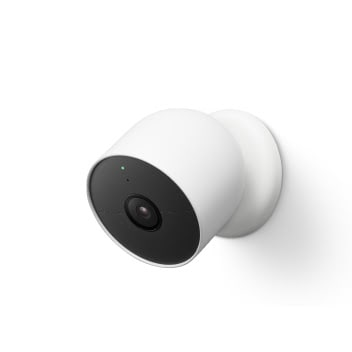
Nest’s battery camera is worth considering for its Google Home settings and removable magnetic body, but history access needs particular attention. One historical Nest Battery deployment reported repeated loading failures; a separate walkthrough describes working history and downloads. Its 6/10 overall grade reflects that specific caution alongside usable controls and a charging cable you need to keep track of.
Updated October 16, 2026. Compare the eight-camera guide or jump to grades, controls, recordings, handling and the decision.
Everyday-use grades
| Everyday task | Grade / 10 |
|---|---|
| App navigation and ordinary controls | 8 |
| Finding and saving an event | 3 |
| Physical handling and power routine | 7 |
| Overall | 6 |
Grades compare app controls, finding and saving recordings, and physical handling. They are based on the linked historical reviews and reports, not firsthand testing by us. Security, privacy, detection accuracy, image/audio quality and battery duration are outside this assessment.
Using the everyday controls
Tech With Brett adds the battery camera through Google Home’s device chooser, selecting Nest Cam Battery and scanning its QR code. A setup code is an alternative if scanning is unavailable. Later, he shows battery preferences and activity-zone choices. The 8/10 controls grade recognizes these clear routes with settings spread across different tasks.
If Google Home is already familiar, look beyond its opening screen to the camera’s settings and history. Those are the places you will revisit. This review concerns the outdoor-or-indoor battery camera; older cameras using the Nest app and wired-only indoor models have different setup contexts.
Sources: Everything the Google Nest Cam (battery) Can Do — Tech With Brett
Finding and saving a recording
One person describing a multi-camera Nest Battery installation reported consistent trouble loading history and live cameras in Google Home. Failure to open history is a direct obstacle when you need an existing recording, and that specific historical report drives the 3/10 retrieval grade. It is one deployment account, not a failure rate across Nest owners.
Tech With Brett provides a different experience: his walkthrough describes viewing history and seeing and downloading events. He also discusses different recording plans and a continuous-power arrangement. Taken together, the accounts make history the task to check carefully on your intended phone, account and power setup. Open existing events and try a save; a successful live view alone leaves the archive question unanswered.
Sources: r/EufyCam — Potentially switching from Google Nest Cam Battery setup, a few questions; Everything the Google Nest Cam (battery) Can Do — Tech With Brett
Mounting, access and power chores
RodrickViews shows the magnetic body and its particular magnetic charging connector. The body is convenient to angle and remove, but he dislikes needing that cable: there is no backup USB charging port in the setup he describes. The 7/10 physical grade balances easy handling against keeping a dedicated charging lead available.
Choose a reachable position and give the cable a permanent storage place. If you instead want continuous power, check the supported cable and the recording arrangement together. Brett’s powered, expanded-history discussion is distinct from battery-only use, so choose the configuration before deciding what history you expect to keep.
Sources: Google Nest Cam Outdoor or Indoor (Battery, 2nd Gen) — RodrickViews; Everything the Google Nest Cam (battery) Can Do — Tech With Brett
Which routine fits you
Consider Nest if you like its Google Home controls and can check recorded history in your intended setup before relying on it. Ring Outdoor Cam Plus, Battery is the alternative to compare for date/event sorting and a menu-based phone save. Both require attention to the recording service as well as the camera’s physical placement.
Read the Ring Outdoor Cam Plus, Battery review or return to the comparison table.
Comparison sources: Everything the Google Nest Cam (battery) Can Do — Tech With Brett; Google Nest Cam Outdoor or Indoor (Battery, 2nd Gen) — RodrickViews; r/EufyCam — Potentially switching from Google Nest Cam Battery setup, a few questions; Security.org — 2K Upgrade? | Ring Outdoor Cam Plus (Battery) Review; Erin Lawrence — Full Review +: What's new? Ring Outdoor Cam Plus (Wireless)
Check the selected Amazon listing for the exact package, current terms and availability.
Sources and review context
Google Nest Cam Outdoor or Indoor, Battery
Google Home settings and a removable magnetic camera body
Nest’s battery camera is worth considering for its Google Home settings and removable magnetic body, but history access needs particular attention. One historical Nest Battery deployment reported repeated loading failures; a separate walkthrough describes working history and downloads. Its 6/10 overall grade reflects that specific caution alongside usable controls and a charging cable you need to keep track of.
Reasons to choose it
- Google Home provides a device chooser, setup-code alternative and battery preferences.
- The magnetic body is convenient to angle and remove.
Tradeoffs to know
- One historical Nest Battery deployment reported repeated history-loading failures.
- Charging depends on keeping the particular magnetic cable.
Think twice if: You cannot check the history-opening routine that you will depend on
Published specifications
- Everyday-use focus
- Google Home settings and a removable magnetic camera body
Further reading
Ratings
Editorial score 6
App navigation and ordinary controls8
Setup uses Google Home device chooser and camera QR/setup code; battery preference and activity-zone controls are described.
Finding and saving an event3
One historical Nest Battery deployment reported repeated Google Home history-loading failures, a direct obstacle to opening recordings in that installation.
Physical handling and power routine7
Separate reviewer dislikes proprietary magnetic charging cable; magnetic removable body simplifies charging access but keeping cable matters.
Sources & further reading
youtube.com review
youtube.com review
youtube.com review
youtube.com review
User reports at Reddit
Keep reading
Something changed? Help us keep this useful.
Send a correction →