Elgato Wave:3 Review (2026): The Streamer Mic That Pays Off If You Use the Mixer
The Wave:3 is our streamer pick because Wave Link and Clipguard solve real live-audio headaches, but the condenser capsule and software setup make it the wrong easy mic for some desks.
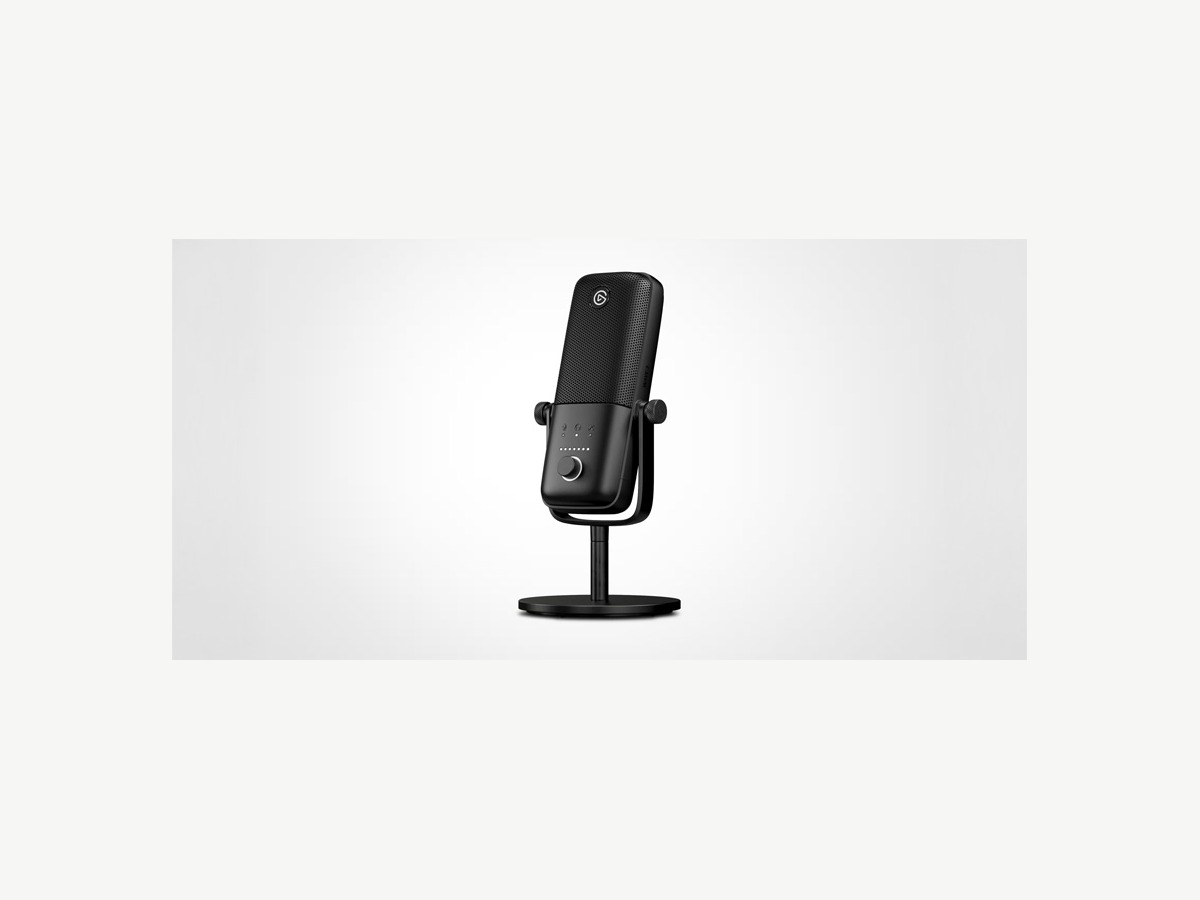
The Elgato Wave:3 is a USB-C condenser microphone for streamers, creators, and gaming desks that need Wave Link routing, Clipguard protection, headphone monitoring, and a compact desktop setup.
MSRP
—
Amazon
$149.99
at writing · 2026-05-14
Buyer fit
A streamer-focused USB condenser with Wave Link and Clipguard as the main advantage; great when the software setup fits, annoying when it does not.
MSRP
—
Amazon
$149.99
at writing · 2026-05-14
Score breakdown
How this product scored
Same rubric, but focused on one product so the reasons behind the score stay readable.
Speech sound quality
Clear, bright speech quality with useful Clipguard protection, but lighter low-end means close placement and a little tuning may matter for warmer voices.
Room and desk-noise rejection
A cardioid condenser can sound open but is less forgiving than the dynamic picks when keyboards, fans, or reflective rooms are part of the desk.
Controls and monitoring
The multi-control dial, LEDs, headphone jack, direct monitoring, and fast capacitive mute are strong day-to-day streamer controls.
Software and USB setup
Wave Link is a major advantage for stream routing, but it adds setup, update, and routing complexity that casual buyers may resent.
Mounting and desk fit
Compact body and desktop stand fit camera-friendly desks well, though typing thumps and low stand height may justify boom/shock upgrades.
Use-case flexibility
Excellent for streaming, gaming, calls, and basic voiceover; less flexible for future studio growth because there is no XLR output.
Reliability and support
Hardware evidence is reassuring, but software/OS caveats and limited long-term owner depth keep confidence moderate.
Evidence confidence
Strong formal reviews, YouTube tests, official/product imagery, feature data, and exact Amazon identity support the ranking.
Quick Verdict
Elgato’s Wave:3 is not just a USB mic with streamer branding slapped on the box. It is a compact condenser built around a live desktop setup: Wave Link, Clipguard, game/chat/music routing, quick mute, headphone monitoring, and a small stand that does not dominate the camera frame. If those tools sound useful, the Wave:3 earns its place. If you just want to plug in a mic for calls and never think about audio again, it may be more mic system than you need.
That is why it ranks #4 in our Best USB Microphones in 2026 guide as the Best for streamers pick, not the safest all-around pick. The parent score is 7/10: strong sound and excellent streamer tools, held back by condenser room pickup, software setup, and no XLR path. PCMag’s description of Wave Link gets to the point: apps can appear as “stereo faders (up to eight inputs)” and be “blended with the mic audio” for a live stream (source). That is the useful trick: your microphone becomes part of the whole broadcast mix instead of one lonely input.
The current shopping caveat: the kept product is Elgato Wave:3 / ASIN B088HHWC47, captured in an Amazon availability check at $149.99 on 2026-05-14T22:14:12Z. Refresh the live listing for seller, condition, bundle, and price before checkout. Use the product link to check current availability, and buying through it helps support KB4UB.
Score Breakdown
Overall score: 7/10. The Wave:3 wins a specific lane rather than trying to beat every mic in every room. It is a compact USB-C cardioid condenser with headphone monitoring, a capacitive mute, a multi-control dial, Wave Link mixing, and Clipguard clipping protection. Those are excellent tools for streaming. They are less convincing if your room is noisy, your keyboard is loud, or you do not want an app involved.
- Speech sound quality: 8/10 — Clear, bright, and easy to make usable for speech. One reviewer describes it as having “a brighter sound” while being “lacking a little bit on the lowend” (source), which is a fair expectation-setter.
- Room and desk-noise rejection: 6/10 — It is a condenser. It can sound open, but it is not the safest pick for an untreated room. The same review calls it a “pretty sensitive cardioid mic” (source).
- Controls and monitoring: 8/10 — The front dial, LEDs, headphone jack, and top mute button are genuinely useful.
- Software and USB behavior: 6/10 — Wave Link is the reason to buy it and the reason some people should avoid it.
- Mounting and desk fit: 8/10 — The small stand and compact body fit desks well, though boom/shock upgrades may still be smart.
- Use-case flexibility: 8/10 — Great for streaming, gaming, calls, and basic voiceover; weak if you want XLR later.
- Reliability and support: 6/10 — Formal coverage is strong, but there is a real OS/setup caveat in the source mix.
- Evidence confidence: 8/10 — The product identity, formal reviews, YouTube tests, and exact Amazon signal are strong, even with limited long-term owner depth.
What Feels Great Right Away
The first thing the Wave:3 gets right is desk fit. It is small, neat, and not trying to cosplay as a broadcast studio prop. A YouTube reviewer calls it “a simple minimal looking USB microphone” that is “nice and small compact” and easy to move in and out of a setup (source). That matters if your mic shares space with a monitor arm, keyboard, controller, Stream Deck, lights, and a drink you definitely should not spill near USB ports.
The second immediate win is control. The front dial cycles through mic gain, headphone volume, and mix balance; LEDs make the current level readable; the headphone jack gives you direct monitoring; and the capacitive mute is quick. PCMag notes that the top mute button is “highly sensitive and therefore works quickly” (source). For streamers, that fast mute can be the difference between a clean broadcast and accidentally sharing a cough, snack, or room chaos.
The third win is Clipguard. In one test, the reviewer deliberately overloads the mic — “we are clipping, we are distorted, it sounds absolutely terrible” — then engages Clipguard to show why it exists (source). It is not a license to scream into bad gain settings, but it is a useful safety net for live moments when your voice suddenly jumps.
Setup and Daily Use Notes
Set the Wave:3 up like a close desk mic, not a room mic. Keep it near enough that your voice wins over the keyboard and room, angle it away from the loudest desk noise, and do a short recording test before trusting it on a live stream. The included stand is convenient, but it sits on the same surface as your keyboard and mouse. If thumps or typing travel into the mic, a boom arm or shock mount becomes less of an accessory and more of the missing piece.
Wave Link is the everyday reason to choose this over simpler condensers. PCMag says “Wave Link is offered as a free download and works with both macOS and Windows” (source), then describes app audio being blended with mic audio for streaming. That is useful if you want separate control over game sound, Discord, browser audio, music, alerts, and your voice. It is overkill if your entire audio life is Zoom plus the occasional voice memo.
The identity caveat is worth keeping in mind: the current official Elgato page now emphasizes newer Wave:3 MK.2 language in places, while this review targets the legacy Wave:3 Amazon listing and ASIN. The included imagery and feature rows were checked against Wave:3 product cues, but final publish should still avoid accidentally swapping in MK.2-only claims.
What Gets Annoying
The first annoyance is the one that makes or breaks the purchase: software. Wave Link is powerful, but routing game, chat, browser, music, mic, and monitoring audio means there are more ways to confuse yourself than with a mic that simply appears as one input. If you enjoy tuning a stream desk, that is fun. If you want no settings, it is homework.
The second annoyance is room pickup. The Wave:3 is a condenser, and multiple source notes point in the same direction: it sounds clear, but it can hear more of the room than a close dynamic mic. One reviewer says it is “going to pick up a little bit more background noise around you” (source). That does not ruin it; it just means placement, gain, and room control matter.
The third annoyance is mute handling. PCMag likes the fast mute, but also notes that touching it creates “a tapping noise” that is more noticeable when muting than unmuting (source). Small issue, not a dealbreaker. But if you constantly mute mid-sentence on stream, you should know the tap may not be perfectly invisible.
Finally, there is no XLR escape hatch. If you plan to move into an audio interface later, the Samson Q2U or Shure MV7+ make more sense.
Reliability, Compatibility, and Ownership Reality
The ownership picture is mostly reassuring for the intended buyer, but it is not spotless. The hardware story is strong: USB-C, headphone monitoring, clear controls, compact size, and a stable little stand. One reviewer says the circular stand is “completely made of metal” with “a large rubber” pad on the bottom and calls it “very stable” (source). That is good news if you are starting on the included stand.
The less reassuring part is software and OS behavior. The source set includes a Level1Techs forum thread where a Pop OS user says “the microphone part of the Wave 3 only sometimes works” and that it would work for a while before it “stops collecting audio” (source). I would not treat one Linux-focused thread as proof of broad failure. I would treat it as a warning that the Wave:3 is safest for buyers on the normal Windows/macOS streamer path who are willing to keep Wave Link and system audio settings tidy.
For day-to-day ownership, the boring advice wins: keep the USB cable from being strained, save your Wave Link setup once it works, test Discord/OBS/Zoom before a real session, and do not assume Clipguard fixes bad placement.
How It Compares
Against the Shure MV7+, the Elgato is the streamer-control pick while the Shure is the safer noisy-room voice pick. If your room is untreated and your keyboard is loud, the Shure’s dynamic close-talk approach is more forgiving. If your real problem is balancing game, chat, music, and mic audio live, Elgato is the more interesting tool.
Against the Sennheiser Profile USB, the Wave:3 has the deeper streaming setup; the Sennheiser is calmer if you want obvious hardware controls in a quiet room. Against the Samson Q2U, the Elgato feels more modern and polished on a streamer desk, but the Samson is cheaper, dynamic, and has USB/XLR flexibility.
Against the RØDE NT-USB+, Audio-Technica AT2020USB-X, HyperX QuadCast 2 S, and Blue Yeti, the key difference is software focus. Some of those mics chase studio-condenser tone, RGB presence, or multi-pattern flexibility. The Wave:3 is more opinionated: one cardioid mic, compact desk hardware, and a mixer-first setup. That is why it sits in the #4 streamer lane instead of trying to be the universal recommendation. See the full shortlist in Best USB Microphones in 2026.
Who Should Buy It
Buy the Elgato Wave:3 if you stream, game, teach live, record simple voiceover, or run lots of creator calls and want one mic to sit at the center of a controlled audio setup. It makes the most sense if you already like Elgato’s ecosystem, use OBS or similar tools, and want separate control over your mic and other computer audio.
Also buy it if you want a compact mic that looks normal on camera. SoundGuys describes the audience well: “Streamers looking for something to easily link up with their streaming setup can enjoy this sleek mic,” and adds that it is also a fit for podcasters and frequent conference callers (source). That is the right lane. The Wave:3 is not trying to be the most isolation-heavy mic in the category; it is trying to make live desktop audio easier once you accept the setup.
For the full category ranking and simpler/noisier-room alternatives, see Best USB Microphones in 2026.
Who Should Skip It
Skip the Wave:3 if your room is loud and you will not keep the mic close. A dynamic mic such as the Shure MV7+ or Samson Q2U gives you better odds when keyboard noise, fans, and wall reflections are the real enemy.
Skip it if you want XLR later. The Wave:3 is USB-only, and that is fine for its lane, but it makes the upgrade path narrower than USB/XLR options. Skip it if you dislike software mixers, virtual routing, or checking app settings before important calls. And skip it if you are buying mainly for ordinary meetings: the Sennheiser Profile USB is simpler, while the Samson Q2U is cheaper and more forgiving.
The Wave:3 is a strong buy when its mixer tools are the point. It is a weaker buy when those tools become clutter.
Tell us what this page missed
These pages get better when real buyer complaints make it back into the scoring model. If something important is underweighted, say it.
Rate this review
Give it a score from 1-10 and tell us what to improve.
0/4000 characters