ELECOM DEFT PRO Review (2026): A Button-Heavy Finger Trackball With Setup Homework
A closer look at ELECOM’s right-hand finger trackball: eight-button control, wired/2.4GHz/Bluetooth modes, Mouse Assistant setup, and the rough-bearing complaints to know before buying.
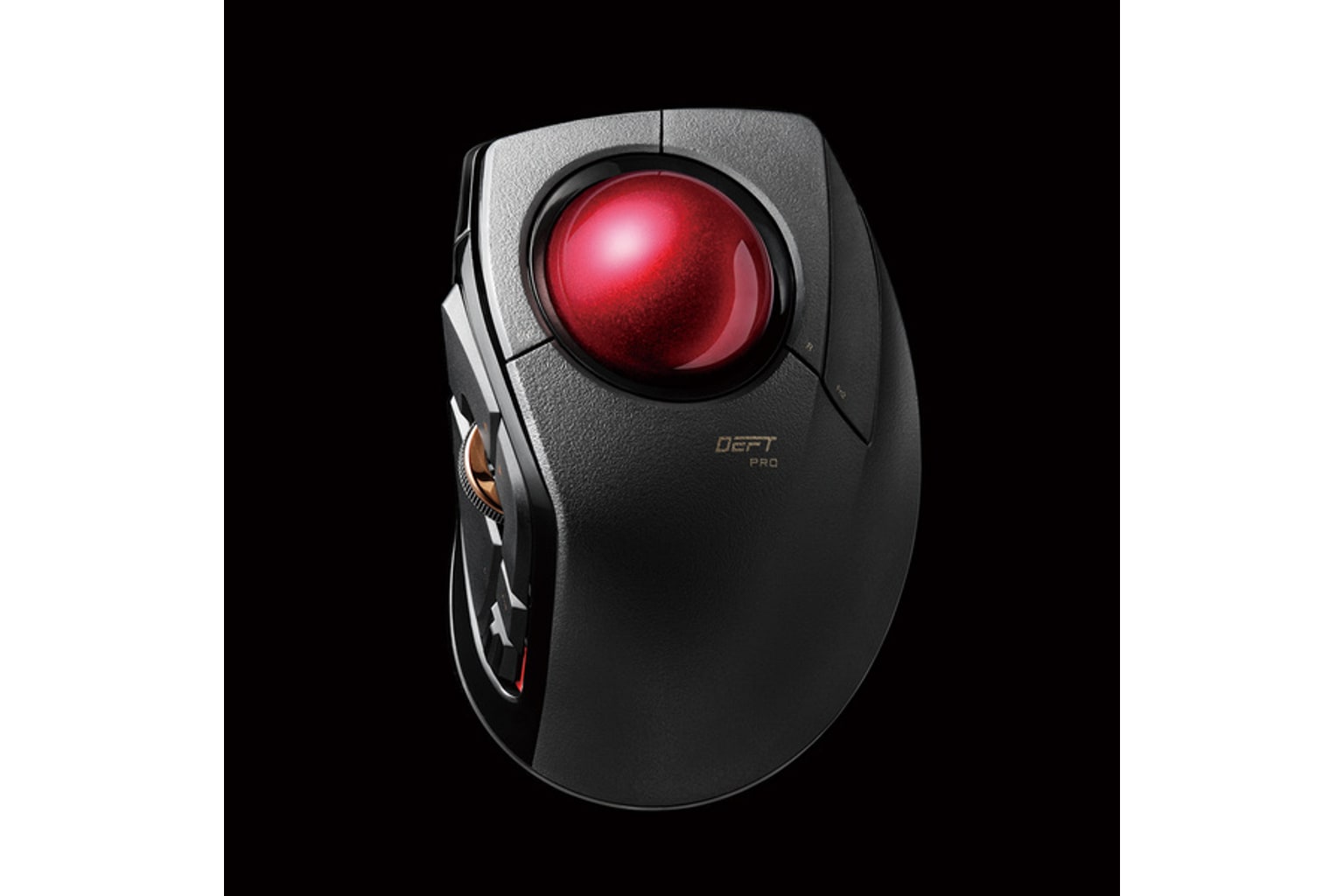
The ELECOM DEFT PRO is the #4 ergonomic-mouse pick for right-handed buyers who want a stationary finger trackball, lots of controls, and three connection modes. The tradeoff is homework: software setup, fit risk, and ball-maintenance complaints matter more here than with simpler vertical mice.
MSRP
$64.99
Amazon
$59.99
at writing · 2026-05-06
Buyer fit
Configurable finger-trackball pick for right-handed buyers who want many controls and three connection modes.
MSRP
$64.99
Amazon
$59.99
at writing · 2026-05-06
Score breakdown
How this product scored
Same rubric, but focused on one product so the reasons behind the score stay readable.
Comfort and posture fit
DEFT PRO is the button-heavy finger-trackball lane. It offers wired, 2.4GHz, and Bluetooth modes plus more controls than the simple vertical mice, but the setup curve, software caveats, and ball/bearing maintenance keep it from being a safer mainstream pick.
Controls, buttons, and scroll
DEFT PRO is the button-heavy finger-trackball lane. It offers wired, 2.4GHz, and Bluetooth modes plus more controls than the simple vertical mice, but the setup curve, software caveats, and ball/bearing maintenance keep it from being a safer mainstream pick.
Tracking and desk behavior
DEFT PRO is the button-heavy finger-trackball lane. It offers wired, 2.4GHz, and Bluetooth modes plus more controls than the simple vertical mice, but the setup curve, software caveats, and ball/bearing maintenance keep it from being a safer mainstream pick.
Setup, software, and connectivity
DEFT PRO is the button-heavy finger-trackball lane. It offers wired, 2.4GHz, and Bluetooth modes plus more controls than the simple vertical mice, but the setup curve, software caveats, and ball/bearing maintenance keep it from being a safer mainstream pick.
Durability and maintenance
DEFT PRO is the button-heavy finger-trackball lane. It offers wired, 2.4GHz, and Bluetooth modes plus more controls than the simple vertical mice, but the setup curve, software caveats, and ball/bearing maintenance keep it from being a safer mainstream pick.
Workspace fit
DEFT PRO is the button-heavy finger-trackball lane. It offers wired, 2.4GHz, and Bluetooth modes plus more controls than the simple vertical mice, but the setup curve, software caveats, and ball/bearing maintenance keep it from being a safer mainstream pick.
Quick Verdict
The ELECOM DEFT PRO is the ergonomic mouse to buy only if the idea of a finger trackball sounds exciting, not merely tolerable. It sits still on the desk, moves the pointer with a 44 mm index-finger ball, gives you wired USB, 2.4GHz wireless, and Bluetooth, and packs far more controls than the simple vertical mice in this guide.
That is why it ranked #4 in our Best Ergonomic Mice in 2026, not #1. The DEFT PRO is useful because it is specialized. The Logitech Lift is easier for most people. The Logitech MX Ergo S is the safer mainstream trackball. ELECOM is for the right-handed buyer who looks at a button map and thinks, good, I can make this mine.
The price of that control is homework. ELECOM’s own page promises "Multi-connection support: easily switch between Bluetooth, USB wireless, or wired mode," but it also says "Button customization software (Mouse Assistant) is Windows only" (source). Owner threads add the rougher edges: confusing setup visuals, bearing-smoothness complaints, and shells that do not fit every hand. Use the product links to check today’s price, seller, exact M-DPT1MRXBK listing, and availability; those links may also support KB4UB.
Score Breakdown
Overall score: 7.6/10. That is a strong score for a niche finger trackball, not a blanket recommendation for every ergonomic-mouse shopper. The DEFT PRO earns its place by doing things the vertical mice cannot, then loses points because setup, fit, and ball feel ask more from the buyer.
- Comfort and posture fit: 7.6/10. The stationary shape can reduce whole-arm mouse movement, and finger control avoids the thumb-ball bet of the MX Ergo S. But it is right-hand-only and not magically comfortable for every hand. One long-time trackball user wrote that the "DEFT Pro is way too tall for me" after trying several finger trackballs (source). That is a fit warning, not a product failure.
- Controls, buttons, and scroll: 8.2/10. This is ELECOM’s best category. The 8-button layout, tilt wheel, back/forward buttons, assignable functions, and DPI switch are the reason to buy it.
- Tracking and desk behavior: 7.5/10. A planted 44 mm ball is great for tight desks, but bearing smoothness is the recurring caveat. One owner said the stock ruby bearings were "sooooo rough" before switching to ceramic bearings, which made tracking much better (source). Do not assume every unit needs tinkering; do assume smoothness matters.
- Setup, software, and connectivity: 7.1/10. Three connection modes are excellent. Mouse Assistant is the tax you pay for deep customization, especially outside Windows.
- Durability and maintenance: 7.2/10. The removable ball and wired fallback help, but trackballs still need cleaning, bearing attention, and realistic expectations.
- Workspace fit: 7.4/10. It saves sweep space because it does not move, but it is not ambidextrous, not especially travel-friendly, and not as easy to share as a normal vertical mouse.
What Feels Great When It Clicks
When the DEFT PRO works for you, the win is quietly satisfying: the mouse stays put, your arm stops sweeping around the desk, and your fingers handle the cursor. That can feel calmer on a crowded setup than any moving mouse, especially if you already know you like trackballs.
The button story is the other reason people put up with the quirks. ELECOM gives you a tilt wheel, browser-style back/forward controls, function buttons, DPI choices, and three connection modes. For the right person, screenshots, window commands, browser navigation, game bindings, or app shortcuts can move under the same hand instead of living on the keyboard. One follow-up reviewer said that after an unimpressive first unboxing, "this is really all I use now," adding that the software was "perfectly fine" and that the mouse "stays out of my way" during work, video editing, and games (source). That is the real upside: once mapped, it can disappear into the day.
It also has a more flexible connection story than many trackballs. Wired USB is the least mysterious desk mode, the 2.4GHz receiver is handy when you have a spare USB-A port, and Bluetooth keeps the receiver out of the picture. The AA battery is not glamorous, but wired mode gives you a fallback if wireless power or pairing becomes the thing slowing you down.
What Gets Annoying
The DEFT PRO’s annoyances come from the same features that make it appealing. More buttons mean more setup. A finger trackball means a new motion pattern. A removable ball means maintenance. A right-hand ergonomic shell means some hands will love it and others will reject it quickly.
Mouse Assistant is the clearest example. ELECOM’s current page says button customization is Windows-only, while older support material and owner discussions make the Mac story less straightforward than Logitech’s. One owner was confused enough by ELECOM’s setup image to write, "this was super confusing," because the software graphic did not match how the thumb-side controls looked in hand (source). If you buy the DEFT PRO for remapping, treat software patience as part of the price.
The ball feel is the second watch item. Some owners are happy after normal use. Others talk about stiction, cleaning, lubrication, or replacing bearings. A user who picked it as a beginner trackball liked it but said it "could’ve been smoother" after cleaning seemed to increase drag (source). That does not make the DEFT PRO a bad product; it makes it a poor choice for someone who wants a sealed, no-fuss mouse.
Finally, do not underrate hand fit. The shell is right-handed, button reach is personal, and the thumb wheel can bother people who already have thumb pain.
Setup and Daily Use Notes
Before you keep the DEFT PRO, set it up like the product it is, not like a normal mouse you toss onto a desk. First, confirm the exact listing: M-DPT1MRXBK, ASIN B07C9T4TTW, black body with red ball, new retail offer. The captured Amazon offer was $59.99, Ships from Amazon and Sold by ELECOM-USA, with ELECOM USA’s $64.99 compare-at price used only as a list-price proxy.
Second, choose the connection mode you will actually use. Wired mode is the least mysterious and keeps the mouse powered over USB. The 2.4GHz receiver is convenient if your desk has a spare USB-A port. Bluetooth keeps the receiver out of the picture but can add pairing variables. None of that is scary, but it is more to manage than the Anker budget vertical mouse.
Third, decide whether you need Mouse Assistant. Basic pointing is one thing; buying this product for its extra controls is another. If you use Windows and enjoy remapping, the DEFT PRO becomes much more interesting. If you are on macOS or Linux and expect every control to be easy, slow down before checkout.
Daily maintenance is also part of ownership. ELECOM describes a removable 44 mm ball with artificial ruby support bearings and reduced maintenance, but trackballs still collect dust, skin oil, and desk grit. If the ball starts feeling sticky, clean carefully before assuming the mouse is defective. If you already know you hate this kind of upkeep, Logitech Lift is the calmer recommendation.
How It Compares With the Other Picks
The DEFT PRO is not competing for the same buyer as every mouse in the ranking. It is the finger-trackball lane.
- Logitech Lift: choose Lift if you want the safest first ergonomic mouse. It still moves like a regular mouse, has quieter office manners, and is less likely to punish you for not loving trackballs.
- Logitech MX Ergo S: choose MX Ergo S if you want the more polished mainstream trackball and are comfortable steering with your thumb. Choose ELECOM if finger control, more button mapping, and wired/receiver/Bluetooth flexibility matter more than software polish.
- Logitech MX Vertical: choose MX Vertical if you have medium-to-large hands and want a conventional moving mouse with a taller vertical shell. It is simpler than ELECOM but less desk-stationary.
- Anker 2.4G Wireless Vertical: choose Anker if you mainly want a cheap vertical-mouse trial. It cannot match ELECOM’s controls or connection modes, but it asks much less from you.
See where it lands in the full Best Ergonomic Mice in 2026 ranking.
The simple way to decide: if "finger trackball with lots of buttons" sounds useful, keep reading reviews and price-check the DEFT PRO. If it sounds like homework, buy a simpler pick.
Who Should Buy It — and Who Should Skip It
Buy the ELECOM DEFT PRO if:
- you are right-handed and specifically want a finger trackball
- you like programmable controls and will actually spend time mapping them
- you want wired, 2.4GHz, and Bluetooth options in one mouse
- your desk is crowded and a stationary pointer makes sense
- you are comfortable cleaning a trackball and troubleshooting ball smoothness
- the Logitech MX Ergo S sounds too thumb-focused for your hand
Skip it if:
- you want the easiest ergonomic-mouse recommendation
- you are left-handed
- you dislike setup software or use a system where Mouse Assistant support is limited
- rough-ball reports or possible bearing tinkering would make you angry
- you need a small travel mouse
- you are buying for fast-twitch gaming, precision drawing, or anyone who expects a normal mouse feel immediately
Bottom line: the DEFT PRO is a strong buy only inside its lane. The complaints are not tiny, but they are also not mysterious. This is a more flexible, more complicated trackball for people who enjoy that trade. If that sounds like you, it earns the #4 spot. If you are just trying to reduce wrist twist with the least drama, start with Lift or MX Ergo S instead.
Tell us what this page missed
These pages get better when real buyer complaints make it back into the scoring model. If something important is underweighted, say it.
Rate this review
Give it a score from 1-10 and tell us what to improve.
0/4000 characters