
The recommendation
Egofit is the strongest starting point in this group for a buyer who can leave its rear and sides accessible. A Walker Pro demonstration shows a rear lift onto front wheels, side handles and remote operation. Its 8.4 task score is useful only if that moving routine and the power and care access work in your room.
Grades at a glance
| Product | Overall | Placement and handling | Ordinary controls | Routine chores |
|---|---|---|---|---|
| Egofit Walker Pro M1 | 8.4 | 9.0 | 9.0 | 7.0 |
Does it fit your life?
Is this the right desk routine?
Egofit is the strongest starting point in this group for a buyer who can leave its rear and sides accessible. A Walker Pro demonstration shows a rear lift onto front wheels, side handles and remote operation. Its 8.4 task score is useful only if that moving routine and the power and care access work in your room.
Choose it if: You can approach the rear to use the demonstrated front-wheel moving method and leave the switch and care slot reachable.
Look elsewhere if: Cabinets or stored boxes would block the rear approach or the power and care access.
Read the seven-product comparison, or check placement, controls and stowing and care.
Leave room to approach the rear
The useful feature in the Walker Pro demonstration is the moving sequence: the presenter lifts from the rear and rolls on wheels at the front, with side handles also shown. That gives you a concrete placement question. Can you get to the rear after the pad is under the desk, or would the desk and neighboring furniture block the approach?
Plan the route as well as the final bay. A pad that fits beneath a desk still needs a way back out when you bring in a chair. The demonstrated handling points are a reason to leave access, not a promise that every buyer will find the lift easy or that it will fit beneath a particular bed. This review concerns Walker Pro; do not assume a Plus or M2 arrangement is identical.
Keep the handheld control visible
The presenter demonstrates remote operation and starting and controlling the machine through an app. That makes a handheld control worth considering when arranging the desk. Choose a place to keep it visible and reachable rather than making access depend on finding a phone among work items.
The app sequence is historical. It shows what the presenter did, not a promise about present phones, operating systems or pairing. If app use is essential to your choice, verify the current unit's instructions before ordering. The task comparison here is direct selection and access to the controls, rather than a claim about the breadth of the software.
Reserve access to the switch and care slot
A second Walker Pro review identifies the power cable and switch and a small care-access slot at the top left. Keep those points reachable after the pad is beneath the desk. Boxes alongside the deck can turn a convenient working position into an awkward place for routine attention.
The same layout check should include the rear approach used for moving. You need access for both use and retrieval; a tight fit that sacrifices either is a poor match for this routine. Keep the selected unit’s care instructions with its accessories for the actual method and intervals.
The alternative worth comparing
The GOYOUTH handling report includes difficulty carrying its boxed machine upstairs, while another GOYOUTH reviewer could not fit it under a low couch. Compare that room problem with Egofit's shown rear-lift/front-wheel method. Egofit offers a specific handling sequence to plan around; GOYOUTH remains an alternative when its parking destination and access route suit the room. Neither account supplies your furniture clearance.
| Everyday task | Egofit Walker Pro M1 / 10 | GOYOUTH / 10 | What to compare |
|---|---|---|---|
| Placement and handling | 9 | 7 | Egofit shows a rear-lift/front-wheel method; GOYOUTH reports expose boxed-stair and low-couch constraints. |
| Ordinary controls | 9 | 7 | Egofit demonstrates remote/app operation; GOYOUTH describes a pocket or wrist remote. |
| Routine chores | 7 | 7 | Egofit has a described care slot; GOYOUTH shows belt-adjustment access. |
| Overall ordinary tasks | 8.4 | 7 | Compare the room routine before choosing by total. |
See the GOYOUTH review for its room arrangement. The totals use unrounded category values before final rounding. They rate these desk routines, not exercise results or treadmill performance.
The pictured arrangement
Sources
- EgoFit Walker Pro Review
- EgoFit Walker Pro Review - The Best Standing Desk Treadmill?
- Goyouth Treadmill Review/ Features 2 In 1 Under Table Treadmill
- GOYOUTH 2 in 1 Under Desk Electric Treadmill REVIEW
- Review of GOYOUTH Under Desk Treadmill
- I Tried an Under Desk Treadmill For One Week - GOYOUTH 2 in 1 Under Desk Treadmill Review
Egofit Walker Pro M1
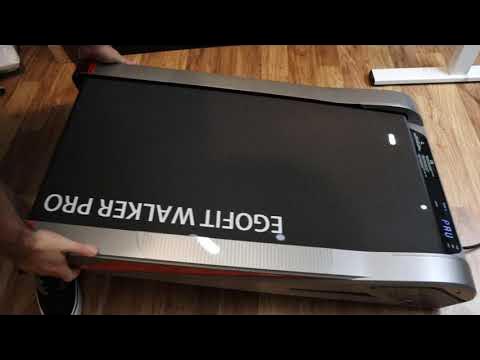
Egofit
You can approach the rear to use the demonstrated front-wheel moving method and leave the switch and care slot reachable.
Egofit is the strongest starting point in this group for a buyer who can leave its rear and sides accessible. A Walker Pro demonstration shows a rear lift onto front wheels, side handles and remote operation. Its 8.4 task score is useful only if that moving routine and the power and care access work in your room.
Reasons to choose it
- A review demonstrates front wheels and side handles.
- Remote operation and a care-access slot are described.
Tradeoffs to know
- Using the demonstrated wheeling method requires reaching the rear.
- Power-switch and top-left care access need their own reachable space.
Think twice if: Cabinets or stored boxes would block the rear approach or the power and care access.
Further reading
Ratings
Editorial score 8.4
Placement and handling9
The Walker Pro demonstration shows lifting from the rear onto front wheels and using side handles. That is useful when the room leaves those handling points accessible.
Ordinary controls9
Remote operation and app startup are demonstrated. The handheld routine offers a control you can keep at the desk; the historical app demonstration is not a current compatibility promise.
Routine chores7
A separate review identifies the cable, switch and top-left care slot. Reserve room to reach those areas after placement.
Sources & further reading
youtube.com review
youtube.com review
youtube.com review
youtube.com review
youtube.com review
youtube.com review
Keep reading
Something changed? Help us keep this useful.
Send a correction →