
The recommendation
Start with Egofit if its rear-lift/front-wheel routine fits your room, or UREVO if console and remote choice matters more and you have flat parking. R2 earns consideration when folding upright makes space possible. Check DeerRun’s app startup, Sperax’s physical setup and GOYOUTH’s delivery and furniture fit; approach Yagud cautiously if you want minimal moving and adjustment chores.
The shortlist, at a glance

You have a flat parking bay and want the remote beside the keyboard, with console buttons available in the raised arrangement.
UREVO Strol 2E Smart 2-in-1 Folding Treadmill →

A folded, upright parking place solves a specific space problem in a shared room.
WALKINGPAD R2 Folding Treadmill →
You can approach the rear to use the demonstrated front-wheel moving method and leave the switch and care slot reachable.
Egofit Walker Pro M1 →

You have checked the delivery route, parking opening and outlet arrangement and want a handheld control at the desk.
GOYOUTH 2 in 1 Under Desk Electric Treadmill →
You can investigate the carpet-moving routine and keep adjustment points reachable, and you prefer the demonstrated pause/restart behavior.
Yagud Walking Pad Treadmill →

You are comfortable with the listed app-start condition and can check the selected unit’s moving and parking instructions.
DeerRun Under Desk Walking Pad Treadmill →

You can reach the manual support and side switch and have a measured destination for the wheeled slab.
Sperax Walking Vibration Pad with APP →
Grades at a glance
| Product | Overall | Placement and handling | Ordinary controls | Routine chores |
|---|---|---|---|---|
| UREVO Strol 2E Smart 2-in-1 Folding Treadmill | 7.7 | 7.0 | 9.0 | 7.0 |
| WALKINGPAD R2 Folding Treadmill | 7.0 | 7.0 | 7.0 | 7.0 |
| Egofit Walker Pro M1 | 8.4 | 9.0 | 9.0 | 7.0 |
| GOYOUTH 2 in 1 Under Desk Electric Treadmill | 7.0 | 7.0 | 7.0 | 7.0 |
| Yagud Walking Pad Treadmill | 5.1 | 4.0 | 7.0 | 4.0 |
| DeerRun Under Desk Walking Pad Treadmill | 7.7 | 9.0 | 7.0 | 7.0 |
| Sperax Walking Vibration Pad with APP | 7.7 | 9.0 | 7.0 | 7.0 |
Compare your shortlist
Does it fit your life?
Start with the room, then choose the control routine
Choose the walking pad whose daily changeover fits your room: from parking to desk, from setup to control, and back to a chair. A folding deck can solve a parking problem while adding handwork. Wheels can help on the route without making every floor or furniture opening suitable.
Egofit’s Walker Pro demonstration shows a rear-lift/front-wheel method and side handles; it leads this group’s ordinary-task scores. The UREVO Strol 2E review describes easy console and remote controls, with flat storage and a high-pile-carpet caveat. Start with those two if their arrangements suit your room. Choose R2’s folding and upright parking when that destination is what makes a walking pad possible, accepting its handle preparation and reported carpet drag.
Use the comparison table to narrow the field and each full review to check the routine. These are editorial assessments of placement, controls and chores based on linked reports and guidance, not hands-on testing by us or a ranking of exercise results. A higher score cannot supply a parking space your room lacks.
Seven routines at a glance
| Model and review | Handling / 10 | Controls / 10 | Chores / 10 | Overall / 10 | Room decision |
|---|---|---|---|---|---|
| UREVO Strol 2E | 7 | 9 | 7 | 7.7 | Console and pocket remote; reserve flat parking. |
| WALKINGPAD R2 | 7 | 7 | 7 | 7 | Folding and upright parking; tight handles and plush carpet complicate transitions. |
| Egofit Walker Pro M1 | 9 | 9 | 7 | 8.4 | Rear lift and front wheels; keep handling and care access open. |
| GOYOUTH | 7 | 7 | 7 | 7 | Pocket or wrist remote; check delivery route, couch opening and outlet layout. |
| Yagud | 4 | 7 | 4 | 5.1 | Pause/restart selection; carpet workaround and repeated adjustment deserve attention. |
| DeerRun | 9 | 7 | 7 | 7.7 | Related Q2 wheel guidance; selected listing requires app startup. |
| Sperax | 9 | 7 | 7 | 7.7 | Manual support and wheels; side switch precedes remote use. |
Category scores and the total are rounded separately; the total uses unrounded values. Equal totals can describe different routines: DeerRun’s app-start condition and Sperax’s side-switch preparation are useful examples. Choose the arrangement you can repeat, then use the scores as a comparison aid.
Draw a desk-to-parking route
Mark three places before buying: where the pad sits during use, where the chair waits and where the pad goes afterward. Measure the furniture opening you intend to use and check the actual unit's storage instructions. These planning steps turn “under desk” into a specific room arrangement.
For flat parking, the UREVO account describes wheeling on hard flooring but cautions about high-pile carpet and says to keep the machine flat. For a folding destination, the R2 account describes a deck that folds in half and parks upright, tempered by small wheels dragging on plush carpet. That is a trade between the destination and the transition, not an automatic storage winner.
The GOYOUTH low-couch account is a useful reminder that a low slab can still miss the available opening. The Yagud comparison used added sliders in a carpeted home. Treat both as room-specific friction. Do not turn either into universal furniture fit or an instruction to add a particular accessory.
Decide how much preparation you want
A handheld remote solves a reach problem only after the machine is ready. The Strol 2E reviewer found both console buttons and the pocket remote very easy, while the R2 review describes remote operation without buttons on the handle. Decide where the control will live when you are at the keyboard.
For DeerRun, read the selected listing’s startup condition: it says the machine is designed to work with the app to get started. Historical remote-control reports do not erase that condition. For Sperax, the demonstration starts at the side switch and then moves to remote power and selection. An accessible remote and an accessible physical switch are separate layout requirements.
The gifted GOYOUTH review describes a pocket or wrist remote with display and retained-setting functions, but the reports show different remote layouts. Yagud's comparison account describes a pause/restart routine that returns to the starting setting. Use those accounts to decide what to check on the selected unit, not as universal button instructions.
Include the chores after use
The routine ends after the machine is parked and the work area is ready again. Plan a home for the remote, a place for the cable when unused and reachable storage for the care items that actually arrive with the unit. Check outlet location and the equipment instructions before fixing the desk layout. This is organization advice rather than an electrical workaround or a promise of supplied cable hardware.
An office trial of GOYOUTH encountered a single wall outlet shared with a laptop, then later resolved the room problem. That story should trigger a cable-and-outlet inventory, not a claim that GOYOUTH has a general power defect. A separate GOYOUTH review shows an ordinary belt-adjustment chore. Yagud's comparison reports repeated adjustment over a short period, which is a meaningful chore difference without establishing a general reliability pattern.
Egofit's care-access discussion identifies a top-left slot plus power cable and switch. A DeerRun office account keeps a wrench and oil bottle in a bag to retain the loose items and contain spills. Both are useful reminders to reserve access and accessory space. Use the instructions for the actual machine for care methods and intervals.
UREVO Strol 2E
Choose the Strol 2E when you have a flat parking space and want a choice of console buttons or a pocket remote. The reviewed model rolls readily on hard flooring, but high-pile carpet complicates the trip and upright storage is not its intended arrangement.
Best fit: You have a flat parking bay and want the remote beside the keyboard, with console buttons available in the raised arrangement.
Tradeoff: Your only parking space is an upright slot, or the daily route crosses high-pile carpet you cannot avoid.
Start with the parking place. In the Strol 2E review, the deck can be rolled away, but the reviewer says to keep this model flat rather than store it vertically. A bed or other furniture may provide a destination only after you check the actual opening and the route to it. A narrow slot beside a cabinet is a different requirement from a flat bay under furniture.
Continue to UREVO Strol 2E: controls and daily preparation or the storage and care routine.
WALKINGPAD R2
Choose the R2 if folding the deck and parking it upright is what makes room for a walking pad. That space saving comes with a repeated folding and handle-adjustment routine; the reports also flag small wheels on plush carpet. If you already have flat parking, compare UREVO before accepting those extra transitions.
Best fit: A folded, upright parking place solves a specific space problem in a shared room.
Tradeoff: You need to clear the desk frequently and dislike firm handle adjustments or moving small wheels over plush carpet.
The R2 earns its place by changing how it occupies the room. The R2 review describes folding the deck in half and storing it upright, including parking beside a desk. Work out the unfolded location and the folded destination as two separate spaces. The path between them needs attention too: the same reviewer found the small wheels felt like dragging on plush carpet.
Continue to WALKINGPAD R2: controls and daily preparation or the storage and care routine.
Egofit Walker Pro M1
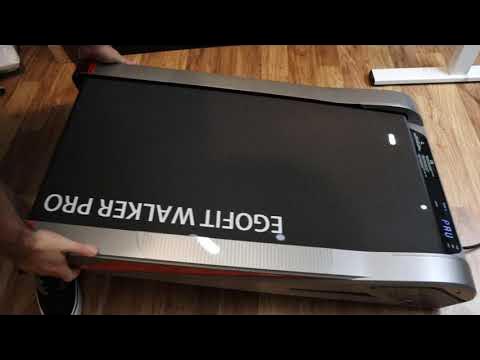
Egofit is the strongest starting point in this group for a buyer who can leave its rear and sides accessible. A Walker Pro demonstration shows a rear lift onto front wheels, side handles and remote operation. Its 8.4 task score is useful only if that moving routine and the power and care access work in your room.
Best fit: You can approach the rear to use the demonstrated front-wheel moving method and leave the switch and care slot reachable.
Tradeoff: Cabinets or stored boxes would block the rear approach or the power and care access.
The useful feature in the Walker Pro demonstration is the moving sequence: the presenter lifts from the rear and rolls on wheels at the front, with side handles also shown. That gives you a concrete placement question. Can you get to the rear after the pad is under the desk, or would the desk and neighboring furniture block the approach?
Continue to Egofit Walker Pro M1: controls and daily preparation or the storage and care routine.
GOYOUTH
GOYOUTH is worth considering once you have checked both the delivery route and a real parking opening. The reports describe useful wheels and a pocket or wrist remote, alongside an awkward boxed carry upstairs and a couch too low for storage. It is a practical shortlist option for a planned room, rather than a purchase to fit around later.
Best fit: You have checked the delivery route, parking opening and outlet arrangement and want a handheld control at the desk.
Tradeoff: You are relying on wheels to solve a stair delivery or on an unmeasured gap beneath a low couch.
Separate arrival day from daily use. In one GOYOUTH account, carrying the machine upstairs in its box was difficult. That is a route-planning issue to settle before delivery rather than a reason to assume the wheels solve stairs. Consider where the package will arrive and how it reaches the room, following the handling instructions for the unit.
Continue to GOYOUTH: controls and daily preparation or the storage and care routine.
Yagud
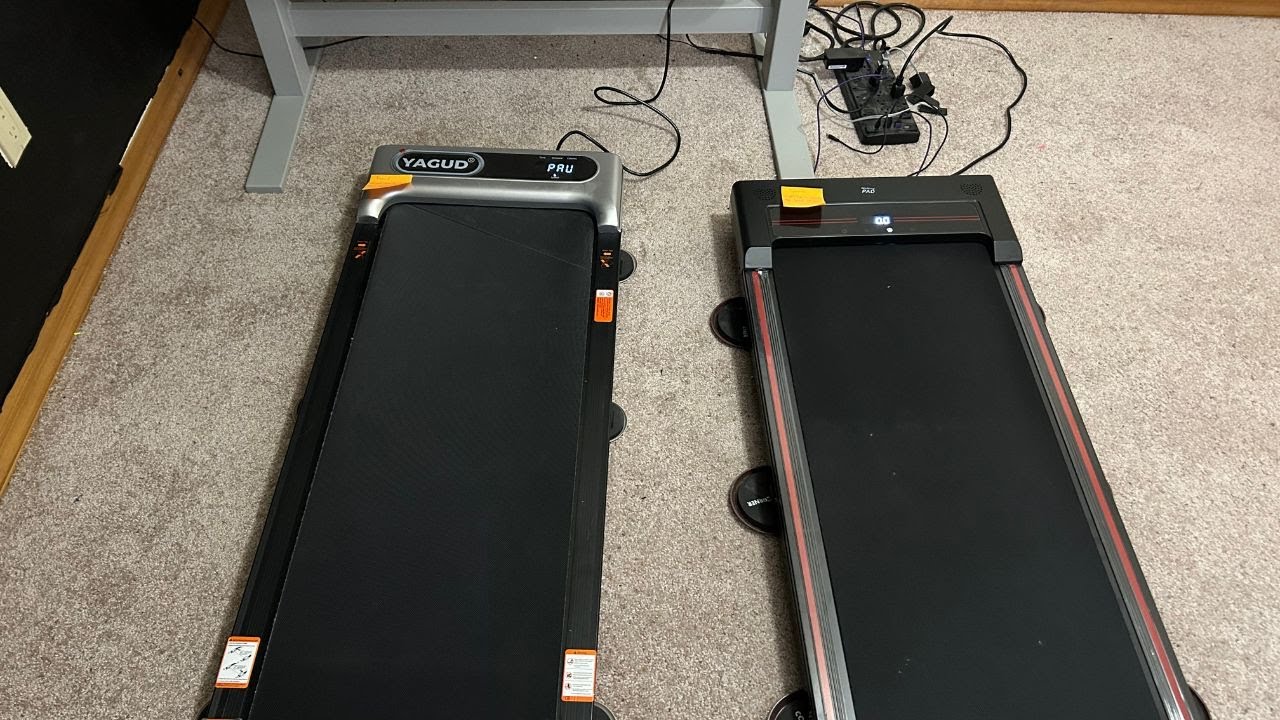
Yagud is a less convincing choice for a desk that must be cleared often. The comparison account used added sliders to move the pads across carpet and reported repeated Yagud belt adjustment over a short period. Its pause/restart control may suit you, but investigate those two chores before choosing it over UREVO.
Best fit: You can investigate the carpet-moving routine and keep adjustment points reachable, and you prefer the demonstrated pause/restart behavior.
Tradeoff: You want to clear the desk often with as little moving and adjustment work as possible.
Start with the floor, not the feature list. In the Yagud comparison, the presenter says the pads were difficult to move around a carpeted home without added furniture sliders. That is a concrete reason to scrutinize a desk-to-storage route through carpet. The sliders are the presenter's workaround, not an included accessory or a recommendation that they suit every floor or unit.
Continue to Yagud: controls and daily preparation or the storage and care routine.
DeerRun
Consider DeerRun only after settling its app-start requirement. The selected listing offers remote adjustment but says the app is needed to get started. Manufacturer wheel guidance gives a useful basis for planning repositioning; it does not settle how you will lift or park this exact variant.
Best fit: You are comfortable with the listed app-start condition and can check the selected unit’s moving and parking instructions.
Tradeoff: You are buying a handheld remote specifically to avoid initial app setup, or need confirmed upright parking.
The manufacturer’s Q2 page describes a manual-incline model with built-in wheels for movement. This is useful guidance for ordinary repositioning, with a narrower implication than a complete handling demonstration. It is the manufacturer describing a related manual-support model; its incline specification should not be substituted for the selected listing's variant.
Continue to DeerRun: controls and daily preparation or the storage and care routine.
Sperax
Consider Sperax for the demonstrated sequence of setting a physical support, reaching the side switch and then using the remote. Wheels help explain the stowing routine, but you still need to measure the parking opening. Its vibration label is not a reason for the task score or a basis for promising results.
Best fit: You can reach the manual support and side switch and have a measured destination for the wheeled slab.
Tradeoff: Your layout blocks physical setup access, or you expect the remote to replace that preparation.
In the Sperax demonstration, the presenter lowers a physical support bar, changes its position and moves the slab using wheels at one end. That is the useful mechanism to consider when arranging a desk: leave enough room to approach the support and the end used for moving. A red arrow in the illustration draws attention to that manual movement, not to a powered incline control.
Continue to Sperax: controls and daily preparation or the storage and care routine.
Inspect the pictured layouts
UREVO with the upright raised, plus a lowered-upright desk inset. The furnishings illustrate placement.
UREVO with its upright raised and lowered in a desk inset. The tablet and desk illustrate arrangements; the composite does not establish furniture fit or included furnishings.
R2 with its handle raised and a separate view of the deck folded and parked upright.
R2 with its handle raised, alongside a separate view of the folded deck parked upright. The inset shows the destination, not the handle adjustments needed to reach it.
red-trim GOYOUTH in an open-room view and beneath a desk in a separate inset.
red-trim GOYOUTH in an open-room view and beneath a desk. These posed arrangements do not establish the opening beneath your desk, couch or bed.
DeerRun with manual supports deployed and a desk inset. The “0%–6%” overlay advertises the pictured variant.
DeerRun with manual supports deployed, plus a desk inset. The graphic advertises “0%–6%” for the pictured variant; it is not our measurement or a substitute for the selected unit’s instructions. Use the visible supports to understand the arrangement, not to infer clearance or a lifting method.
Sperax with manual supports, wheels and remote. The red arrow illustrates support movement; the inset is a separate arrangement.
a Sperax slab with deployed manual supports, wheels and a remote in hand. The red arrow illustrates support movement. The inset shows a separate promotional arrangement with cords and motion marks; it does not establish included accessories or vibration results.
Phair Review video — Yagud pictured on the left.
Sources
- Urevo 2in1 WalkingPad Review
- WalkingPad R2 2-in-1 Under Desk Treadmill Review
- WalkingPad R2 Review 2026 🏃 Best foldable 2-in-1 treadmill?
- EgoFit Walker Pro Review
- EgoFit Walker Pro Review - The Best Standing Desk Treadmill?
- Goyouth Treadmill Review/ Features 2 In 1 Under Table Treadmill
- GOYOUTH 2 in 1 Under Desk Electric Treadmill REVIEW
- Review of GOYOUTH Under Desk Treadmill
- I Tried an Under Desk Treadmill For One Week - GOYOUTH 2 in 1 Under Desk Treadmill Review
- Worth it? Yagud Vs Sperax Walking Pads In Depth Comparison
- DeerRun Under the Desk Walking Pad Review After 5 Months
- DeerRun Walking Pad Review | Best Walking Pad On The Market For The Price?
- Amazon.com : DeerRun Under Desk Walking Pad Treadmill for Home Office & Small Spaces, 6% Manual Incline, 0.6–3.8 MPH Walking Speed, 2.5 HP, 300 lb Capacity, App & Remote Control : Sports & Outdoors
- DeerRun Q2 Urban 7% Incline Under-desk Walking Pad with Smart Control
- Sperax Walking Pad Review | Treadmill and Vibration Pad All In One | Watch How It Works
UREVO Strol 2E Smart 2-in-1 Folding Treadmill
UREVO
You have a flat parking bay and want the remote beside the keyboard, with console buttons available in the raised arrangement.
Choose the Strol 2E when you have a flat parking space and want a choice of console buttons or a pocket remote. The reviewed model rolls readily on hard flooring, but high-pile carpet complicates the trip and upright storage is not its intended arrangement.
The takeaway
Choose the Strol 2E when you have a flat parking space and want a choice of console buttons or a pocket remote. The reviewed model rolls readily on hard flooring, but high-pile carpet complicates the trip and upright storage is not its intended arrangement.
Reasons to choose it
- Console buttons and a pocket remote offer two direct control choices.
- Transport wheels help with movement on hard flooring.
Tradeoffs to know
- The reviewed Strol 2E needs flat storage.
- High-pile carpet and a low tablet rack add placement compromises.
Think twice if: Your only parking space is an upright slot, or the daily route crosses high-pile carpet you cannot avoid.
Further reading
Ratings
Editorial score 7.7
Placement and handling7
The reviewed Strol 2E rolls on hard flooring and needs flat storage. High-pile carpet makes the trip less convenient, so judge the route as well as the parking bay.
Ordinary controls9
The reviewer found console buttons and the pocket remote easy to use. Choose a reachable control position for the desk arrangement you will actually use.
Routine chores7
The removable rack gives small items a place during use but needs its own place when stowing. Its low position also limits its appeal as a screen holder.
WALKINGPAD R2 Folding Treadmill
WALKINGPAD
A folded, upright parking place solves a specific space problem in a shared room.
Choose the R2 if folding the deck and parking it upright is what makes room for a walking pad. That space saving comes with a repeated folding and handle-adjustment routine; the reports also flag small wheels on plush carpet. If you already have flat parking, compare UREVO before accepting those extra transitions.
The takeaway
Choose the R2 if folding the deck and parking it upright is what makes room for a walking pad. That space saving comes with a repeated folding and handle-adjustment routine; the reports also flag small wheels on plush carpet. If you already have flat parking, compare UREVO before accepting those extra transitions.
Reasons to choose it
- The deck folds in half and can be parked upright.
- Handheld remote operation is described in the review.
Tradeoffs to know
- Small wheels dragged on plush carpet in a review.
- Handle adjustments and the folding sequence add repeated handwork.
Think twice if: You need to clear the desk frequently and dislike firm handle adjustments or moving small wheels over plush carpet.
Further reading
Ratings
Editorial score 7
Placement and handling7
Folding the deck and parking upright can recover room space. Small-wheel drag on plush carpet and firm handle adjustments temper that convenience.
Ordinary controls7
Handheld adjustment is available in the review, while the handle has no control buttons. Plan a reachable home for the remote.
Routine chores7
The review describes the folding sequence and key insertion. Count preparation when deciding how often you will switch between pad and chair.
Egofit Walker Pro M1
Egofit
You can approach the rear to use the demonstrated front-wheel moving method and leave the switch and care slot reachable.
Egofit is the strongest starting point in this group for a buyer who can leave its rear and sides accessible. A Walker Pro demonstration shows a rear lift onto front wheels, side handles and remote operation. Its 8.4 task score is useful only if that moving routine and the power and care access work in your room.
The takeaway
Egofit is the strongest starting point in this group for a buyer who can leave its rear and sides accessible. A Walker Pro demonstration shows a rear lift onto front wheels, side handles and remote operation. Its 8.4 task score is useful only if that moving routine and the power and care access work in your room.
Reasons to choose it
- A review demonstrates front wheels and side handles.
- Remote operation and a care-access slot are described.
Tradeoffs to know
- Using the demonstrated wheeling method requires reaching the rear.
- Power-switch and top-left care access need their own reachable space.
Think twice if: Cabinets or stored boxes would block the rear approach or the power and care access.
Further reading
Ratings
Editorial score 8.4
Placement and handling9
The Walker Pro demonstration shows lifting from the rear onto front wheels and using side handles. That is useful when the room leaves those handling points accessible.
Ordinary controls9
Remote operation and app startup are demonstrated. The handheld routine offers a control you can keep at the desk; the historical app demonstration is not a current compatibility promise.
Routine chores7
A separate review identifies the cable, switch and top-left care slot. Reserve room to reach those areas after placement.
GOYOUTH 2 in 1 Under Desk Electric Treadmill
GOYOUTH
You have checked the delivery route, parking opening and outlet arrangement and want a handheld control at the desk.
GOYOUTH is worth considering once you have checked both the delivery route and a real parking opening. The reports describe useful wheels and a pocket or wrist remote, alongside an awkward boxed carry upstairs and a couch too low for storage. It is a practical shortlist option for a planned room, rather than a purchase to fit around later.
The takeaway
GOYOUTH is worth considering once you have checked both the delivery route and a real parking opening. The reports describe useful wheels and a pocket or wrist remote, alongside an awkward boxed carry upstairs and a couch too low for storage. It is a practical shortlist option for a planned room, rather than a purchase to fit around later.
Reasons to choose it
- Reviews describe wheeled repositioning and a pocket or wrist remote.
- A review shows an ordinary belt-adjustment chore.
Tradeoffs to know
- One reviewer struggled with carrying the box upstairs.
- A low couch blocked storage for another reviewer.
Think twice if: You are relying on wheels to solve a stair delivery or on an unmeasured gap beneath a low couch.
Ratings
Editorial score 7
Placement and handling7
Reported wheels help ordinary movement, but boxed stairs and a low couch caused distinct difficulties. Check delivery and daily parking separately.
Ordinary controls7
The gifted review describes a pocket or wrist remote, display selection and retained settings. Layouts vary across the reports, so match the routine to the remote supplied.
Routine chores7
A review shows belt adjustment; another encountered and later resolved an outlet conflict. Plan access for care and for the equipment sharing the desk.
Yagud Walking Pad Treadmill
Yagud
You can investigate the carpet-moving routine and keep adjustment points reachable, and you prefer the demonstrated pause/restart behavior.
Yagud is a less convincing choice for a desk that must be cleared often. The comparison account used added sliders to move the pads across carpet and reported repeated Yagud belt adjustment over a short period. Its pause/restart control may suit you, but investigate those two chores before choosing it over UREVO.
The takeaway
Yagud is a less convincing choice for a desk that must be cleared often. The comparison account used added sliders to move the pads across carpet and reported repeated Yagud belt adjustment over a short period. Its pause/restart control may suit you, but investigate those two chores before choosing it over UREVO.
Reasons to choose it
- The comparative report describes display-mode selection and pause/restart behavior.
Tradeoffs to know
- The carpeted-room report relied on added furniture sliders.
- The same account reports repeated belt adjustment in a short period.
Think twice if: You want to clear the desk often with as little moving and adjustment work as possible.
Further reading
Ratings
Editorial score 5.1
Placement and handling4
The comparison used added furniture sliders to move the pads around a carpeted home. That workaround makes a frequently cleared carpeted desk a less attractive fit.
Ordinary controls7
The comparison describes display selection and pause/restart at the starting setting. Decide whether reselecting after an interruption fits your use.
Routine chores4
The presenter reported repeated belt adjustment over a short period. This is concrete recurring work in that account, without establishing a failure rate.
DeerRun Under Desk Walking Pad Treadmill
DeerRun
You are comfortable with the listed app-start condition and can check the selected unit’s moving and parking instructions.
Consider DeerRun only after settling its app-start requirement. The selected listing offers remote adjustment but says the app is needed to get started. Manufacturer wheel guidance gives a useful basis for planning repositioning; it does not settle how you will lift or park this exact variant.
The takeaway
Consider DeerRun only after settling its app-start requirement. The selected listing offers remote adjustment but says the app is needed to get started. Manufacturer wheel guidance gives a useful basis for planning repositioning; it does not settle how you will lift or park this exact variant.
Reasons to choose it
- Manufacturer guidance describes built-in wheels for movement on a manual-support model.
- Historical reports describe ordinary remote adjustment.
Tradeoffs to know
- The selected listing says app setup is needed to get started.
- Loose care accessories need a deliberate storage place.
Think twice if: You are buying a handheld remote specifically to avoid initial app setup, or need confirmed upright parking.
Further reading
Ratings
Editorial score 7.7
Ordinary controls7
The selected listing allows remote adjustment but says app use is needed to get started. Historical handheld-control reports cannot remove that preparation requirement.
Routine chores7
A historical office account keeps a wrench and oil bottle in a bag. The useful task is organizing loose care items, without assuming an identical kit or care schedule.
Placement and handling9
The related manual-incline Q2 manufacturer page describes built-in wheels for movement. This supports ordinary repositioning only; exact support geometry, lifting and parking posture need the selected unit’s instructions.
Sperax Walking Vibration Pad with APP
Sperax
You can reach the manual support and side switch and have a measured destination for the wheeled slab.
Consider Sperax for the demonstrated sequence of setting a physical support, reaching the side switch and then using the remote. Wheels help explain the stowing routine, but you still need to measure the parking opening. Its vibration label is not a reason for the task score or a basis for promising results.
The takeaway
Consider Sperax for the demonstrated sequence of setting a physical support, reaching the side switch and then using the remote. Wheels help explain the stowing routine, but you still need to measure the parking opening. Its vibration label is not a reason for the task score or a basis for promising results.
Reasons to choose it
- A demonstration shows manual support movement and wheeled repositioning.
- Side-switch and remote operation are described in sequence.
Tradeoffs to know
- The side switch remains part of preparation.
- Under-furniture stowing depends on the actual clearance.
Think twice if: Your layout blocks physical setup access, or you expect the remote to replace that preparation.
Further reading
Ratings
Editorial score 7.7
Placement and handling9
The demonstration shows a physical support bar and wheels at one end. Leave room to operate the support and approach the moving end; measure furniture clearance separately.
Ordinary controls7
The demonstrated sequence begins at the side switch and continues on the remote. Both need to be reachable in the planned desk position.
Routine chores7
The presenter demonstrates wheeled movement and describes under-furniture parking. Plan retrieval space and a place for the remote and cable.
Sources & further reading
youtube.com review
youtube.com review
youtube.com review
youtube.com review
youtube.com review
youtube.com review
youtube.com review
youtube.com review
youtube.com review
youtube.com review
youtube.com review
youtube.com review
amazon.com product page
deerruntreadmill.com product information
youtube.com review
Keep reading
Something changed? Help us keep this useful.
Send a correction →