DJI Power 1000 V2 Review (2026): Quiet High-Output Power, With an Adapter Catch
DJI’s 1kWh station is unusually quiet and powerful for indoor backup, studio gear, tools, and small-appliance loads — but solar, car charging, DC outputs, and current seller terms need a careful look before checkout.
The DJI Power 1000 V2 is the quiet high-output runner-up in our portable power station ranking: excellent for indoor AC power and creator setups, less ideal if you want the simplest solar/DC accessory path.
MSRP
$599
Amazon
$429
at writing · 2026-05-06
Buyer fit
A strong runner-up for people who care about quiet indoor use and unusually high AC output. It loses the default slot because solar, car charging, and DC outputs lean on DJI SDC accessories, and the captured Amazon buy box was not DJI/Amazon direct.
MSRP
$599
Amazon
$429
at writing · 2026-05-06
Score breakdown
How this product scored
Same rubric, but focused on one product so the reasons behind the score stay readable.
Usable runtime
Several tests landed around typical 1kWh efficiency rather than miracle capacity; idle drain with AC on is the main thing to manage.
Load handling
The 2600W inverter is the standout, with reviewers running demanding tools and appliances that trip weaker 1kWh units.
Recharge speed
Wall charging is fast and easy, but serious solar, car charging, and DC output routes depend on SDC adapters that add cost and planning.
Noise & thermals
Quiet operation was the strongest repeated positive signal, including reviewer measurements and creator/studio use cases.
Controls
The front panel, bright display, physical speed switch, and simple app make DJI easy to understand without burying basics.
Portability
It is compact for its output but heavier than some 1kWh rivals and lacks built-in DC ports on the face.
Service
DJI support/warranty is reassuring, but the captured Amazon buy box was Fly Image Tech with a non-returnable hazardous-materials caveat.
Backup fit
UPS tests were strong and expansion is possible, but the ecosystem is adapter-driven rather than built into the box.
Quick Verdict
DJI’s Power 1000 V2 is the portable power station you look at when the usual 1kWh boxes feel a little too loud, a little too limited, or a little too obsessed with making you open an app for basic things. DJI is best known for drones and camera gear, and that shows here: the Power 1000 V2 feels clean, quiet, and built for people who may use it near cameras, audio gear, laptops, lights, routers, or sleeping humans.
It ranks #2 in our full portable power station guide, just behind the Anker SOLIX C1000 Gen 2. The reason it trails Anker is simple: DJI is the better quiet/high-output showoff, while Anker is the easier default for more buyers because it has fewer accessory and seller caveats. DJI’s 2600W AC output is the big flex; the SDC adapter plan is the fine print.
Before you buy, the useful question is not whether this is powerful. It is. The useful question is whether its quiet, polished core box is worth living with DJI’s adapter-heavy solar/car/DC setup and the captured Amazon caveat: at writing, the standalone V2 ASIN B0FD9Z5F3S was new and in stock at $429, but the buy box showed Fly Image Tech rather than DJI/Amazon direct and Amazon marked the item non-returnable because of hazardous-materials transport rules. Use the product links to recheck current price, seller, return terms, exact V2 variant, and bundle contents before checkout; those links may also support KB4UB.
Score Breakdown
- Usable runtime: 7.7/10. The 1024Wh LFP battery is normal for this class, not magic. It should handle common outage, creator, office, and camping loads well, but high-watt appliances still eat a 1kWh pack quickly. Turn AC off when you do not need it.
- Load handling: 9.2/10. This is DJI’s biggest win. The 2600W AC rating gives it more appliance and tool headroom than most 1kWh-class stations, and reviewer evidence specifically points to heavier loads like appliances, tools, and studio equipment.
- Recharge flexibility: 7.6/10. Wall charging is fast: the captured specs list 0–80% in 37 minutes and 0–100% in 56 minutes. Solar, car charging, and some DC output routes are less graceful because they lean on DJI SDC accessories.
- Noise and thermals: 9.1/10. This is the reason to want it. Quiet-operation evidence is stronger than anything else in the packet.
- Controls: 8.1/10. The bright display, front-panel layout, physical charging-speed switch, and simple app are strong daily-use choices.
- Portability: 7.4/10. Around 31.3 lb is portable, not featherweight. Jackery and Anker are easier carries.
- Service and seller confidence: 7.1/10. DJI support and the 5-year warranty claim help, but the captured Amazon seller/return caveat needs a real pre-purchase check.
- Backup fit: 7.3/10. UPS-style behavior is useful, but this is not the cleanest all-in home-backup setup because too many expansion/DC/solar paths run through accessories.
What Feels Great Right Away
The first thing that feels good is the output headroom. One reviewer framed it well: “you can run heavier loads on it, appliances, tools, studio equipment without constantly worrying about tripping that inverter.” That is exactly why DJI almost steals the overall win. A 1kWh station still has a 1kWh-ish tank, but a bigger inverter changes what you can safely try before the box throws up its hands.
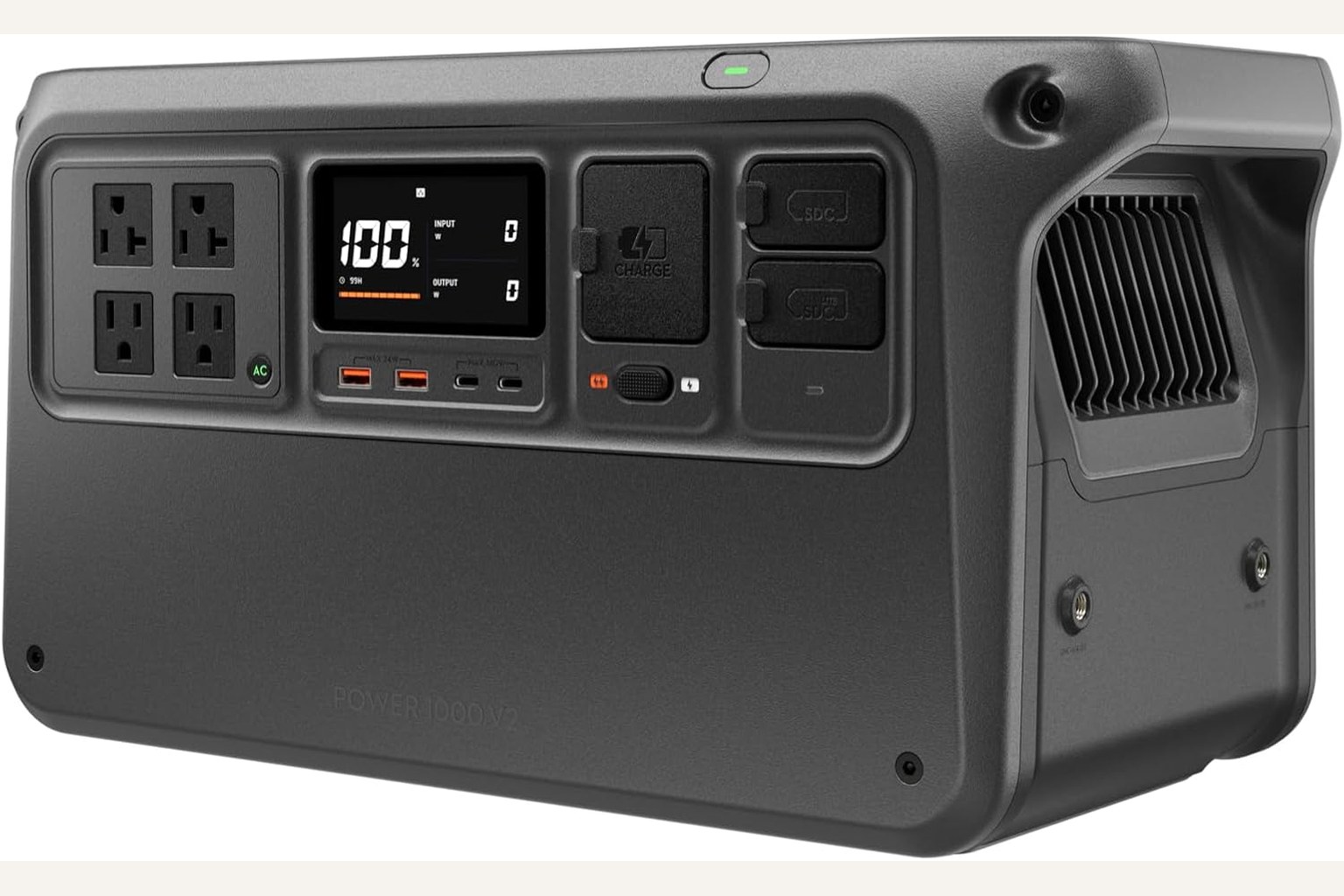
The front panel also sounds better than the spec sheet makes it look. The same reviewer called the jump to four AC outlets “dramatically more usable” because “you’re no longer juggling plugs or unplugging one device just to power another.” That is a tiny sentence with a very real ownership consequence. During an outage, plug-juggling is how a calm backup plan turns into floor-cable spaghetti.
The controls are another quiet win. DJI gives you a physical charging-speed switch instead of burying that choice completely in an app. The quote that matters: “a lot of power stations hide that kind of control inside their apps and their menus. Here, it’s instant and it’s obvious.” Good. More products should try being obvious. Radical stuff.
The Quietness Is the Main Event
If you are buying this for an apartment, office, studio, RV, bedroom-adjacent outage setup, or creator kit, quietness is not a luxury feature. It decides whether you actually want the station near you.
The research trail is unusually clear here. A reviewer called the Power 1000 V2 “one of the quietest power stations in its class” and said that under normal loads “it’s nearly silent.” Later, after charging tests, the verdict was even more specific: “It’s not the kind of sound that dominates a room or is going to ruin your audio.” That matters for camera/audio people, but it also matters if your router, CPAP, lamp, fan, or work laptop lives in the same room you do.
This is where DJI beats EcoFlow DELTA 3 Plus for many indoor buyers. EcoFlow has the stronger expansion story on paper, but the parent evidence had repeated fan and heat complaints. DJI’s reviews, by contrast, keep pointing back to low noise under common use. If fan noise makes you twitchy, DJI deserves the serious look.
Setup, Daily Use, and the App
The daily routine should feel straightforward: charge it from the wall, plug loads into the front, watch input/output on the display, and use the app for monitoring and settings rather than basic survival. Android Authority described the app as modest but useful: it shows “how much power your devices are drawing,” remaining-capacity context, battery health, and operating temperature.
That is the right kind of app for this product. You want visibility, not homework. DJI also supports UPS-style use with a captured 10 ms switch-time claim, so you can leave it between wall power and selected devices. Treat that as portable-station backup behavior, not a guarantee for every hypersensitive device you own. If a shutdown would be catastrophic, test your exact device before trusting it.
There is one reliability-support detail worth knowing: if an error code appears, Heliguy’s support note says you can “connect to the DJI Home app to check the specific issue and solution, or visit the DJI Power Series Product Support Page.” That is helpful, but it also means the app becomes part of troubleshooting. Install it and test it while everything is boring. Boring is the correct time to learn backup gear.
The Annoyances to Know Before Buying
The biggest catch is DJI’s adapter habit. The front of the unit is clean, but clean comes at a price: car charging, solar input, DC appliance output, and some expansion paths lean on SDC accessories. If you just want AC outlets and USB-C, great. If you want a straightforward solar/camping/DC setup, slow down and price the exact accessories.
Solar is the clearest example. The Solar Lab wrote, “Solar charging is where things get a little odd,” then explained that higher solar input depends on DJI’s Power Solar Panel Adapter and a separate 12V-style input path. Their blunt summary is the one to remember: “It works, but it’s not exactly intuitive, and it relies heavily on proprietary accessories.” That does not make DJI a bad buy. It makes DJI a buy-with-the-accessory-cart-open product.
The second caveat is the Amazon offer itself. Our price snapshot captured a new/in-stock standalone ASIN at $429, but the buy box showed Fly Image Tech and a hazardous-materials non-returnable note. Portable power stations often have special return handling because of battery transport rules, so do not treat checkout like buying a phone case. Confirm seller, shipper, return path, warranty expectations, and that you are on the standalone V2 rather than a solar bundle or older DJI Power variant.
How It Compares With Anker, EcoFlow, Jackery, BLUETTI, and Goal Zero
Against the Anker SOLIX C1000 Gen 2, DJI is quieter and more powerful on AC output. Anker is still the better default because it is lighter, simpler to recommend, and had the cleaner captured seller/support story. If you want one compact outage box for most people, Anker. If you want quiet high-output indoor power and you are willing to inspect accessories, DJI.
Against EcoFlow DELTA 3 Plus, DJI gives up the cleaner expansion story. EcoFlow is the pick if extra batteries, broad ports, and a more complete growth path matter most. DJI is the pick if fan noise and polished front-panel use matter more than expansion.
Jackery Explorer 1000 v2 is the easier lightweight 1kWh choice, but its lower output makes DJI feel more capable with demanding loads. BLUETTI AC180 has a heavier utility vibe and more stored-energy appeal, but it is less pleasant as an indoor/quiet pick. Goal Zero Yeti 700 is smaller and rugged, not a real rival if you need 1kWh-class output.
Who Should Buy It — and Who Should Skip It
Buy the DJI Power 1000 V2 if:
- you want a quiet 1kWh-class station for an apartment, office, studio, RV, bedroom-adjacent backup setup, or creator kit
- high AC output matters more than having the lightest box
- you want a clean front panel, readable display, four AC outlets, and a physical charge-speed switch
- your main loads are AC/USB devices like routers, laptops, lights, cameras, tools, small appliances, or audio/video gear
- you are willing to price DJI SDC accessories before buying
Skip it if:
- you want the simplest solar/car/DC setup with fewer proprietary add-ons
- you need the easiest all-around recommendation for a non-technical household
- you want expansion batteries to be the center of the plan
- the current seller/return terms look worse than a competing offer
- 31-ish lb is too much for where you plan to carry it
Bottom line: the DJI Power 1000 V2 is the portable power station I would look at first for quiet indoor high-output use. I would not hand it to every buyer as the default because the adapter plan and captured seller caveat are real. But if those check out for your setup, the core box is very, very compelling.
Tell us what this page missed
These pages get better when real buyer complaints make it back into the scoring model. If something important is underweighted, say it.
Rate this review
Give it a score from 1-10 and tell us what to improve.
0/4000 characters