Dell Pro Webcam WB5023 Review (2026): Sensible for Dell Desks, Thin on Proof
Dell’s 2K business webcam offers Dell Peripheral Manager controls, auto-framing, a built-in mic, and a magnetic cap, but the thin long-term evidence keeps the recommendation narrow.
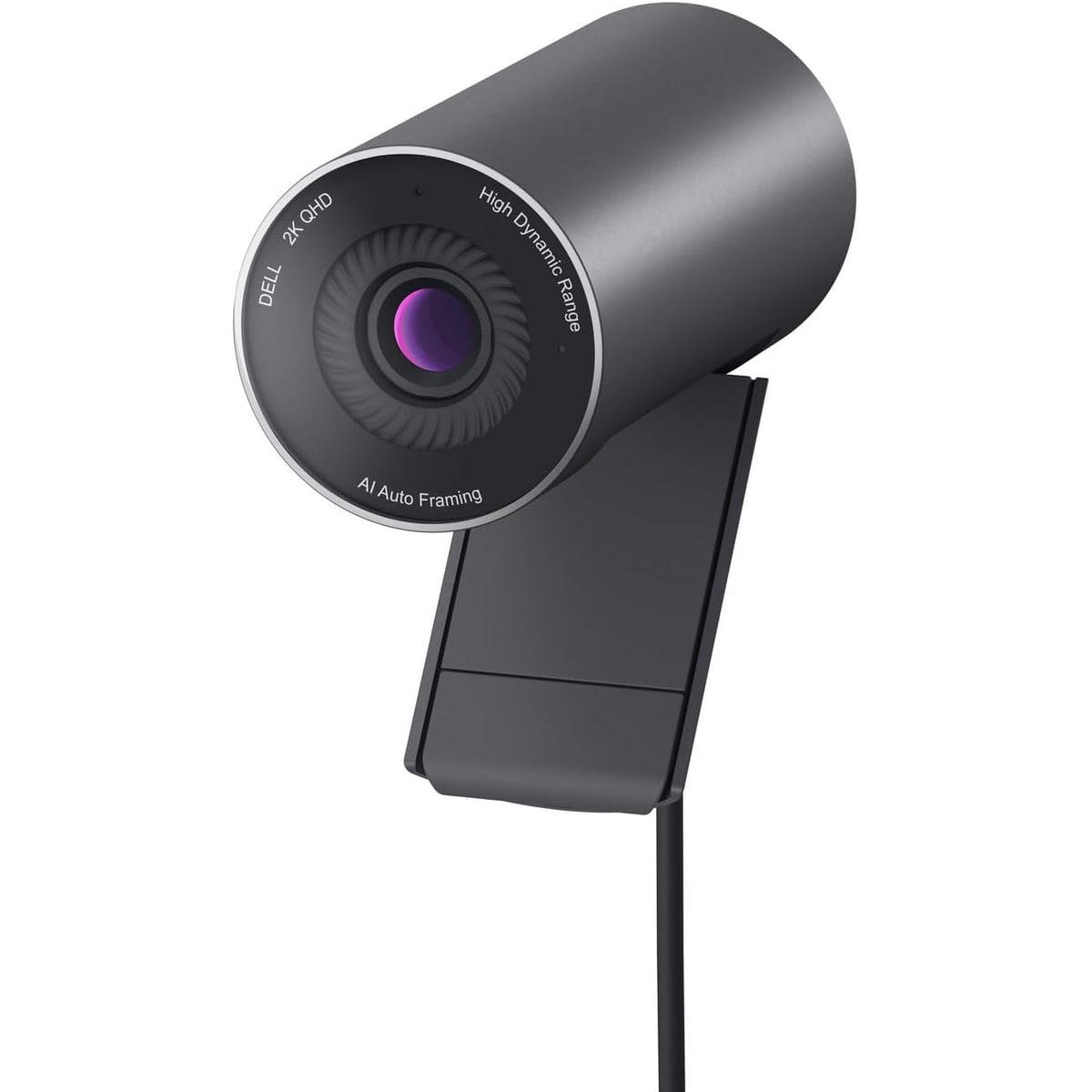
The Dell Pro Webcam WB5023 is the simple business pick in our webcam ranking: a Dell-friendly 2K meeting camera for offices that value familiar setup more than the sharpest image for the money.
MSRP
—
Amazon
$142.38
at writing · 2026-05-14
Buyer fit
A straightforward Dell 2K business webcam with office appeal; the evidence is thinner, so it lands below the clearer standouts.
MSRP
—
Amazon
$142.38
at writing · 2026-05-14
Score breakdown
How this product scored
Same rubric, but focused on one product so the reasons behind the score stay readable.
Image quality and bad-light handling
2K/QHD business-call image is credible, but side-by-side evidence points to warmer/greener default color and less polish than Dell’s UltraSharp 4K lane.
Focus and exposure stability
Dell Peripheral Manager exposes autofocus, exposure, frame-rate priority, zoom, HDR, and AI auto-framing controls, which helps stability when the buyer is willing to tune.
Mic and call audio
The built-in microphone is a useful business-call inclusion, especially versus Dell’s older 4K model without one, but source evidence does not prove headset-level audio.
Mounting, privacy, and hardware
Universal monitor mount, magnetic lens cap, tilt adjustment, and tripod mounting path are practical office features, with exact spec gaps still noted.
Software and compatibility friction
Dell Peripheral Manager/DDPM gives the webcam its cleanest business fit through presets, HDR, AI auto-framing, mic enablement, and image controls.
Reliability, heat, and support
The source mix is transcript-heavy and light on owners, forums, docks, long-call heat, disconnects, and support patterns, so confidence stays cautious.
Use-case fit
A sensible fit for Dell-heavy business desks and office procurement; less compelling for value buyers, creators, or premium image shoppers.
Evidence confidence
Exact ASIN/current-price signal and Dell video evidence support the basics, but broad owner/community evidence is thinner than for the top webcam picks.
Quick Verdict
The Dell Pro Webcam WB5023 is easiest to understand as a work accessory, not a gadget flex. It is for the buyer asking, “Will this behave like a normal office camera on a Dell-heavy desk?” rather than “Will this beat every webcam image for the money?” That sounds boring until you are buying for a company laptop, a shared work setup, or a monitor where familiar controls and support paths matter.
The WB5023 has a sensible pitch: 2K capture, Dell Peripheral Manager controls, AI auto-framing, HDR toggles, a built-in mic, a magnetic lens cap, and tripod support. The catch is that the proof is narrower than it is for the stronger picks above it. Comparison transcripts point to useful business features, but not enough long-term owner evidence to call it a slam-dunk.
That is why it ranked #7 in our Best Webcams in 2026 guide as the Best simple business pick. Buy it when Dell compatibility, office setup, and procurement simplicity matter. Skip it if you are mainly chasing the best image-per-dollar, creator controls, or a recommendation backed by richer owner chatter.
Score Breakdown
Overall score: 6/10. The WB5023 earns that score because it has a real job: be a straightforward Dell business webcam with 2K capture, app controls, auto-framing, a built-in mic, and office-friendly setup. It does not score higher because the evidence pool is thinner and the image story is not strong enough to beat the clearer category standouts.
- Image quality and bad-light handling: 6 — The 2K/QHD pitch is credible, but side-by-side transcript evidence points to a softer image than Dell’s own UltraSharp 4K model. One comparison called the Pro webcam’s default color “a little bit more warmer” with a “Greener tinge,” while saying the 4K UltraSharp looked more neutral (source). That does not ruin the Dell; it just means you should expect business-call quality, not premium polish.
- Focus and exposure stability: 7 — Dell’s controls matter here. A walkthrough says you can choose zoom, autofocus, exposure, frame rate priorities, and AI auto-framing inside Dell Peripheral Manager (source).
- Mic and call audio: 6 — The built-in mic is a practical win compared with Dell’s older 4K UltraSharp lane, but the packet does not prove it replaces a headset.
- Mounting, privacy, and hardware: 6 — The magnetic lens cap, monitor mount, and tripod path are sensible, though exact official specs are not as cleanly captured as I would like.
- Software and compatibility: 7 — Dell Peripheral Manager is the main reason this webcam has a coherent business identity.
- Reliability, heat, and support: 5 — Owner/community evidence is thin, so long-call heat, dock behavior, disconnects, and support stories remain under-proven.
- Use-case fit: 7 — Good fit for Dell-friendly business desks; weaker fit for value shoppers and creators.
- Evidence confidence: 6 — The exact ASIN and source transcripts support the review, but the lack of broad owner evidence keeps the verdict cautious.
What Feels Great Right Away
The nicest thing about the WB5023 is that it knows what it is. This is not a tiny creator camera trying to sell you a dramatic desk upgrade. It is a Dell business webcam with a 2K ceiling, a familiar control app, and enough meeting-focused features to make sense beside a work laptop or monitor.
Dell’s official setup transcript gives the ownership shape clearly: after mounting and connecting the webcam, the user is told to choose a preset, then “Enable AI Auto-framing to ensure that the camera always keeps you in the center of the frame” and turn on HDR for “optimal image quality in extreme lighting conditions” (source). That matters because the Dell is not just a bare USB camera. Its best case assumes you will use Dell’s app once and let the camera behave like part of the desk.
The hardware details are also quietly useful. The official setup shows a universal mounting clip, tilt adjustment, a magnetic lens cap that attaches to the back of the webcam, and a tripod mounting path. One comparison transcript liked that the tripod adjustment is “directly on the bottom,” which means fewer extra stand pieces to manage (source). None of that is glamorous. It is exactly the kind of boring convenience business buyers often want.
What Gets Annoying After the Glow Wears Off
The first annoyance is that the Dell does not make a slam-dunk image-quality argument at its captured price. It may be fine for meetings, but the local source set does not show the same broad praise or hands-on confidence that supports the Brio 505, Anker C200, or premium 4K picks. If the WB5023 is close in price to a Logitech MX Brio sale, the Dell has to win on Dell-desk comfort, not pure image value.
The second annoyance is default tuning. The comparison evidence suggests the WB5023 can look less sharp than Dell’s UltraSharp 4K model and that color or white balance may need help. That is not shocking for a midrange business webcam, but it means Dell Peripheral Manager is part of the experience rather than a bonus menu you can ignore forever.
The third issue is not a flaw in the camera so much as a confidence limit. Owner, forum, support, heat, dock, and long-call evidence remain thin. That should not scare off a Dell-heavy office buyer, but it should stop a normal shopper from treating the WB5023 as the obvious value pick.
Setup and Daily Use Notes
Setup should be straightforward, but it is not app-free if you want the full value. The official Dell flow says to mount the webcam, remove the magnetic lens cap, connect it, and use Dell Peripheral Manager on Windows. Mac users are told they need to install Dell Display and Peripheral Manager manually (source).
Once inside the software, the useful knobs are the point: presets, AI auto-framing, HDR, camera controls, microphone enablement, and color/image settings. A walkthrough calls out brightness, sharpness, contrast, saturation, anti-flicker, HDR, auto white balance, autofocus, exposure, frame-rate priority, and zoom controls (source). If you like setting a camera once and leaving it alone, that is helpful. If you hate vendor apps, the Logitech Brio 101 or a simpler budget webcam may feel less fussy.
For daily use, treat the built-in mic as meeting backup audio, not a podcast mic. Keep the lens cap habit simple: cover it when you are done, stick the cap to the back so it does not wander, and check your framing before a serious call. Also keep the commerce identity clean: this review is for Dell Pro Webcam WB5023 / ASIN B0GVB9LBDB, not the Dell UltraSharp 4K WB7022 or a renewed/bundled listing.
How It Compares With the Other Picks
Against the Logitech Brio 505, the Dell is less broadly convincing. The Brio 505 is the safer mainstream work-call pick because its privacy, Logitech controls, desk-call role, and buyer fit are easier to recommend. The Dell makes more sense when Dell accessory familiarity or procurement matters.
Against the Anker PowerConf C200 2K, the Dell is the more business-coded option, not the better value play. The Anker has the stronger budget-upgrade hook and a lower captured price; the Dell needs a buyer who trusts Dell’s software/support lane enough to pay more.
Against the Logitech MX Brio and Insta360 Link 2 Pro, the WB5023 should not be treated like a premium image or tracking camera. Those models are for sharper fixed desks or people who want smarter framing and presentation features. The Dell is for a narrower office job: look acceptable, use familiar controls, and avoid buying a random no-name webcam.
Against the Logitech Brio 101, the Dell is more capable and more expensive. The Brio 101 is the cheap camera-to-exist baseline; the WB5023 is the conservative business upgrade.
See the full category ranking in Best Webcams in 2026.
Who Should Buy It
Buy the Dell Pro Webcam WB5023 if you are outfitting a Dell-heavy work desk, prefer familiar business accessories, and want a 2K webcam with Dell Peripheral Manager controls, auto-framing, HDR toggles, a built-in mic, a magnetic cap, and tripod support. It is easiest to justify when compatibility habits, support paths, or office purchasing simplicity matter more than squeezing the best image-per-dollar out of Amazon.
Skip it if you are a normal home buyer chasing the best webcam for the money. The Anker PowerConf C200 2K is the more obvious budget upgrade, the Logitech Brio 505 is the safer mainstream work-call pick, and the Logitech MX Brio or Insta360 Link 2 Pro make more sense if you are paying for a sharper premium camera.
For the full comparison, see Best Webcams in 2026, then recheck the exact WB5023 ASIN, seller, and price before buying.
Tell us what this page missed
These pages get better when real buyer complaints make it back into the scoring model. If something important is underweighted, say it.
Rate this review
Give it a score from 1-10 and tell us what to improve.
0/4000 characters