
The recommendation
Shortlist the DCC-3200NAS for direct buttons and the shared family filling workflow, checking exact suffix details separately when needed.
Grades at a glance
| Product | Overall | Filling and carafe handling | Ordinary control selection | Basket and routine care access |
|---|---|---|---|---|
| Cuisinart DCC-3200NAS 14-Cup Programmable Coffee Maker | 8.7 | 9.0 | 9.0 | 8.0 |
Does it fit your life?
The reason to consider it
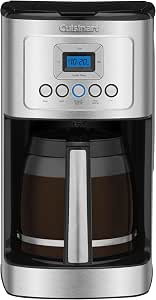
The Cuisinart DCC-3200NAS 14-Cup Programmable Coffee Maker suits a buyer who prefers directly labeled ordinary buttons and a filling arrangement organized around a wide opening, a side water window, and the carafe lid. It is a useful shortlist choice when you want the main selections visible on the front and are comfortable with the lid-removal and basket-handling tasks that go with preparation.
Our ordinary-use score is 8.7/10. Filling and carafe handling and ordinary control selection are its stronger categories, with basket and care access a little lower. The assessment focuses on the physical and control workflow shared in the DCC-3200 family demonstrations. The selected product is the NAS-suffix listing; the accounts do not establish every suffix-specific package or revision detail, so those details should remain separate from the buying advice here.
The practical attraction is clarity. You can identify the water window, the fill opening, and the ordinary buttons as distinct parts of preparation. The qualification is that a visible clean cue and removable filter do not describe the entire care task. If your main preference is to carry the reservoir to the sink, compare the Ninja CE251 before deciding that the Cuisinart's button layout is the more important convenience.
Open the family comparison, or jump to filling, controls, care, and alternatives.
The opening, window, and lid
The linked DCC-3200-family demonstrations show a wide fill opening and side water window, with the carafe lid removed for filling. The sequence appears around 1:38–3:08 in the manufacturer-presented rehost and around 1:20–2:00 in a hands-on family demonstration. These observations support the shared chassis workflow, while leaving NAS-specific finish and package questions aside.
Filling and carafe handling receive 9/10. The combination of an accessible opening and a visible water window is appealing for a buyer who wants to see what they are doing during preparation. The lid-removal step is worth retaining in the description because it is part of the actual sequence. A wide opening can help with access while still leaving a separate lid to handle and return.
Consider where you will see the side water window from your intended counter position. A feature that is easy to identify in a demonstration still needs a suitable viewing angle in your kitchen. If the machine will be close to another appliance, think about whether you can see the relevant side and reach the opening comfortably. This is a placement check for your space, rather than a measured fit claim for the brewer.
The lid needs a temporary home while you fill. That may be a trivial detail in an uncluttered kitchen, or a meaningful part of the task on a crowded counter. Imagine the whole movement with the carafe in hand: removing the lid, setting it down, filling, and returning it. If that sequence feels natural to you, the Cuisinart's arrangement is a reasonable fit. If it feels like the chore you want to avoid, prioritize that preference in the comparison.
Compare the side-window view with the route you take to the machine. If you approach from the front with the carafe, will you also have a clear view of the relevant side? If you normally fill beside another appliance, where will the lid go while the carafe is in your hand? These are the two placement checks that follow directly from this layout. A wide opening is most useful when the window and the temporary lid space work together.
Handles and separate care parts
The family demonstrations show the reusable filter and basket lifting by handles, with the charcoal-filter holder separately accessible. The relevant passages appear around 1:38–2:23 in the manufacturer-presented rehost and around 3:34 in the hands-on demonstration. The care task therefore includes more than the first filter you lift out after preparation.
Basket and routine care access receive 8/10. Handles provide clear removal points, and the separate holder can be reached. The slightly lower care grade reflects the need to attend to those distinct parts rather than treating the lift-out filter as the entire arrangement. Think about how the basket, filter, lid, and holder will fit your clearing routine, with the selected unit's instructions available for the appropriate care steps.
The clean light belongs with the care controls, while the basket, reusable filter, and charcoal-filter holder are physical items to handle. The family presentation shows that separate holder behind the basket area. When evaluating care access, follow the parts as well as the indicator: being able to locate a cue is useful, but you still need to reach the component involved and follow the selected machine’s care instructions.
A handled filter is easiest to appreciate when you picture where it goes after removal. Will you empty it near the machine or carry it directly to the sink? Where will the basket and lid wait while you deal with the contents? Those are ordinary household decisions. The Cuisinart's accessible parts give you a defined set of items to plan around, which is more useful than a vague expectation that clearing will take care of itself.
A buyer choosing between this and the OXO 9 should compare which parts they prefer organizing. The Cuisinart family account identifies handled filter and basket parts plus a separate holder. The OXO 9 account identifies a handled basket, removable head, mixing tube, and smaller pieces. Both arrangements require more thought than emptying grounds alone. The useful preference is whether the particular pieces and their return positions feel manageable, especially when one person clears and another prepares.
How to read the scores
| Ordinary task | Editorial score | Main buying consideration |
|---|---|---|
| Filling and carafe handling | 9/10 | Wide opening and side window, with lid removal |
| Ordinary control selection | 9/10 | Dedicated ordinary buttons and separate programming setup |
| Basket and routine care access | 8/10 | Handled parts plus separately accessible holder |
| Overall ordinary-use assessment | 8.7/10 | Clear preparation layout with distinct care tasks |
The scores are most useful when read as a description of the routine. The front-panel and filling arrangements are the stronger parts of the recommendation. Care remains approachable but involves distinct components. If you like the Cuisinart because the buttons look familiar, also examine where you will handle the lid and basket; the panel is only one part of what you are buying.
The 8.7 overall matches the OXO 9's overall in this comparison, but the category pattern differs. The Cuisinart favors direct buttons; the OXO's care-access assessment is stronger. That difference is more useful than declaring a tie and stopping there. Compare the control logic and the removable parts to decide which tradeoff matters more in your own kitchen.
The comparisons worth making
The Ninja CE251 is the main alternative if filling is your priority. Its exact-model review shows a handled removable reservoir and direct ordinary buttons. The comparison is especially useful because you can keep the idea of dedicated buttons while changing how water reaches the machine. Decide whether tank-to-sink filling is more valuable than the Cuisinart family's opening-and-window arrangement.
The OXO Brew 9-Cup is the alternative for a buyer who wants to compare a dial with the Cuisinart's buttons. Its demonstration shows a handled basket, removable head, and separate care details, while retaining learned clock and delay actions. Compare both the panel and the clearing sequence. A dial's tidy appearance is only helpful if its actions feel natural to you.
The Technivorm KBGV Select makes sense when your priority is the shortest ordinary selection sequence. The seller demonstration shows half/full and start controls, alongside deliberate basket alignment. It offers a useful contrast with the Cuisinart's named choices: decide whether you want distinct selections available or prefer to minimize the number of decisions you see before starting.
The OXO 12-Cup is worth considering when the separate smaller-serving arrangement is a specific requirement. Its linked review in the family guide describes the basket-and-range matching that comes with that flexibility. That is a different buying priority from direct buttons or a side window. Name the physical arrangement you intend to use before deciding whether another configuration would improve your routine.
Keep the exact listing in view
The selected identity here is DCC-3200NAS. The linked demonstrations concern the DCC-3200 14-cup family and do not state the NAS suffix. The shared exterior buttons, water window, carafe-lid sequence, and basket workflow are the relevant observations. If a particular finish, included item, or revision detail determines your purchase, confirm it for the exact selected listing rather than treating the family demonstration as a complete package description.
One source is presented by Cuisinart's Mary Rogers and rehosted by Coffee house 24h .com; the available account does not authenticate that channel as official. The other is a hands-on family demonstration with disclosure not stated. These contexts matter when weighing a polished presentation. The ordinary workflow can be described with the source type kept honest, and the buying advice can remain useful without turning the rehost into an official endorsement.
A useful final comparison with the Ninja keeps one preference constant: both have dedicated ordinary buttons in their demonstrations. Then change the filling route in your mind. Would you rather bring the carafe to the Cuisinart’s opening and watch the side window, or carry the Ninja’s tank to the sink and return it? If you clearly prefer one, that physical distinction is likely to matter more than choosing between two panels that already suit your preference for labels.
Shortlist the Cuisinart DCC-3200NAS when direct ordinary buttons and the family filling layout fit your preferences, with the exact suffix-specific details checked separately if they matter to you. Its appeal is a legible preparation sequence. The most considered purchase is one in which the water-window view, lid handling, labeled selections, and care parts all make sense in the place and household where the brewer will be used.
Cuisinart DCC-3200NAS 14-Cup Programmable Coffee Maker
Cuisinart
Buyers who prefer dedicated buttons and the shared DCC-3200 family filling arrangement.
Direct ordinary buttons and a wide-opening, side-window family workflow, with lid handling and distinct care parts.
Reasons to choose it
- Shared family workflow shows a wide opening and side window.
- Dedicated ordinary buttons are directly labeled.
- Basket and reusable filter lift by handles.
Tradeoffs to know
- Carafe lid is removed during filling.
- Clock and programming are separate setup actions.
- Separate filter holder adds another care part.
Think twice if: A removable reservoir is your leading priority or suffix-specific package details are decisive and unchecked.
Published specifications
- Model
- Cuisinart DCC-3200NAS 14-Cup Programmable Coffee Maker
- Review focus
- Filling, ordinary controls, and basket care access
Further reading
Ratings
Editorial score 8.7
Filling and carafe handling9
DCC-3200-family demonstrations show a wide opening, side window, and lid removal; NAS-specific package and finish details remain separate.
Ordinary control selection9
Dedicated brew, bold, small-batch, and tone selections are direct, while clock and programming need setup.
Basket and routine care access8
Handled basket/filter and separate holder provide access; the clean light is a navigation cue rather than the care task.
Sources & further reading
User reports at youtube.com
youtube.com product page
User reports at youtube.com
youtube.com review
youtube.com product page
Keep reading
Something changed? Help us keep this useful.
Send a correction →