Corsair Scimitar Elite Wireless Review (2026): MMO Thumb Grid, Setup Homework
A closer look at the Scimitar Elite Wireless thumb grid, adjustable Key Slider, iCUE setup, battery claims, variant traps, and why it is a specialist MMO pick instead of an all-purpose mouse.
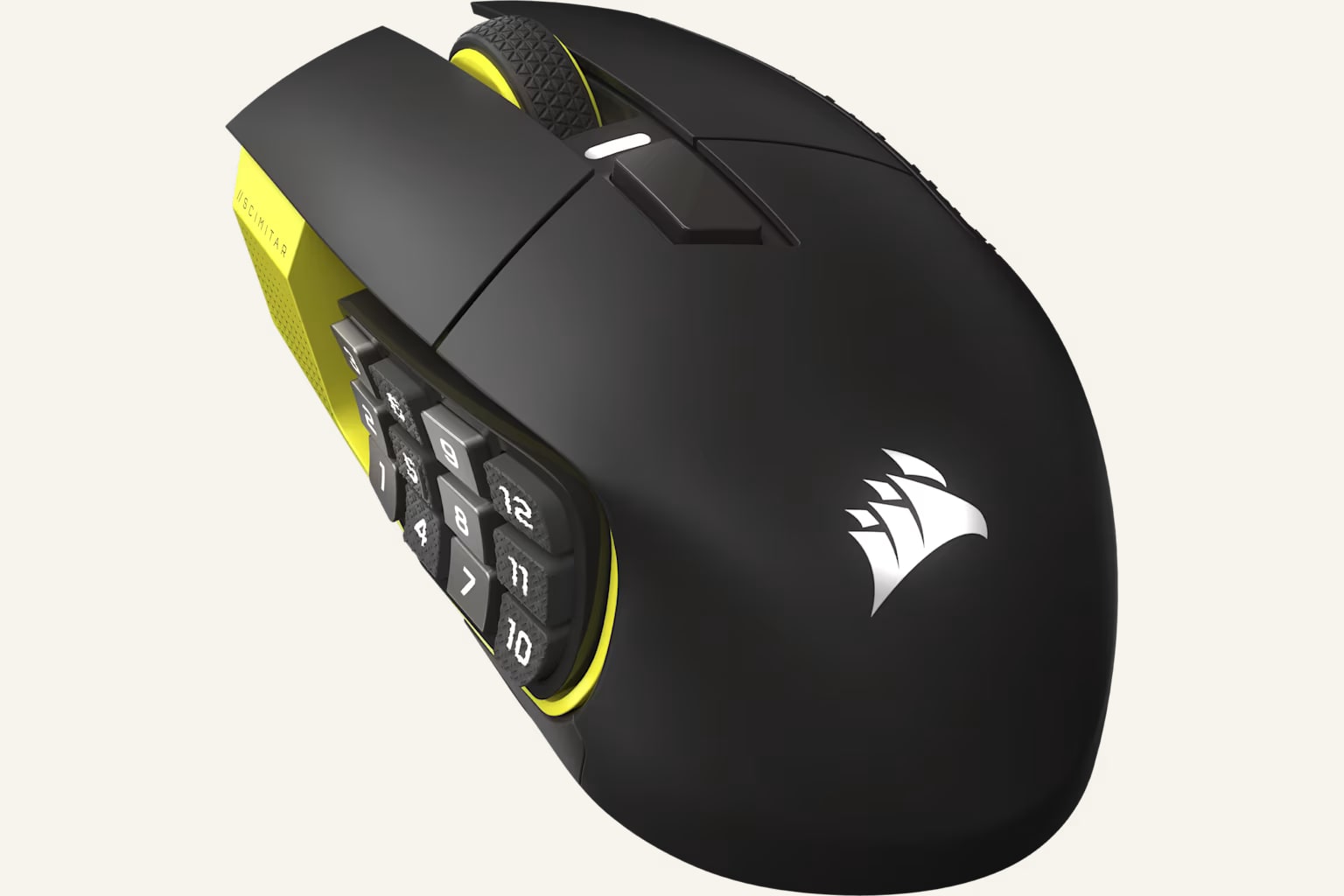
The Corsair Scimitar Elite Wireless is the MMO specialist in our gaming-mouse ranking: big, wireless, button-heavy, and worth considering when a real thumb grid matters more than low-weight FPS speed. It can feel like a secret weapon, but only if you will configure it and learn the grid.
MSRP
—
Amazon
$139.99
at writing · 2026-05-15
Buyer fit
Best MMO grid pick: The Scimitar Elite Wireless is not the best gaming mouse for everyone; it is the best pick here for players whose games genuinely reward a thumb grid.
MSRP
—
Amazon
$139.99
at writing · 2026-05-15
Score breakdown
How this product scored
Same rubric, but focused on one product so the reasons behind the score stay readable.
Shape and grip comfort
Corsair Scimitar Elite Wireless MMO scores 7.2/10 for shape and grip comfort. Score reflects shell shape, hand-fit warnings, grip comfort, and long-session caveats from owner/reviewer evidence.
Tracking and control
Corsair Scimitar Elite Wireless MMO scores 7/10 for tracking and control. Score reflects sensor confidence, control feel, polling practicality, glide, and whether the performance benefits are likely to matter in real games.
Buttons, clicks, and wheel
Corsair Scimitar Elite Wireless MMO scores 9.2/10 for buttons, clicks, and wheel. Score reflects button layout, click feel, wheel behavior, side-button reach, and repeated control complaints.
Battery and connection
Corsair Scimitar Elite Wireless MMO scores 8/10 for battery and connection. Score reflects connection reliability, battery expectations, charging, sleep/wake behavior, and dongle or cable caveats.
Software/firmware friction
Corsair Scimitar Elite Wireless MMO scores 6.8/10 for software/firmware friction. Score reflects setup workload, app and firmware annoyances, onboard memory behavior, account requirements, and how much software gets in the buyer’s way.
Use-case fit
Corsair Scimitar Elite Wireless MMO scores 8.3/10 for use-case fit. Score reflects how clearly the mouse fits its intended lane versus buyers who would be happier with a different shape, weight, or button layout.
Durability confidence
Corsair Scimitar Elite Wireless MMO scores 7/10 for durability confidence. Score reflects warranty/support context, owner complaints, build confidence, and whether known issues look rare or worth planning around.
Before You Buy
The Corsair Scimitar Elite Wireless can either feel like a secret weapon or a very expensive mistake. If you live in MMO hotbars, macros, push-to-talk layers, or productivity shortcuts, the 12-button thumb grid can save real hand travel. If you mostly play shooters and want the mouse to disappear under your hand, the same grid, weight, and setup work can feel like baggage.
That is why this review is less about asking whether the Scimitar is “good” and more about whether you will actually enjoy living with it. In our best gaming mice ranking, it lands at #7 with a 7.6/10 overall score as the Best MMO grid pick. It ranks below the FPS and utility winners because it is specialized, not because the idea is weak. Use this deeper review to check the Key Slider fit, iCUE setup, battery claims, side-button learning curve, and listing-name traps before you buy. Then use the product links to confirm current price, seller, color, condition, and availability; KB4UB may earn from qualifying purchases, which helps support this work.
Quick Verdict
Buy the Scimitar Elite Wireless if you already know why a thumb grid matters. Corsair’s official page describes the current SE family as having “16 customizable buttons,” an “adjustable Key Slider™,” a MARKSMAN S 33K sensor, and low-latency SLIPSTREAM wireless. That sounds like spec-sheet language, but the practical point is simple: this mouse gives MMO and macro-heavy players control space that the Viper V3 Pro, Superlight 2, DeathAdder V3 Pro, and G305 do not even try to offer.
The best ownership sign is that the grid is adjustable, not fixed. One hands-on reviewer with mid-sized hands said the mouse “does feel pretty good to me out of the box” in palm grip, but still had to move the side panel “in the middle” because all the way back made some buttons harder to reach. That is exactly the kind of detail to care about before checkout.
The catch is equally clear. Another reviewer put the setup reality plainly: “you’re going to want to configure these buttons” and “you will need Corsair’s IQ software.” If that sounds exciting, the Scimitar makes sense. If it sounds like homework, a simpler gaming mouse will probably make you happier.
Score Breakdown
- Shape and grip comfort: 7.2/10. The right-handed MMO shell and adjustable side grid can be comfortable, especially for palm grip, but this is still a large 114 g mouse with a lot happening under your thumb.
- Tracking and control: 7/10. The Marksman 33K-class sensor and 1000 Hz wireless posture are not the issue. The score is lower than the FPS leaders because weight, size, and grip changes matter when aim is the whole job.
- Buttons, clicks, and wheel: 9.2/10. This is the reason to buy it. Sixteen programmable buttons and a 12-button thumb grid give hotbar players room that normal five-button mice cannot match.
- Battery and connection: 8/10. Corsair’s wireless setup, USB-C charging, Bluetooth/receiver options, and up-to-150-hour claim are strong, but real life depends on mode, lighting, and how often you charge.
- Software setup: 6.8/10. iCUE is powerful because it lets you map the grid, macros, DPI, lighting, and profiles. It is also the main chore of ownership.
- Use-case fit: 8.3/10. Excellent for MMO, MOBA, hotbar, and macro-heavy buyers. Weak for small-hand fingertip play and competitive FPS.
- Durability confidence: 7/10. The evidence base supports the concept, but side-button complexity, wheel feel, profile buttons, and variant confusion keep it from feeling risk-free.
What Feels Great After Setup
The Scimitar feels best once the thumb grid stops being a novelty and starts becoming muscle memory. If your left hand is already busy with movement, modifiers, voice chat, and ability rotations, moving frequent commands to your thumb can make a game feel calmer. That is the magic of this mouse: it can turn a messy hotbar into something your hand learns.
The adjustable Key Slider is the feature that makes that possible for more people. A fixed 12-button wall can be miserable if your thumb lands in the wrong place. Here, the whole grid can move forward or backward, and the packet’s hands-on transcripts repeatedly come back to that detail. One reviewer explained that larger hands can push the side buttons forward to get a “perfect kind of hold,” while another said the adjustable position was “a huge perk for Comfort” because hand sizes vary.
The surface and controls also sound better than “MMO brick” stereotypes suggest. A hands-on transcript notes texture for grip, a “very grippy” rubber scroll wheel, and side buttons that were “not slippery” with “a pretty nice grip.” Another Scimitar reviewer was more enthusiastic, saying the clicks, scroll wheel, side buttons, coating, and skates all felt “really premium.” Treat that as one positive hands-on read, not a universal promise, but it matches why this mouse made the list: when the grid fits, it gives you a kind of control density the lighter FPS picks cannot copy.
Setup, Fit, and Daily Use
Plan on setup time. The Scimitar can work as a normal mouse, but that is not why anyone should spend Scimitar money. One reviewer said it plainly: “it’s usually not something you use out of the box” because “all these buttons are going to be programmable.” Another walked through iCUE options for key assignments, lighting, DPI, profile switching, macros, media controls, and app launching. That depth is useful, but only if you are willing to build profiles and test them in the games or apps you actually use.
Fit is the second big daily question. At 114 g, the Scimitar is not trying to be an ultralight. It can feel balanced and planted for palm grip, MMOs, MOBAs, and desk shortcuts, but it is the wrong starting point if your whole goal is fast FPS flicks. The grid also asks your thumb to learn where 12 buttons are without looking. Expect a break-in period, and use the return window to test whether you can reliably hit the back row, front row, and center cluster without changing grip.
Also treat the Amazon row carefully. The packet records current Amazon-new search availability and a parent payload ASIN/price snapshot, but it also flags Scimitar variant-name risk. Elite Wireless, Elite Wireless SE, RGB Elite, older wired Scimitar rows, renewed listings, and bundles can appear near each other. Before buying, confirm the exact wireless model, new condition, seller, colorway, included receiver/cable, and return terms.
The Annoyances to Know Before Buying
The first annoyance is the learning curve. A 12-button grid is powerful only after you remember where everything lives. Until then, it can slow you down or cause misfires. This is not a reason to avoid the Scimitar if you play hotbar-heavy games; it is a reason to be honest about the first week.
The second annoyance is software. iCUE is part of the value because it unlocks the button grid, lighting, DPI, macros, and profiles. It is also one more app to install, update, and troubleshoot. If you want a mouse that never asks you to open a control panel, the Logitech G305 or a simpler FPS mouse is easier to live with.
The third annoyance is control feel around the wheel and profile buttons. The harshest long-term transcript in the packet is not for this exact wireless SE row, so do not treat it as a direct failure rate. But it does flag the family’s kind of annoyance: one five-year reviewer said an area “rattles a little bit,” called the middle mouse button “not a nice experience to click,” and said nearby buttons could be “accidentally pressed to switch profiles.” That is worth testing as soon as the mouse arrives. Click the wheel, shake lightly for rattle, check profile buttons, and make sure the grid feels solid before your return window closes.
How It Compares
The Scimitar Elite Wireless is the specialist in this ranking, so compare it by job, not by raw rank.
- Razer Viper V3 Pro: Better overall and much better for competitive FPS. Choose the Scimitar only if hotbars and macros matter more than low weight.
- Logitech G PRO X Superlight 2: The safer lightweight FPS shape. It is much simpler and easier to recommend broadly, but it cannot replace a true MMO grid.
- Razer DeathAdder V3 Pro: Better if you want right-handed ergonomic support for shooters. It has the comfort idea without the thumb-grid workload.
- Razer Basilisk V3: Better for a cheaper wired desk-control mouse with a useful wheel. The Scimitar is better for true MMO button volume.
- Logitech G305: Cheaper wireless and much simpler. Pick it if budget wireless matters more than shortcuts.
- Logitech G502 X Plus: The closest premium utility alternative, with more general controls and a familiar G502 shape. The Scimitar wins only if you specifically need the grid.
- SteelSeries Aerox 5 Wireless: Lighter with extra buttons, but not a full MMO mouse. It is the mixed-genre wildcard; the Scimitar is the hotbar tool.
For the full score grid and all eight picks, go back to our Best Gaming Mice in 2026 guide.
Who Should Buy It — and Who Should Skip It
Buy the Corsair Scimitar Elite Wireless if:
- you play MMOs, MOBAs, ARPGs, or sim/strategy games where thumb commands genuinely help
- you want a real 12-button side grid instead of two or three side buttons
- you like the idea of adjusting the grid position to your thumb
- you are comfortable spending time in iCUE to build profiles and macros
- you want wireless convenience and USB-C charging in an MMO mouse
- you will check the exact listing carefully before buying
Skip it if:
- your main games are competitive shooters
- you prefer small fingertip mice or very low weight
- software setup sounds annoying, not fun
- you only need browser back/forward and a couple of shortcuts
- you are worried by similar Scimitar names and do not want to verify the listing
- you want the safest all-purpose mouse in this guide
Bottom line: the Scimitar Elite Wireless is not trying to beat the FPS flagships. It is trying to make a crowded hotbar easier to control. If that problem is real for you, it is the clearest MMO-grid pick in our group. If that problem is imaginary, buy something simpler. For the broader ranking, compare it with the full gaming mouse guide.
Tell us what this page missed
These pages get better when real buyer complaints make it back into the scoring model. If something important is underweighted, say it.
Rate this review
Give it a score from 1-10 and tell us what to improve.
0/4000 characters