ASUS ZenWiFi BQ16 Pro Review (2026): The 10G Mesh Kit for Power Users
A focused look at ASUS’s two-node quad-band Wi-Fi 7 mesh kit, including 10G ports, dual 6 GHz backhaul, free AiProtection, setup complexity, AP-mode caveats, and who should skip it.
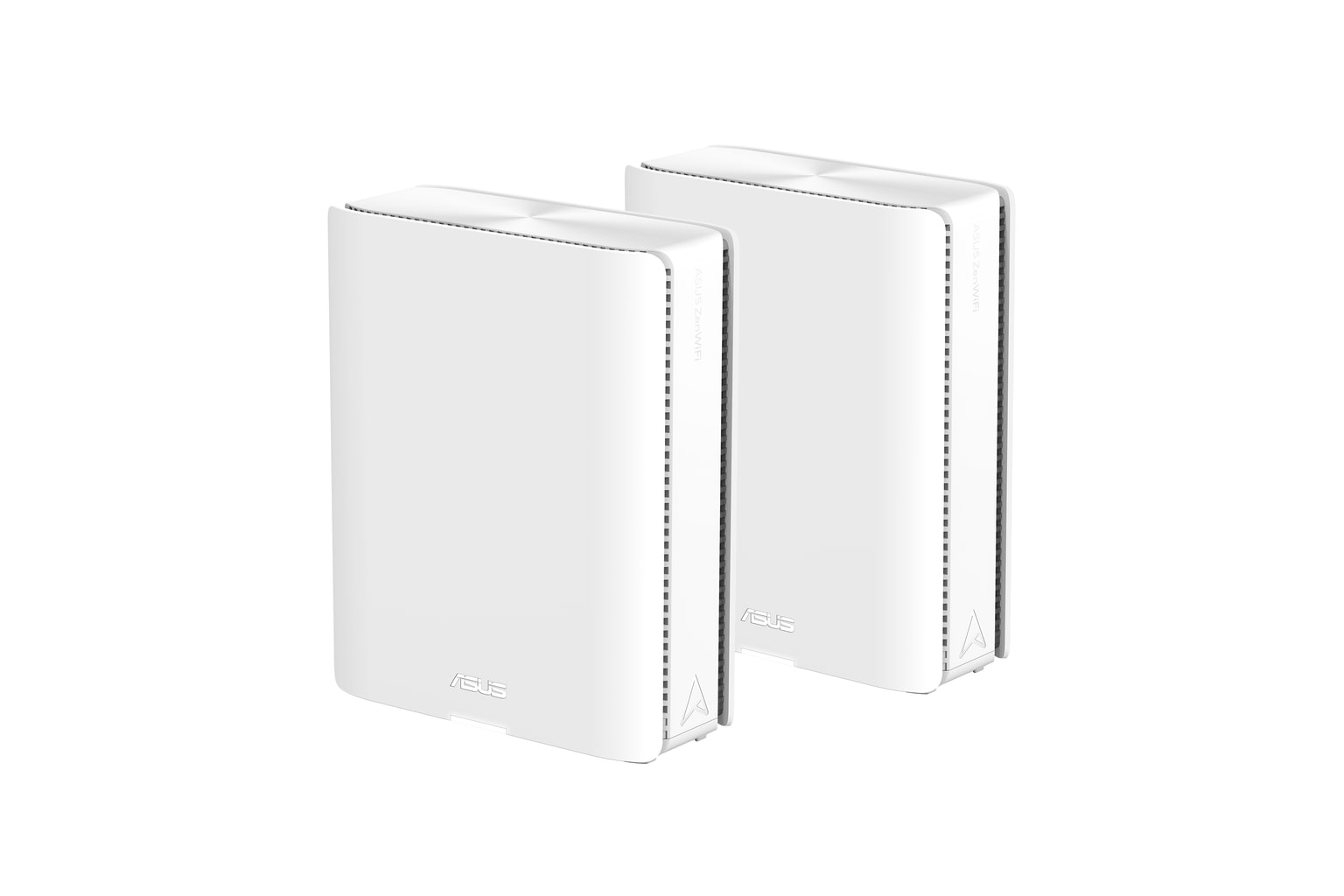
ASUS ZenWiFi BQ16 Pro is the power-user pick in our Wi-Fi mesh ranking: fast, deeply configurable, and unusually rich in 10G ports and free controls, but expensive and less friendly than simpler three-node kits.
MSRP
$1,099.99
Amazon
$929.99
at writing · 2026-05-06
Buyer fit
It has the strongest hardware and control surface here, especially dual 10G ports and subscription-free AiProtection, but the price, two-node pack, and ASUS complexity make it a fit-specific recommendation. Current Amazon-new availability was verified for ASIN B0D398YQPN at $929.99 during the latest price check.
MSRP
$1,099.99
Amazon
$929.99
at writing · 2026-05-06
Score breakdown
How this product scored
Same rubric, but focused on one product so the reasons behind the score stay readable.
Coverage & roaming reliability
Coverage, roaming, satellite stability, and placement evidence from official specs plus review/source patterns. Scoring reflects official specs, third-party reviews, owner/support signals, and product-specific caveats.
Setup & app clarity
Setup walkthroughs, app clarity, device/node visibility, troubleshooting, and how much the kit asks of non-expert buyers. Scoring reflects official specs, third-party reviews, owner/support signals, and product-specific caveats.
Backhaul & port flexibility
Wired backhaul support, port count/speed, WAN/LAN options, and whether the hardware fits modern ISP and wired-device setups. Scoring reflects official specs, third-party reviews, owner/support signals, and product-specific caveats.
Firmware stability & support
Visible update/support activity, known caveats, support docs, and whether the ownership trail looked calm or watchful. Scoring reflects official specs, third-party reviews, owner/support signals, and product-specific caveats.
Controls & subscription posture
How much useful security, parental control, privacy, and network management is included without an ongoing paid tier. Scoring reflects official specs, third-party reviews, owner/support signals, and product-specific caveats.
Performance headroom
Throughput, latency, multi-client room-to-room performance, and whether the spec class leaves room for modern clients. Scoring reflects official specs, third-party reviews, owner/support signals, and product-specific caveats.
Quick Verdict
ASUS ZenWiFi BQ16 Pro is the mesh system to buy when you are trying to avoid a very specific regret: spending almost a thousand dollars on a router kit and then discovering it behaves like a locked-down appliance. This is not that. It is a two-node, quad-band Wi-Fi 7 system with dual 6 GHz radios, two 10G Ethernet ports per node, USB, AiMesh, VPN features, Smart Home Master networks, and subscription-free AiProtection.
That is why it ranked #3 as the Best power-user pick in our Best Wi-Fi Mesh Systems in 2026. It is not our default pick for most homes because TP-Link Deco BE63 costs less, includes three nodes, and gives most buyers more practical placement flexibility. But the ASUS is the more exciting machine if your home network has multi-gig fiber, a 10G switch or NAS, wired backhaul, serious VPN needs, or family/security settings you do not want hidden behind another router subscription.
The pre-buy question is whether you will actually use that power. PCMag called the BQ16 Pro “one of the best-performing Wi-Fi 7 mesh systems we've tested,” but HighSpeedInternet also described needing channel tweaks before the 6 GHz results made sense. At the most recent availability check, the exact Amazon-new 2-pack ASIN B0D398YQPN was in stock at $929.99, sold by Amazon.com. Use the product links to recheck today’s price, availability, seller, exact 2-pack variant, return/support terms, and current ASUS support pages before checkout; those links also help support KB4UB.
Score Breakdown
- Coverage and roaming reliability: 8.1/10. ASUS claims up to 8,000 sq ft from the two-pack, and reviewer testing points to very strong signal and satellite performance. Still, two large nodes are not automatically better than three smaller nodes in a chopped-up house.
- Setup and app clarity: 6.5/10. Setup can be quick, but ASUS gives you a web interface and an app with a lot to manage. That is wonderful for tinkerers and intimidating for buyers who just want three green checkmarks.
- Backhaul and port flexibility: 9.4/10. This is the headline score: two 10G ports per node, wired backhaul support, dual 6 GHz radios, MLO/backhaul headroom, and USB. Very few mesh kits are this flexible.
- Firmware stability and support: 6.5/10. The evidence is watchful rather than alarming: community/forum activity and firmware discussions suggest this is not the calmest plug-and-forget lane.
- Controls and subscription posture: 8.6/10. AiProtection, parental controls, Safe Browsing, VPN, and network segmentation are major wins because ASUS does not push the same paid-security path as NETGEAR, TP-Link, or eero.
- Performance headroom: 8.4/10. Reviewed throughput was excellent, especially with Wi-Fi 7 clients and good placement. Older devices and difficult walls will not magically turn into 10G clients.
What Feels Great Right Away
The first delight is that the BQ16 Pro feels like real network hardware hiding inside a mesh shape. Each unit is large, identical, and serious; Dong Knows Tech notes that in a pack, one unit has a sticker marking the main unit, but “you can pick any to use as the primary router.” That is a small thing, yet it matches the whole ASUS promise: more freedom, fewer artificial rails.
PCMag’s setup walkthrough was also reassuring. After scanning the QR code, creating the network and admin credentials, and waiting several minutes, the reviewer said the network was created and optimized, then the satellite was moved and ready for testing. So this is not a hand-built enterprise network pretending to be a consumer product. It can still behave like a normal mesh kit on day one.
The difference is what happens after day one. The app shows client and node details, real-time traffic, optimization controls, Family settings, AiProtection, VPN settings, and firmware notifications. The web console adds advanced firewall, IPv6, and logs. If you are the person everyone calls when the internet is weird, that visibility can feel genuinely useful instead of ornamental.
Setup Is Easy Until You Want Everything Tuned
ASUS’s strength is also the reason this kit ranked behind Deco and Orbi for broader buyer fit. The BQ16 Pro gives you both a phone app and a web interface, and they are not just duplicate dashboards. Some controls live more naturally in one place than the other.
HighSpeedInternet captured the tradeoff perfectly: “My biggest beef in interacting with routers and mesh systems is that you generally need two interfaces to manage your home network fully.” The same review liked having “a real web interface you can actually use,” then immediately imagined a less technical family member asking, “Can you come over and set up this monster Wi-Fi thing for me?” That is the whole caveat in two sentences.
For an enthusiast, this is not a problem; it is the reason to buy ASUS. You can split networks, inspect logs, use VPN Fusion, manage parental profiles, run security scans, and make choices that eero or Google simply will not expose. For a household that wants the simplest app-led handoff, the BQ16 Pro may feel like buying a sports car for grocery runs.
Ports, Backhaul, and Speed Are the Real Reason to Pay
This is where the ASUS earns its keep. Each node has a 10GbE WAN/LAN port, a 10GbE LAN port, a 1GbE WAN/LAN port, two 1GbE LAN ports, and USB 3.0. That gives multi-gig fiber owners, wired-backhaul homes, NAS users, and 10G-switch households far more room than mainstream mesh systems.
PCMag’s benchmark language was not subtle: the router node’s close-proximity score was “the fastest we've seen from any mesh system to date,” and the satellite node also led the compared field in the cited tests. HighSpeedInternet also found the ZenWiFi backhaul faster than Orbi’s in its comparison. This is the part that can feel a little magical if you have the clients and layout to use it: the satellite does not have to feel like the weak half of the kit.
The caveat is price-class expectation. PCMag praised the ports but also wrote, “A pair of 2.5GbE ports instead of the 1GbE ports would be more appropriate for a mesh system in this price range.” Dong Knows Tech made a similar point by noting that the Deco BE95 goes further with all multi-gig ports and SFP+. In other words, ASUS is outstanding versus most mesh kits, but not immune to nerd-grade nitpicking at this price.
The Free Controls Are a Big Win, With One Important Catch
ASUS’s subscription story is one of the best reasons to choose the BQ16 Pro over NETGEAR, TP-Link, or eero. PCMag says the kit includes “free parental control and network security software powered by Trend Micro,” with user profiles, age-based filters, security scans, phishing protection, Instant Guard VPN, Safe Browsing DNS filters, and Smart Home Master networks for Kids, IoT, and VPN use.
That is not just a checklist win. Router subscriptions are easy to ignore during checkout and annoying to rediscover later, especially if parental controls or security scans were part of the reason you upgraded. ASUS’s approach makes the high upfront price feel more honest: you are paying for hardware and controls, not buying a discounted box that later asks for more money.
The catch is network mode. The product dossier flags an ASUS AiProtection limitation: AiProtection does not currently operate in access point, repeater, or media bridge mode. That matters if your ISP gateway, firewall, or existing router must stay in charge and the BQ16 Pro will sit behind it as an access point. If AiProtection is one of your reasons for buying, confirm your intended network layout before checkout.
What Gets Annoying Once You Live With It
The main annoyance is not that the BQ16 Pro is bad. It is that a system this expensive makes every rough edge feel more personal.
HighSpeedInternet’s 6 GHz testing is the best example. The reviewer wrote, “Truth be told, I had speed issues when I first started testing the 6 GHz band using my Wi-Fi 7 client,” then explained that changing channels fixed the result: “Not bad for a mesh system after a bit of tweaking!” That is encouraging if you know how to tweak. It is less charming if you expected the first test to justify the price immediately.
Firmware and support signals also ask for a calmer reading. Owner and support discussions around BQ16 Pro firmware updates and ASUS Wi-Fi 7 experiences also deserve a calm read. That does not mean the product is unstable or should be avoided. It does mean this is the kind of router some owners follow, update, and discuss, not the kind they forget exists for five years.
The two-node pack is the other practical limit. ASUS claims up to 8,000 sq ft, but home shape matters more than the biggest coverage number. A long ranch, plaster walls, dense floors, or awkward modem location may be better served by three smaller nodes from Deco or Orbi than two powerful ASUS towers.
How It Compares
ASUS ZenWiFi BQ16 Pro is not trying to be the safest default. It is trying to be the mesh kit for people who would rather have more control than fewer settings.
- TP-Link Deco BE63: Our best overall pick. It cost much less at the latest Amazon-new price check, includes three nodes, and gives four 2.5GbE ports per node. Choose Deco if you want practical Wi-Fi 7 for more homes; choose ASUS if 10G, dual 6 GHz, VPN tools, and free controls matter more.
- NETGEAR Orbi 770: The premium large-home pick. Orbi is the calmer mainstream choice for broad coverage and app-led setup, but its subscription path and lower wired ceiling make ASUS more attractive for network-heavy homes.
- TP-Link Deco XE75 Pro: The value pick. It gives Wi-Fi 6E and a 2.5GbE port for far less money. ASUS is overkill if your devices and ISP plan cannot use Wi-Fi 7/10G headroom.
- Amazon eero 6+: The simple setup pick. Eero is easier to hand to a non-technical household, but gigabit ports, Wi-Fi 6, and paid features put it in a different class.
- Google Nest Wifi Pro: The Google Home fit. Nest is prettier and simpler, but its gigabit ports and limited settings make it a poor substitute for what ASUS does best.
Who Should Buy the ASUS ZenWiFi BQ16 Pro
Buy the BQ16 Pro if your home network has outgrown simple mesh. It makes the most sense with multi-gig fiber, wired Ethernet runs, a 10G switch or NAS, a busy home office, Wi-Fi 7 clients, or a layout where a strong router-plus-satellite pair can be placed well.
It is also a smart fit for people who care about network segmentation. Smart Home Master networks for Kids, IoT, and VPN use are more than marketing if you have smart-home devices, work gear, guest devices, and family rules all fighting for attention.
The best buyer is comfortable being the house network admin. You do not need to be a professional, but you should be willing to open the web interface, check node status, read a support page, choose wired backhaul when available, and revisit settings after firmware updates. If that sounds fun or at least acceptable, ASUS gives you more room to grow than the friendlier kits.
Who Should Skip It
Skip the BQ16 Pro if the main goal is a fast, boring mesh system that a non-technical family member can manage alone. Google Nest Wifi Pro, eero 6+, Orbi 770, or Deco may be easier to live with depending on your home and budget.
Skip it if your internet plan is around gigabit or lower, your devices are mostly Wi-Fi 5/Wi-Fi 6, and you do not own wired gear that benefits from 10G. You may still get a great network, but you will be paying for headroom you rarely feel.
Skip it if you need three or more placement points more than two powerful nodes. Coverage claims are useful starting points, not a promise that two boxes will solve every dead zone.
Finally, skip it or rethink the layout if you planned to use it in access point mode specifically for AiProtection. The free security/parental-control story is a major reason to buy ASUS, so do not accidentally choose a mode that removes a feature you expected.
Bottom Line
Buy the ASUS ZenWiFi BQ16 Pro if: you want a high-ceiling Wi-Fi 7 mesh kit with 10G ports, wired-backhaul strength, VPN/segmentation tools, and free parental/security controls.
Skip it if: you want the cheapest good mesh system, the simplest phone-app setup, or three smaller nodes for awkward placement.
Bottom line: BQ16 Pro is the enthusiast pick for a reason. It is fast, flexible, and unusually generous with controls after purchase. It is also expensive, a little demanding, and best suited to the buyer who already knows why 10G ports and ASUSWRT-style controls matter. If that is you, it can feel like the rare mesh kit that does not outgrow your network plans the moment it arrives.
Feature breakdown
Full feature list
Grouped feature details are expandable so buyers can go deep when they want, without turning the whole review into a spec landfill.
Full feature list
10 features
+
Full feature list
10 features
Bands
Quad-band: 2.4 GHz, 5 GHz, 6 GHz-1, 6 GHz-2
Backhaul
AiMesh with dual 6 GHz / MLO and documented Ethernet backhaul support
Controls
AiProtection Pro, parental controls, Safe Browsing, Smart Home Master networks, VPN features, and router security tools without a subscription claim
Checked Kit
ASUS ZenWiFi BQ16 Pro quad-band Wi-Fi 7 mesh router, 2-pack
Speed Class
BE30000; ASUS lists 1376 Mbps on 2.4 GHz, 5764 Mbps on 5 GHz, and 11529 Mbps on each of two 6 GHz bands
Ap Mode Caveat
ASUS AiProtection page notes AiProtection does not currently operate in access point, repeater, or media bridge mode
Ports Per Node
10G WAN/LAN x1, 10G LAN x1, 1G WAN/LAN x1, 1G LAN x2, USB 3.0
Claimed Coverage
Up to 8,000 sq ft for the 2-pack; placement and building materials still matter
Price At Writing
$929.99 USD new Amazon.com offer captured 2026-05-06T08:41:56Z for ASIN B0D398YQPN
Wireless Standard
Wi-Fi 7 / 802.11be; backwards compatible with Wi-Fi 6E/6/5/4 and older standards per ASUS specs
Tell us what this page missed
These pages get better when real buyer complaints make it back into the scoring model. If something important is underweighted, say it.
Rate this review
Give it a score from 1-10 and tell us what to improve.
0/4000 characters