ASUS RT-BE86U Review (2026): Best Standalone Pick, No 6 GHz
What to know before buying the RT-BE86U: excellent wired headroom, deep ASUS controls, no mandatory security subscription, quick setup for technical buyers, AiMesh caveats, and no 6 GHz radio.
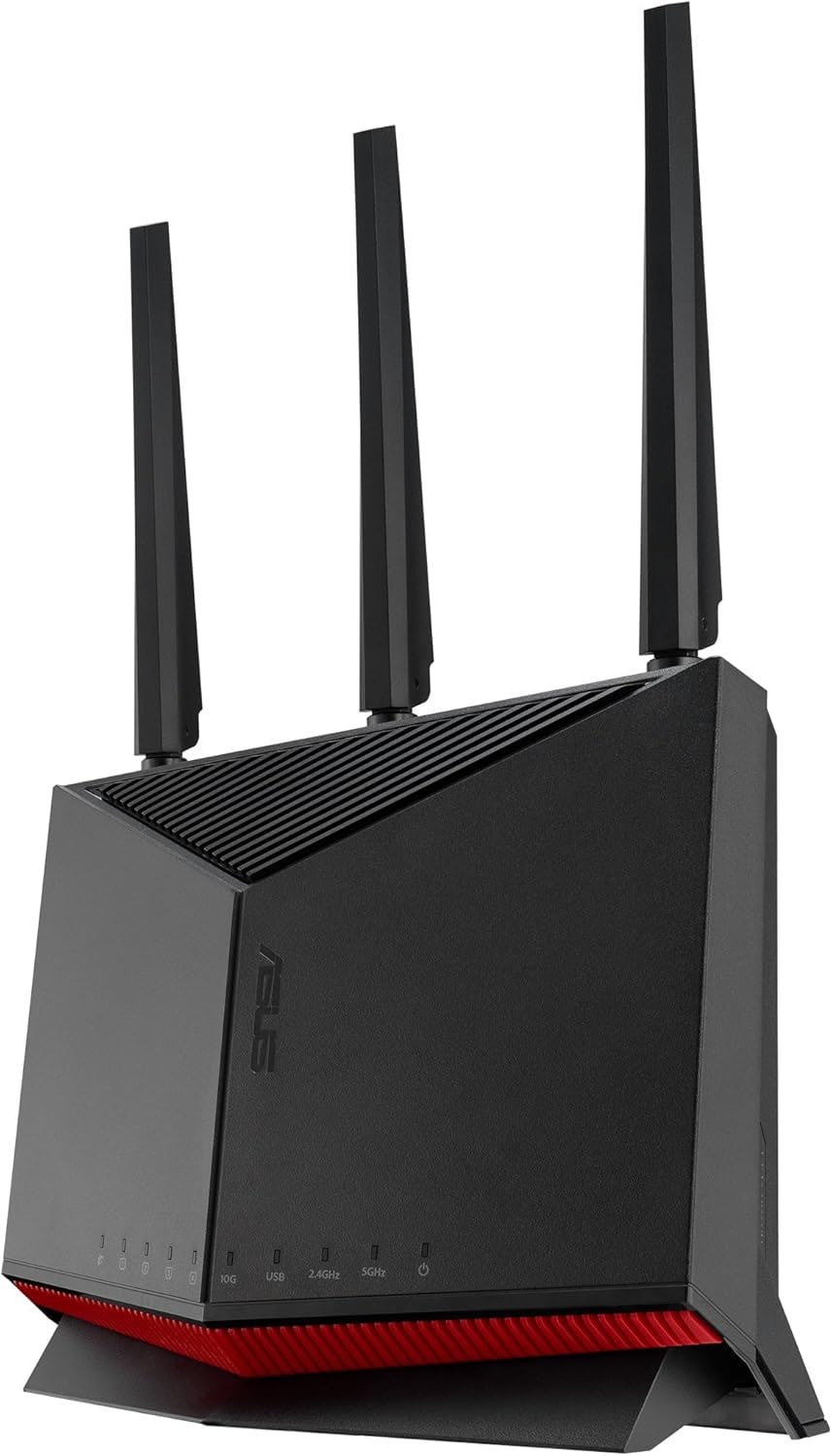
ASUS RT-BE86U is our best overall home Wi‑Fi router pick because it combines Wi‑Fi 7, 10G/2.5G wired ports, ASUSWRT controls, VPN and segmentation tools, AiMesh, and strong value at the captured Amazon price. The tradeoff is that it is dual-band and more technical than app-first routers.
MSRP
$329.99
Amazon
$219.99
at writing · 2026-05-17
Buyer fit
Best overall for buyers who want one strong standalone router with serious wired ports, ASUSWRT controls, VPN/segmentation/gaming tools, AiMesh expansion, and no required security subscription; the tradeoffs are a more technical interface and no 6 GHz radio.
MSRP
$329.99
Amazon
$219.99
at writing · 2026-05-17
Score breakdown
How this product scored
Same rubric, but focused on one product so the reasons behind the score stay readable.
Coverage & reliability
Coverage, range, roaming/connection stability, and wall/distance evidence from official claims, formal reviews, transcripts, retailer pages, and owner reports. The score reflects official claims, support docs, formal reviews, retailer details, and owner reports for this router.
Setup & recovery
First-run setup, app/web clarity, modem/ISP recovery, firmware update flow, and whether troubleshooting looks approachable for the intended buyer. The score reflects official claims, support docs, formal reviews, retailer details, and owner reports for this router.
Speed headroom
Wi-Fi generation/bands/channel limits plus WAN/LAN/USB hardware, with score credit only when that headroom fits likely real homes. The score reflects official claims, support docs, formal reviews, retailer details, and owner reports for this router.
Controls & subscriptions
Included controls, VPN/security/parental features, local admin depth, privacy/account posture, and clarity around paid tiers. The score reflects official claims, support docs, formal reviews, retailer details, and owner reports for this router.
Firmware & support trust
Visible firmware/support docs, warranty/support posture, update cadence, and whether available evidence suggests calm or watchful long-term ownership. The score reflects official claims, support docs, formal reviews, retailer details, and owner reports for this router.
Fit & value clarity
How cleanly the router matches its role and price without making the wrong buyer pay for specs they cannot use. The score reflects official claims, support docs, formal reviews, retailer details, and owner reports for this router.
Quick Verdict
ASUS RT-BE86U is the capable standalone router in this group: not the easiest, not the flashiest Wi‑Fi 7 spec sheet, but the one that gives a more demanding home network the most useful tools. ASUS builds it around serious wired ports, ASUSWRT controls, VPN and network-segmentation tools, AiMesh expansion, and security/parental-control features that do not immediately steer buyers into a required monthly plan. That matters if you have ever bought a fast router and later discovered the setting you needed was hidden, missing, or paywalled.
That is why it ranked #1 as the Best overall pick in our Best Home Wi‑Fi Routers in 2026. If you want an app-first router for a relative who hates settings, eero 7 is calmer. If you want the cheapest current Wi‑Fi 7 box, TP-Link Archer BE230 costs much less. But if you want one standalone router that can anchor a more capable home network, the RT-BE86U is the one I would start with.
The pre-buy check is the missing 6 GHz band. PCMag calls it a dual-band router that delivers “solid throughput performance,” but also says it “does not support 6GHz transmissions or 320MHz channels.” At the captured Amazon-new check, exact ASIN B0DGZZJ996 was available at $219.99, with Ships from/Sold by Amazon.com evidence in the source record; a later targeted fetch hit Amazon’s interstitial, so use the product links to recheck today’s price, seller, new condition, coupon wording, and return path. Those links also help support KB4UB.
Score Breakdown
- Coverage and reliability: 8.0/10. Formal testing and ASUS’s own coverage claims point in the right direction, but the 2,750 sq ft number is still an environment-dependent claim. PCMag found strong 5 GHz signal in main areas with weaker edges, which is exactly the caveat to remember before expecting magic through every wall.
- Setup and recovery: 7.2/10. Setup can be quick if you are comfortable with router choices. PCMag’s browser-based setup was “quick and easy,” but ASUS gives you more knobs than eero, and that can feel busy if all you wanted was a phone app that says done.
- Speed headroom: 9.3/10. The 10G WAN/LAN port, 2.5G WAN/LAN option, three 2.5G LAN ports, USB, and BE6800 Wi-Fi 7 radios make this the strongest wired-headroom pick here. The catch is no 6 GHz and no 320 MHz channels.
- Controls and subscriptions: 9.0/10. ASUSWRT, the ASUS Router app, VPN Fusion, Guest Network Pro, AiProtection Pro, parental profiles, and firewall/admin tools give it a deeper control story than app-first routers without turning basic security into an obvious paid upsell.
- Firmware and support trust: 7.5/10. ASUS has visible specs, support surfaces, admin tools, and firmware features, but the owner/community trail for this exact newer model is thinner than for older ASUS staples.
- Fit and value clarity: 8.3/10. It is best for advanced standalone-router buyers. It is not the cheapest Wi-Fi 7 path, not the easiest household router, and not the right answer if you specifically want 6 GHz.
What Feels Great Right Away
What feels good right away is that the RT-BE86U does not make the wired side feel like an afterthought. PCMag’s physical inspection lists a “10GbE WAN/LAN port, a 2.5GbE WAN/LAN port, three 2.5GbE LAN ports” plus USB, a power switch, reset, LED button, and WPS. ASUS’s own page says the router has “one 10G port and four 2.5G ports,” with Multi-WAN auto detection and USB mobile tethering backup.
That matters more than the usual router-box speed number. If you have a 2Gbps fiber plan, a wired desktop, a NAS, a console, or a future switch, the RT-BE86U gives you real room to arrange the network. It also makes wired backhaul for AiMesh more credible than a gigabit-only router.
The one-port caveat is important: one 10G WAN/LAN port is not the same as having 10G WAN and 10G LAN at the same time. A serious fiber-and-NAS buyer may still want to compare ASUS’s bigger RT-BE88U/RT-BE96U-class hardware or plan on a 2.5GbE compromise. For most advanced homes, though, this is a generous port map for a standalone router at the captured sale price.
Setup: Friendly Enough, Deep When You Want It
The RT-BE86U gives you two paths: the ASUS Router app and the ASUSWRT web console. That flexibility is a feature if you are the household network person, because you can start with guided setup and still get to the serious settings later.
PCMag’s setup passage is reassuringly normal: “Installing the RT-BE86U was quick and easy.” The reviewer connected the modem and router, opened a desktop browser, let the installation utility launch, created the network, selected the 10GbE WAN port with DHCP, separated the bands, and waited a few minutes for settings to apply. That is not scary, but it does reveal the target buyer: someone who is not bothered by choosing ports and band names.
The web console is where ASUS separates itself from simpler routers. PCMag says the mobile app handles phone control, while the web console offers “more granular controls,” including network maps, CPU/RAM/port status, AiMesh, AiProtection, parental controls, Adaptive QoS, Traffic Analyzer, Game, Open NAT, VPN, firewall, administration, and network tools. If that menu sounds like relief, buy this lane. If it sounds exhausting, eero 7 may be the happier router even though it gives up depth.
Wi-Fi 7 With an Asterisk
This is Wi-Fi 7, but it is the version that needs an asterisk before someone checks out. ASUS lists 2.4 GHz and 5 GHz operation, BE6800 speeds, 160 MHz channels, 4096-QAM, OFDMA, beamforming, MU-MIMO, WPA3, and dual-band MLO. ASUS also says Multi-Link Operation can combine and switch between the 2.4 GHz and 5 GHz bands.
The missing piece is the 6 GHz radio. PCMag’s comparison puts it cleanly: the RT-BE86U delivered strong performance and fills a “nice niche,” but “you still don’t get 6GHz transmissions or 320MHz channels.” Dong Knows Tech is more positive for the right buyer, calling the RT-BE86U “an excellent buy” if you want Wi-Fi 7 and “don’t need the 6GHz band.”
That is the decision. If your home is full of Wi-Fi 6 and early Wi-Fi 7 devices, the RT-BE86U can be fast and sensible. If you bought Wi-Fi 7 specifically for a clean 6 GHz lane, 320 MHz channels, or the bragging-rights version of the spec, this is not the router you thought it was.
Range and Reliability Reality Check
ASUS claims coverage up to 2,750 sq ft and talks about high-power front-end modules, detachable antennas, and a seven-stream design. Treat that as a useful orientation, not a promise. Routers do not know your walls, furnace room, neighbor congestion, or where the cable modem got installed.
The better evidence is mixed in a believable way. PCMag reported impressive 2.4 GHz and 5 GHz throughput scores, including 1,589Mbps close-proximity on 5 GHz and 889Mbps at 30 feet in that test setup. Its heat-map note is more useful for real buyers: the router did “a relatively good job” with 2.4 GHz through most of the house, while the 5 GHz signal was strong in main areas but “wavered a bit” in the garage and far edges.
That is still a strong standalone-router story. It does not mean one RT-BE86U fixes every long, brick, or multi-floor home. If your pain is one cursed far room, put the router where it will actually live, test that room immediately, and consider wired AiMesh expansion if the first placement cannot beat the floor plan.
Security, VPN, and Segmentation Are the Point
This is the RT-BE86U’s most convincing everyday advantage over simpler routers. ASUS lists AiProtection Pro, router security assessment, malicious-site blocking, Two-Way IPS, infected-device prevention/blocking, WPA3 modes, firewall filters, DNS-over-TLS, parental-control profiles, time scheduling, and Safe Browsing/AdGuard DNS references. The official page says advanced parental controls are available “all without subscriptions.”
Guest Network Pro is also more than a guest password. ASUS describes dedicated networks for kids, IoT devices, guests, and VPN routing, and PCMag saw menus for guest, IoT, Kids, and VPN networks. That can be genuinely delightful if you have smart-home clutter, a work laptop, kids’ devices, or a VPN use case and you do not want to rebuild the whole network around a separate prosumer firewall.
The privacy footnote is not nothing. Some ASUS protection features rely on Trend Micro or third-party services, and optional VPN integrations have their own terms. So the win is not “zero tradeoffs.” The win is that ASUS gives you a lot of control and security tooling without making the router feel like it was designed mainly to sell a monthly plan.
What Might Annoy You Later
The daily annoyance risk is not that the RT-BE86U lacks features. It is that it has enough features to make a casual buyer feel like they bought homework. Gizmodo’s review context described the app and web setup as powerful but potentially intimidating, which matches the product’s personality: great if you like seeing the machinery, less great if you want the machinery hidden.
AiMesh is another good example. ASUS’s official pitch says the RT-BE86U can power AiMesh for wider coverage under one network name, and Dong Knows Tech says it “works great in an AiMesh setup” with multiple units or as a wired satellite. But the owner/forum row in the source record is a reminder to stay humble: one RT-BE86U owner said their AiMesh nodes paired over Ethernet, then after a reboot a node went offline and “never reconnects unless I hook up the ethernet cable again.” Another commenter reported a similar wireless-backhaul issue while support continued troubleshooting.
That is anecdotal, not a verdict against AiMesh. The fair takeaway is simpler: if mesh is central to the plan, wired backhaul is the safer version, and buyers who want a no-fuss multi-node kit from day one may prefer eero or another mesh-first system.
How It Compares
The parent ranking matters because the RT-BE86U is not trying to be everyone’s cheapest or simplest router.
- TP-Link Archer BE230: the value threat. It gets you inexpensive dual-band Wi‑Fi 7, dual 2.5GbE ports, USB, Tether/web setup, and recent firmware activity for much less money. Choose TP-Link if price matters most; choose ASUS if you want stronger ports, deeper controls, and security features that are not built around a required monthly plan.
- NETGEAR Nighthawk RS500: the premium 6 GHz alternative. It gives you tri-band Wi‑Fi 7 and 6 GHz headroom, but costs more in the source record and carries NETGEAR account/app and Armor/parental-control caveats.
- Amazon eero 7: the calm setup pick. Eero is friendlier for non-technical homes and expands easily inside eero’s app-first world, but it gives up the RT-BE86U’s web-console depth and advanced local-control feel.
- TP-Link Archer AX21 V5: the “do not overbuy” baseline. It is cheap and sensible for simple gigabit-or-slower homes, but it is not in the same class for wired headroom, controls, or Wi‑Fi 7 features.
If ports, VPN, ASUSWRT, and separate guest/IoT/kids networks make you lean forward, the RT-BE86U is probably still the right lane. If you already feel dread, buy a calmer router.
Who Should Buy the ASUS RT-BE86U
Buy the ASUS RT-BE86U if you want a strong standalone router for a medium or larger home, a gaming setup, a wired office, a 2Gbps-class internet plan, a NAS/switch-heavy corner, or an ASUS AiMesh house that benefits from wired backhaul. It is also the right pick if you value a full web UI, VPN tools, guest/IoT/kids network separation, parental profiles, and security features that are not presented as a required subscription.
It is especially sensible if your current frustration is that your router feels like a sealed appliance. The RT-BE86U lets you see and adjust more of the network. That can turn into better troubleshooting, cleaner device separation, and fewer “why can’t I change this?” moments.
The happiest buyer is not chasing every Wi-Fi 7 headline. They are buying a router that feels capable, configurable, and honest about its limits. At the captured Amazon price, that combination is why it beat the cheaper Archer, the simpler eero, and the pricier Nighthawk in this set.
Who Should Skip It
Skip it if you want the easiest possible router for a non-technical household. ASUS gives you an app, but the personality here is still advanced-router friendly. Eero 7 is the calmer pick if setup simplicity matters more than ports and controls.
Skip it if your definition of Wi-Fi 7 includes a 6 GHz radio and 320 MHz channels. The RT-BE86U does not have them. NETGEAR RS500 or a higher-end ASUS tri-band router is the more honest comparison if that is the feature you came for.
Skip it if you need simultaneous 10G WAN and 10G LAN. The single 10G WAN/LAN port is useful, but it still forces a choice; the other side of the connection may be 2.5GbE. Heavy fiber/NAS buyers should sketch the actual port plan before checkout.
Finally, skip it if you are building a clean multi-node mesh from scratch and do not want to think about wired backhaul, node compatibility, or ASUS settings. AiMesh is useful, but it is not the same experience as buying a mesh kit designed around app-first node setup.
Bottom Line
Buy the ASUS RT-BE86U if: you want the best standalone balance in this router set: Wi‑Fi 7 on 2.4/5 GHz, 10G/2.5G wired ports, ASUSWRT depth, VPN and segmentation tools, AiMesh expansion, and security/parental controls without a required monthly security plan.
Skip it if: you want the simplest app-first router, a full 6 GHz/320 MHz Wi‑Fi 7 experience, simultaneous 10G WAN and LAN, or a mesh kit that feels effortless from the first node.
Bottom line: RT-BE86U wins because it gives advanced home buyers the most useful mix of hardware and control without jumping into flagship-router pricing. Just do not buy it under the mistaken impression that every Wi‑Fi 7 router includes 6 GHz.
Feature breakdown
Full feature list
Grouped feature details are expandable so buyers can go deep when they want, without turning the whole review into a spec landfill.
Full feature list
9 features
+
Full feature list
9 features
Mesh
AiMesh primary/router node support; wired backhaul is the safer plan where possible
Bands
Dual-band 2.4 GHz and 5 GHz; no 6 GHz band and no 320 MHz channels
Ports
1 x 10G WAN/LAN, 1 x 2.5G WAN/LAN, 3 x 2.5G LAN, USB 3.2 Gen 1, and USB 2.0
Controls
ASUS Router app plus ASUSWRT web UI, VPN Fusion, Guest Network Pro, Adaptive QoS, gaming features, firewall/admin tools, AiProtection Pro, and parental-control profiles
Speed Class
BE6800, with up to 1,032Mbps on 2.4 GHz and 5,764Mbps on 5 GHz in official/spec evidence
Checked Model
ASUS RT-BE86U standalone dual-band BE6800 Wi-Fi 7 router, ASIN B0DGZZJ996
Coverage Claim
ASUS/PCMag-cited claim up to 2,750 sq ft; actual range depends on layout, placement, interference, and clients
Price At Writing
$219.99 USD new Amazon.com offer captured 2026-05-17T20:55:00Z for ASIN B0DGZZJ996
Wireless Standard
Wi-Fi 7 / 802.11be on 2.4 GHz and 5 GHz; backwards compatible with older Wi-Fi generations per ASUS specs
Tell us what this page missed
These pages get better when real buyer complaints make it back into the scoring model. If something important is underweighted, say it.
Rate this review
Give it a score from 1-10 and tell us what to improve.
0/4000 characters