Arzopa Z1FC Review (2026): Cheap 144 Hz Fun, With One-Cable Caveats
What to know before buying the Arzopa Z1FC: 144 Hz gaming appeal, 1080p text limits, host-device battery drain, mini-HDMI fallback, kickstand behavior, model-name traps, and exact ASIN pricing.
The Arzopa Z1FC is the cheap high-refresh portable monitor to consider if 144 Hz matters more than crisp all-day text, but the best experience depends on your device power, USB-C video support, and the exact Amazon listing.
MSRP
$129.99
Amazon
$109.99
at writing · 2026-05-17
Buyer fit
Best cheap pick if the 144 Hz refresh rate matters and 1080p is acceptable; less compelling than the Z1RC for work because text sharpness and 16:10 space matter more for most buyers.
MSRP
$129.99
Amazon
$109.99
at writing · 2026-05-17
Score breakdown
How this product scored
Same rubric, but focused on one product so the reasons behind the score stay readable.
Display readability
Arzopa Z1FC scores 6/10 for display readability because the panel is usable indoors, but resolution, brightness, or color evidence keeps it behind the sharper and premium picks.
Setup and power reliability
Arzopa Z1FC scores 7/10 for setup and power reliability because USB-C and HDMI paths are useful, but host Alt Mode, external power, and pass-through details still matter.
Stand and portability
Arzopa Z1FC scores 8/10 for stand and portability because the built-in stand and travel sizing are useful, with some limits around portrait, rigidity, or mount verification.
Device and use-case fit
Arzopa Z1FC scores 7/10 for device and use-case fit because it has a clear buyer lane, but that lane is narrower than the overall winner.
Color and motion fit
Arzopa Z1FC scores 7/10 for color and motion fit because 144 Hz helps casual gaming, but panel-quality proof is not premium.
Reliability and support
Arzopa Z1FC scores 5/10 for reliability and support because current new-listing evidence exists, but long-term exact-model owner/QC evidence remains thin.
Evidence confidence
Arzopa Z1FC scores 7/10 for evidence confidence because product research, formal review material, hands-on notes, and the current Amazon snapshot are enough for ranking with stated caveats.
Quick Verdict
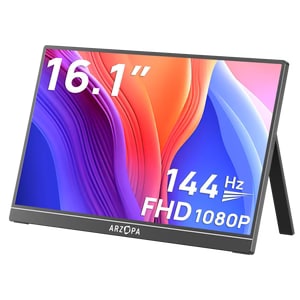
The Arzopa Z1FC is the portable monitor to buy when your biggest fear is not soft spreadsheet text — it is spending more than you need to make a Steam Deck, Switch, console, dorm desk, or laptop feel bigger and smoother. It ranked fifth in our full portable monitors ranking because it is the cheap high-refresh pick: 16.1 inches, 1080p, 144 Hz, USB-C, mini-HDMI, and a built-in kickstand at roughly $110 in the captured Amazon snapshot.
That lane is real. PCWorld calls the Z1FC a budget pick with “Good build quality for the price” and says its 144 Hz refresh rate “provides good motion clarity.” Wirecutter also frames it as “a 1080p portable monitor that’s good for work and play,” which matches the practical appeal: handheld gaming, casual console use, and occasional laptop work can feel better without jumping to OLED or 2.5K pricing.
The caveat is that the Z1FC is not the sensible default for everyone. The 1080p panel is less comfortable for long work than the Z1RC’s 2.5K/16:10 screen, one-cable USB-C can drain the host device fast, and Arzopa model names are easy to mix up. Buy it because 144 Hz at a low price matters to you, not because it is the safest all-around work screen.
Score Breakdown
- Display readability: 6/10. The 16.1-inch 1080p panel is fine for indoor casual use, but it cannot match the sharper Z1RC, Lenovo, or ViewSonic picks for all-day reading and work.
- Setup and power reliability: 7/10. USB-C and mini-HDMI make the Z1FC flexible, but one-cable USB-C depends on DisplayPort Alt Mode and host power, while HDMI setups still need USB power.
- Stand and portability: 8/10. The built-in kickstand is a real advantage over floppy cover stands, and hands-on coverage supports both horizontal and vertical use.
- Device and use-case fit: 7/10. It has a clear job — cheap high-refresh fun — but that job is narrower than the work-first Z1RC.
- Color and motion fit: 7/10. 144 Hz is the reason to care, especially for casual gaming, but HDR and panel-quality claims should not be treated like premium monitor proof.
- Reliability and support: 5/10. Current new-listing evidence exists, but exact-ASIN owner and long-term support signals are still thin.
- Evidence confidence: 7/10. Confidence is good enough for this ranked lane because formal reviews, official text, YouTube hands-on notes, the product research and Amazon snapshot agree on the core identity, with caveats stated.
What Feels Great Right Away
The Z1FC’s best trick is that it makes a cheap setup feel more exciting immediately. A basic 60 Hz travel panel can be useful, but the Z1FC’s 144 Hz claim gives it a different personality: mouse movement feels smoother, supported games can look more fluid, and handheld or console setups feel less like a tiny-screen compromise.
The other immediate win is the stand. Forbes describes the Z1FC as using a “thin yet sturdy adjustable kickstand” that can position the monitor horizontally or vertically without taking up too much desk space. That matters because portable-monitor stands are often the part buyers regret first. A built-in kickstand is faster to trust on a kitchen table, hotel desk, dorm setup, or temporary gaming corner than a fold-over cover that needs the perfect angle.
It also helps that the Z1FC is not tied to one device family. Arzopa’s product page says it supports PS5, Xbox, Switch, Steam Deck, PCs, phones, and more, and the hands-on transcripts back up the basic USB-C/mini-HDMI idea. The happy path is simple: screen out, stand open, cable in, and a much bigger view than the device alone gives you.
Setup, Power, and the One-Cable Catch
The Z1FC can be simple, but only with the right device. The cleanest setup is USB-C from a compatible laptop, handheld, phone, or tablet that supports video over USB-C and can supply enough power. One handheld-focused reviewer liked that “you can actually power the monitor off a single USBC cable,” which is exactly the small convenience people hope for when buying a portable display.
The catch is battery drain. In that same test, battery life with the external monitor attached was “basically exactly an hour,” then the reviewer summed up the tradeoff plainly: with “single cable goodness,” you are “eating up battery life quite a bit.” That does not make the Z1FC bad. It means the neat one-cable setup is best for short sessions, desk use near power, or devices with plenty of battery.
For consoles, older laptops, or devices without USB-C video, mini-HDMI gives you a fallback, but it is not a one-cable setup. Expect HDMI for video plus a USB-C power cable into a charger, power bank, dock, or wall adapter. Test your exact device before the return window closes, especially if you are buying it for a trip or a handheld you cannot afford to drain quickly.
Gaming Smoothness vs. Work Text
The Z1FC earns its place because 144 Hz at this price is unusual in a portable monitor. PCWorld says the 144 Hz refresh rate and a “bright 337-nit display” make it better than many budget competitors, while also listing “Doesn’t support Adaptive Sync” as a con. That is the right balance: motion can be fun and visibly smoother, but this is not a premium gaming monitor with every modern display feature.
For work, the story is more mixed. A 16.1-inch 1080p screen is usable for email, chat, dashboards, video calls, light spreadsheets, and a browser beside your laptop. It is not the screen to pick for long writing sessions, dense code, tiny spreadsheet cells, or reading all day. The Z1RC’s 2560×1600, 16:10 panel exists because text comfort and vertical room matter more for many laptop workers than refresh rate.
HDR and color claims also need restraint. Arzopa and Amazon-style copy mention wide color and HDR, but the product research flags conflicting response-time, brightness, and color details. Treat the Z1FC as a fun, affordable 1080p high-refresh screen, not a creator display hiding in a budget shell.
Stand, Portability, and Size Reality
The Z1FC is portable, but it is not tiny. Forbes says the 16.1-inch display feels “borderline too large to add into a bag,” especially with a smaller 13-inch laptop. That is a useful warning because 16.1 inches sounds only slightly bigger than 15.6 inches until you are packing it with a charger, handheld, cables, and a laptop.
The good news is that the stand helps it feel less fussy once it is out of the bag. The handheld review calls it a “no frills portable monitor setup” and says the kickstand works in horizontal mode and portrait mode. The official Arzopa page also claims a 1.7 lb weight and 0.3-inch thickness, which fits the overall pattern: thin enough to travel, substantial enough that you should still plan how it will be protected.
The available product imagery and review material do not prove a rugged case, VESA mount, tripod system, or premium travel kit. If this will live in a backpack, add a sleeve or make sure your bag has a padded compartment. A cheap monitor becomes less cheap if the screen gets crushed on the first commute.
Reliability, Model Identity, and Price Caveats
The Z1FC’s risk is not one dramatic flaw; it is the normal budget-monitor stack of small things to verify. The reviewed listing is tied to ASIN B0CH9WTW56, a new in-stock Amazon snapshot at $109.99, sold by NANYAN and shipped from Amazon. That is the row to preserve. Arzopa has nearby names — Z1RC, Z3FC, Z1F, gray variants, and other Z1FC-looking rows — and the evidence specifically warns not to let those bleed together.
Long-term reliability is the softest part of the recommendation. The source pool has formal reviews, official product text, and hands-on video transcripts, but not enough exact-owner/forum evidence to make bold claims about dead pixels, flicker, cable life, warranty service, or support consistency. The reliability score is 5/10 for that reason.
Price also needs a publish-time recheck. Amazon showed $109.99 as a Prime-style price at capture, while Arzopa-store pricing and list-price signals conflicted. If the Z1FC is near $100 to $125, the value argument is strong. If it drifts much higher, compare it hard against the sharper Z1RC and the cheaper MSI before buying.
How It Compares
The Z1FC makes sense only if you are honest about why you want it. It is not trying to be the most comfortable work monitor in the set; it is the fun cheap one.
- Arzopa Z1RC: Choose the Z1RC if work text matters more than refresh rate. It is the better everyday laptop companion because 2560×1600 and 16:10 make documents, coding, and web pages feel less cramped.
- ViewSonic VX1655-4K-OLED: Choose ViewSonic if the panel is the point. It is far more expensive, but OLED contrast and 4K sharpness are in a different class.
- Lenovo ThinkVision M14t Gen 2: Choose Lenovo if touch, pen-style work, and compact business travel matter. The Z1FC is cheaper and better for casual gaming, not touch notes.
- ASUS ZenScreen MB229CF: Choose ASUS if you need a large moveable office screen. It is too big for backpack-first travel but better for temporary desks.
- MSI PRO MP165 E6: Choose MSI if you just need the cheapest brand-name second screen. Choose Z1FC if 144 Hz is worth paying extra for.
Who Should Buy the Arzopa Z1FC
Buy the Z1FC if you want a cheap, thin, 16.1-inch portable screen that can make handheld gaming, a console corner, a dorm desk, or occasional laptop work feel better. It is especially appealing if 144 Hz is the reason you are shopping and you are comfortable with 1080p.
It is also a reasonable travel or backup screen if your expectations are calibrated. Use USB-C with devices that support DisplayPort Alt Mode, pack separate power for HDMI, and test every device during the return window. If one-cable USB-C is part of the dream, test battery drain before relying on it away from an outlet.
Skip it if your main need is crisp all-day text, 16:10 productivity space, touch or pen input, verified pass-through charging, premium support, creator color work, outdoor brightness, or a sturdier mounting system. Also slow down if the Amazon row does not clearly match Z1FC / ASIN B0CH9WTW56.
Bottom line: the Arzopa Z1FC is a good cheap high-refresh pick when smooth motion and price matter more than text sharpness. Before buying, recheck the exact listing, current price, seller, return window, and your device’s USB-C video support; if you are not sure 144 Hz is the point, compare it against the rest of our portable monitors ranking.
Feature breakdown
Full feature list
Grouped feature details are expandable so buyers can go deep when they want, without turning the whole review into a spec landfill.
Full feature list
5 features
+
Full feature list
5 features
Buyer Lane
budget high-refresh work-and-casual-gaming pick
Key Caveats
1080p on 16.1 inches is usable but not ideal for crisp all-day text., USB-C one-cable use requires DisplayPort Alt Mode and enough host power., One-cable handheld use can drain the host battery quickly., HDMI sources need separate USB-C power for the monitor., Exact model identity matters because nearby Arzopa Z1RC/Z3FC/Z1F rows can look similar.
Commerce Snapshot
[object Object]
Source Signal Count
44
Source Family Posture
[object Object]
Tell us what this page missed
These pages get better when real buyer complaints make it back into the scoring model. If something important is underweighted, say it.
Rate this review
Give it a score from 1-10 and tell us what to improve.
0/4000 characters