Anker PowerConf C200 2K Review (2026): Cheap, Sharp, and Still Light-Hungry
The PowerConf C200 gives budget buyers 2K video, selectable FOV, a real shutter, and useful tuning—but the deal works best in decent light.
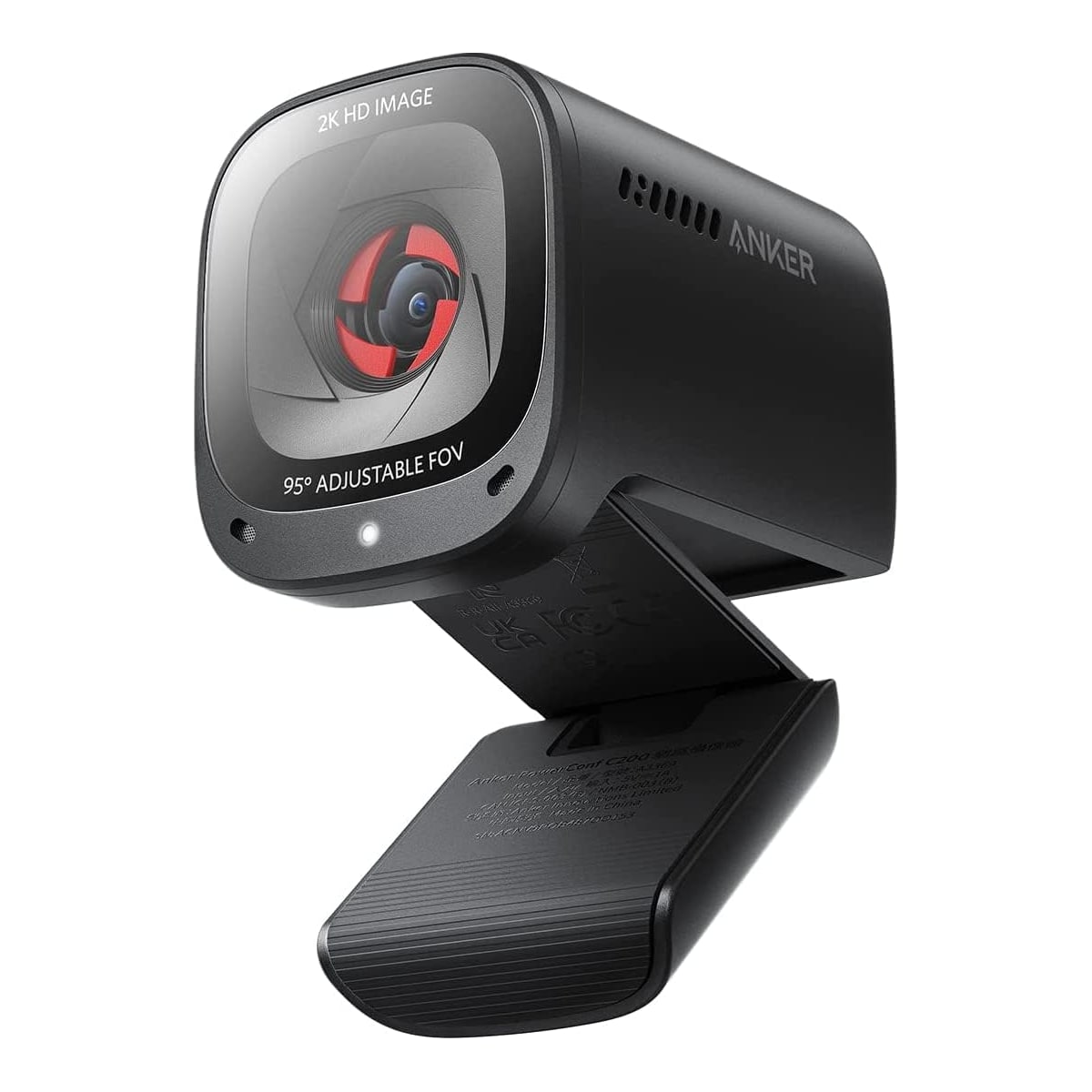
The Anker PowerConf C200 2K is our best value 2K webcam: a credible laptop-camera upgrade for buyers who want sharper calls, privacy, and basic tuning without premium pricing.
MSRP
—
Amazon
$47.49
at writing · 2026-05-14
Buyer fit
A strong cheap 2K desk camera with privacy and tuning features; best when expectations stay realistic about lighting and software polish.
MSRP
—
Amazon
$47.49
at writing · 2026-05-14
Score breakdown
How this product scored
Same rubric, but focused on one product so the reasons behind the score stay readable.
Image quality and bad-light handling
Strong for a budget 2K webcam in decent front light, but dim or backlit rooms still need manual help and realistic expectations.
Focus and exposure stability
Autofocus is useful and often snappy, though transcript evidence preserves occasional focus searching and exposure tweaking.
Mic and call audio
Dual mics are acceptable as meeting-call backup audio, not a replacement for a headset or dedicated USB microphone.
Mounting, privacy, and hardware
Mechanical privacy cover, removable cable, monitor clip, and tripod thread are practical value wins, with a stiffer mount as the caveat.
Software and compatibility friction
AnkerWork controls are useful for FOV, resolution, mic pickup, and firmware, but the best experience may require opening the app instead of staying fully hands-off.
Reliability, heat, and support
Evidence is demo-heavy and thinner on owner/forum durability, long-call heat, disconnects, and support patterns, so confidence stays moderate.
Use-case fit
Excellent value fit for normal work calls and laptop-camera upgrades; less convincing for paid streaming, bad-light rooms, or premium fixed desks.
Evidence confidence
Exact ASIN/current-new commerce signal and many YouTube/demo rows support the verdict, while owner/community coverage remains thinner than ideal.
Quick Verdict
If you are about to buy the Anker PowerConf C200 2K because the price looks almost suspiciously reasonable, the regret check is this: do you have decent front light, and are you willing to open AnkerWork’s app once to tame the picture? If yes, this is one of the rare cheap webcams that feels like a real upgrade. If no, the 2K badge will not save a dark, backlit room.
That is why the C200 ranked #2 in our Best Webcams in 2026 as the Best value 2K pick. It sits behind the safer Logitech Brio 505 because Logitech is the calmer default for mainstream work calls, but the Anker is the one I would check first when the Brio 505 feels too expensive and the Brio 101 feels too bare. You get 2K capture, adjustable field of view, autofocus, dual mics, a mechanical privacy cover, and a small body that does not look like a bargain-bin webcam from 2014.
The catch is not scary; it is just real. Low light still needs help, the app/tuning story matters, and long-term owner evidence is thinner than I would like. At the writing snapshot, the exact kept Amazon product was ASIN B09MFMTMPD, captured as a current-new signal at $47.49 on 2026-05-14T21:35:05Z; seller/shipper details did not extract cleanly, so refresh the live listing before checkout. Use the product link to check current price and availability, and it helps support KB4UB if you buy through it.
Score Breakdown
Overall score: 7/10. That score is good because the C200 solves the budget-webcam problem better than most: it gives you sharper-than-basic video, a real shutter, useful framing choices, and enough controls to rescue a normal desk. It does not score like a premium camera because difficult lighting, app tuning, and limited owner/support evidence still matter.
- Image quality and bad-light handling: 7/10 — The best evidence supports the C200 as a strong bright-room value. One quick-review transcript opens with the camera at 1440p and says, “for a budget webcam I really like the image quality,” with “really good” colors and sharpness (source). That is exactly the right kind of praise: strong for the price, not magically immune to bad lighting.
- Focus and exposure stability: 7/10 — Autofocus is useful and often quick, but not invisible. A budget-focused review found “there is still some Focus searching” and recommended manual exposure/focus tweaks in OBS when bright lights washed the image out (source).
- Mic and call audio: 7/10 — The built-in mics are better treated as emergency or meeting-call audio. The quick review says they are “not as good as like a studio microphone” but usable if you need one (source).
- Mounting, privacy, and hardware: 7/10 — The physical privacy cover, removable USB-C-to-USB-A cable, monitor clip, and 1/4-inch tripod thread are practical wins at this price.
- Software and compatibility: 6/10 — The AnkerWork app is part of the value because it controls FOV, resolution, mic pickup/noise settings, and firmware. It is also one more thing to install if you hoped this would be completely hands-off.
- Reliability, heat, and support: 6/10 — The source mix is strong on demos and Amazon text, thinner on long-call durability, support, and failure patterns. That keeps the confidence grounded.
- Use-case fit: 8/10 — For a budget laptop-camera replacement on Zoom, Teams, or Meet, this is a clean fit. For paid streaming, client-facing video in bad light, or a premium desk setup, spend more.
- Evidence confidence: 7/10 — There is enough exact-product evidence to recommend it, but not enough long-term owner/support depth to pretend every durability question is settled.
What Feels Great Right Away
The best thing about the C200 is that it makes the cheap-webcam choice feel less depressing. The jump from a soft laptop camera to 2K/1440p at 30 fps can be obvious in a normal room, especially when you are not asking the camera to fight a window behind you. One reviewer framed 2K as the sweet spot for calls, saying “2K is about 1440p resolution” and “the perfect resolution” because 4K can be excessive for Zoom-style use (source).
The adjustable field of view is the hidden convenience. The C200 can show a wider 95-degree view when you need it, then crop tighter when your background is a mess. One transcript says the tighter angle was “very very handy” because it let the reviewer keep their face in frame without showing extra stuff behind them (source). That is the sort of everyday feature that matters more than another spec-box flourish.
The privacy cover also earns its keep. It is a simple mechanical slider, not a tiny separate cap you will lose. For people who join meetings half-awake or share a room with family, that little switch is more reassuring than software-only privacy.
What Gets Annoying
The C200’s main annoyance is that its best image may require a little fiddling. If your face is lit from the front, it can look crisp for the money. If your room is dim, backlit, or blasted by a ring light, expect exposure compromises. A budget review noted overexposure near a window and said manual settings could get “a much better final looking result” (source). That is useful honesty: the camera can improve, but it may not do the whole job by itself.
The mount is another reasonable-but-not-luxury detail. One hands-on transcript says “there's no rotation on the head” and that the camera needs to be positioned near the center of the display (source). Another comparison called the body “pretty stiff and stationary” once placed on a monitor (source). Neither is a dealbreaker for a fixed desk, but it matters if your monitor is off to the side or your laptop lid moves around.
Finally, do not overbuy the mic claims. Dual mics and pickup modes are nice for a cheap webcam, but a headset or USB mic will still sound more intentional. Treat the built-in audio as a backup you are glad exists, not the reason to buy the camera.
Setup and Daily Use Notes
Setup should be simple for the basics: plug in the USB-C-to-USB-A cable, place it on the monitor clip or a tripod, open your call app, and choose the Anker camera. The full value comes from the AnkerWork software, because that is where you adjust field of view, resolution, picture settings, mic pickup behavior, noise reduction, and firmware.
The practical daily checklist is short. Put the camera close to the middle of your display, add front light if your face looks noisy or gray, narrow the FOV if the room behind you is too revealing, and check exposure before an important call. If you use OBS, you may have more control over focus and exposure; if you only use Teams or Meet, you may want to set the camera once in AnkerWork and leave it alone.
The product identity also needs care. This review is for the Anker PowerConf C200 2K / ASIN B09MFMTMPD. Do not blend it with the newer C310, the B600 conference model, renewed listings, bundles, or generic Anker conference cameras. The captured Amazon price was $47.49, but webcams move around quickly, so treat that as a snapshot, not a promise.
How It Compares With the Other Picks
Against the Logitech Brio 505, the C200 is the value bet. The Brio 505 is the safer overall work-call camera because Logitech’s desk-call package, privacy design, and software story are easier to recommend to more people. The C200 wins when price matters and you still want 2K, adjustable FOV, and a shutter.
Against the Logitech Brio 101, the C200 is the better avoid-buying-twice choice. The Brio 101 is cheap and recognizable, but it is a bare 1080p baseline. If the C200 is still near its captured price, the extra image control and 2K ceiling are usually worth considering.
Against the Insta360 Link 2 Pro, Logitech MX Brio, and OBSBOT Meet 2, the C200 is not trying to win the premium desk. Those cameras make more sense if you want 4K detail, smart framing, creator controls, or a more polished fixed setup. The C200’s job is narrower and very useful: make normal calls look better without forcing you into premium-webcam money.
See the full category ranking in Best Webcams in 2026.
Who Should Buy It
Buy the Anker PowerConf C200 2K if you want a low-cost but credible webcam for work calls, classes, casual streaming, family video calls, or a desktop that currently has no camera. It is especially easy to like if your room has decent light, you want to crop out background clutter, and you appreciate a physical shutter without paying Logitech MX Brio or Insta360 money.
Skip it if your room is consistently dim, you sit in front of a bright window, you refuse to touch camera settings, or you need a polished video look for paid work. Also skip it if the mic is mission-critical; use a headset or separate microphone instead.
Bottom line: the C200 is a strong value pick because the compromises are normal, visible, and mostly manageable. It is not the webcam that makes every room look expensive. It is the one that can make an ordinary desk look much less embarrassing for around budget-upgrade money, and that is a real win.
Tell us what this page missed
These pages get better when real buyer complaints make it back into the scoring model. If something important is underweighted, say it.
Rate this review
Give it a score from 1-10 and tell us what to improve.
0/4000 characters