Amazon eero 6+ Review (2026): Easy Mesh With a Gigabit Ceiling
What to know before buying the eero 6+ 3-pack: very easy setup, strong mainstream Wi-Fi 6 performance, gigabit-port limits, eero Plus costs, privacy caveats, and who should move up.
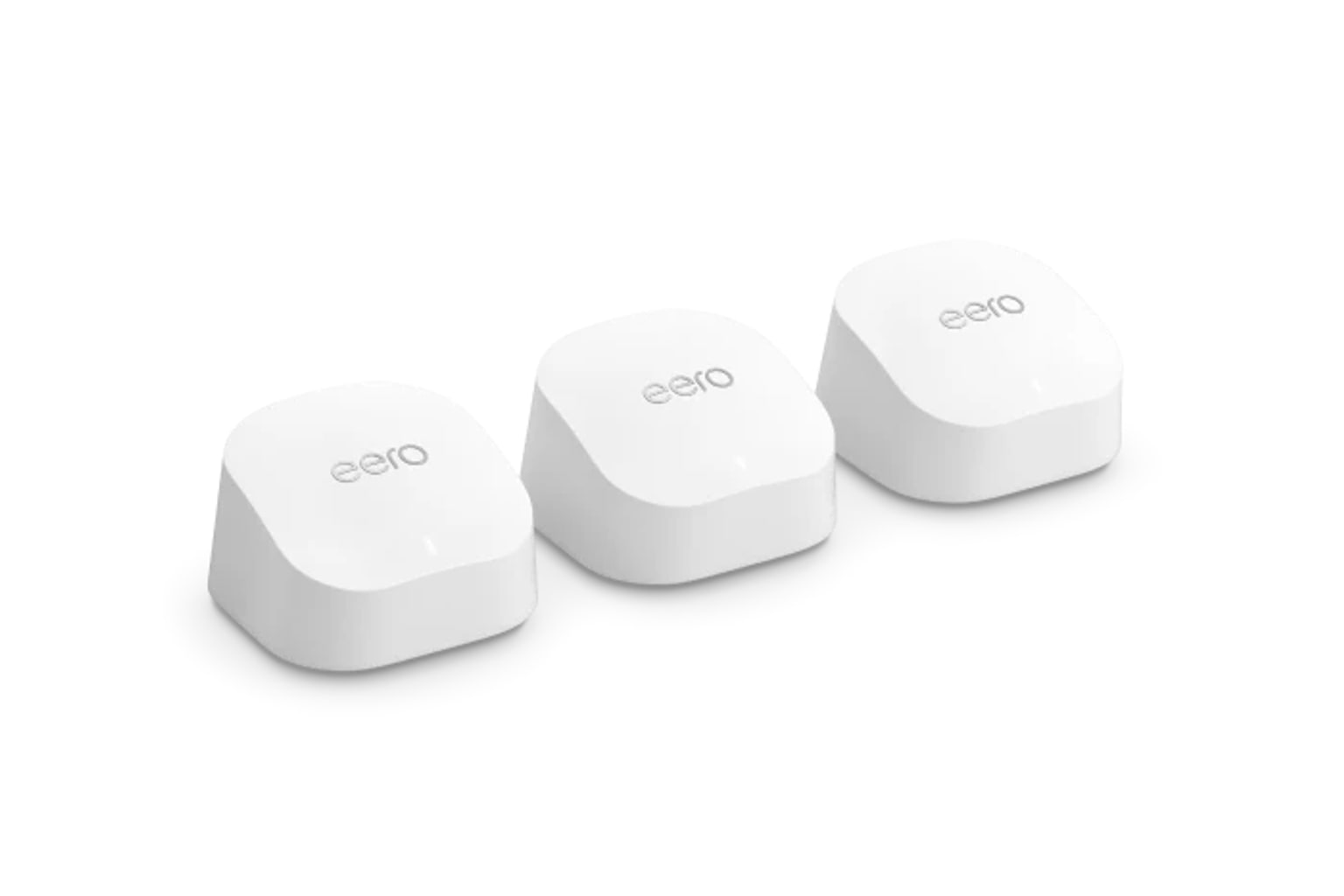
Amazon eero 6+ is the simple setup pick in our Wi-Fi mesh ranking: compact, friendly, and fast enough for many gigabit-class homes, but limited by dual-band Wi-Fi 6, 1GbE ports, paid feature boundaries, and fewer advanced controls.
MSRP
—
Amazon
$299.99
at writing · 2026-05-06
Buyer fit
It wins on simplicity and a familiar app, not specs. Choose it when gigabit-class Wi-Fi 6 and easy management matter more than 6 GHz, 2.5GbE, or advanced admin controls. Current Amazon-new availability was verified for ASIN B08ZK2BHP2 at $299.99 during Stage 1/2 checks.
MSRP
—
Amazon
$299.99
at writing · 2026-05-06
Score breakdown
How this product scored
Same rubric, but focused on one product so the reasons behind the score stay readable.
Coverage & roaming reliability
Coverage, roaming, satellite stability, and placement evidence from official specs plus review/source patterns. Product-specific scoring used the Stage 3 source rows and Stage 2 dossier caveats.
Setup & app clarity
Setup walkthroughs, app clarity, device/node visibility, troubleshooting, and how much the kit asks of non-expert buyers. Product-specific scoring used the Stage 3 source rows and Stage 2 dossier caveats.
Backhaul & port flexibility
Wired backhaul support, port count/speed, WAN/LAN options, and whether the hardware fits modern ISP and wired-device setups. Product-specific scoring used the Stage 3 source rows and Stage 2 dossier caveats.
Firmware stability & support
Visible update/support activity, known caveats, support docs, and whether the ownership trail looked calm or watchful. Product-specific scoring used the Stage 3 source rows and Stage 2 dossier caveats.
Controls & subscription posture
How much useful security, parental control, privacy, and network management is included without an ongoing paid tier. Product-specific scoring used the Stage 3 source rows and Stage 2 dossier caveats.
Performance headroom
Throughput, latency, multi-client room-to-room performance, and whether the spec class leaves room for modern clients. Product-specific scoring used the Stage 3 source rows and Stage 2 dossier caveats.
Quick Verdict
Amazon eero 6+ is the mesh kit to buy when the thing you are trying to avoid is not a bad speed-test screenshot — it is the household mutiny that starts when Wi-Fi setup turns into a weekend project. This three-pack is compact, friendly, and intentionally un-nerdy. Its best trick is making the network feel manageable for someone who never wants to learn what channel width is.
That is why it ranked #5 as the Best simple setup in our Best Wi-Fi Mesh Systems in 2026. It is not above the Wi-Fi 7 and Wi-Fi 6E picks because its ceiling is real: dual-band Wi-Fi 6, no 6 GHz band, no 2.5GbE ports, and only two gigabit Ethernet ports per node. But if your home has a gigabit-or-slower plan, mostly Wi-Fi 5/Wi-Fi 6 devices, and one person who just wants the internet to stop being weird, eero still has a very good argument.
The buyer-regret check is simple: do you want the calmest setup, or do you want room for multi-gig internet, deeper controls, and newer radios? PCMag wrote that “Installing the eero 6+ system was straightforward,” while CNET warned that the gigabit ports set the limit if you are “thinking about upgrading to a multigig internet plan.” At the captured check, the exact Amazon-new 3-pack ASIN B08ZK2BHP2 was in stock at $299.99, sold by Amazon.com. Use the product links to recheck today’s price, availability, seller, exact 3-pack configuration, eero Plus bundle status, and return terms; those links also help support KB4UB.
Score Breakdown
- Coverage and roaming reliability: 7.1/10. The official 3-pack claim is up to 4,500 sq ft and 75+ devices. Treat that as a starting map, not a guarantee; walls, modem location, and where the satellites land still decide the mood in the back bedroom.
- Setup and app clarity: 8.7/10. This is the eero 6+ win. The app is mature, setup is heavily guided, and device/node visibility is good enough for most households.
- Backhaul and port flexibility: 5.9/10. Wired backhaul is supported, but each node has only two 1GbE ports and there is no dedicated wireless backhaul band.
- Firmware stability and support: 7.5/10. The support story is generally calm, with official support and broad eero ecosystem maturity. The caveats are more about topology and expectations than a clear reliability red flag.
- Controls and subscription posture: 5.8/10. Useful security, privacy, and parental features can live behind eero Plus, and CNET flagged limited data-collection controls.
- Performance headroom: 6.8/10. Strong for a mainstream Wi-Fi 6 kit, especially with 160 MHz support, but no 6 GHz, no Wi-Fi 7, and no multi-gig port headroom.
What Feels Great Right Away
The first nice thing about eero 6+ is how little ceremony it asks for. The nodes are small white pods instead of spaceship towers, and any node can be the gateway. PCMag’s setup walkthrough is exactly the kind of paragraph nervous buyers want to see: download the app, create an account, follow prompts, plug a node into the modem, and continue. The key line is short but important: “Installing the eero 6+ system was straightforward.”
That matters because mesh Wi-Fi often fails people before speed ever enters the conversation. A technically stronger kit can still be the wrong kit if the app makes the household admin feel like unpaid IT support. Eero’s app gives you the basics people actually check: which node is online, which device is connected, speed/data views, profiles, guest networking, notifications, and enough settings to solve normal problems without exposing every router lever.
The size helps too. PCMag notes the three identical nodes are “noticeably smaller” than eero Pro 6 nodes, and the official 3-pack claim is 4,500 sq ft. Coverage claims should always be sanity-checked against your house, but the hardware is easy to place on a shelf or counter without making the room look like a network closet.
The Speed Story Is Better Than the Spec Sheet Looks
Eero 6+ is not trying to win the spec-sheet knife fight against Deco BE63, Orbi 770, or ASUS BQ16 Pro. It is dual-band Wi-Fi 6. No 6 GHz. No Wi-Fi 7. No 2.5GbE. On paper, that sounds boring.
In the right home, boring can still be fast enough. PCMag wrote that the eero 6+ “performed wonderfully in testing,” including a 938Mbps close-proximity router score and a 367Mbps 30-foot score in that review’s Wi-Fi 6 mesh comparison. CNET also points to the real upgrade over older eero hardware: 160 MHz channel support, which can help compatible devices and the links between eero nodes move more data.
The BroadbandNow comparison against Google Nest Wifi Pro shows the shape of the tradeoff. Near the router, the transcript reports average downloads around 781 Mbps and uploads around 750 Mbps for eero 6+. Farther away, eero held downloads above 500 Mbps, but upload speeds dropped harder than Google’s Wi-Fi 6E kit. That is the honest version: eero 6+ can feel quick and stable in a gigabit-class home, but newer 6 GHz systems have advantages with modern devices and cleaner spectrum.
Ports, Backhaul, and the Gigabit Ceiling
The port story is the main reason eero 6+ sits below the newer mesh systems in the parent ranking. CNET says it plainly: “Each Eero 6 Plus device features a pair of gigabit Ethernet ports in the back.” That is useful because you can wire a satellite, plug in a TV or console, or add a small switch where needed. In a three-pack, six total gigabit ports is not nothing.
But the same detail is also the ceiling. CNET’s warning is the one to remember before checkout: “Those Ethernet ports set a speed limit for the incoming connection,” so if a multi-gig internet plan is on your near-future list, “you’ll want to skip the 6 Plus.” That is not a harsh knock on a simple Wi-Fi 6 system; it is just the wrong tool for a multi-gig home.
Wired backhaul can still make eero 6+ much easier to live with. If your house has Ethernet or MoCA adapters, wiring the satellites removes some pressure from the shared dual-band wireless links. If everything is wireless and your home is long, dense, or chopped up by old walls, the lack of a third band may matter sooner.
The App Is Friendly, But Check the eero Plus Line
Eero’s app is one of the best reasons to buy this kit, but the software story has a second half: which features are included and which ones ask for eero Plus.
PCMag describes the app as useful for everyday management: profiles, connected-device details, guest networking, reservations, port forwarding, DNS, DDNS, NAT, UPnP, and a separate Thread-compatible smart-home network. That is plenty for a mainstream household. Eero 6+ also has a smart-home hub angle, with Zigbee, Thread, Matter controller support, and Alexa integration noted in the product evidence.
The paid line matters if parental controls, ad blocking, threat detection, or identity/privacy extras are part of why you are upgrading. PCMag notes that eero 6+ “doesn’t come with the free parental control and anti-malware software” found on some competitors and says some features require a subscription. The packet’s current eero.com snapshot lists eero Plus at $9.99/month or $99.99/year after trials.
That does not make eero a bad buy. It means you should price the network you actually want, not just the hardware in the cart.
Privacy and Control Caveats
Eero is built to automate decisions that many buyers do not want to make. That is a feature until you are the kind of person who wants to make them.
CNET’s privacy section is worth reading before you buy. The review says eero does not track the websites you visit or the contents of your network traffic, but it does collect network data and app/device information to maintain and improve performance. The harder caveat is this line: “Other manufacturers offer an option to limit data collection or opt out of it altogether, but there's no such option with Eero.” CNET adds that if you are “especially privacy-conscious,” eero probably is not the best fit.
Advanced router control is similar. The dossier notes eero uses automatic channel selection and users cannot manually change channel or bandwidth. Most buyers will never miss that. Some will be relieved. But if your idea of a good router includes manual channel planning, VLAN-style separation, deep firewall work, or a serious web console, eero 6+ will feel too sealed off. The sealed-off feeling is pleasant for the right person and maddening for the wrong one.
How It Compares
Eero 6+ is the simple setup pick, not the all-around winner. The parent ranking matters here because the best mesh kit is heavily shaped by house layout and future plans.
- TP-Link Deco BE63: Our best overall pick. It adds Wi-Fi 7 and four 2.5GbE ports per node at a captured price not far above eero 6+. Choose Deco if you want longer hardware runway; choose eero if simple setup and eero familiarity matter more.
- NETGEAR Orbi 770: The large-home premium pick. Orbi has newer Wi-Fi 7 hardware and broader coverage ambitions, but costs much more and has its own paid-service story.
- ASUS ZenWiFi BQ16 Pro: The power-user pick. ASUS is the opposite of eero: huge control surface, 10G ports, and a higher price. Buy ASUS only if you actually want to manage the machine.
- TP-Link Deco XE75 Pro: The value pick. It gives Wi-Fi 6E and a 2.5GbE port for less at the captured check, though TP-Link’s paid HomeShield line still needs attention.
- Google Nest Wifi Pro: The Google Home fit. Nest adds 6 GHz and Matter/Thread appeal, while eero tends to be the friendlier fit for Amazon/eero households and older eero mix-and-match upgrades.
Who Should Buy the Amazon eero 6+
Buy eero 6+ if your home is an apartment, townhouse, or smaller-to-medium house where the pain is dead zones and setup fatigue, not a multi-gig networking plan. It is a strong fit for people replacing an old router/extender mess, families that want easy profiles and device visibility, and households already comfortable with Amazon/eero gear.
It is also a good fit if your internet plan is around gigabit or lower and your client devices are mostly Wi-Fi 5 and Wi-Fi 6. You do not need Wi-Fi 7 to make Netflix, video calls, phones, tablets, smart speakers, and basic work laptops behave. You need a mesh system that is placed well and does not make everyone dread troubleshooting.
The happiest eero 6+ buyer values calm over control. They will forgive the missing 6 GHz band because the network feels good enough. They will forgive the gigabit ports because the ISP plan is not faster than that. They will forgive eero Plus if the free feature set already covers the household.
Who Should Skip It
Skip eero 6+ if you have or expect multi-gig internet. The gigabit Ethernet ports are a hard limit, and buying a mesh system right before a faster ISP upgrade is how small regrets become expensive.
Skip it if you want 6 GHz or Wi-Fi 7 headroom for newer phones, laptops, gaming handhelds, or a cleaner wireless backhaul. Deco XE75 Pro, Deco BE63, Orbi 770, ASUS BQ16 Pro, and Nest Wifi Pro all move beyond eero 6+ in different ways.
Skip it if you dislike paid router features. Eero’s basic management is friendly, but if parental controls, security scans, ad blocking, privacy extras, or identity services are central to your decision, compare the ongoing eero Plus cost against ASUS, TP-Link, NETGEAR, and Google before you commit.
Finally, skip it if you are the household network tinkerer. Eero’s whole personality is that it hides complexity. If you want the complexity, that personality will start cute and become annoying.
Bottom Line
Buy the Amazon eero 6+ if: you want a compact, easy Wi-Fi 6 mesh system for a gigabit-or-slower home, especially if setup simplicity matters more than router control.
Skip it if: you need multi-gig ports, Wi-Fi 6E/Wi-Fi 7 headroom, deep admin settings, or included advanced parental/security tools without a subscription.
Bottom line: eero 6+ is still the calm pick. It is not the smartest long-term hardware buy for every home in 2026, which is why it ranked behind newer Deco, Orbi, and ASUS systems. But for the buyer who wants the network to quietly work without becoming a hobby, eero’s simplicity remains the feature.
Feature breakdown
Full feature list
Grouped feature details are expandable so buyers can go deep when they want, without turning the whole review into a spec landfill.
Full feature list
11 features
+
Full feature list
11 features
Bands
Dual-band: 2.4 GHz and 5 GHz; no 6 GHz band and no Wi-Fi 7
Backhaul
Shared dual-band wireless backhaul or wired Ethernet backhaul
Controls
eero app for setup and management; eero Plus optional for advanced security, privacy, and parental features
Smart Home
Zigbee controller, Thread compatible, Matter controller support, smart-home hub features, and Alexa integration noted in evidence
Checked Kit
Amazon eero 6+ mesh Wi-Fi system, 3-pack, without eero Plus bundle
Speed Class
AX3000 with 160 MHz support on compatible 5 GHz devices
Ports Per Node
Two 1GbE auto-sensing RJ-45 Ethernet ports per node plus USB-C power
Claimed Coverage
Up to 4,500 sq ft for the 3-pack and 75+ connected devices; layout and materials still matter
Price At Writing
$299.99 USD new Amazon.com offer captured 2026-05-06T08:38:57Z for ASIN B08ZK2BHP2
Wireless Standard
Wi-Fi 6 / IEEE 802.11a/b/g/n/ac/ax; dual-band 2.4 GHz and 5 GHz
Manual Control Caveat
Automatic channel selection; no manual channel or bandwidth selection in the support evidence
Tell us what this page missed
These pages get better when real buyer complaints make it back into the scoring model. If something important is underweighted, say it.
Rate this review
Give it a score from 1-10 and tell us what to improve.
0/4000 characters