
The recommendation
An appealing physical setup when the opening stand solves a recurring placement chore.
Grades at a glance
| Product | Overall | Positioning, aiming and handling | Input, menu and control selection | Everyday power, cables and packing |
|---|---|---|---|---|
| XGIMI MoGo 4 Laser | 7.7 | 9.0 | 7.0 | 7.0 |
Does it fit your life?
The reason to put it on your shortlist
The MoGo 4 Laser is appealing if the physical act of setting up a projector usually puts you off using one. In the Laser-specific review of a brand-supplied sample, the stand is part of the body: pull it open and swivel it to reveal the lens. That makes the transition from a packed object to an aimed projector unusually tangible. Rather than first finding a prop and then adjusting the body around it, you begin with a mechanism already attached to the projector.
Its controls and packing need a little more thought. The same reviewer preferred the larger remote, despite also handling a smaller one, and described finding a second settings route when looking for an adjustment. The practical recommendation is to treat the large remote as part of the main kit and to learn the settings you use before taking it away. The stand reduces one set of chores; it does not remove every choice involved in operating the projector.
This review was updated on October 16, 2026 after checking cached demonstrations. One Laser-specific review used a brand-supplied sample; its reviewer says the brand had no input. A second demonstration covers both the regular MoGo 4 and the Laser. We use that mixed demonstration only for explicitly shared physical stand, lanyard, remote, and port actions. It does not supply Laser image-quality conclusions or a current software guarantee, and this is not our own hands-on test.
Opening the stand is the useful trick
The Laser review describes pulling the projector away from its built-in stand and swiveling it to expose the lens. That is a practical advantage for a device you expect to pack frequently. The stand is already present when you arrive. It also gives the opening motion a clear purpose, so setup begins with a physical action rather than a search through accessories. For occasional use, an obvious first step can be valuable simply because you do not have to remember where a separate part went.
An attached stand is most useful when the destination already has an appropriate surface. It changes the angle of the projector, not the amount of room on the table. Before buying, think about whether you normally have a clear bedside table, desk, or shelf. If you expect to improvise a support every time, the stand may solve only part of the inconvenience. The body still has to occupy a suitable place and remain accessible for the connections you intend to make.
The mixed regular-and-Laser demonstration reinforces the shared opening and handling routine, while the Laser-specific account supplies the clearer description of the mechanism. Keep that distinction in mind when watching comparisons. A video containing two similar-looking models can be useful for physical actions they share without settling differences between their capabilities. Here the purchase argument rests on opening and aiming the body, not on transferring one model's projected result to the other.
Carrying it and settling it down
The dual-model demonstration describes carrying with the lanyard and setting the body down. Those shared physical actions help explain the carrying routine. They do not establish that every surface or angle will work equally well. We would use them as reasons to inspect the handling arrangement, then make a placement plan around your own furniture rather than treating a short demonstration as a promise of stability everywhere.
For a short move at home, decide whether you want to carry only the body or move the whole kit together. For a longer trip, provide a place for the lanyard and loose control pieces so they do not become the items you have to search for on arrival. The MoGo's design brings several parts together, but it still rewards a deliberate packing arrangement. The easiest object to grab is only one part of the journey from a bag to a usable setup.
Compare that routine with the Mars 3 Air's handle or the Halo+'s small desktop kickstand. The MoGo's opening stand, the Mars handle, and the Halo GTV kickstand are three different mechanisms to consider. Which feels simpler depends on what you move and where you put it. Name the destination surface and the expected carrying distance before deciding that one mechanism is inherently better for you.
Take the full remote seriously
The Laser reviewer describes both a larger remote and a smaller portable version, and says she normally preferred the larger one because it offered more controls. That is a useful counterweight to the appeal of a miniature accessory. A small controller may be easier to stow, but the controller you actually reach for needs to do the tasks you want. If you expect to change settings, keep the fuller remote in the kit from the start.
The mixed-model demonstration describes keeping the small remote attached as a backup when the main remote is forgotten. That is a narrowly useful physical observation: there can be another controller with the projector. It does not mean every command is available on it, or establish the contents of the package you may buy today. Check current kit contents, and consider how you would use each remote rather than assuming that receiving two makes operation twice as straightforward.
For a household, choose one remote as the ordinary one and give it a consistent home. Explain the smaller controller's role only if you actually expect someone to use it. Otherwise two remotes can become two places to look for a button. The buying attraction is having an alternative, while the practical obligation is deciding which controller belongs beside the viewer and which stays with the projector. That decision can be made before the first trip.
Menus deserve a little familiarization
The Laser-specific report describes an adjustment being available through more than one settings route. The reviewer first followed a shorter picture-menu path, then used another press of the settings button to reach the fuller settings. We use that account as a navigation observation only. It shows why a familiar label does not always mean you have reached the control you intended. It does not support a claim about the brightness result, and it is not a current step-by-step menu guide.
That is a good reason to explore the controls before relying on them somewhere unfamiliar. Find how to return from a menu, how to choose the intended input, and which controller exposes the settings you need. You do not need to investigate every screen. A small amount of focused familiarization around your own routine is more useful than repeatedly entering menus during a viewing session because an adjustment is not where you expected it.
If you mostly want to place the projector and leave it alone, the menu caveat may matter less than the integrated stand. If you regularly switch sources or adjust settings, it deserves more attention. The retained review suggests a workable system with some discovery involved. Current software may arrange it differently, so confirm what your exact unit presents. The general buying lesson is to judge access to controls as well as the presence of a button with a promising label.
Physical ports do not settle compatibility
The shared hardware demonstration describes a USB-C charging port, USB-A, and HDMI connections. The Laser-specific review also discusses the physical connections. Those observations make it easier to picture where cables enter the body and what you would need to pack for a wired setup. They do not establish that every cable, source device, app, or portable supply will work. A connection plan needs the exact requirements of the device and the source you intend to use.
Keep charging and source selection as separate questions. A port described for charging is not automatically a video-input shortcut, and an HDMI connection does not by itself guarantee the particular content path you want. Before buying additional leads or transmitters, establish the intended route from your source to the projector. This is especially useful if your goal is a compact kit: unnecessary adapters can quickly undermine the convenience of a body with an integrated stand.
For ordinary packing, leave enough room for the plugs as well as the cables. When the projector is positioned on a table, think about whether the leads will be reachable without changing the aim. That is a simple layout question you can answer from the hardware arrangement. We do not use the port descriptions to promise playback quality or an electrical outcome. The supported advantage is knowing that the reviewed design offers those physical connection choices.
Decide which accessories earn their place
The Laser-specific reviewer, using a brand-supplied sample, raises an additional power arrangement for time away from mains. That observation belongs on a packing list as an unresolved requirement. It is not a recommendation for a particular bank or a prediction of viewing time. Before adding a supply to your bag, establish the requirements of the exact unit and intended use. If the appropriate arrangement is larger than you want to carry, that affects the buying decision even though the stand itself folds into the body.
The two remotes create a more immediate choice. The full remote was the Laser reviewer's preference, while the dual-model demonstration shows a small remote kept attached as a backup. Plan around the controller you expect to use most. If that is the full remote, reserve an accessible place for it instead of treating it as an optional extra left at home. The smaller controller may have a useful role, but the shared demonstration supports its physical presence and handling, not a promise that it replaces every action on the larger one.
Accessories pictured beside the projector deserve the same scrutiny. Decorative filters appear in the historical demonstrations, but they do not explain the carrying, aiming, or ordinary selection advantages assessed here. Their presence in a review does not establish a current bundle. Decide whether they serve an activity you actually want before letting them occupy case space or influence the purchase. You can evaluate the opening stand and remote arrangement without adopting every accessory shown with them.
A useful comparison is a short move at home versus a weekend visit. At home, you may care chiefly about opening the stand and finding the remote. For a visit, the chosen source lead, supply, and loose accessories become part of the collection. Write those two arrangements separately if both matter to you. The MoGo's integrated stand may be attractive in each, but the complete kits need not be identical. Comparing those concrete arrangements with the Mars handle or ZIP hinges is more revealing than deciding from the smallest product photograph.
Reading the everyday-use scores
Positioning, aiming, and handling earns 9/10. The pull-open swivel stand and described lanyard make a strong case for convenient handling, with the ordinary qualification that the body still needs an appropriate place. Input, menu, and control selection earns 7/10. The remote choices are useful, but the preference for the full remote and the second settings path show why a little learning remains. Neither category grades an optical result or assumes the current interface matches the recordings.
Power, cables, and packing earns 7/10. The described charging and wired connection choices are understandable, while power planning and optional accessories can enlarge the kit. The overall everyday-use score is 7.7/10. That is the same total as several alternatives with different mechanisms. The MoGo earns its place through the physical transition from packed cylinder to aimed projector, rather than through a claim that every task is easier than on every rival.
The alternatives that clarify the choice
The Halo+ GTV account is worth comparing if you want a familiar desktop kickstand and a remote with memorable short- and long-press actions. Its remote is reported as unlit, while the MoGo review's main control reservation is the preference for the fuller controller and the navigation route. Think about which issue you would notice repeatedly. A control you learn once may be a smaller burden for you than a physical arrangement you have to improvise on every move.
The Aurzen ZIP offers another form of integrated aiming through its folding hinges. Its reports discussed here introduce a different source-device and accessory routine, including a correction about what fits in a reviewed case. It is a useful comparison if folded size is the attraction. The Mars 3 Air, meanwhile, gives a handle and body buttons rather than making the swiveling stand the centerpiece. These are distinct physical routines, even though the overall everyday scores happen to tie.
Choose the MoGo 4 Laser if opening and swiveling the stand feels like the right answer to your recurring setup problem, and you are content to pack the full remote and check your intended connections. Confirm the exact Laser model and current kit contents before ordering. Then practice the few control actions you need. Its everyday appeal is strongest when the attached stand gets used frequently and the rest of the kit has an equally clear place in your bag.
XGIMI MoGo 4 Laser
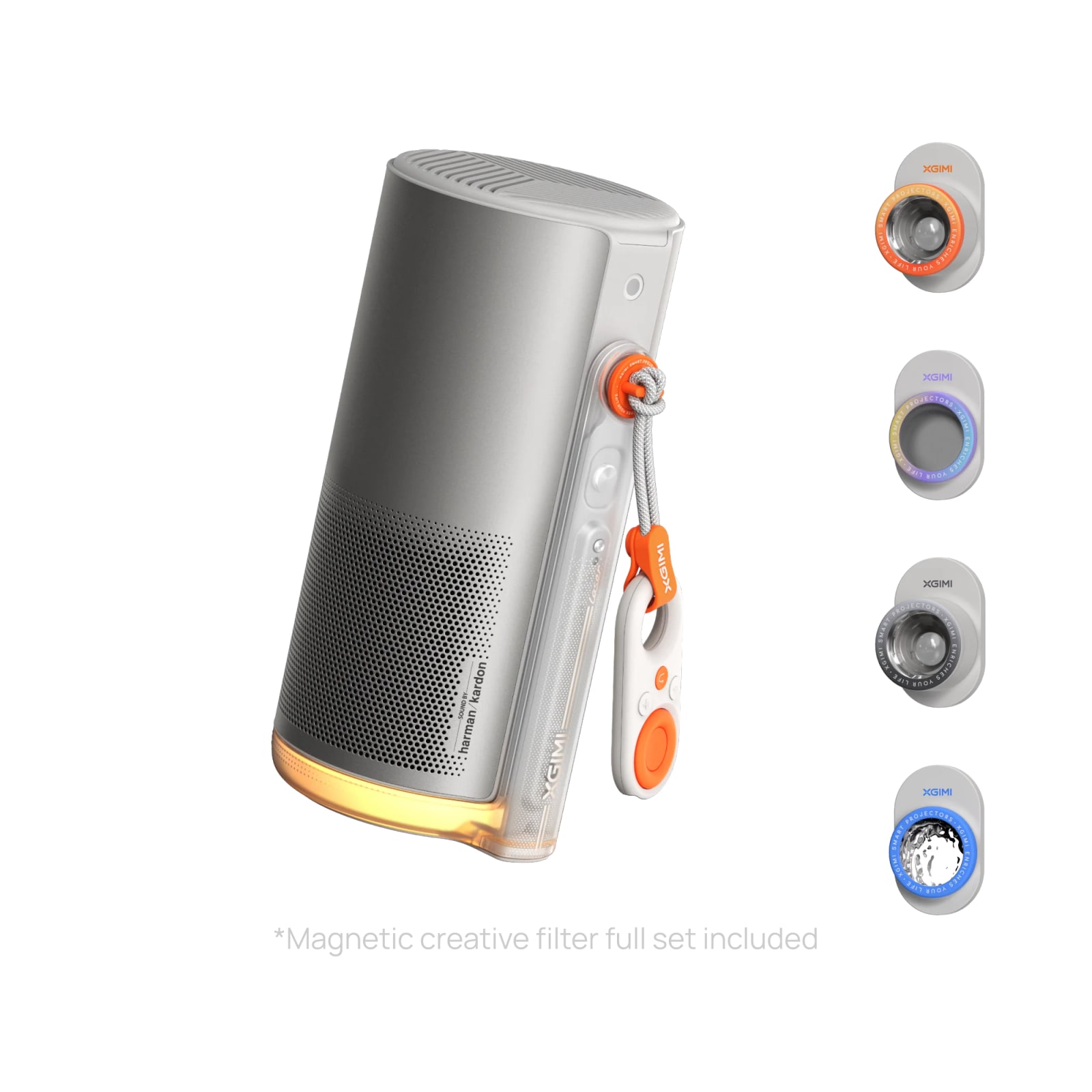
XGIMI
Buyers who want an attached aiming mechanism and will keep the full remote with it.
An opening swivel stand reduces physical setup, while the full remote and accessory plan still matter.
Reasons to choose it
- Pull-open swivel stand described
- Carry lanyard in shared physical demonstration
- Small backup remote described
Tradeoffs to know
- Laser reviewer preferred the full remote
- Historical second settings path needed discovery
- Extra power or stand accessories enlarge the kit
Think twice if: You expect every adjustment to be obvious without learning the controls.
Published specifications
- Aiming mechanism
- Pull-open swivel stand
- Control choice
- Full remote preferred in Laser-specific report
- Mixed-model evidence
- Shared physical actions only
Further reading
Ratings
Editorial score 7.7
Positioning, aiming and handling9
The opening swivel stand and described lanyard reduce ordinary aiming and carrying chores.
Input, menu and control selection7
Full and smaller controllers offer choices, but the Laser reviewer preferred the full remote and found a second settings route.
Everyday power, cables and packing7
Physical charging and wired connections are described; separate power and optional accessories still need planning.
Sources & further reading
youtube.com review
youtube.com review
youtube.com review
youtube.com review
youtube.com review
youtube.com review
youtube.com review
youtube.com review
youtube.com review
youtube.com review
youtube.com review
youtube.com review
youtube.com review
youtube.com review
Keep reading
Something changed? Help us keep this useful.
Send a correction →