
The recommendation
Choose the VIOFO A119 Mini 2 when you want a compact camera without making the phone your only interface. Its local controls and sliding mount are persuasive; the small display and less detailed retrieval walkthrough are the compromises.
Grades at a glance
| Product | Overall | Controls and menu navigation | Finding and saving a recorded clip | Physical handling and routine access |
|---|---|---|---|---|
| VIOFO A119 Mini 2 | 7.7 | 8.0 | 7.0 | 8.0 |
Does it fit your life?
A compact camera that keeps local controls
VIOFO A119 Mini 2 is our compact starting point for someone who still wants menus on the camera. A small display and physical controls keep ordinary local interaction available, while the app provides another place to change settings and work with recordings. That choice is its strongest attraction. You can prefer a compact body without committing to the screenless arrangement of Garmin Mini 2 or the larger touchscreen of Nextbase 622GW.
Be realistic about the display. It is a small interface for a small camera, and the buttons still need to be learned. The useful benefit is having local controls when you want them, rather than making the body a comfortable place for every long viewing session. If you naturally use physical controls for a quick check and a phone for a more involved task, this division is likely to make sense. If you want one large screen for everything, another design deserves priority.
Our overall everyday-use score is 7.7/10. Controls and physical handling each earn 8/10, while recorded-clip access earns 7/10. The phone viewing-and-download route is described, with less detail about the full search and export routine. The Mini 2 therefore earns its recommendation through compact handling and a choice of interfaces. Buy because those are the qualities you value, with the small screen and more limited retrieval walkthrough understood before you decide.
Physical actions have a place alongside the app
The walkthrough identifies physical controls for menu access, recording, microphone and Wi-Fi functions, plus a side control associated with locking or confirming an action. These are functions described in the review, not a promise that every word appears printed on the camera. Their value is that common actions and local menus remain available on the device rather than requiring you to begin a phone session for everything.
That arrangement is helpful if you like to check a device directly while parked. You can decide whether a short local interaction is enough, or whether to use the phone's larger interface for a longer settings session. The choice is an advantage even if you develop a preference for one route over the other. It gives the Mini 2 a different balance from a screenless camera whose app is compulsory for viewing.
Controls score 8/10. The combination of a local display, physical buttons and app settings supports that recommendation. It does not mean every function will be obvious before you learn the camera. A small body necessarily puts several interactions into a compact space. If you are comfortable learning a few direct controls, that is a reasonable compromise. If you prefer visible touch targets and a larger interface, the 622GW may be worth the extra body size for your particular routine.
A small display is useful for the right reason
The review describes a one-and-a-half-inch display. On this camera, the value of that screen is having menu choices and ordinary information available on the body. If your main frustration with a screenless device is reaching for a phone to make a quick change, a small local display may be enough. If your main wish is a generous surface for browsing recordings, screen size deserves a larger role in the purchase decision.
This puts the A119 Mini 2 between two distinct alternatives. Garmin Mini 2 keeps its body tiny and moves viewing to the phone. Nextbase 622GW makes a large touchscreen central to the camera's interaction. VIOFO keeps a modest display beside physical controls, with the app available for longer sessions. Consider which of those divisions suits you before deciding whether compactness or a larger interface matters more. A small screen is an advantage only when the local actions it supports are ones you want to use.
For example, you might prefer to confirm an ordinary setting at the camera, then use the phone when you want to view or download a recording. That is a choice about comfort, not a required sequence. Someone who dislikes switching devices may prefer a more prominent camera-side screen. Someone who mostly leaves the camera alone after configuration may be happy with Garmin's approach. The VIOFO is most persuasive when keeping local menus available is worth more to you than making either the body or the screen as small or as large as possible.
Use the phone when the larger interface is useful
In the reviewed setup, the VIOFO app can change settings, view recordings and download them to the phone. That makes it an alternative interface rather than simply a file-transfer accessory. If you find the small local display adequate for short checks but less comfortable for a longer session, the app gives you another place to work. The choice of interface is the useful feature; it is not necessary to make every action a phone task to benefit from it.
A good buying question is whether you like that flexibility. Some buyers prefer one consistent interface for every job. Others appreciate using buttons for a brief action and a phone for a more detailed review. The Mini 2 is more persuasive for the second group. Its compactness does not force you into the screenless approach, but it also does not make the local display the best place for every task.
The app account comes from a historical review configuration, so use it to understand the available route rather than predict every current menu. There is no measured transfer-time promise here. If app use is central to your plans, pay attention to how you expect to locate and retain a recording on your phone. A familiar-looking settings interface and a comfortable retrieval sequence are related considerations, but one does not automatically establish the other.
Viewing and downloading are established more clearly than the full search
Recorded-clip access scores 7/10. The review describes viewing recorded footage and downloading it through the app. That is useful support for the basic route from camera to phone. It gives less detail about the complete task of locating a particular recording and exporting it to a final destination, so the recommendation stays moderate rather than assuming a universally effortless file routine.
For a buyer, the difference is practical. You might know exactly which clip you want, or you might need to browse several before identifying the right one. The same download feature serves both situations, but the second relies more heavily on how comfortable file browsing feels. The walkthrough leaves those browsing details less clear than the basic download route. Decide whether a straightforward described phone route is sufficient for your needs or whether you want a more explicit walkthrough before choosing.
VIOFO A229 Pro is the natural comparison when access flexibility matters more than compactness. Its overview demonstrates a file-list menu and describes app, USB and removable-card paths. Those options offer a different way to approach a computer-based task. The Mini 2's case is more focused: compact hardware, local settings and a described phone viewing-and-download route. Pick it because that combination matches your routine, rather than treating every VIOFO model as interchangeable for retrieval.
The sliding mount supports ordinary removal
Physical handling scores 8/10. The compact body and sliding GPS mount are the main reasons. The review demonstrates separating the body from the mount by sliding it to the side. That gives the removal action a clear pattern and helps distinguish the camera body from the part that remains attached. It is relevant if you sometimes take the camera down for handling or access, even if you expect it to stay in place most of the time.
The slide action is different from Nextbase's demonstrated magnetic separation. One may appeal more than the other depending on how you like to hold and release small devices. Body size matters alongside that mechanism: the Mini 2 offers a compact object, while the 622GW offers a larger touch interface. If you are choosing for removal convenience, compare the whole action instead of assuming a particular mechanism is always best.
The mount also has a role in the power connection, which deserves attention before you treat it as a purely mechanical accessory. The review distinguishes the body connection from the mount connection, including the mount's GPS role. That is a small detail to understand in ordinary handling. The benefit is a compact, separable unit, with the responsibility to know which connection belongs to the arrangement you intend to use.
Two USB-C positions do not mean identical roles
The walkthrough identifies a USB-C port on the body and another on the mount, with the mount connection needed to power the GPS module. That is more useful information than the connector name alone. A buyer who prefers USB-C may welcome the connector, but still needs to understand the difference between those positions. Treating every matching connector as interchangeable would miss an important part of the camera's ordinary arrangement.
This is also why the mount belongs in the purchase decision. It is not simply a place to hold the camera; it is part of the reviewed power and GPS setup. If you expect to handle the body separately, keeping those roles clear makes the physical routine easier to understand. For routine handling, the useful point is that body and mount connections have different roles.
Garmin Mini 2 provides a useful contrast with its reviewed micro-USB connection and a screenless body. The connector may influence which cable arrangement you prefer, but the interface difference is likely to matter more. For the VIOFO, the attraction is compact local control with a distinct mount arrangement. Choose the camera as a complete set of interactions rather than selecting it solely because a connector matches the other devices you already own.
Voice control is an extra; buttons and app are the basis
Make the physical controls and app your reasons to choose A119 Mini 2. Voice functions are described, but BlackboxMyCar's walkthrough reports that some commands register inconsistently in its recorded setup. That is a useful limitation for anyone hoping to make speech the main interface. It does not describe every later version, but it is enough to avoid treating the presence of voice control as a promise of effortless operation.
The practical question is whether you would still want the camera if you routinely used its buttons or app. If the answer is yes, voice functions can remain an additional option to explore. If the answer is no, their behavior on the equipment and software you plan to use becomes a purchase requirement that the feature name alone cannot satisfy. The small display and physical controls provide the firmer basis for this camera's recommendation.
Keep accessories and model identity equally clear. The main review uses an optional polarizing filter; it should not be assumed to accompany every package. This is the A119 Mini 2, and descriptions of A119 V3, A119M Pro or another similar name do not establish its controls or connector roles. First decide whether the Mini 2's own small display, sliding mount and described app route fit your needs. Then compare the exact contents of the package you intend to obtain, rather than allowing an accessory in a demonstration to settle the camera choice.
Which compromise would make you choose another model?
Choose Garmin Mini 2 if your preference is a tiny body and you are happy to use a phone for viewing. You give up the VIOFO's local screen and menus, so make that a conscious exchange. If your reason for considering A119 Mini 2 is precisely that you dislike phone dependence for ordinary settings, the Garmin addresses a different priority and its small size may not be enough to change your mind.
Choose Nextbase 622GW if a larger touchscreen would improve the jobs you expect to do. Its demonstrated important and normal recording folders give local playback a clearer organization, and its magnetic separation is convenient for the reviewer's windshield cleaning. You also accept the reviewed stop-recording step before settings and playback, plus the dual-file condition for app previews. The Nextbase offers a more prominent local interface, with a different set of interaction details to learn.
Choose A229 Pro if you want a local file list and several described phone or computer access routes enough to accommodate a larger body. Stay with A119 Mini 2 if compact local controls are the point of the purchase. Its 7.7/10 everyday-use score reflects that balance: useful controls and handling, with a more moderately supported retrieval routine. The deciding question is which extra capability you would use enough to justify a different camera. If a larger screen, a tinier body or additional computer routes are secondary, the Mini 2's compact combination remains a sensible choice.
VIOFO A119 Mini 2
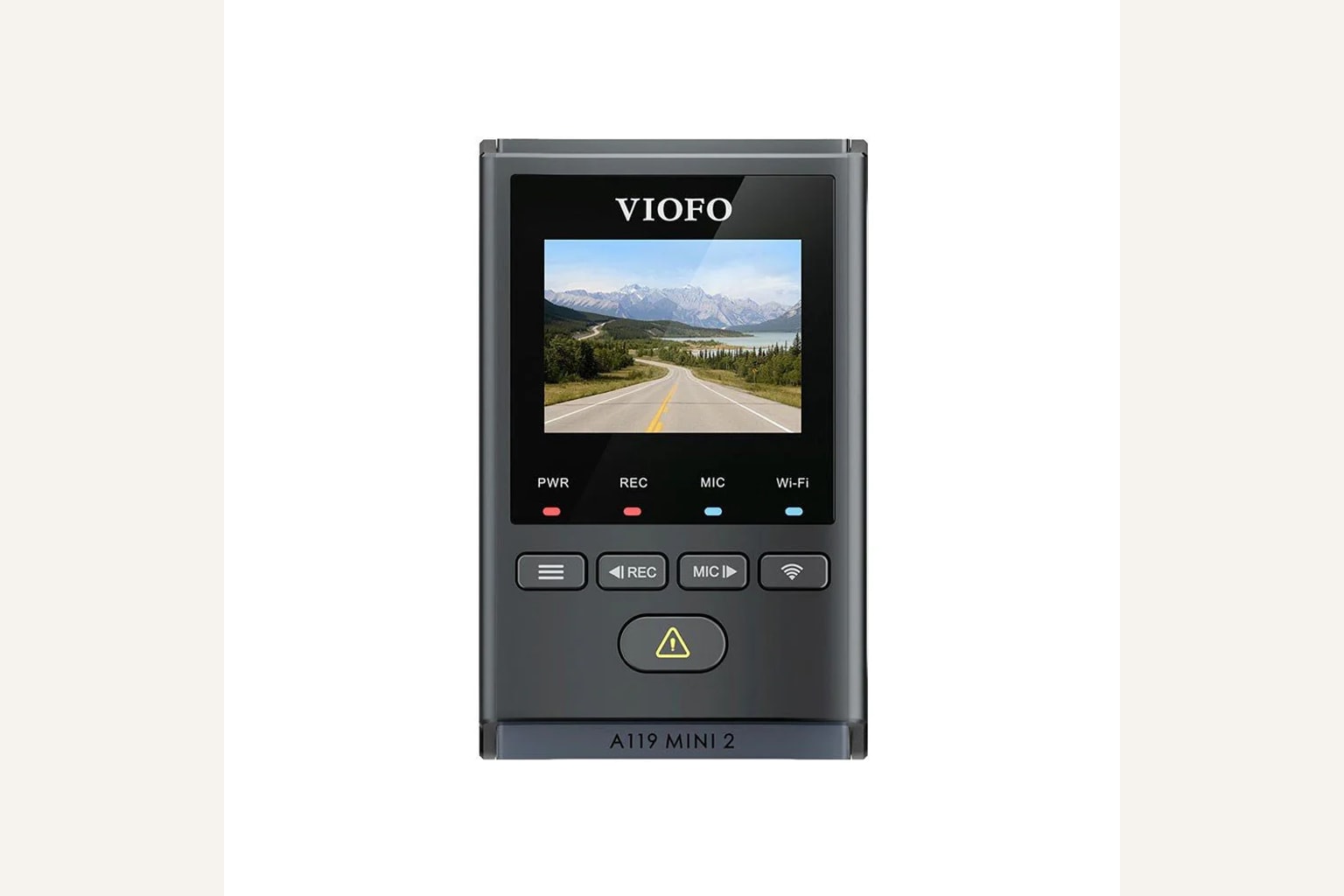
VIOFO
Buyers who want compact hardware while retaining local menus.
A compact camera with a small local display, physical controls and an optional app interface.
The takeaway
A balanced compact choice when local controls matter more than screen size.
Reasons to choose it
- Local menus in a compact body
- App provides an alternative interface
- Sliding GPS mount
Tradeoffs to know
- Small display
- Limited detail about complete clip export
- Body and mount USB-C ports have different roles
Think twice if: You want a spacious touchscreen or a fully demonstrated export sequence.
Published specifications
- Local interface
- Small display and physical controls
- Mount
- Sliding GPS mount
- Phone route
- Settings, recording viewing and downloads described
Further reading
Ratings
Editorial score 7.7
Controls and menu navigation8
A local display and physical controls coexist with app settings.
Finding and saving a recorded clip7
Phone viewing and downloads are described, with less detail about the complete search and export routine.
Physical handling and routine access8
The compact body and sliding mount are convenient, with distinct mount and body connector roles to learn.
Sources & further reading
youtube.com review
youtube.com review
youtube.com review
youtube.com review
youtube.com review
youtube.com review
youtube.com review
youtube.com review
Keep reading
Something changed? Help us keep this useful.
Send a correction →